

Find the right tools for an AI agent without sending the entire tool catalog into every prompt.


Quick start · Adding tools · Agents · Evaluation · Documentation
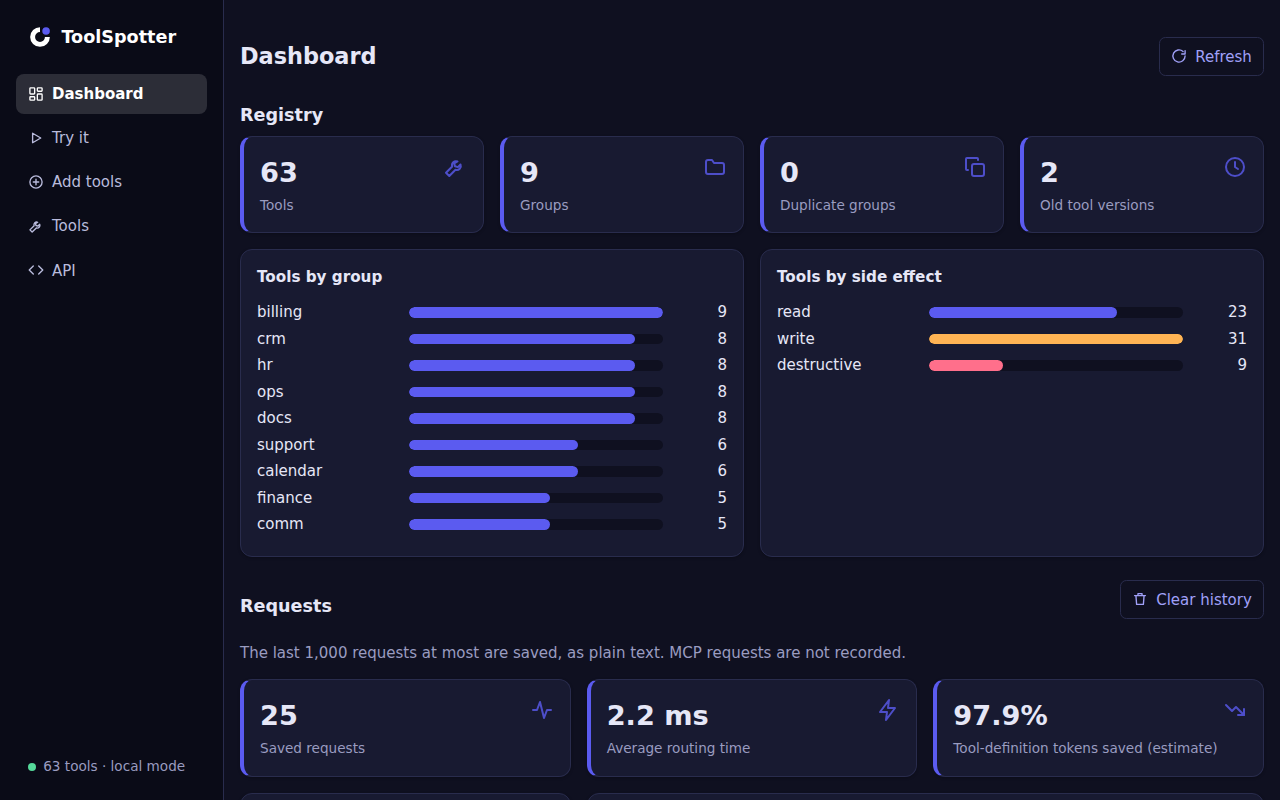
Why ToolSpotter
An agent with many tools has to read every definition before it can act, which costs tokens and makes similar tools easy to confuse. ToolSpotter takes a request in plain language and returns a short, ordered list of tools for the agent to use. It selects tools; it does not run them.
Features
| Works without an API key | Local keyword and vector search with rule-based planning |
| Optional LLM planner | Gemini, with the local planner as the fallback |
| Careful by default | Asks before unclear or destructive requests; returns nothing when no tool fits |
| Easy to load | JSON catalog, upload with preview, or a scan of a local or remote MCP server |
| Three interfaces | Website, REST API and read-only MCP server |
| Small to run | One Python process and one SQLite file |
Quick start
You need Python 3.11 or newer.
python3 -m venv .venv && source .venv/bin/activate
pip install toolspotter
toolspotter serve                                       # starts empty: add tools on the website
Then open the website at http://127.0.0.1:8080/ui/ or the API documentation at http://127.0.0.1:8080/docs (the latter needs an internet connection).
With Docker, no Python needed:
docker run -p 127.0.0.1:8080:8080 akshraj05/toolspotter # starts empty: add tools on the website
To run from source, with a sample catalog:
git clone https://github.com/akshraj-05/toolspotter.git
cd toolspotter
python3 -m venv .venv && source .venv/bin/activate
pip install -e .
toolspotter serve --catalog tests/data/catalog.json
To build the Docker image yourself, run docker build -t toolspotter . in the cloned folder.
Ask for tools
curl -s -X POST http://127.0.0.1:8080/route \
  -H 'content-type: application/json' \
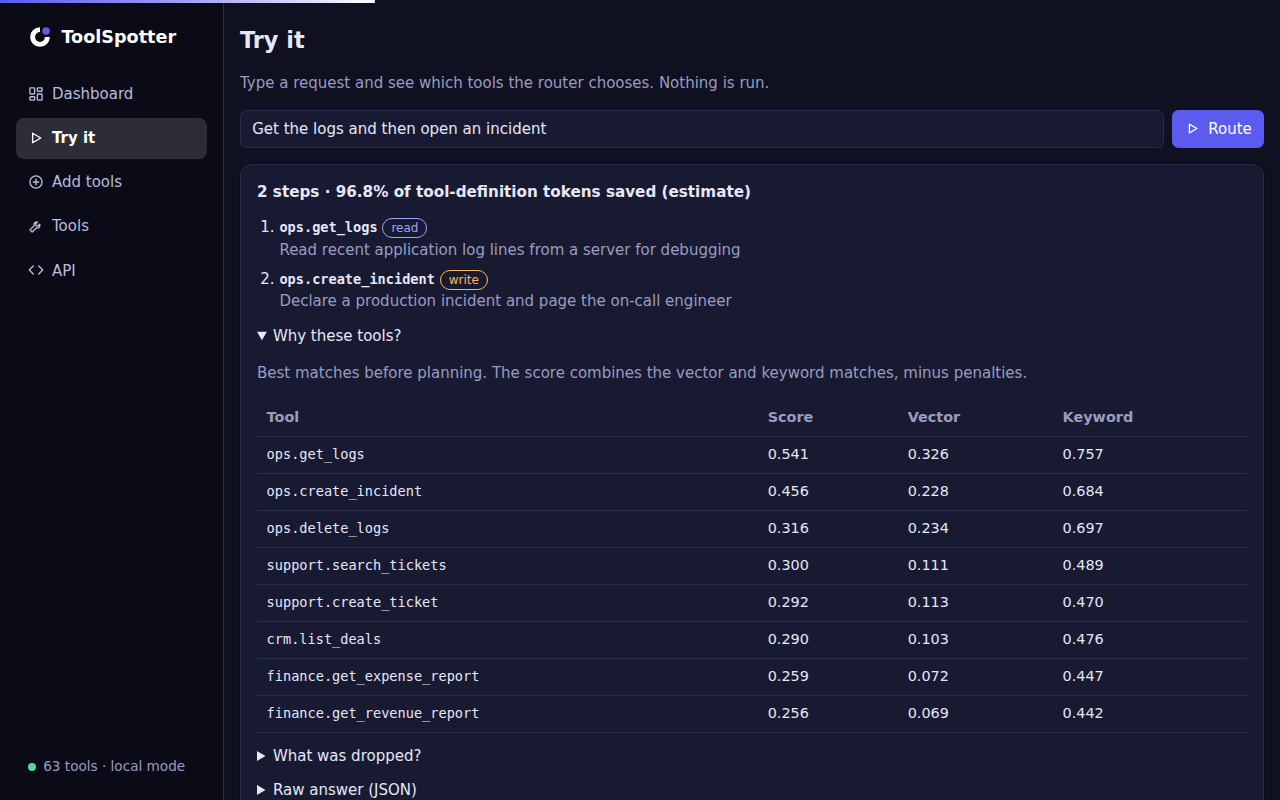
  -d '{"query": "Get the logs and then open an incident"}'
With the larger catalog in eval/custom/catalog.json (in the repository), the answer includes (shortened):
{
  "selected_tools": ["ops.get_logs", "ops.create_incident"],
  "plan": ["ops.get_logs", "ops.create_incident"],
  "clarify": false,
  "clarify_question": null,
  "tokens_saved_pct": 0.9677
}
The full response also holds the selected tool definitions and a trace of the scores. tokens_saved_pct is an estimate of the tool-definition tokens saved.
Adding tools
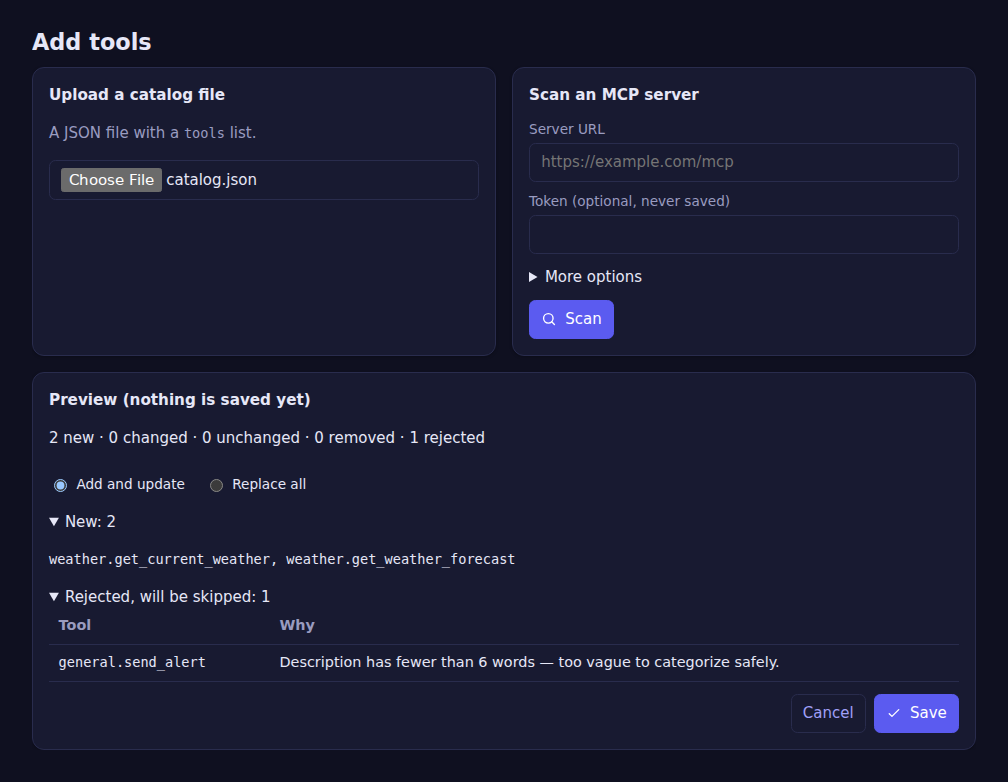
Add tools on the website, from a file, from an MCP server or over REST. Every route applies the same checks.
Upload a catalog file
Choose a file under Add tools. The preview shows what is new, changed or rejected, and why, before anything is saved.
{
  "tools": [
    {
      "name": "send_email",
      "description": "Send an email message to a recipient with a subject and body",
      "parameters": [{"name": "to", "type": "string", "required": true}],
      "side_effects": "write"
    }
  ]
}
name, description (at least 6 words) and parameters are required. Set side_effects to read, write or destructive for any tool that changes data. See the tool format and limits.
From the command line:
toolspotter validate catalog.json                      # check a file first
toolspotter serve --catalog catalog.json
Scan an MCP server
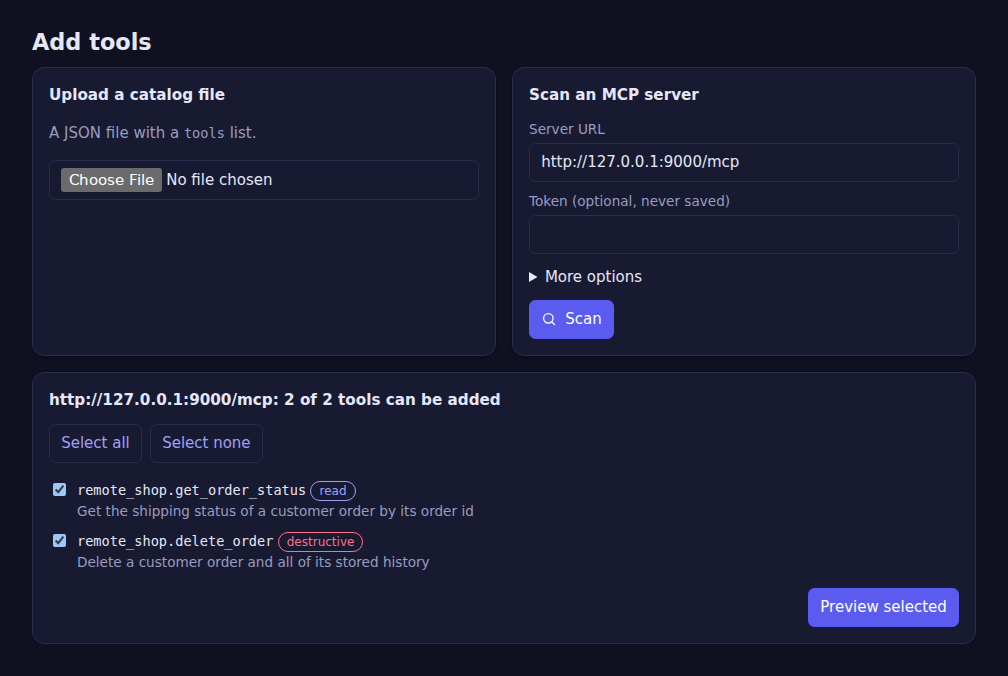
Enter the server's URL and a token if it needs one, then pick the tools to add. The token is used once and never saved.
A local MCP server is loaded from the command line:
toolspotter serve --import-mcp "python my_server.py"
Create or edit one tool
Press New tool, or select any tool in the list to change or delete it.
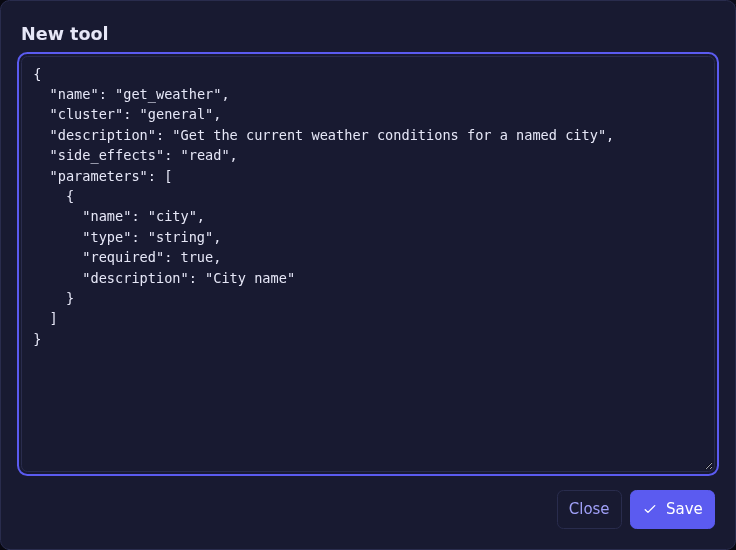
The same actions are available over REST.
Use it from an agent
Call POST /route before your model call, or add ToolSpotter to an MCP host. It offers find_tools and registry_status, and cannot change your tools.
{
  "mcpServers": {
    "toolspotter": {
      "command": "toolspotter",
      "args": ["mcp", "--catalog", "/path/to/catalog.json"]
    }
  }
}
Configuration
ToolSpotter works without any setup. To use the Gemini planner, you need an API key and, optionally, a model:
| Setting | Variable | Default |
|---|---|---|
| API key | GEMINI_API_KEY |
|
| Model | TOOLSPOTTER_LLM_MODEL |
gemini-3.5-flash-lite |
Run toolspotter init and enter both, or set them in your shell and switch Gemini on:
export GEMINI_API_KEY=your-key
export TOOLSPOTTER_LLM_MODEL=gemini-3.5-flash-lite
export TOOLSPOTTER_LLM_PROVIDER=gemini
Evaluation
110 held-out requests across GitHub MCP tools, Playwright MCP tools and a custom catalog. A request passes only if the answer is exactly right: the expected tools in order, a clarifying question, or nothing.
| Setup | github (40) |
playwright (10) |
custom (60) |
All (110) |
|---|---|---|---|---|
| Keyword search baseline | 18 (45%) | 6 (60%) | 20 (33%) | 44 (40%) |
| Local mode (no LLM, no key) | 25 (62%) | 8 (80%) | 39 (65%) | 72 (65%) |
| Gemini planner | 37 (92%) | 10 (100%) | 57 (95%) | 104 (95%) |
Read these with care:
- The requests were written with an AI assistant and not independently reviewed, which may favour the Gemini score.
- On requests that need one tool, local mode is not clearly better than keyword search. Its gains are in asking questions, rejecting unrelated requests and planning several steps.
- The Gemini run used
gemini-3.5-flash-liteon 2026-11-28: 125 calls, none failed.
Full results, limits and how to run it
Documentation
| Document | Contents |
|---|---|
| Using ToolSpotter | Website, MCP servers, tool format, REST API, Docker, saved data |
| Evaluation | Results in detail |
| Architecture | How the parts fit together |
| Engine design | The rules in each routing step |
| Integrations | Calling it from an agent |
Contributing
Issues and pull requests are welcome.
pip install -e ".[test]"
pytest                                   # runs offline
python eval/run.py                       # tuning half, with failures listed
Add tests with your change. Improve routing with general rules, check them on the tuning half, and do not tune against the final half.
License
MIT © 2026 Akshraj Chavda.
The GitHub and Playwright tool definitions in eval/ belong to their authors and keep their own licences: see sources.
1 maintainer

Metadata
1 maintainer
Release files for toolspotter 0.1.0
For a detailed explanation of source distributions (sdists) and built distributions (wheels), please see the package formats documentation.
Source distribution (sdist)
| File | Size | Uploaded | Provenance | Actions |
|---|---|---|---|---|
| toolspotter-0.1.0.tar.gz | 197.1 kB | Without provenance | Details for toolspotter-0.1.0.tar.gz |
Built distribution (wheel)
| File | Interpreter | ABI | Platform | Actions Reset |
|---|---|---|---|---|
| toolspotter-0.1.0-py3-none-any.whl | Python 3 | none | any | Details for toolspotter-0.1.0-py3-none-any.whl |
Total release size: 319.7 kB
Release files / toolspotter-0.1.0.tar.gz
| Download URL | toolspotter-0.1.0.tar.gz |
|---|---|
| Size | 197.1 kB |
| Tags | Source |
|
SHA-256 checksum How to use checksums |
ac210a9370c432a1958253c2aa5fde62fb6e5684ba50beb8cd6b483d79eb8397
|
|
BLAKE2b-256 checksum How to use checksums |
71a54c2ae77d412ce48aae3fd2137f0d047609da0da4d55d0cabd1f24cadd221
|
| Upload date | |
|
Uploaded using Trusted Publishing? What is trusted publishing? |
No |
| Uploaded via |
twine/7.0.0 CPython/3.12.3
|
Release files / toolspotter-0.1.0-py3-none-any.whl
| Download URL | toolspotter-0.1.0-py3-none-any.whl |
|---|---|
| Size | 122.6 kB |
| Tags | Python 3 |
|
SHA-256 checksum How to use checksums |
3b44ec56eb54e582f697503459823af7574fabd07829f94b596dcc0a3bbc093c
|
|
BLAKE2b-256 checksum How to use checksums |
a16a4cd45354428ff6ae63ed41ee454fecce3765aff959923dc33c8606aa5b06
|
| Upload date | |
|
Uploaded using Trusted Publishing? What is trusted publishing? |
No |
| Uploaded via |
twine/7.0.0 CPython/3.12.3
|
Security for toolspotter 0.1.0
Provenance
Provenance describes where a file came from. On PyPI, provenance is shared via attestations, which provide a verifiable record of the build or publishing details. View details, limitations and caveats.
No provenance found
None of the files in this release were uploaded with provenance metadata.
A note on package security
PyPI is a repository for distributing packages, not a service for auditing them. While third-party security researchers and our staff do their best to detect and remove malicious packages, PyPI cannot guarantee the quality, security or suitability of any given package.
To learn more about protecting yourself from malicious actors, visit our package security documentation.













