
 ToolUniverse: Democratizing AI scientists










Install
AI agent (recommended) — open your AI agent and run:
Read https://aiscientist.tools/setup.md and set up ToolUniverse for me.
The agent will walk you through MCP configuration, API keys, skill installation, and validation.
or set up manually
Add to your MCP config file:
{
  "mcpServers": {
    "tooluniverse": {
      "command": "uvx",
      "args": ["--refresh", "tooluniverse"],
      "env": {"PYTHONIOENCODING": "utf-8"}
    }
  }
}
--refresh checks PyPI for the newest release on every launch. Drop it
("args": ["tooluniverse"]) to start faster from uv's cache — then upgrade
with uv cache clean tooluniverse.
Install agent skills:
npx skills add mims-harvard/ToolUniverse
Claude Code users — one line, no config file:
claude plugin marketplace add mims-harvard/ToolUniverse
claude plugin install tooluniverse@tooluniverse
Python developers — install the SDK. Install uv first and do not use system pip: on a current Mac, pip install tooluniverse fails with externally-managed-environment (PEP 668) and python3 -m venv can fail at ensurepip. uv manages its own Python and avoids both.
curl -LsSf https://astral.sh/uv/install.sh | sh   # if you don't have uv
uv venv --python 3.12 && source .venv/bin/activate
uv pip install tooluniverse
Needs Python 3.10 or newer. On an Apple Silicon Mac it also needs macOS 14 or newer: faiss-cpu, which backs the vector-search tools, publishes no arm64 wheel older than macosx_14_0, so macOS 13 and earlier would have to compile it. Intel Macs, Windows and Linux have no such floor.
The base install covers the API and database tools. Local ML, cheminformatics, and plotting tools need extras — uv pip install 'tooluniverse[all]', or a single group such as [ml], [visualization], [bioinformatics]. Note [all] excludes pdf, singlecell, smolagents, client, and build, which install by name. Run tooluniverse-doctor to see which groups are missing.
tu CLI — discover, inspect, run, and test tools from the terminal.
Python SDK — programmatic access for building AI scientist systems.
Building AI Scientists with ToolUniverse
Click to watch the demo (YouTube) (Bilibili)
What is ToolUniverse?
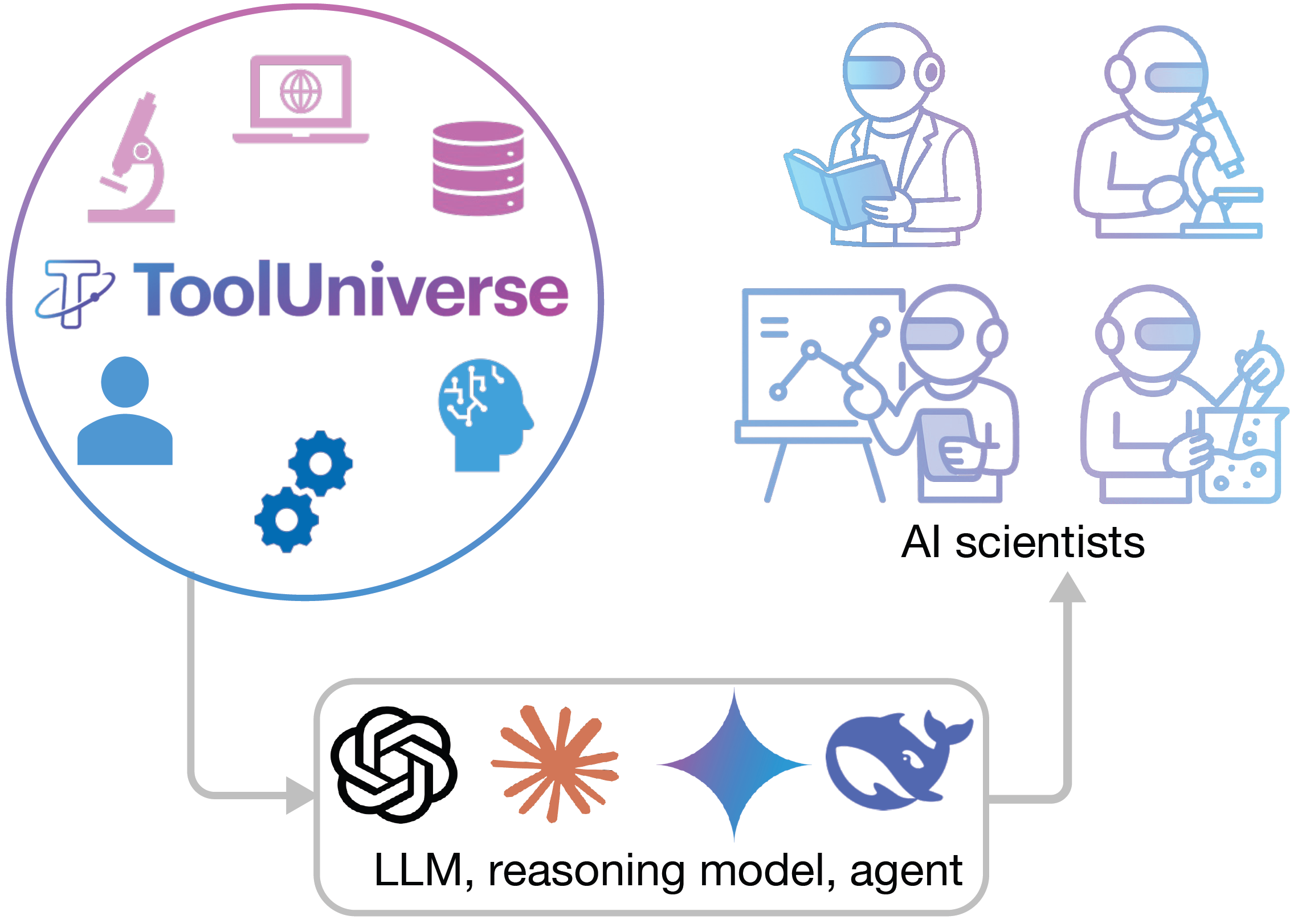
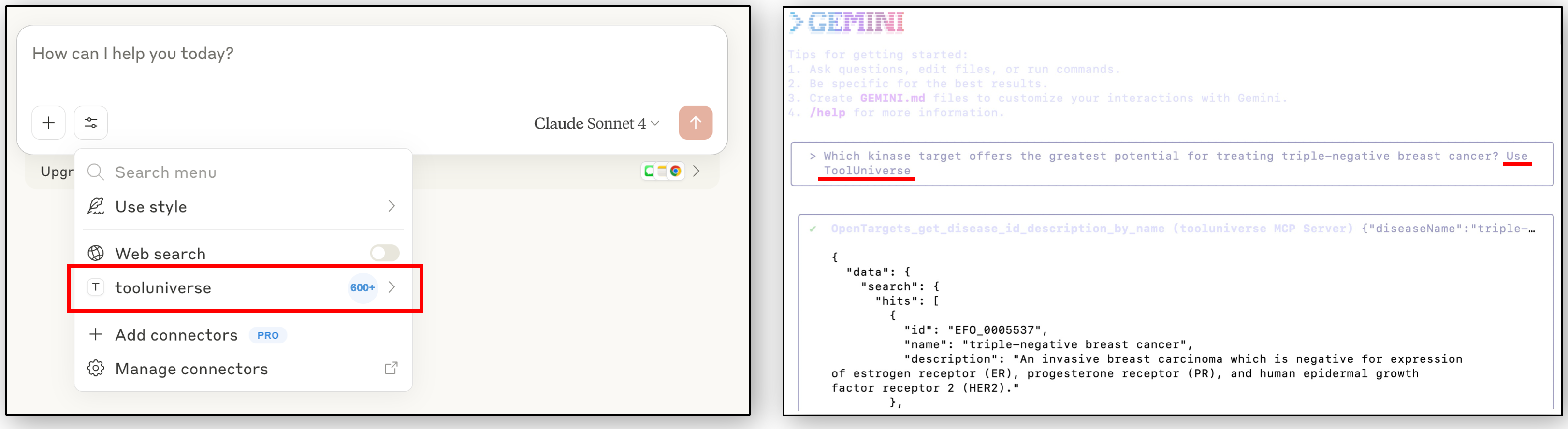
ToolUniverse is an ecosystem for creating AI scientist systems from any large language model. Powered by the AI-Tool Interaction Protocol, it standardizes how LLMs identify and call tools, integrating more than 1000 machine learning models, datasets, APIs, and scientific packages for data analysis, knowledge retrieval, and experimental design.
Key features:
- AI-Tool Interaction Protocol: Standardized interface governing how AI scientists issue tool requests and receive results
- Universal AI Model Support: Works with Claude, GPT, Gemini, Qwen, Deepseek, and open models
- MCP Integration: Native Model Context Protocol server with configurable transport and tool selection
- Async Operations: Long-running tasks (protein docking, molecular simulations) with progress tracking and parallel execution
- Tool Composition: Chain tools for sequential or parallel execution in self-directed workflows
- Compact Mode: Reduces 1000+ tools to 4-5 core discovery tools, saving ~99% context window
- CLI (
tu): Discover, inspect, run, and test tools directly from the terminal — 9 subcommands for interactive and scripted workflows - Agent Skills: 68 pre-built research workflows for drug discovery, precision oncology, rare disease diagnosis, pharmacovigilance, and more
- Literature Search: Unified search across PubMed, Semantic Scholar, ArXiv, BioRxiv, Europe PMC, and more
- Two-Tier Result Caching: In-memory LRU + SQLite persistence with per-tool fingerprinting for 10x speedup, offline support, and reproducibility
- Continuous Expansion: Register new tools locally or remotely without additional configuration
AI Scientists Powered by ToolUniverse
Building your project with ToolUniverse? Submit via GitHub Pull Request or contact us.
TxAgent: AI Agent for Therapeutic Reasoning [Project] [Paper] [PyPI] [GitHub] [HuggingFace]
TxAgent leverages ToolUniverse's scientific tool ecosystem to solve complex therapeutic reasoning tasks.
Medea: An Omics AI Agent for Therapeutic Discovery [Project] [Paper] [GitHub]
Medea integrates ToolUniverse tools for multi-omics analysis to identify therapeutic targets and predict drug responses across cancer, autoimmune, and other diseases.
Workshops and Education
Building AI Co-Scientists with ToolUniverse
Materials from the October 8, 2026 workshop in the Core for Computational Biomedicine (CCB) AI Seminar & Workshop Series at Harvard Medical School. Includes the ToolUniverse workshop slides, CCB introduction slides, and a follow-along Markdown guide for using ToolUniverse live with clinical and genetics examples.
Documentation
Full documentation: zitniklab.hms.harvard.edu/ToolUniverse
- CLI Reference (
tu) - Python Developer Guide
- AI Agent Setup
- Agent Skills
- Expand ToolUniverse
- API Reference
Community
Shanghua Gao, the lead creator of this project, is currently on the job market.
Slack · GitHub Issues · Shanghua Gao · Marinka Zitnik
Leaders: Shanghua Gao · Marinka Zitnik
Contributors: Shanghua Gao · Richard Zhu · Pengwei Sui · Zhenglun Kong · Sufian Aldogom · Yepeng Huang · Ayush Noori · Reza Shamji · Krishna Parvataneni · Theodoros Tsiligkaridis · Marinka Zitnik
Privacy Policy
ToolUniverse runs locally and collects nothing: no telemetry, no analytics, no conversation data. When you run a tool, that tool's arguments are sent to that tool's data provider (UniProt, openFDA, Open Targets and so on) so it can answer, and nothing else leaves your machine. API keys stay local and are sent only to the service they belong to. Full policy: https://github.com/mims-harvard/ToolUniverse/blob/main/PRIVACY.md
Citation
@article{gao2025democratizingaiscientistsusing,
      title={Democratizing AI scientists using ToolUniverse},
      author={Shanghua Gao and Richard Zhu and Pengwei Sui and Zhenglun Kong and Sufian Aldogom and Yepeng Huang and Ayush Noori and Reza Shamji and Krishna Parvataneni and Theodoros Tsiligkaridis and Marinka Zitnik},
      year={2025},
      eprint={2509.23426},
      archivePrefix={arXiv},
      primaryClass={cs.AI},
      url={https://arxiv.org/abs/2509.23426},
}
1 maintainer

Metadata
1 maintainer
Release files for tooluniverse 1.5.8
For a detailed explanation of source distributions (sdists) and built distributions (wheels), please see the package formats documentation.
Source distribution (sdist)
| File | Size | Uploaded | Provenance | Actions |
|---|---|---|---|---|
| tooluniverse-1.5.8.tar.gz | 7.6 MB | Without provenance | Details for tooluniverse-1.5.8.tar.gz |
Built distribution (wheel)
| File | Interpreter | ABI | Platform | Actions Reset |
|---|---|---|---|---|
| tooluniverse-1.5.8-py3-none-any.whl | Python 3 | none | any | Details for tooluniverse-1.5.8-py3-none-any.whl |
Total release size: 18.2 MB
Release files / tooluniverse-1.5.8.tar.gz
| Download URL | tooluniverse-1.5.8.tar.gz |
|---|---|
| Size | 7.6 MB |
| Tags | Source |
|
SHA-256 checksum How to use checksums |
9b55e6369d2d742f8658492cdcc221a10ad9a6d3b4044e598e96942cd87c24a9
|
|
BLAKE2b-256 checksum How to use checksums |
950f3a0ee45b5274f99f95507c896881e16c6dcb750ca906bec7b23d48d04749
|
| Upload date | |
|
Uploaded using Trusted Publishing? What is trusted publishing? |
No |
| Uploaded via |
twine/7.0.0 CPython/3.13.16
|
Release files / tooluniverse-1.5.8-py3-none-any.whl
| Download URL | tooluniverse-1.5.8-py3-none-any.whl |
|---|---|
| Size | 10.7 MB |
| Tags | Python 3 |
|
SHA-256 checksum How to use checksums |
7a70c60a108af3f15d18697f4fa9ae8dab4bbf4b6f31b92ba85b85b4af81cb9d
|
|
BLAKE2b-256 checksum How to use checksums |
c58b8b29d4a41d32b13632b9331f4dced50f9f66325b53c87e6746fe0a68a1cc
|
| Upload date | |
|
Uploaded using Trusted Publishing? What is trusted publishing? |
No |
| Uploaded via |
twine/7.0.0 CPython/3.13.16
|
Security for tooluniverse 1.5.8
Provenance
Provenance describes where a file came from. On PyPI, provenance is shared via attestations, which provide a verifiable record of the build or publishing details. View details, limitations and caveats.
No provenance found
None of the files in this release were uploaded with provenance metadata.
A note on package security
PyPI is a repository for distributing packages, not a service for auditing them. While third-party security researchers and our staff do their best to detect and remove malicious packages, PyPI cannot guarantee the quality, security or suitability of any given package.
To learn more about protecting yourself from malicious actors, visit our package security documentation.














