

top-notes
A calm, beautiful notes app that lives in your Linux system tray.
Keep ideas close, organised, and out of the way until you need them.




Your thoughts, one click away
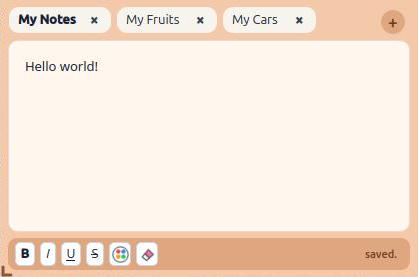
top-notes is a lightweight rich-text editor designed for quick notes throughout the day. It stays tucked into the system tray, then appears in the upper-right corner of your desktop whenever inspiration strikes.
There are no accounts to create, no sync service to configure, and no network connection required. Your notes remain on your computer.
Highlights
| Feature | What it gives you | |
|---|---|---|
| 🗂️ | Groups & tabs | Keep separate collections for work, home, ideas, or anything else. Tabs can be renamed, reordered, and closed. |
| ✨ | Rich text | Format selections with bold, italic, underline, strikethrough, text colours, font families, and sizes. |
| 🎨 | Made to feel like yours | Choose from seven tab accents and a selection of editor backgrounds. |
| 📌 | Always within reach | Show or hide the editor with a click on the tray icon. It stays neatly anchored at the top-right of your desktop. |
| 💾 | Private local saving | Notes and preferences are stored locally, with atomic saves to help protect against interrupted writes. |
| ⚡ | Delightfully small | A focused desktop app with one runtime dependency and no browser engine, telemetry, plugins, or network activity. |
Install
Once the package is published on PyPI, installation is even simpler:
python3 -m pip install top-notes
Run
Launch top-notes from your application menu, or run:
top-notes
Python 3.10 or newer and a Linux desktop environment with a system tray are required. If your desktop does not show tray icons by default, enable its compatible system-tray or AppIndicator extension.
How it works
- Click the tray icon to show or hide your notes.
- Right-click the tray icon to switch or create groups, open settings, or quit.
- Use the + button beside the tabs to add a note.
- Right-click a tab to rename it or choose its accent colour.
- Select text to reveal familiar formatting controls.
- Resize the editor using the subtle grip in its lower-left corner.
Your window size, appearance, groups, and notes are remembered automatically.
Privacy
top-notes is built around a simple promise: your notes are yours.
- No account or sign-in
- No telemetry or analytics
- No cloud sync
- No network requests
- No third-party plugins
All content stays in your operating system’s standard local application-data location.
License
top-notes is released under the MIT License. © 2026 spaceshit.
1 maintainer

Metadata
1 maintainer
Release files for top-notes 1.0
For a detailed explanation of source distributions (sdists) and built distributions (wheels), please see the package formats documentation.
Source distribution (sdist)
| File | Size | Uploaded | Provenance | Actions |
|---|---|---|---|---|
| top_notes-1.0.tar.gz | 17.6 kB | With provenance | Details for top_notes-1.0.tar.gz |
Built distribution (wheel)
| File | Interpreter | ABI | Platform | Actions Reset |
|---|---|---|---|---|
| top_notes-1.0-py3-none-any.whl | Python 3 | none | any | Details for top_notes-1.0-py3-none-any.whl |
Total release size: 33.6 kB
Release files / top_notes-1.0.tar.gz
| Download URL | top_notes-1.0.tar.gz |
|---|---|
| Size | 17.6 kB |
| Tags | Source |
|
SHA-256 checksum How to use checksums |
7f94bf1960af15effbcbb49378c35d3640e711d825bd90700150615988551de4
|
|
BLAKE2b-256 checksum How to use checksums |
992b197f4e60afc525694784f14565542f8a4634ebecba73f3084ac84a9ee316
|
| Upload date | |
|
Uploaded using Trusted Publishing? What is trusted publishing? |
Yes |
| Uploaded via |
twine/7.0.0 CPython/3.13.14
|
Provenance
Provenance describes where a file came from. On PyPI, provenance is shared via attestations, which provide a verifiable record of the build or publishing details. View details, limitations and caveats.


PyPI Publish Attestation
PyPI verified that this artifact, at this checksum, originated from the publisher listed below.
Signed by GitHub Actions, verified by PyPI on Aug 21, 2026.
Transparency logRelease files / top_notes-1.0-py3-none-any.whl
| Download URL | top_notes-1.0-py3-none-any.whl |
|---|---|
| Size | 16.0 kB |
| Tags | Python 3 |
|
SHA-256 checksum How to use checksums |
35ff8b71989571bf93e4271331111a8964db87be8a82a28ae3a0dc02bbfdba43
|
|
BLAKE2b-256 checksum How to use checksums |
3757ad10b258fbf1995a2eea109914686c734fb0ad5991b4a822ea38a31711e0
|
| Upload date | |
|
Uploaded using Trusted Publishing? What is trusted publishing? |
Yes |
| Uploaded via |
twine/7.0.0 CPython/3.13.14
|
Provenance
Provenance describes where a file came from. On PyPI, provenance is shared via attestations, which provide a verifiable record of the build or publishing details. View details, limitations and caveats.
PyPI Publish Attestation
PyPI verified that this artifact, at this checksum, originated from the publisher listed below.
Signed by GitHub Actions, verified by PyPI on Aug 21, 2026.
Transparency logSecurity for top-notes 1.0
Provenance
Provenance describes where a file came from. On PyPI, provenance is shared via attestations, which provide a verifiable record of the build or publishing details. View details, limitations and caveats.
Full provenance
Both files in this release have been uploaded with provenance metadata.
Attestation for top_notes-1.0.tar.gz
PyPI Publish Attestation
PyPI verified that this artifact, at this checksum, originated from the publisher listed below.
Signed by GitHub Actions, verified by PyPI on Aug 21, 2026.
Transparency logA note on package security
PyPI is a repository for distributing packages, not a service for auditing them. While third-party security researchers and our staff do their best to detect and remove malicious packages, PyPI cannot guarantee the quality, security or suitability of any given package.
To learn more about protecting yourself from malicious actors, visit our package security documentation.













