







Introduction
Keeping your system up-to-date usually involves invoking multiple package managers. This results in big, non-portable shell one-liners saved in your shell. To remedy this, Topgrade detects which tools you use and runs the appropriate commands to update them.
Installation
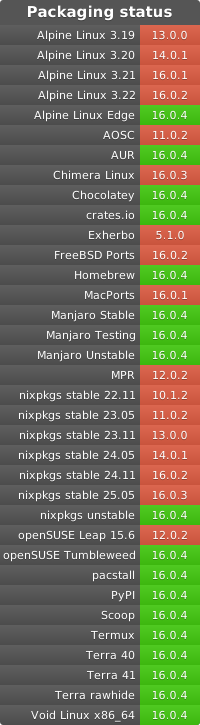
Official
- Self-updating binary (all platforms): releases
- Install from source (all platforms):
cargo install topgrade - Debian/Ubuntu (deb-get):
deb-get install topgrade - Arch Linux (AUR): topgrade or topgrade-bin
- PyPI:
pip,pipx, oruv toolinstall topgrade - Windows (Winget):
winget install --id=topgrade-rs.topgrade -e - macOS or Linux (Homebrew):
brew install topgrade - Fedora/RHEL/AlmaLinux/CentOS-Stream (Copr):
sudo dnf copr enable lilay/topgrade && sudo dnf install topgrade
Community-maintained
- Windows (Chocolatey):
choco install topgrade - Windows (Scoop):
scoop bucket add main && scoop install main/topgrade - macOS (MacPorts):
sudo port install topgrade - Ubuntu (Pacstall):
pacstall -I topgrade-bin - NixOS or Nix (nixpkgs): topgrade
- Alpine Linux:
sudo apk add topgrade - Void Linux:
sudo xbps-install -S topgrade
Usage
Just run topgrade.
Configuration
See config.example.toml for an example configuration file.
MSRV
Find the current MSRV in Cargo.toml under rust-version. This MSRV will only be bumped in a major release.
Migration and Breaking Changes
Whenever there is a breaking change, the major version number will be bumped, and we will document these changes in the release note, please take a look at it when updated to a major release.
Got a question? Feel free to open an issue or discussion!
Configuration Path
CONFIG_DIR on each platform
- Windows:
%APPDATA% - macOS and other Unix systems:
${XDG_CONFIG_HOME:-~/.config}
topgrade will look for the configuration file in the following places, in order of priority:
CONFIG_DIR/topgrade.tomlCONFIG_DIR/topgrade/topgrade.toml
If the file with higher priority is present, no matter if it is valid or not, the other configuration files will be ignored.
On the first run (provided that no configuration file exists), topgrade will create a configuration file at
CONFIG_DIR/topgrade.toml for you. Any files in CONFIG_DIR/topgrade.d/ are also loaded and merged before the main
configuration file.
Custom Commands
Custom commands can be defined in the configuration file, which can be run before, during, or after the built-in commands, as
required.
By default, the custom commands are run using a new shell according to the $SHELL environment variable on Unix (falls
back to sh) or pwsh on Windows (falls back to powershell).
On Unix, if you want to run your command using an interactive shell, for example to source your shell's RC files, you
can add -i at the start of your custom command.
Note, however, that this requires the command to exit the shell correctly, or else the shell will hang indefinitely.
Remote Execution
You can specify a key called remote_topgrades in the configuration file.
This key should contain a list of hostnames that have Topgrade installed on them.
Topgrade will use ssh to run topgrade on remote hosts before acting locally.
To limit the execution only to specific hosts, use the --remote-host-limit parameter.
Contribution
Problems or missing features?
Open a new issue describing your problem and, if possible, provide a solution.
Missing a feature or found an unsupported tool/distro?
Just let us know what you are missing by opening an issue. For tools, please open an issue describing the tool, which platforms it supports, and if possible, give us an example of its usage.
Want to contribute?
See CONTRIBUTING.md
Discord server
You're welcome to join our Discord server if you want to discuss Topgrade!
2 maintainers


Metadata
2 maintainers
Release files for topgrade 17.14.0
For a detailed explanation of source distributions (sdists) and built distributions (wheels), please see the package formats documentation.
Source distribution (sdist)
| File | Size | Uploaded | Provenance | Actions |
|---|---|---|---|---|
| topgrade-17.14.0.tar.gz | 4.5 MB | Without provenance | Details for topgrade-17.14.0.tar.gz |
Built distributions (wheels)
Total release size: 34.0 MB
Release files / topgrade-17.14.0.tar.gz
| Download URL | topgrade-17.14.0.tar.gz |
|---|---|
| Size | 4.5 MB |
| Tags | Source |
|
SHA-256 checksum How to use checksums |
42a4fa8b48b680fb9376883b98345d6fc50643c326c6d4c42256fccbf2341949
|
|
BLAKE2b-256 checksum How to use checksums |
47b42fde296784da2b999bd495bb8cb756cb4e7813d0c96ac24f530475aae90b
|
| Upload date | |
|
Uploaded using Trusted Publishing? What is trusted publishing? |
Yes |
| Uploaded via |
maturin/1.15.0
|
Release files / topgrade-17.14.0-py3-none-win_amd64.whl
| Download URL | topgrade-17.14.0-py3-none-win_amd64.whl |
|---|---|
| Size | 2.7 MB |
| Tags | Python 3 Windows x86-64 |
|
SHA-256 checksum How to use checksums |
a12acb1dbaedf4481b64269d54fa09425df9f0c9857556d291081dd25f96ee2b
|
|
BLAKE2b-256 checksum How to use checksums |
b9af3cca1295fcf71b54041b8189ac90d0320c5559cce8bca8f564da34f5a123
|
| Upload date | |
|
Uploaded using Trusted Publishing? What is trusted publishing? |
Yes |
| Uploaded via |
maturin/1.15.0
|
Release files / topgrade-17.14.0-py3-none-win32.whl
| Download URL | topgrade-17.14.0-py3-none-win32.whl |
|---|---|
| Size | 2.4 MB |
| Tags | Python 3 Windows x86-32 |
|
SHA-256 checksum How to use checksums |
415367c84b8e53f0ec3c3ec56b2837c6d952943a70f45c8da9a983014d99fc3d
|
|
BLAKE2b-256 checksum How to use checksums |
3aad0506e4cff94e2c8bb9c9da758dbb2c3644f16ff5c5b2d9c5e00f75320f9d
|
| Upload date | |
|
Uploaded using Trusted Publishing? What is trusted publishing? |
Yes |
| Uploaded via |
maturin/1.15.0
|
Release files / topgrade-17.14.0-py3-none-manylinux_2_17_x86_64.manylinux2014_x86_64.whl
| Download URL | topgrade-17.14.0-py3-none-manylinux_2_17_x86_64.manylinux2014_x86_64.whl |
|---|---|
| Size | 6.5 MB |
| Tags | Linux glibc 2.17+ x86-64 Python 3 |
|
SHA-256 checksum How to use checksums |
dd46965e219d50c3ecf7ebd47086cfb5e61acb60ca42313b838863ffdf281659
|
|
BLAKE2b-256 checksum How to use checksums |
6197e8303d36997cc5d8187744277e5c36fff419be5dfcf11c5e0fd4cd230d3d
|
| Upload date | |
|
Uploaded using Trusted Publishing? What is trusted publishing? |
Yes |
| Uploaded via |
maturin/1.15.0
|
Release files / topgrade-17.14.0-py3-none-manylinux_2_17_i686.manylinux2014_i686.whl
| Download URL | topgrade-17.14.0-py3-none-manylinux_2_17_i686.manylinux2014_i686.whl |
|---|---|
| Size | 6.0 MB |
| Tags | Linux glibc 2.17+ x86-32 Python 3 |
|
SHA-256 checksum How to use checksums |
e15cdf3d75de47d6c0638ffe157bb1db47a3fb06a43f8380fdf0425a3e42007f
|
|
BLAKE2b-256 checksum How to use checksums |
88d42c99f2d0ff40b52b559c7500f8eb1a213b91b14b47826b8ebd3739172876
|
| Upload date | |
|
Uploaded using Trusted Publishing? What is trusted publishing? |
Yes |
| Uploaded via |
maturin/1.15.0
|
Release files / topgrade-17.14.0-py3-none-manylinux_2_17_aarch64.manylinux2014_aarch64.whl
| Download URL | topgrade-17.14.0-py3-none-manylinux_2_17_aarch64.manylinux2014_aarch64.whl |
|---|---|
| Size | 6.1 MB |
| Tags | Linux glibc 2.17+ ARM64 Python 3 |
|
SHA-256 checksum How to use checksums |
2b7d0715447be2c53821288525fb93ba844fbbe21b752ebff16480144f633719
|
|
BLAKE2b-256 checksum How to use checksums |
0028a10ebd0034d92cde689af2e9eb22d294911a0ab791bdc3363bd6be3ec64a
|
| Upload date | |
|
Uploaded using Trusted Publishing? What is trusted publishing? |
Yes |
| Uploaded via |
maturin/1.15.0
|
Release files / topgrade-17.14.0-py3-none-macosx_11_0_arm64.whl
| Download URL | topgrade-17.14.0-py3-none-macosx_11_0_arm64.whl |
|---|---|
| Size | 2.7 MB |
| Tags | Python 3 macOS 11.0+ ARM64 |
|
SHA-256 checksum How to use checksums |
80c0551d75a4cd373a5e2e242b6a302438fbfed173b408e17d96f8465437c655
|
|
BLAKE2b-256 checksum How to use checksums |
455ee9853916e9c4017e55fb2574d448a376a7eb7267650eaf86b70d1e19fd00
|
| Upload date | |
|
Uploaded using Trusted Publishing? What is trusted publishing? |
Yes |
| Uploaded via |
maturin/1.15.0
|
Release files / topgrade-17.14.0-py3-none-macosx_10_12_x86_64.whl
| Download URL | topgrade-17.14.0-py3-none-macosx_10_12_x86_64.whl |
|---|---|
| Size | 2.9 MB |
| Tags | Python 3 macOS 10.12+ x86-64 |
|
SHA-256 checksum How to use checksums |
5339ecfeed9eabdc6bbee4dbcf5e6c4369ba011c1d0686ab182bc54402891aef
|
|
BLAKE2b-256 checksum How to use checksums |
e2c2c0d2f4a4462d625c5cd7f3b17cc50fc0748a8281cbe390f1e1f5f19ced7c
|
| Upload date | |
|
Uploaded using Trusted Publishing? What is trusted publishing? |
Yes |
| Uploaded via |
maturin/1.15.0
|
Security for topgrade 17.14.0
Provenance
Provenance describes where a file came from. On PyPI, provenance is shared via attestations, which provide a verifiable record of the build or publishing details. View details, limitations and caveats.
No provenance found
None of the files in this release were uploaded with provenance metadata.
A note on package security
PyPI is a repository for distributing packages, not a service for auditing them. While third-party security researchers and our staff do their best to detect and remove malicious packages, PyPI cannot guarantee the quality, security or suitability of any given package.
To learn more about protecting yourself from malicious actors, visit our package security documentation.














