
Topic Store


Topic Store is a ROS package for storing ROS messages to a database or filesystem.
Unlike ROS bags Topic Store adds flexibility by serialising all messages into a data hierarchy that's easily searchable with database queries and allows for remote storage.
You can also use Topic Store as a standalone python package to read and write data without a ROS installation!
Installation
ROS
# From source
cd catkin_ws/src
git clone https://github.com/RaymondKirk/topic_store
catkin build topic_store

# From apt
sudo apt install ros-melodic-topic-store  # you need to add the L-CAS ros source
Installing without ROS
You can install topic_store as an independent python2/3 package without a working ROS installation.
# From source
git clone https://github.com/RaymondKirk/topic_store
cd topic_store/src
pip install --extra-index-url https://rospypi.github.io/simple/ -e .

# From PyPi
pip install --extra-index-url https://rospypi.github.io/simple/ topic-store
To install other dependencies i.e. ros_numpy you can run the following
pip install --extra-index-url https://rospypi.github.io/simple/ ros_numpy
Usage
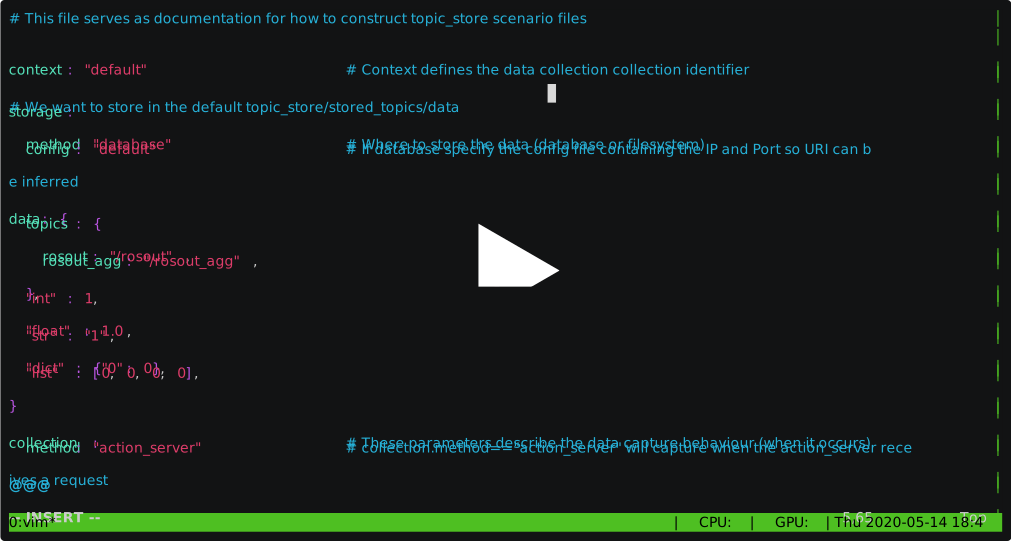
Create a scenario file by following the documentation in scenarios or by following the example file default_config.yaml. The example below will save a history of all messages sent to the ros log topic.
# Save to /path/to/your/scenario/file.yaml. This collection behaviour will save your log history.
context: "save_ros_logs"

storage:
  "method": "filesystem"
  "location": "default"

data: {
  "ros_msg": "/rosout",
}

collection:
  method: "event"
  watch_topic: "/rosout"
If storage.method is database ensure that your database is accessible at the host/port in the config file found at
storage.config. To launch the default database roslaunch topic_store start_database.launch, the default
database creates/uses a Mongo 4.2 server instance in the default ${HOME}/.ros/topic_store/database
folder exposed on localhost:65530 (defined in storage.config of the scenario file).
Docker is a requirement to use a database backend to avoid conflicts with system mongo. A utility script is provided in
scripts/install_docker.sh if you do not have it installed.
Launch your data collection scenario!
roslaunch topic_store run_scenario.launch scenario_file:="/path/to/your/scenario/file.yaml"
Examples
Database data
The below example shows how to load and use files stored in a database.
import topic_store as ts

# Read data
storage = ts.load("/path/to/scenario/file/containing/db/connection/info.yaml")
for item in storage:
    print("As Python Dict", item.dict)  # or item["key"]
    print("As ROS Msgs", item.msgs)  # or item("key")

# Write data
storage.insert_one({"important_data": "topic store is great!"})
Filesystem data
The below example shows how to load and use .topic_store files, saved from when scenarios are ran with the
storage_method="filesystem" option.
import topic_store as ts

# Read data
storage = ts.load("/path/to/file.topic_store")
for item in storage:
    print("As Python Dict", item.dict)  # or item["key"]
    print("As ROS Msgs", item.msgs)  # or item("key")

# Write data
storage.insert_one({"important_data": "topic store is great!"})
Launch a database
When launching a data collection scenario where storage.method==database you must also launch the database or
ensure it's already running at the uri defined in the host/port parameters of the config file located at storage.config.
To launch a database prior to running a data collection scenario.
roslaunch topic_store start_database.launch scenario_file:="/path/to/your/scenario/file.yaml"
Convert to ROS bags
Filesystem .topic_store files and database collections can be converted to ROS bags.
# Convert filesystem files to rosbags
rosrun topic_store convert.py -i input.topic_store -o output.bag

# Convert database collections to rosbags
# Pass scenario file containing connection and collection info as the input
rosrun topic_store convert.py -i scenario_config.yaml -o output.bag
Convert between Filesystem and Database
Filesystem .topic_store files can be migrated to a MongoDB database. Pass the scenario file that contains the database
connection information as the output file.
rosrun topic_store convert.py -i input.topic_store -o scenario_config.yaml
Database collections can be converted to a filesystem .topic_store file. Pass the scenario file that contains the database
connection information as the input file.
rosrun topic_store convert.py -i scenario_config.yaml -o output.topic_store
Export from Mongodb query into rosbag/filesystem
Example call:
- With typical mongodb URI for SSL and authentication
- On database
ff_rasberryand collection2020_riseholme_framos_cameras - Specify database connection URI (
-i) with db nameauthSource=database - Including a query (
-q) for a specific document - Add projection to return only sub-documents (
-p)
convert.py -i "mongodb://USER:PASS@HOST:PORT/?authSource=ff_rasberry&tls=true&tlsAllowInvalidCertificates=true" -c 2020_riseholme_framos_cameras -q '{"_id":"ObjectId(5f115ee6af915351df739757)"}' -p '{"cameras.top.color":1, "robot": 1}' -o out.bag
Storing high bandwidth image data
To store a lot of image data you will be limited to the IO of your machine. Topic Compression offers a compression solution to increase capture performance.
# Install the ROS package
cd catkin_ws/src
git clone https://github.com/RaymondKirk/topic_compression
catkin build topic_compression

# Compression/Decompression is chosen automatically so just pass the input topic name and optionally the out topic name
rosrun topic_compression run in:=/camera/colour/image_raw  # out=/camera/colour/image_raw/compressed
rosrun topic_compression run in:=/camera/depth/image_raw  # out=/camera/depth/image_raw/compressed
1 maintainer

Metadata
1 maintainer
Release files for topic-store 0.1.8
For a detailed explanation of source distributions (sdists) and built distributions (wheels), please see the package formats documentation.
Source distribution (sdist)
| File | Size | Uploaded | Provenance | |
|---|---|---|---|---|
| topic_store-0.1.8.tar.gz | 52.9 kB | Without provenance | Details |
Built distributions (wheels)
| File | Interpreter | ABI | Platform | Reset |
|---|---|---|---|---|
| topic_store-0.1.8-py3-none-any.whl | Python 3 | none | any | Details |
| topic_store-0.1.8-py2-none-any.whl | Python 2 | none | any | Details |
Total release size: 221.5 kB
Release files / topic_store-0.1.8.tar.gz
| Download URL | topic_store-0.1.8.tar.gz |
|---|---|
| Size | 52.9 kB |
| Tags | Source |
|
SHA-256 checksum How to use checksums |
5ce7359efe7c8a3c6c4d032cf8412fd32f12913bca1f10a24d72dc605c6cb103
|
|
BLAKE2b-256 checksum How to use checksums |
f32047293afe2958a858a1b1ab1a42d02675f53e9784e36eb38a5433c1e04400
|
| Upload date | |
|
Uploaded using Trusted Publishing? What is trusted publishing? |
No |
| Uploaded via |
twine/3.4.2 importlib_metadata/4.8.1 pkginfo/1.7.1 requests/2.26.0 requests-toolbelt/0.9.1 tqdm/4.62.3 CPython/3.7.9
|
Release files / topic_store-0.1.8-py3-none-any.whl
| Download URL | topic_store-0.1.8-py3-none-any.whl |
|---|---|
| Size | 84.3 kB |
| Tags | Python 3 |
|
SHA-256 checksum How to use checksums |
26fd84c46bc1a6d00593e75720a9fb87893203b94430125739759792102e5609
|
|
BLAKE2b-256 checksum How to use checksums |
f3ac5077f44e60e8e9b530688fe2fef871d1731c4b36d395e84fbc26c9791733
|
| Upload date | |
|
Uploaded using Trusted Publishing? What is trusted publishing? |
No |
| Uploaded via |
twine/3.4.2 importlib_metadata/4.8.1 pkginfo/1.7.1 requests/2.26.0 requests-toolbelt/0.9.1 tqdm/4.62.3 CPython/3.7.9
|
Release files / topic_store-0.1.8-py2-none-any.whl
| Download URL | topic_store-0.1.8-py2-none-any.whl |
|---|---|
| Size | 84.3 kB |
| Tags | Python 2 |
|
SHA-256 checksum How to use checksums |
4b7290ab0ef72404705331947e8864268d6e4d55fe903d053ff747d1f6dc22df
|
|
BLAKE2b-256 checksum How to use checksums |
e5b9320193a2b458d7cc3e82711f4788cbfa3060f8596faa5e71bc2a1f88200c
|
| Upload date | |
|
Uploaded using Trusted Publishing? What is trusted publishing? |
No |
| Uploaded via |
twine/1.15.0 pkginfo/1.7.1 requests/2.26.0 setuptools/44.1.1 requests-toolbelt/0.9.1 tqdm/4.62.3 CPython/2.7.17
|
Security for topic-store 0.1.8
Provenance
Provenance describes where a file came from. On PyPI, provenance is shared via attestations, which provide a verifiable record of the build or publishing details. View details, limitations and caveats.
No provenance found
None of the files in this release were uploaded with provenance metadata.
A note on package security
PyPI is a repository for distributing packages, not a service for auditing them. While third-party security researchers and our staff do their best to detect and remove malicious packages, PyPI cannot guarantee the quality, security or suitability of any given package.














