

topmostp


Table of Contents
Overview
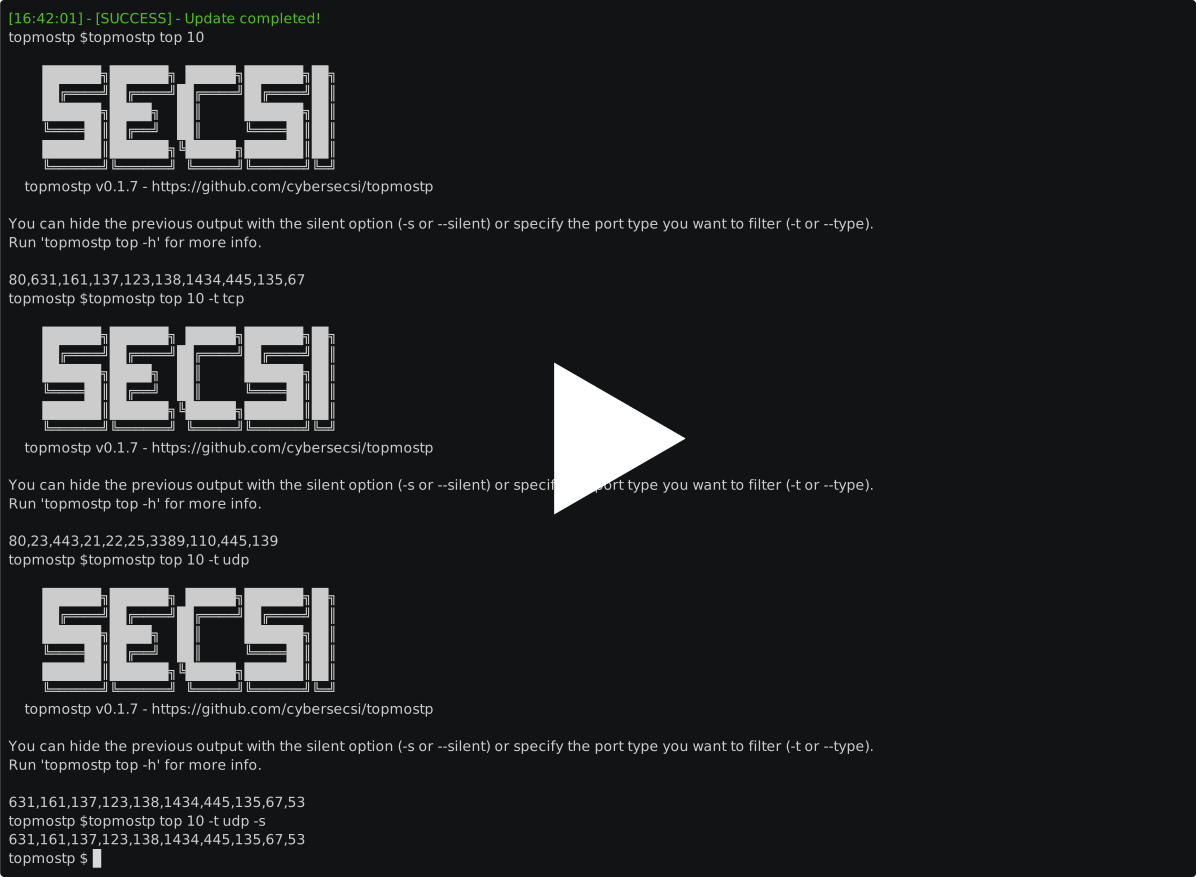
topmostp (Topmost Ports) is a tool that allows you to quickly retrieve the most used ports. The source of the ranking is the nmap-services in the nmap repo.
At SecSI we found it useful to get this information to use it in a pipeline of scripts.
Install
You can easily install it by running:
pip install topmostp
Usage
topmostp --help
This will display help for the tool. Here are all the commands it supports.
 Usage: topmostp [OPTIONS] COMMAND [ARGS]...

╭─ Options ─────────────────────────────────────────────────────────────────────────────────────────╮
│ --help  -h        Show this message and exit.                                                     │
╰───────────────────────────────────────────────────────────────────────────────────────────────────╯
╭─ Commands ────────────────────────────────────────────────────────────────────────────────────────╮
│ find     Find info about about a specific service                                                 │
│ stats    Retrieve stats about a port                                                              │
│ top      Retrieve list of ports by frequency (TCP, UDP, SCTP or all of them. Defaults to 'all')   │
│ update   Update ports list                                                                        │
╰───────────────────────────────────────────────────────────────────────────────────────────────────╯
This is the help for the topmostp top command:
 Usage: topmostp top [OPTIONS] N

 Retrieve list of ports by frequency (TCP, UDP, SCTP or all of them. Defaults
 to 'all')

╭─ Arguments ────────────────────────────────────────────────────────────────╮
│ *    n      INTEGER  [default: None] [required]                            │
╰────────────────────────────────────────────────────────────────────────────╯
╭─ Options ──────────────────────────────────────────────────────────────────╮
│ --type    -t      [tcp|udp|sctp|all]  [default: all]                       │
│ --silent  -s                          Display only results in output       │
│ --help    -h                          Show this message and exit.          │
╰────────────────────────────────────────────────────────────────────────────╯
This is the help for the topmostp find command:
 Usage: topmostp find [OPTIONS] SERVICE

 Find info about about a specific service

╭─ Arguments ────────────────────────────────────────────────────────────────╮
│ *    service      TEXT  [default: None] [required]                         │
╰────────────────────────────────────────────────────────────────────────────╯
╭─ Options ──────────────────────────────────────────────────────────────────╮
│ --help  -h        Show this message and exit.                              │
╰────────────────────────────────────────────────────────────────────────────╯
This is the help for the topmostp stats command:
 Usage: topmostp stats [OPTIONS] PORT PORT_TYPE:{tcp|udp|sctp}

 Retrieve stats about a port

╭─ Arguments ────────────────────────────────────────────────────────────────╮
│ *    port           INTEGER                   [default: None] [required]   │
│ *    port_type      PORT_TYPE:{tcp|udp|sctp}  [default: None] [required]   │
╰────────────────────────────────────────────────────────────────────────────╯
╭─ Options ──────────────────────────────────────────────────────────────────╮
│ --help  -h        Show this message and exit.                              │
╰────────────────────────────────────────────────────────────────────────────╯
A pratical example is the following:
naabu -p $(topmostp top 15 -s) -host secsi.io
In this snippet the output of topmostp is used to retrieve the list of the top 15 ports and it is chained with the naabu port scanning tool.
Demo
Credits
Developed by Angelo Delicato @SecSI
License
topmostp is released under the MIT LICENSE
1 maintainer

Release files for topmostp 0.1.10
For a detailed explanation of source distributions (sdists) and built distributions (wheels), please see the package formats documentation.
Source distribution (sdist)
| File | Size | Uploaded | |
|---|---|---|---|
| topmostp-0.1.10.tar.gz | 5.1 kB | Details |
Built distribution (wheel)
| File | Interpreter | ABI | Platform | Reset |
|---|---|---|---|---|
| topmostp-0.1.10-py3-none-any.whl | Python 3 | none | any | Details |
Total release size: 11.5 kB
Release files / topmostp-0.1.10.tar.gz
| Download URL | topmostp-0.1.10.tar.gz |
|---|---|
| Size | 5.1 kB |
| Tags | Source |
|
SHA-256 checksum How to use checksums |
f4b1b3a30a3f8b3055fffa717ccc3467031b7a35dcd669f85d6a27397ec0b962
|
|
BLAKE2b-256 checksum How to use checksums |
1a3d8c1b4db4a06238d93d8d656d6860ba8f65e692fe6be07636d5096e5676ea
|
| Upload date | |
|
Uploaded using Trusted Publishing? What is trusted publishing? |
No |
| Uploaded via |
poetry/2.2.1 CPython/3.11.0 Linux/6.11.0-1018-azure
|
Release files / topmostp-0.1.10-py3-none-any.whl
| Download URL | topmostp-0.1.10-py3-none-any.whl |
|---|---|
| Size | 6.4 kB |
| Tags | Python 3 |
|
SHA-256 checksum How to use checksums |
f82e63325e9d3ad0902775e67dae75a24d74a701e4f2526bea51bfb48efb0108
|
|
BLAKE2b-256 checksum How to use checksums |
afb2a9b8af0d82ac67a9e4ca33a4ad526f304223828145e212af9f94d5ce834f
|
| Upload date | |
|
Uploaded using Trusted Publishing? What is trusted publishing? |
No |
| Uploaded via |
poetry/2.2.1 CPython/3.11.0 Linux/6.11.0-1018-azure
|














