
Torch-Choice: A PyTorch Package for Large-Scale Choice Modelling with Python



Authors: Tianyu Du, Ayush Kanodia and Susan Athey; Contact: tianyudu@stanford.edu
Acknowledgements: We would like to thank Erik Sverdrup, Charles Pebereau and Keshav Agrawal for their feedback.
torch-choice is a library for flexible, fast choice modeling with PyTorch: it has logit and nested logit models, designed for both estimation and prediction. Please check our paper and online documentation for more details.
Unique features of torch-choice include:
- GPU support via torch for speed
- No GPU? No Problem! You can still leverage the multi-core processing of PyTorch and gain speed-up
- Specify customized models
- Specify availability sets
- Maximum Likelihood Estimation (MLE) (optionally, reporting standard errors or MAP inference with Bayesian Priors on coefficients)
- Estimation via minimization of Cross Entropy Loss (optionally with L1/L2 regularization)
- Integration with PyTorch-Lightning for easy training diagnosis.
What's in the package?
Overall, the torch-choice package offers the following features:
-
The package includes a data management module called
ChoiceDataset, which is built upon PyTorch's dataset module. Our dataset implementation allows users to easily move data between CPU and GPU. Unlike traditional long or wide formats, theChoiceDatasetoffers a memory-efficient way to manage observables. -
The package provides a (1) conditional logit model and (2) a nested logit model for consumer choice modeling.
-
The package leverages GPU acceleration using PyTorch and easily scales to large datasets of millions of choice records. All models are trained using state-of-the-art optimizers in PyTorch. These optimization algorithms are tested to be scalable by modern machine learning practitioners. However, you can rest assured that the package runs flawlessly when no GPU is used as well.
-
Setting up the PyTorch training pipelines can be frustrating. We provide easy-to-use PyTorch lightning wrapper of models to free researchers from the hassle from setting up PyTorch optimizers and training loops.
Installation
We offer multiple ways to install the package. This is a work in progress. For most users, we recommend getting started with uv, which installs torch-choice from source in a lightweight, isolated environment so you get the latest version and bug-fix patches.
We are actively working on this package and will be adding more features and examples. Please feel free to reach out to us with any questions or suggestions.
🚀 Quick Installation with uv (Recommended)
uv is a modern, fast Python package and environment manager written in Rust.
- What is
uv?uvreplaces the usualpip+ virtualenv workflow with a single tool that can create virtual environments and install Python packages much faster thanpipalone. - Lightweight virtual environment per project: When you use the
uvsetup script below, it creates a separate, lightweight virtual environment in a.venv/folder so you can trytorch-choicewithout touching your global Python. - No interference with your existing environment:
uvworks alongside your existing Python, Conda, andpipsetups. It does not overwrite or modify your system Python or other environments; everything stays isolated inside the project’s virtual environment.
If you don't have uv:
# macOS/Linux (official installer)
curl -LsSf https://astral.sh/uv/install.sh | sh
# Windows (PowerShell, official installer)
powershell -c "irm https://astral.sh/uv/install.ps1 | iex"
# Or via pip (alternative, do not recommend)
pip install uv
# Verify the installation
uv --version
Quick setup with all dependencies (editable install from local source):
# Recommended: full setup (creates .venv and installs all extras)
./scripts/setup_uv.sh
Tips:
- Use without activating the venv:
uv run python your_script.py - Or activate:
source .venv/bin/activate
This installs dependencies via uv (fast resolver) and torch-choice from local source (editable) inside a fresh .venv/ virtual environment in the project directory. See UV_SETUP.md for detailed instructions and advanced usage.
Run the quick example with uv
To run the Quick Example: Transportation Choice Dataset (see section below) using uv:
# From the project root, after cloning the repository
./scripts/setup_uv.sh

# Start a Python session inside the uv-managed virtual environment
uv run python

# This script will run a small `torch-choice` model on CPU and GPU (if available) to verify the installation and training loop.
uv run python scripts/quick_check.py
Then paste the Python code from the Quick Example: Transportation Choice Dataset section into the Python prompt. Because uv is using the lightweight .venv/ environment it created for this project, your existing system or Conda environments will remain unchanged. The setup_uv.sh script also runs a small torch-choice model internally as a quick check that the installation and training loop work end-to-end.
Installation from Pip
Simply run pip install torch-choice to install the package. This will install the latest stable version of the package.
Installation from Source
For those who wish to leverage the latest features, you can install torch-choice from GitHub source.
- Clone the repository to your local machine or server.
- Install required dependencies in
requirements.txt. Please make sure to install the correct version of PyTorch compatible with your CUDA driver. PyTorch needs to be installed before installing PyTorch Lightning. - Run
python3 setup.py install. - Check installation by running
python3 -c 'import torch_choice; print(torch_choice.__version__)'.
The installation page provides more details on installation.
Quick Example: Transportation Choice Dataset
In this demonstration, we set up a minimal example of fitting a conditional logit model using our package. We provide equivalent R code as well for reference, to aid in replicating from R to this package. We are modelling people's choices on transportation modes using the publicly available ModeCanada dataset.
More information about the ModeCanada: Mode Choice for the Montreal-Toronto Corridor.
In this example, we are estimating the utility for user $u$ to choose transport method $i$ in session $s$ as
$$ U_{uis} = \alpha_i + \beta_i \text{income}_s + \gamma \text{cost} + \delta \text{freq} + \eta \text{ovt} + \iota_i \text{ivt} + \varepsilon $$
If you are using uv, you can use uv run python to start a Python session inside the uv-managed virtual environment and run the code below.
# load package.
import torch_choice
device = "cpu"  # choose "cuda" if using GPU, choose "mps" if using Apple Silicon.
# load data.
dataset = torch_choice.data.load_mode_canada_dataset().to(device)
# define the conditional logit model.
model = torch_choice.model.ConditionalLogitModel(
    formula='(itemsession_cost_freq_ovt|constant) + (session_income|item) + (itemsession_ivt|item-full) + (intercept|item)',
    dataset=dataset,
    num_items=4).to(device)
# fit the conditional logit model using the new sklearn-style API.
estimation = model.fit(
    dataset,
    num_epochs=500,
    learning_rate=0.003,
    batch_size=-1,
    model_optimizer="LBFGS",
    device=device,
)
# Pretty-print the regression table (also happens automatically unless print_summary=False).
print(estimation)
# Access estimation results programmatically.
print(estimation.train_ll)
print(estimation.coef_summary.head())
The fit method now returns an EstimationOutput object so you can inspect log-likelihoods,
standard errors, and coefficient tables directly from Python. To suppress console output during
training, pass print_summary=False to fit, and call print(output) later. Legacy helpers
model.run(...) and torch_choice.run(...) remain available and now simply forward to
model.fit(...), so existing scripts continue to work while you migrate.
  | Name  | Type                  | Params
------------------------------------------------
0 | model | ConditionalLogitModel | 13
------------------------------------------------
13        Trainable params
0         Non-trainable params
13        Total params
0.000     Total estimated model params size (MB)
Epoch 499: 100%|█████████████████████████████████████████████████████████████████████████████████████████████████████████████████████████████████████████████████████████████| 1/1 [00:00<00:00, 50.89it/s, loss=1.87e+03, v_num=3]
`Trainer.fit` stopped: `max_epochs=500` reached.
Epoch 499: 100%|█████████████████████████████████████████████████████████████████████████████████████████████████████████████████████████████████████████████████████████████| 1/1 [00:00<00:00, 50.06it/s, loss=1.87e+03, v_num=3]
Time taken for training: 17.461677074432373
Skip testing, no test dataset is provided.
==================== model results ====================
Log-likelihood: [Training] -1874.3455810546875, [Validation] N/A, [Test] N/A

| Coefficient                           |   Estimation |   Std. Err. |    z-value |    Pr(>|z|) | Significance   |
|:--------------------------------------|-------------:|------------:|-----------:|------------:|:---------------|
| itemsession_cost_freq_ovt[constant]_0 |  -0.0336983  |  0.00709653 |  -4.74856  | 2.0487e-06  | ***            |
| itemsession_cost_freq_ovt[constant]_1 |   0.0926308  |  0.00509798 |  18.1701   | 0           | ***            |
| itemsession_cost_freq_ovt[constant]_2 |  -0.0430381  |  0.00322568 | -13.3423   | 0           | ***            |
| session_income[item]_0                |  -0.0890566  |  0.0183376  |  -4.8565   | 1.19479e-06 | ***            |
| session_income[item]_1                |  -0.0278864  |  0.00387063 |  -7.20461  | 5.82201e-13 | ***            |
| session_income[item]_2                |  -0.0380771  |  0.00408164 |  -9.32887  | 0           | ***            |
| itemsession_ivt[item-full]_0          |   0.0594989  |  0.0100751  |   5.90553  | 3.51515e-09 | ***            |
| itemsession_ivt[item-full]_1          |  -0.00684573 |  0.00444405 |  -1.54043  | 0.123457    |                |
| itemsession_ivt[item-full]_2          |  -0.006402   |  0.00189828 |  -3.37252  | 0.000744844 | ***            |
| itemsession_ivt[item-full]_3          |  -0.00144797 |  0.00118764 |  -1.2192   | 0.22277     |                |
| intercept[item]_0                     |   0.664312   |  1.28022    |   0.518904 | 0.603828    |                |
| intercept[item]_1                     |   1.79165    |  0.708119   |   2.53015  | 0.0114015   | *              |
| intercept[item]_2                     |   3.23494    |  0.623899   |   5.18504  | 2.15971e-07 | ***            |
Significance codes: 0 '***' 0.001 '**' 0.01 '*' 0.05 '.' 0.1 ' ' 1
ConditionalLogitModel(
  (coef_dict): ModuleDict(
    (itemsession_cost_freq_ovt[constant]): Coefficient(variation=constant, num_items=4, num_users=None, num_params=3, 3 trainable parameters in total, device=cpu).
    (session_income[item]): Coefficient(variation=item, num_items=4, num_users=None, num_params=1, 3 trainable parameters in total, device=cpu).
    (itemsession_ivt[item-full]): Coefficient(variation=item-full, num_items=4, num_users=None, num_params=1, 4 trainable parameters in total, device=cpu).
    (intercept[item]): Coefficient(variation=item, num_items=4, num_users=None, num_params=1, 3 trainable parameters in total, device=cpu).
  )
)
Conditional logistic discrete choice model, expects input features:

X[itemsession_cost_freq_ovt[constant]] with 3 parameters, with constant level variation.
X[session_income[item]] with 1 parameters, with item level variation.
X[itemsession_ivt[item-full]] with 1 parameters, with item-full level variation.
X[intercept[item]] with 1 parameters, with item level variation.
device=cpu
Mode Canada with R
We include the R code for the ModeCanada example as well.
R code
```{r}
# load packages.
library("mlogit")

# load data.
ModeCanada <- read.csv('https://raw.githubusercontent.com/gsbDBI/torch-choice/main/tutorials/public_datasets/ModeCanada.csv?token=GHSAT0AAAAAABRGHCCSNNQARRMU63W7P7F4YWYP5HA')
ModeCanada <- select(ModeCanada, -X)
ModeCanada$alt <- as.factor(ModeCanada$alt)

# format data.
MC <- dfidx(ModeCanada, subset = noalt == 4)

# fit the data.
ml.MC1 <- mlogit(choice ~ cost + freq + ovt | income | ivt, MC, reflevel='air')
summary(ml.MC1)
```
We highly recommend users to go through tutorials we prepared to get a better understanding of what the package offers. We present multiple examples, and for each case we specify the utility form.
Paper Replication Script
For full replication instructions of results demonstrated in the paper (environment setup, running the paper demo, and performance benchmarks), see
replication/paper_replication_guideline.md.
Reproducibility and Randomness
The torch-choice package is built upon several dependencies that introduce randomness, you would need to fix random seeds for these packages for reproducibility:
import random
import numpy as np
import torch

SEED = 12345
random.seed(SEED)
np.random.seed(SEED)
torch.manual_seed(SEED)
torch.use_deterministic_algorithms(True)
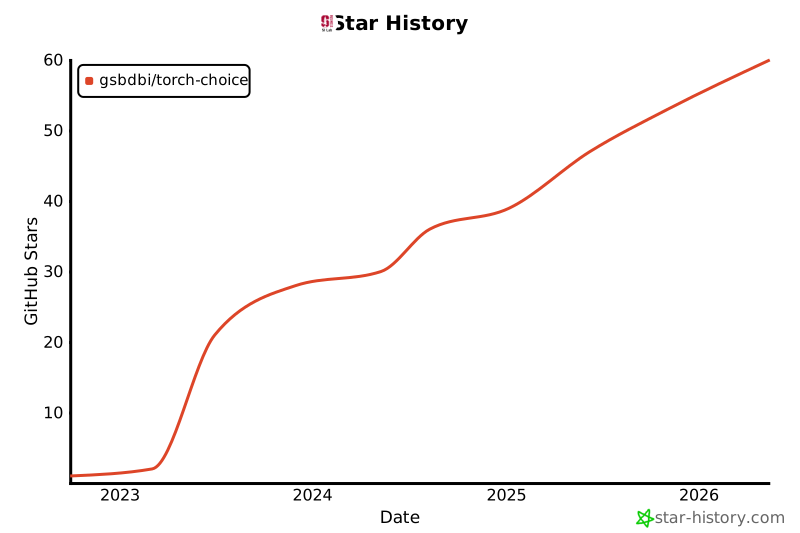
Star History
1 maintainer

Metadata
1 maintainer
Release files for torch-choice 1.0.7
For a detailed explanation of source distributions (sdists) and built distributions (wheels), please see the package formats documentation.
Source distribution (sdist)
| File | Size | Uploaded | Provenance | Actions |
|---|---|---|---|---|
| torch_choice-1.0.7.tar.gz | 4.0 MB | Without provenance | Details for torch_choice-1.0.7.tar.gz |
Built distribution (wheel)
| File | Interpreter | ABI | Platform | Actions Reset |
|---|---|---|---|---|
| torch_choice-1.0.7-py3-none-any.whl | Python 3 | none | any | Details for torch_choice-1.0.7-py3-none-any.whl |
Total release size: 4.1 MB
Release files / torch_choice-1.0.7.tar.gz
| Download URL | torch_choice-1.0.7.tar.gz |
|---|---|
| Size | 4.0 MB |
| Tags | Source |
|
SHA-256 checksum How to use checksums |
6eeff03b6f00e49e76aac3ac2bcbbe384c307da9439643fca94da2c43d8c1e5f
|
|
BLAKE2b-256 checksum How to use checksums |
88047f62caecc09636bad179d1d0aa5e97d7cb03c751381af0cb6cccee0e9b98
|
| Upload date | |
|
Uploaded using Trusted Publishing? What is trusted publishing? |
No |
| Uploaded via |
twine/6.1.0 CPython/3.13.12
|
Release files / torch_choice-1.0.7-py3-none-any.whl
| Download URL | torch_choice-1.0.7-py3-none-any.whl |
|---|---|
| Size | 75.4 kB |
| Tags | Python 3 |
|
SHA-256 checksum How to use checksums |
d0329ed1f1533ce0fcc37af1f648f96448f86090a83d2f5c2fae316eed56bad6
|
|
BLAKE2b-256 checksum How to use checksums |
23b63a4d86f202f6bb7cd87efe9158c2a8788e359c38ddf8439a7d0814af9880
|
| Upload date | |
|
Uploaded using Trusted Publishing? What is trusted publishing? |
No |
| Uploaded via |
twine/6.1.0 CPython/3.13.12
|
Security for torch-choice 1.0.7
Provenance
Provenance describes where a file came from. On PyPI, provenance is shared via attestations, which provide a verifiable record of the build or publishing details. View details, limitations and caveats.
No provenance found
None of the files in this release were uploaded with provenance metadata.
A note on package security
PyPI is a repository for distributing packages, not a service for auditing them. While third-party security researchers and our staff do their best to detect and remove malicious packages, PyPI cannot guarantee the quality, security or suitability of any given package.
To learn more about protecting yourself from malicious actors, visit our package security documentation.














