
torch_contour





Installation
pip install torch_contour
What is torch_contour?
torch_contour is a PyTorch library for differentiable operations in contour coordinate space. It lets you:
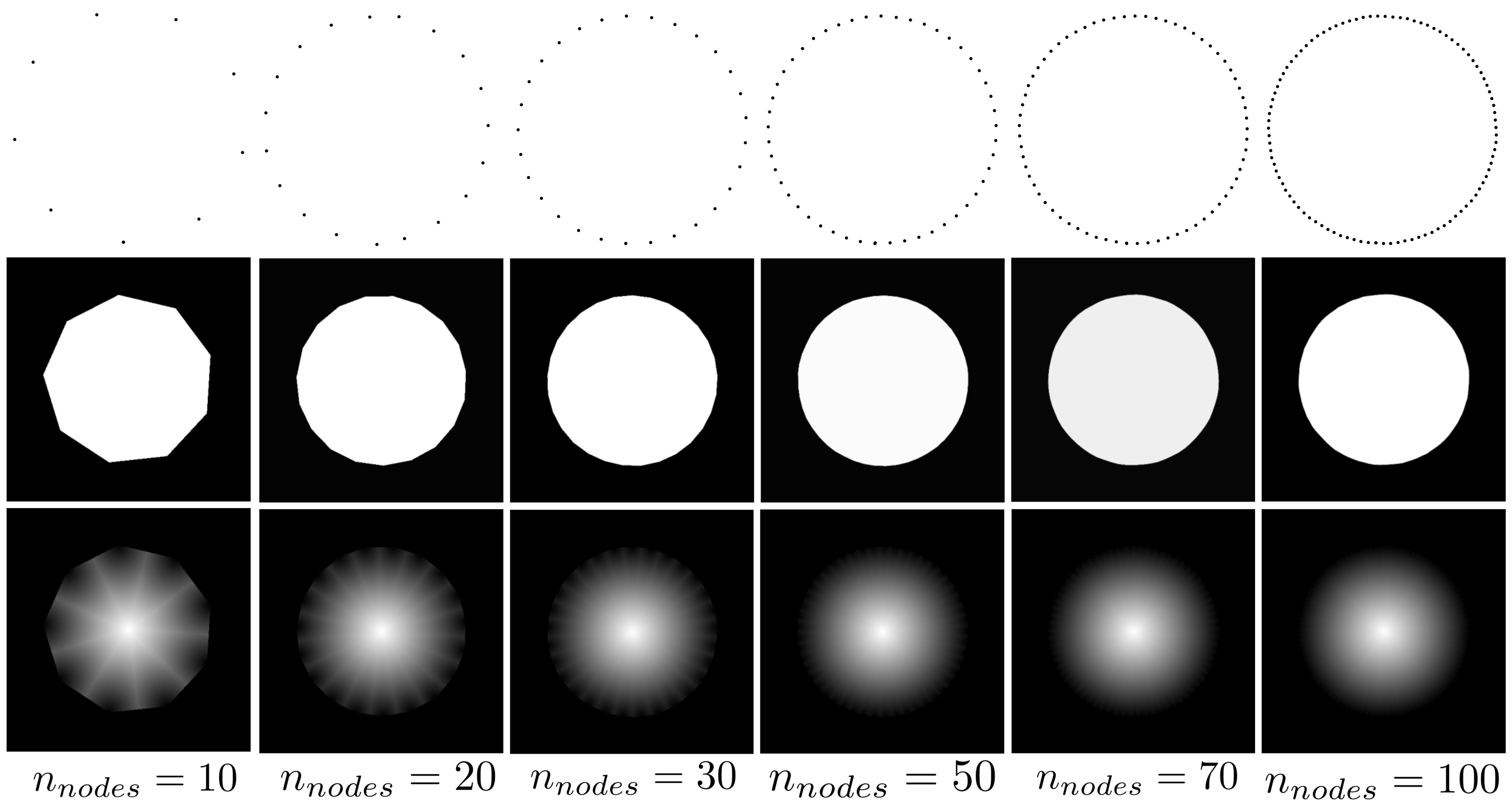
- Convert a polygon (contour) into image representations — masks, distance maps, SDFs, isolines, drawn edges — all in a fully differentiable way.
- Sample image features at contour node positions (differentiable w.r.t. the coordinates).
- Compute geometric descriptors and training losses directly on contour coordinates.
All layers and functions are differentiable: gradients flow back to the contour coordinates, making them suitable as components in trainable active contour / contour regression models.
Input convention
Every layer and function expects contours as a torch.Tensor of shape (B, N, K, 2) with values in [0, 1]:
| Dimension | Meaning |
|---|---|
B |
batch size |
N |
number of polygons per image |
K |
number of nodes per polygon |
2 |
(x, y) coordinates, normalised to [0, 1] |
API
1. Contour-to-image layers
All modules inherit from nn.Module, have no learnable weights, and produce outputs of shape (B, N, H, H) where H = size.
They are based on the winding-number property of polygons: for any point strictly inside a closed polygon, the sum of oriented angles subtended by consecutive edges equals ±2π; outside, it converges to 0. This property is approximated with a smooth tanh so that gradients exist everywhere.
ContourToMask(size, k=1e5, eps=1e-5)
Converts a polygon to a binary mask.
from torch_contour import ContourToMask
import torch

ctm = ContourToMask(size=128)
contour = torch.rand(2, 1, 50, 2)   # (B, N, K, 2)
mask = ctm(contour)                  # (2, 1, 128, 128)
ContourToDistanceMap(size, k=1e5, eps=1e-5)
Converts a polygon to an unsigned distance map (high values far from the boundary, low near it).
from torch_contour import ContourToDistanceMap

ctd = ContourToDistanceMap(size=128)
dmap = ctd(contour)               # (2, 1, 128, 128)
# also returns the intermediate mask:
dmap, mask = ctd(contour, return_mask=True)
ContourToSDF(size, k=1e5, eps=1e-5)
Converts a polygon to a signed distance function (SDF): positive inside, negative outside, zero on the boundary.
from torch_contour import ContourToSDF

sdf_layer = ContourToSDF(size=128)
sdf = sdf_layer(contour)          # (2, 1, 128, 128)
ContourToIsolines(size, isolines, k=1e5, eps=1e-5)
Extracts a set of Gaussian-weighted isolines from the distance map, centred on given levels.
from torch_contour import ContourToIsolines

iso = ContourToIsolines(size=128, isolines=[0.1, 0.5, 0.9])
isolines = iso(contour)           # (2, 1, 3, 128, 128)
DrawContour(size, thickness=1, k=1e5)
Draws the contour boundary as a thin line using a Sobel edge detector on the mask.
from torch_contour import DrawContour

draw = DrawContour(size=128, thickness=2)
drawn = draw(contour)             # (2, 1, 128, 128)
Smoothing(sigma)
Applies circular Gaussian smoothing along the node dimension. Handles the periodic boundary of a closed contour — no need for contour[0] == contour[-1].
from torch_contour import Smoothing

smoother = Smoothing(sigma=2)
smoothed = smoother(contour)      # (2, 1, 50, 2) — same shape as input
Backward-compatible aliases: the original underscore names (
Contour_to_mask,Contour_to_distance_map,Contour_to_isolines,Draw_contour) are still exported and work as before.
2. Differentiable feature sampling
sample_features_on_contour(feature_map, contour, mode="bilinear", padding_mode="border")
Samples image features at each contour node position using bilinear interpolation — differentiable with respect to both the feature map and the contour coordinates.
For each node (x, y), instead of snapping to the nearest pixel (which is non-differentiable), bilinear interpolation computes a weighted average of the 4 neighbouring pixels. The weights vary smoothly with (x, y), so gradients flow back to the contour coordinates.
from torch_contour import sample_features_on_contour

feature_map = torch.rand(2, 64, 128, 128)  # (B, C, H, W)
contour      = torch.rand(2, 1, 50, 2)     # (B, N, K, 2) in [0, 1]

features = sample_features_on_contour(feature_map, contour)
# → (2, 1, 50, 64)  i.e.  (B, N, K, C)
This is the core building block for active contour models where each contour node queries the image for local evidence (edge strength, colour, learned features, …) to decide how to move.
3. Geometric descriptors
All functions take a contour of shape (B, N, K, 2) and return a tensor of shape (B, N) (or (B, N, K, 2) for normals).
from torch_contour import area, perimeter, curvature, normals, compactness

a   = area(contour)           # (B, N)   — shoelace formula
p   = perimeter(contour)      # (B, N)   — arc length
c   = compactness(contour)    # (B, N)   — 4π·area/perimeter², in (0, 1]
k   = curvature(contour)      # (B, N, K)
n   = normals(contour)        # (B, N, K, 2) — unit outward normals
compactness equals 1 for a perfect circle and decreases for elongated or irregular shapes.
normals uses central differences and a −90° tangent rotation. Convention: outward normals for clockwise contours (standard image space, y-axis down).
4. Similarity metrics
These operate on soft masks of shape (B, N, H, W) (use ContourToMask to obtain them).
from torch_contour import iou, dice, hausdorff_distance

# Mask-based metrics (B, N, H, W) → (B, N)
iou_score  = iou(pred_mask, target_mask)
dice_score = dice(pred_mask, target_mask)

# Contour-based metric (B, N, K, 2) → (B, N)
hd = hausdorff_distance(contours1, contours2)
All three are differentiable and suitable as training losses (use 1 - iou(...) or 1 - dice(...) to minimise).
5. Regularization losses
Differentiable loss terms for constraining contour shape during training. All return (B, N) and can be combined with any task loss.
from torch_contour import spacing_loss, smoothness_loss, balloon_loss

# Penalizes non-uniform spacing between consecutive nodes
sl = spacing_loss(contour)     # (B, N)

# Penalizes high curvature (second-order finite differences)
# Unlike Smoothing, this is a loss — it does not modify the coordinates
sm = smoothness_loss(contour)  # (B, N)

# Signed area — minimise to shrink, negate to expand (balloon force)
bl = balloon_loss(contour)     # (B, N)
Typical combined loss in a training loop:
task_loss  = 1 - dice(ctm(pred), target_mask).mean()
reg_loss   = smoothness_loss(pred).mean() + 0.1 * spacing_loss(pred).mean()
loss       = task_loss + 0.01 * reg_loss
6. NumPy utilities — CleanContours
CPU-only utilities (NumPy / Numba) for removing self-intersecting loops and re-interpolating contours to a fixed node count. All methods are static.
from torch_contour import CleanContours
import numpy as np

contours_np = contour.cpu().numpy()   # (B, N, K, 2)

# Remove loops, return list of variable-length arrays
cleaned = CleanContours.clean_contours(contours_np)

# Remove loops and re-interpolate back to K nodes → (B, N, K, 2)
cleaned = CleanContours.clean_contours_and_interpolate(contours_np)
Both methods process the batch in parallel (Numba releases the GIL, enabling true multi-thread speedup).
Full example
import torch
import matplotlib.pyplot as plt
from torch_contour import (
    ContourToMask, ContourToDistanceMap, ContourToSDF,
    ContourToIsolines, DrawContour, Smoothing,
    sample_features_on_contour,
    area, perimeter, compactness, normals,
    iou, dice, hausdorff_distance,
    spacing_loss, smoothness_loss, balloon_loss,
)

contour = torch.tensor([[[[
    [0.1640, 0.5085], [0.1267, 0.4491], [0.1228, 0.3772], [0.1461, 0.3027],
    [0.1907, 0.2356], [0.2503, 0.1857], [0.3190, 0.1630], [0.3905, 0.1774],
    [0.4595, 0.2317], [0.5227, 0.3037], [0.5774, 0.3658], [0.6208, 0.3905],
    [0.6505, 0.3513], [0.6738, 0.2714], [0.7029, 0.2152], [0.7461, 0.2298],
    [0.8049, 0.2828], [0.8776, 0.3064], [0.9473, 0.2744], [0.9606, 0.2701],
    [0.9138, 0.3192], [0.8415, 0.3947], [0.7793, 0.4689], [0.7627, 0.5137],
    [0.8124, 0.5142], [0.8961, 0.5011], [0.9696, 0.5158], [1.0000, 0.5795],
    [0.9858, 0.6581], [0.9355, 0.7131], [0.9104, 0.7682], [0.9184, 0.8406],
    [0.8799, 0.8974], [0.8058, 0.9121], [0.7568, 0.8694], [0.7305, 0.7982],
    [0.6964, 0.7466], [0.6378, 0.7394], [0.5639, 0.7597], [0.4864, 0.7858],
    [0.4153, 0.7953], [0.3524, 0.7609], [0.3484, 0.7028], [0.3092, 0.7089],
    [0.2255, 0.7632], [0.1265, 0.8300], [0.0416, 0.8736], [0.0000, 0.8584],
    [0.0310, 0.7486], [0.1640, 0.5085],
]]]], dtype=torch.float32)

size = 200

# --- Contour-to-image layers ---
mask       = ContourToMask(size)(contour)            # (1, 1, 200, 200)
dmap       = ContourToDistanceMap(size)(contour)     # (1, 1, 200, 200)
sdf        = ContourToSDF(size)(contour)             # (1, 1, 200, 200)
iso        = ContourToIsolines(size, [0.1, 0.5, 0.9])(contour)  # (1, 1, 3, 200, 200)
drawn      = DrawContour(size)(contour)              # (1, 1, 200, 200)
smoothed   = Smoothing(sigma=1)(contour)             # (1, 1, 50, 2)

# --- Feature sampling ---
feature_map = torch.rand(1, 64, 200, 200)
features    = sample_features_on_contour(feature_map, contour)  # (1, 1, 50, 64)

# --- Geometric descriptors ---
print(area(contour))        # (1, 1)
print(perimeter(contour))   # (1, 1)
print(compactness(contour)) # (1, 1)
print(normals(contour).shape)  # (1, 1, 50, 2)

# --- Regularization losses ---
loss = smoothness_loss(contour).mean() + spacing_loss(contour).mean()
print(loss)
Citation
If you use the contour-to-image layers, please cite:
@misc{habis2024deepcontourflowadvancingactive,
      title={Deep ContourFlow: Advancing Active Contours with Deep Learning},
      author={Antoine Habis and Vannary Meas-Yedid and Elsa Angelini and Jean-Christophe Olivo-Marin},
      year={2024},
      eprint={2407.10696},
      archivePrefix={arXiv},
      primaryClass={cs.CV},
      url={https://arxiv.org/abs/2407.10696},
}
1 maintainer

Metadata
1 maintainer
Release files for torch-contour 1.4.5
For a detailed explanation of source distributions (sdists) and built distributions (wheels), please see the package formats documentation.
Source distribution (sdist)
| File | Size | Uploaded | |
|---|---|---|---|
| torch_contour-1.4.5.tar.gz | 23.3 kB | Details |
Built distribution (wheel)
| File | Interpreter | ABI | Platform | Reset |
|---|---|---|---|---|
| torch_contour-1.4.5-py3-none-any.whl | Python 3 | none | any | Details |
Total release size: 39.1 kB
Release files / torch_contour-1.4.5.tar.gz
| Download URL | torch_contour-1.4.5.tar.gz |
|---|---|
| Size | 23.3 kB |
| Tags | Source |
|
SHA-256 checksum How to use checksums |
bbbaf4cb4f089963828b9723b8bdbee4fed44e283aeebbd32f270ee033a90ce1
|
|
BLAKE2b-256 checksum How to use checksums |
63f4d4e558d420d392fa5eb16c6b4f1ee07b854d4edeeef05ac91b60c8701338
|
| Upload date | |
|
Uploaded using Trusted Publishing? What is trusted publishing? |
No |
| Uploaded via |
twine/7.0.0 CPython/3.14.0
|
Release files / torch_contour-1.4.5-py3-none-any.whl
| Download URL | torch_contour-1.4.5-py3-none-any.whl |
|---|---|
| Size | 15.8 kB |
| Tags | Python 3 |
|
SHA-256 checksum How to use checksums |
a70a81cd10af4764fdd80e0b5690f750a51807770e91c1f05b268d506f6015ea
|
|
BLAKE2b-256 checksum How to use checksums |
4242900cbb3edc97864a94db2df13159e8302a76d8d4aad97593e2efa9983e8b
|
| Upload date | |
|
Uploaded using Trusted Publishing? What is trusted publishing? |
No |
| Uploaded via |
twine/7.0.0 CPython/3.14.0
|














