
torch-np-classifier
A PyTorch/Lightning implementation of the NP-Classifier — a deep neural network for classifying natural products into pathway, superclass, and class levels of the biosynthetic hierarchy.
The library ships pretrained models and provides a single high-level object, NPClassifierPipeline, for prediction, embedding extraction, and SHAP-based explainability.
Table of contents
- Installation
- Quick start
- Predictions
- Molecular embeddings
- Explainability
- Training your own model
- Benchmark on CocoNut
- Acknowledgements
Installation
From PyPI
pip install torch-np-classifier
From GitHub (latest development version)
pip install git+https://github.com/jcapels/torch_np_classifier.git
Optional dependencies
SHAP explainability and visualisation require two extra packages:
pip install shap matplotlib Pillow
Quick start
from torch_np_classifier import NPClassifierPipeline

# Pretrained checkpoints are downloaded automatically on first prediction (~300 MB), cached afterwards
pipeline = NPClassifierPipeline()

result = pipeline.predict("O=c1c(O)c(-c2ccc(O)c(O)c2)oc2cc(O)cc(O)c12")  # quercetin
print(result["pathway"])     # ['Shikimates and Phenylpropanoids']
print(result["superclass"])  # ['Flavonoids']
print(result["class"])       # ['Flavonols']
print(result["isglycoside"]) # False
Predictions
Single molecule
from torch_np_classifier import NPClassifierPipeline

pipeline = NPClassifierPipeline()

result = pipeline.predict("Cn1cnc2c1c(=O)n(c(=O)n2C)C")  # caffeine
print(result)
# {
#   'pathway':    ['Alkaloids'],
#   'superclass': ['Purine alkaloids'],
#   'class':      ['Xanthines'],
#   'isglycoside': False
# }
Batch prediction
Pass a list of SMILES to get a list of result dicts in the same order:
smiles_list = [
    "Cn1cnc2c1c(=O)n(c(=O)n2C)C",                          # caffeine
    "O=c1c(O)c(-c2ccc(O)c(O)c2)oc2cc(O)cc(O)c12",          # quercetin
    "CN1CC[C@]23c4c5ccc(O)c4O[C@H]2[C@@H](O)C=C[C@@H]3[C@@H]1C5",  # morphine
]

results = pipeline.predict(smiles_list)

for smi, res in zip(smiles_list, results):
    print(res["pathway"], res["superclass"], res["class"])
Level-specific shortcuts
When you only need one level of the hierarchy:
pipeline.predict_pathway("Cn1cnc2c1c(=O)n(c(=O)n2C)C")
# ['Alkaloids']

pipeline.predict_superclass("Cn1cnc2c1c(=O)n(c(=O)n2C)C")
# ['Purine alkaloids']

pipeline.predict_class("Cn1cnc2c1c(=O)n(c(=O)n2C)C")
# ['Xanthines']
Each method accepts a single SMILES string or a list and returns the corresponding type.
Molecular embeddings
predict_embeddings extracts the penultimate-layer activations from any of the three hierarchical models. The default architecture produces a (N, 1536) float32 array.
smiles_list = [
    "Cn1cnc2c1c(=O)n(c(=O)n2C)C",
    "O=c1c(O)c(-c2ccc(O)c(O)c2)oc2cc(O)cc(O)c12",
    "CC(=O)Oc1ccccc1C(=O)O",
]

embeddings = pipeline.predict_embeddings(smiles_list, level="class")
print(embeddings.shape)  # (3, 1536)
The level argument selects which model to extract from: "pathway", "superclass", or "class".
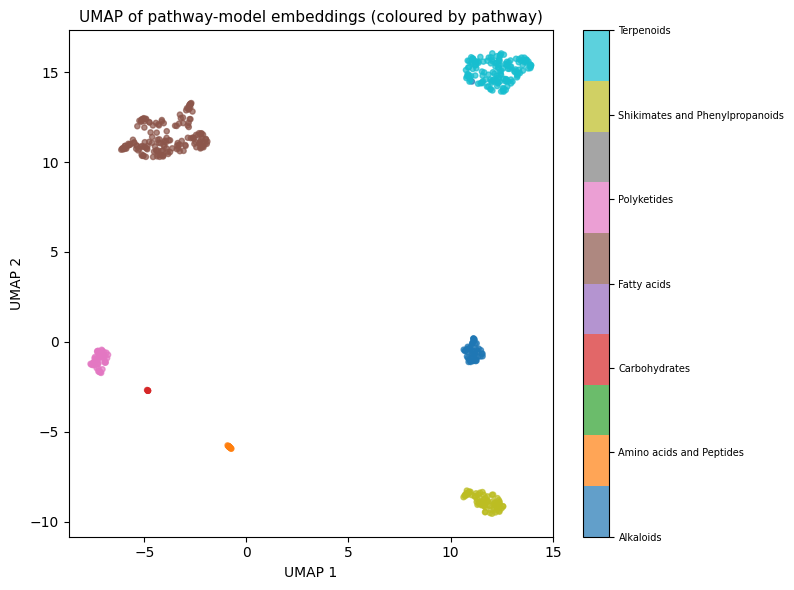
Visualising with UMAP
import umap
import matplotlib.pyplot as plt
import numpy as np
import pandas as pd

df = pd.read_csv("train.csv")
smiles = df["SMILES"].tolist()
pathway_labels = df.columns[2:9].tolist()

emb = pipeline.predict_embeddings(smiles[:500], level="pathway")

reducer = umap.UMAP(n_components=2, random_state=42)
coords = reducer.fit_transform(emb)

colour_idx = np.argmax(df[pathway_labels].values[:500], axis=1)

fig, ax = plt.subplots(figsize=(8, 6))
sc = ax.scatter(coords[:, 0], coords[:, 1], c=colour_idx, cmap="tab10", s=14, alpha=0.7)
cbar = plt.colorbar(sc, ax=ax, ticks=range(len(pathway_labels)))
cbar.ax.set_yticklabels(pathway_labels, fontsize=7)
ax.set_title("UMAP of pathway-model embeddings")
plt.tight_layout()
plt.show()
Explainability
NPClassifierPipeline integrates shap.GradientExplainer to explain any prediction in terms of Morgan fingerprint bits. All SHAP computation runs on CPU regardless of where the model lives.
Three-level explanation
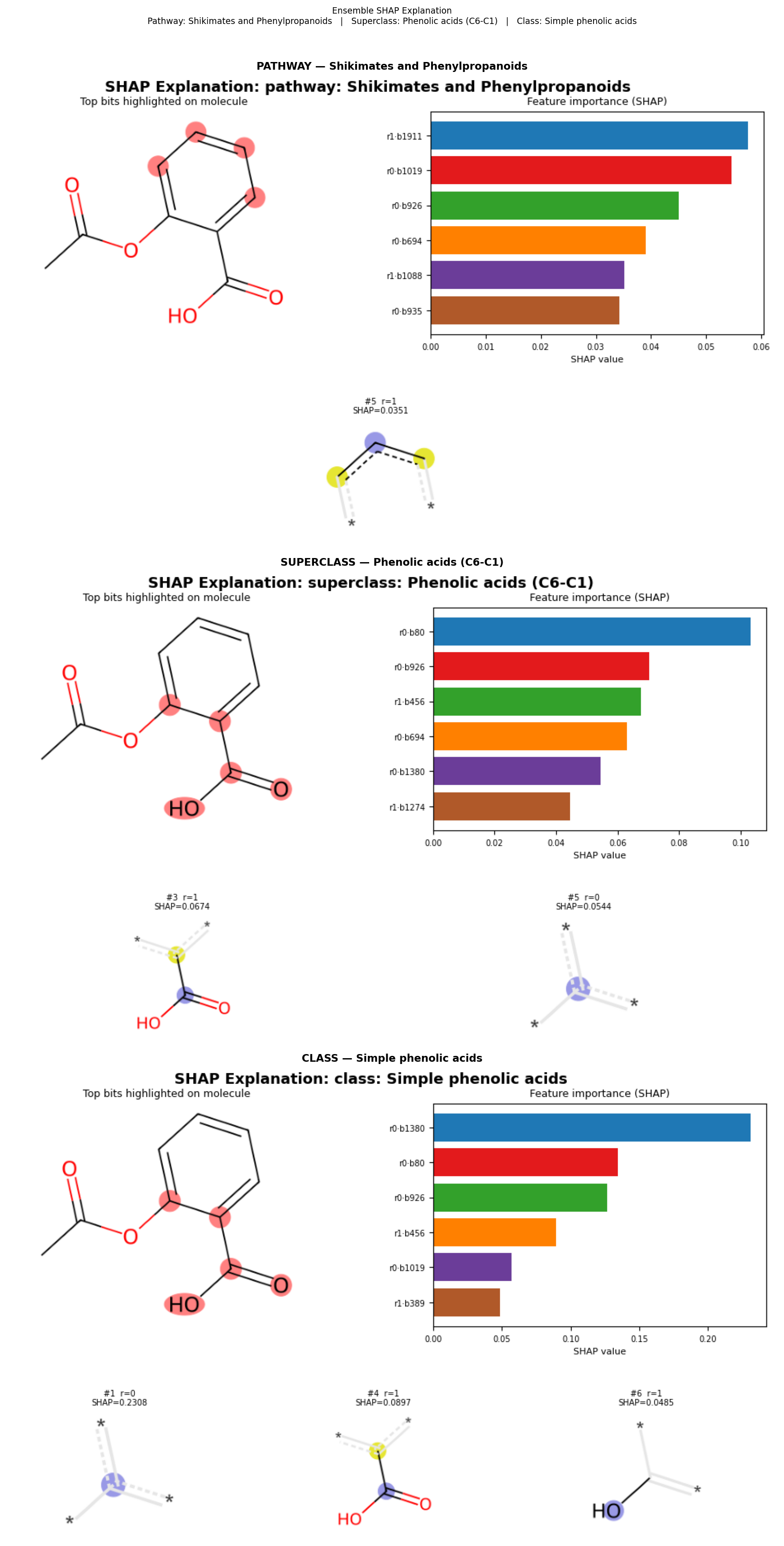
.explain() runs the full ensemble voting, computes SHAP values for each predicted level, and returns a combined matplotlib figure with one panel per level. Each panel shows the molecule with the most important bits highlighted, a SHAP bar chart, and a grid of the corresponding Morgan-environment fragments.
A bundled 200-molecule stratified background is used by default — no setup required:
fig = pipeline.explain("CC(=O)Oc1ccccc1C(=O)O")  # aspirin
fig.savefig("aspirin_explain.png", dpi=150, bbox_inches="tight")
You can supply your own background (SMILES list or pre-computed feature array) for a domain-specific reference distribution:
import pandas as pd

bg_smiles = pd.read_csv("train.csv")["SMILES"].sample(100, random_state=42).tolist()

fig = pipeline.explain(
    "CC(=O)Oc1ccccc1C(=O)O",
    background=bg_smiles,
    k=6,
)
Single-level explanation
.explain_bits() focuses on one hierarchy level and returns one explanation panel per predicted label at that level:
# Class-level explanation
fig = pipeline.explain_bits(
    "O=c1c(O)c(-c2ccc(O)c(O)c2)oc2cc(O)cc(O)c12",  # quercetin
    level="class",
    k=6,
)

# Superclass-level explanation
fig = pipeline.explain_bits(
    "CN1CC[C@]23c4c5ccc(O)c4O[C@H]2[C@@H](O)C=C[C@@H]3[C@@H]1C5",  # morphine
    level="superclass",
    k=6,
)
Pre-computing the background
When explaining many molecules, featurize the background once to avoid redundant computation:
bg_features = pipeline.featurizer.transform(bg_smiles)  # (N, 6144) float32

for smi in smiles_list:
    fig = pipeline.explain(smi, background=bg_features, k=6)
    fig.savefig(f"{smi[:10]}_explain.png", dpi=150, bbox_inches="tight")
Training your own model
High-level: NPClassifierPipeline.fit()
The pipeline can train all three hierarchical models from a CSV file and build the ensemble in one call:
from torch_np_classifier import NPClassifierPipeline

pipeline = NPClassifierPipeline(
    lr=1e-5,
    max_epochs=150,
    batch_size=128,
    pathway_threshold=0.5,
    superclass_threshold=0.3,
    class_threshold=0.1,
)

pipeline.fit(
    smiles_or_csv="train.csv",
    val_smiles_or_csv="val.csv",
    smiles_col="SMILES",
    label_start=2,          # columns to skip before label columns
    checkpoint_dir="checkpoints/",
    early_stopping=True,
    patience=5,
)

# Save and reload
pipeline.fit(...)
# Later:
pipeline = NPClassifierPipeline.from_checkpoints(
    pathway_ckpt="checkpoints/pathway/...",
    superclass_ckpt="checkpoints/superclass/...",
    class_ckpt="checkpoints/class/...",
)
Expected CSV format — first two columns are ignored (key + SMILES), the remaining 730 columns are binary label indicators:
key,SMILES,Alkaloids,Amino acids and Peptides,...
ABC123,Cn1cnc2c1c(=O)n(c(=O)n2C)C,1,0,...
Low-level: NPClassifierLightning + Lightning Trainer
For full control over training loop, callbacks, and logging:
import lightning
from lightning.pytorch.callbacks import EarlyStopping, ModelCheckpoint

from torch_np_classifier import NPClassifierDataModule, NPClassifierLightning

dm = NPClassifierDataModule(
    train_csv="train.csv",
    val_csv="val.csv",
    smiles_col="SMILES",
    label_slice=slice(2, None),
    batch_size=128,
    num_workers=4,
)

model = NPClassifierLightning(num_categories=730, lr=1e-5, scheduler=True)

trainer = lightning.Trainer(
    max_epochs=150,
    callbacks=[
        EarlyStopping(monitor="val_loss", patience=5),
        ModelCheckpoint(dirpath="checkpoints/", monitor="val_loss", save_top_k=1),
    ],
    accelerator="auto",
)

trainer.fit(model, datamodule=dm)
See the examples/ directory and notebooks/ for complete end-to-end walkthroughs including hierarchical training, ensemble construction, and evaluation.
Benchmark on CocoNut
The pretrained models were evaluated on the CocoNut database of natural products. Molecules without a ground-truth label for a given level are counted as correct when the model also predicts nothing (no_gt column).
| Level | n | no_gt | Hit rate | Mean precision | Empty rate |
|---|---|---|---|---|---|
| pathway | 686,556 | 52,271 | 0.9287 (637,612 / 686,556) | 0.9517 | 0.0242 (16,595 molecules) |
| superclass | 588,670 | 150,157 | 0.8442 (496,959 / 588,670) | 0.9301 | 0.0923 (54,357 molecules) |
| class | 556,164 | 182,663 | 0.8238 (458,168 / 556,164) | 0.8890 | 0.0733 (40,762 molecules) |
| is_glycoside | 738,728 | — | 0.9533 accuracy (704,217 / 738,728) | — | — |
- Hit rate — fraction of molecules where the true label appears in the predicted set (or both are empty).
- Mean precision — average fraction of predicted labels that are correct.
- Empty rate — fraction of molecules for which the model produced no prediction.
Acknowledgements
This library is inspired by and builds upon:
- NP-Classifier publication: Kim, H. W. et al. "NPClassifier: A Deep Neural Network-Based Structural Classification Tool for Natural Products." J. Nat. Prod. 2021, 84, 2795–2807. https://doi.org/10.1021/acs.jnatprod.1c00399
- NP-Classifier repository (original Keras model and training data): https://github.com/mwang87/NP-Classifier — the architecture, label hierarchy, and dataset used in this reimplementation were derived from that repository.
1 maintainer

Metadata
1 maintainer
Release files for torch-np-classifier 0.0.2
For a detailed explanation of source distributions (sdists) and built distributions (wheels), please see the package formats documentation.
Source distribution (sdist)
| File | Size | Uploaded | |
|---|---|---|---|
| torch_np_classifier-0.0.2.tar.gz | 67.8 kB | Details |
Built distribution (wheel)
| File | Interpreter | ABI | Platform | Reset |
|---|---|---|---|---|
| torch_np_classifier-0.0.2-py3-none-any.whl | Python 3 | none | any | Details |
Total release size: 132.5 kB
Release files / torch_np_classifier-0.0.2.tar.gz
| Download URL | torch_np_classifier-0.0.2.tar.gz |
|---|---|
| Size | 67.8 kB |
| Tags | Source |
|
SHA-256 checksum How to use checksums |
021d756af645dcf771456d471afdd254b8dd9e5c35044345f0927ea039dd3aa7
|
|
BLAKE2b-256 checksum How to use checksums |
e317727498d23eeddb89cb0e32bce1092c0493141be0f684c6ca59d4026a6988
|
| Upload date | |
|
Uploaded using Trusted Publishing? What is trusted publishing? |
Yes |
| Uploaded via |
twine/6.1.0 CPython/3.13.12
|
Provenance
Provenance describes where a file came from. On PyPI, provenance is shared via attestations, which provide a verifiable record of the build or publishing details. View details, limitations and caveats.


PyPI Publish Attestation
PyPI verified that this artifact, at this checksum, originated from the publisher listed below.
Signed by GitHub Actions, verified by PyPI on May 27, 2026.
Transparency logRelease files / torch_np_classifier-0.0.2-py3-none-any.whl
| Download URL | torch_np_classifier-0.0.2-py3-none-any.whl |
|---|---|
| Size | 64.7 kB |
| Tags | Python 3 |
|
SHA-256 checksum How to use checksums |
b85369f29881915b652ececcb9f623420905583ad6a8d889d42706444780a65b
|
|
BLAKE2b-256 checksum How to use checksums |
2a3792ff3d87cd51e251eb44fb94e0592a91c2b2446bfd326681eeb25e12791e
|
| Upload date | |
|
Uploaded using Trusted Publishing? What is trusted publishing? |
Yes |
| Uploaded via |
twine/6.1.0 CPython/3.13.12
|
Provenance
Provenance describes where a file came from. On PyPI, provenance is shared via attestations, which provide a verifiable record of the build or publishing details. View details, limitations and caveats.
PyPI Publish Attestation
PyPI verified that this artifact, at this checksum, originated from the publisher listed below.
Signed by GitHub Actions, verified by PyPI on May 27, 2026.
Transparency log













