
PyTorch Scatter





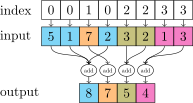
This package consists of a small extension library of highly optimized sparse update (scatter and segment) operations for the use in PyTorch, which are missing in the main package. Scatter and segment operations can be roughly described as reduce operations based on a given "group-index" tensor. Segment operations require the "group-index" tensor to be sorted, whereas scatter operations are not subject to these requirements.
The package consists of the following operations with reduction types "sum"|"mean"|"min"|"max":
- scatter based on arbitrary indices
- segment_coo based on sorted indices
- segment_csr based on compressed indices via pointers
In addition, we provide the following composite functions which make use of scatter_* operations under the hood: scatter_std, scatter_logsumexp, scatter_softmax and scatter_log_softmax.
All included operations are broadcastable, work on varying data types, are implemented both for CPU and GPU with corresponding backward implementations, and are fully traceable.
Installation
Anaconda
Update: You can now install pytorch-scatter via Anaconda for all major OS/PyTorch/CUDA combinations 🤗
Given that you have pytorch >= 1.8.0 installed, simply run
conda install pytorch-scatter -c pyg
Binaries
We alternatively provide pip wheels for all major OS/PyTorch/CUDA combinations, see here.
PyTorch 2.4
To install the binaries for PyTorch 2.4.0, simply run
pip install torch-scatter -f https://data.pyg.org/whl/torch-2.4.0+${CUDA}.html
where ${CUDA} should be replaced by either cpu, cu118, cu121, or cu124 depending on your PyTorch installation.
cpu |
cu118 |
cu121 |
cu124 |
|
|---|---|---|---|---|
| Linux | ✅ | ✅ | ✅ | ✅ |
| Windows | ✅ | ✅ | ✅ | ✅ |
| macOS | ✅ |
PyTorch 2.3
To install the binaries for PyTorch 2.3.0, simply run
pip install torch-scatter -f https://data.pyg.org/whl/torch-2.3.0+${CUDA}.html
where ${CUDA} should be replaced by either cpu, cu118, or cu121 depending on your PyTorch installation.
cpu |
cu118 |
cu121 |
|
|---|---|---|---|
| Linux | ✅ | ✅ | ✅ |
| Windows | ✅ | ✅ | ✅ |
| macOS | ✅ |
Note: Binaries of older versions are also provided for PyTorch 1.4.0, PyTorch 1.5.0, PyTorch 1.6.0, PyTorch 1.7.0/1.7.1, PyTorch 1.8.0/1.8.1, PyTorch 1.9.0, PyTorch 1.10.0/1.10.1/1.10.2, PyTorch 1.11.0, PyTorch 1.12.0/1.12.1, PyTorch 1.13.0/1.13.1, PyTorch 2.0.0/2.0.1, PyTorch 2.1.0/2.1.1/2.1.2, and PyTorch 2.2.0/2.2.1/2.2.2 (following the same procedure).
For older versions, you need to explicitly specify the latest supported version number or install via pip install --no-index in order to prevent a manual installation from source.
You can look up the latest supported version number here.
From source
Ensure that at least PyTorch 1.4.0 is installed and verify that cuda/bin and cuda/include are in your $PATH and $CPATH respectively, e.g.:
$ python -c "import torch; print(torch.__version__)"
>>> 1.4.0

$ echo $PATH
>>> /usr/local/cuda/bin:...

$ echo $CPATH
>>> /usr/local/cuda/include:...
Then run:
pip install torch-scatter
When running in a docker container without NVIDIA driver, PyTorch needs to evaluate the compute capabilities and may fail.
In this case, ensure that the compute capabilities are set via TORCH_CUDA_ARCH_LIST, e.g.:
export TORCH_CUDA_ARCH_LIST = "6.0 6.1 7.2+PTX 7.5+PTX"
Example
import torch
from torch_scatter import scatter_max

src = torch.tensor([[2, 0, 1, 4, 3], [0, 2, 1, 3, 4]])
index = torch.tensor([[4, 5, 4, 2, 3], [0, 0, 2, 2, 1]])

out, argmax = scatter_max(src, index, dim=-1)
print(out)
tensor([[0, 0, 4, 3, 2, 0],
        [2, 4, 3, 0, 0, 0]])

print(argmax)
tensor([[5, 5, 3, 4, 0, 1]
        [1, 4, 3, 5, 5, 5]])
Running tests
pytest
C++ API
torch-scatter also offers a C++ API that contains C++ equivalent of python models.
For this, we need to add TorchLib to the -DCMAKE_PREFIX_PATH (e.g., it may exists in {CONDA}/lib/python{X.X}/site-packages/torch if installed via conda):
mkdir build
cd build
# Add -DWITH_CUDA=on support for CUDA support
cmake -DCMAKE_PREFIX_PATH="..." ..
make
make install
1 maintainer

Metadata
1 maintainer
Release files for torch-scatter-rocm 2.1.2.post7
For a detailed explanation of source distributions (sdists) and built distributions (wheels), please see the package formats documentation.
Built distributions (wheels)
| File | Reset | |||
|---|---|---|---|---|
| torch_scatter_rocm-2.1.2.post7-cp314-cp314-manylinux_2_32_x86_64.whl | CPython 3.14 | CPython 3.14 | Linux glibc 2.32+ x86-64 | Details |
| torch_scatter_rocm-2.1.2.post7-cp313-cp313-manylinux_2_32_x86_64.whl | CPython 3.13 | CPython 3.13 | Linux glibc 2.32+ x86-64 | Details |
| torch_scatter_rocm-2.1.2.post7-cp312-cp312-manylinux_2_32_x86_64.whl | CPython 3.12 | CPython 3.12 | Linux glibc 2.32+ x86-64 | Details |
| torch_scatter_rocm-2.1.2.post7-cp311-cp311-manylinux_2_32_x86_64.whl | CPython 3.11 | CPython 3.11 | Linux glibc 2.32+ x86-64 | Details |
| torch_scatter_rocm-2.1.2.post7-cp310-cp310-manylinux_2_32_x86_64.whl | CPython 3.10 | CPython 3.10 | Linux glibc 2.32+ x86-64 | Details |
Total release size: 36.4 MB
Release files / torch_scatter_rocm-2.1.2.post7-cp314-cp314-manylinux_2_32_x86_64.whl
| Download URL | torch_scatter_rocm-2.1.2.post7-cp314-cp314-manylinux_2_32_x86_64.whl |
|---|---|
| Size | 7.3 MB |
| Tags | CPython 3.14 Linux glibc 2.32+ x86-64 |
|
SHA-256 checksum How to use checksums |
9aed7c371e649addc6bca23463fbd58466eb09e6f3f87f7f293b629ff5727d75
|
|
BLAKE2b-256 checksum How to use checksums |
721378ba607123919550ed68d02719bc6a36b1a42f318b59bb902817e6c1e62b
|
| Upload date | |
|
Uploaded using Trusted Publishing? What is trusted publishing? |
No |
| Uploaded via |
twine/6.2.0 CPython/3.12.12
|
Release files / torch_scatter_rocm-2.1.2.post7-cp313-cp313-manylinux_2_32_x86_64.whl
| Download URL | torch_scatter_rocm-2.1.2.post7-cp313-cp313-manylinux_2_32_x86_64.whl |
|---|---|
| Size | 7.3 MB |
| Tags | CPython 3.13 Linux glibc 2.32+ x86-64 |
|
SHA-256 checksum How to use checksums |
630d1c852f72e0fe3df3ee44c9e14953fb3741f3b8d5f3efb74179ef2c47e748
|
|
BLAKE2b-256 checksum How to use checksums |
cc6355fd6034672e44592ca89037478626059f0ff8b74146a80fa029e58a6921
|
| Upload date | |
|
Uploaded using Trusted Publishing? What is trusted publishing? |
No |
| Uploaded via |
twine/6.2.0 CPython/3.12.12
|
Release files / torch_scatter_rocm-2.1.2.post7-cp312-cp312-manylinux_2_32_x86_64.whl
| Download URL | torch_scatter_rocm-2.1.2.post7-cp312-cp312-manylinux_2_32_x86_64.whl |
|---|---|
| Size | 7.3 MB |
| Tags | CPython 3.12 Linux glibc 2.32+ x86-64 |
|
SHA-256 checksum How to use checksums |
6d7d09c22eac2b6e5dd798cca3803595cbcfa967e41873271c923f24fbe7b718
|
|
BLAKE2b-256 checksum How to use checksums |
104244ad7b06ed60c86e11f0ff2128f6c8acb0678fa32d267f8335396b962433
|
| Upload date | |
|
Uploaded using Trusted Publishing? What is trusted publishing? |
No |
| Uploaded via |
twine/6.2.0 CPython/3.12.12
|
Release files / torch_scatter_rocm-2.1.2.post7-cp311-cp311-manylinux_2_32_x86_64.whl
| Download URL | torch_scatter_rocm-2.1.2.post7-cp311-cp311-manylinux_2_32_x86_64.whl |
|---|---|
| Size | 7.3 MB |
| Tags | CPython 3.11 Linux glibc 2.32+ x86-64 |
|
SHA-256 checksum How to use checksums |
36d8a9ba8da9e0d1ef5412dbb2c2901828683c7712c82827bd407ae7f77dc5d2
|
|
BLAKE2b-256 checksum How to use checksums |
71e275fa345b5508df6abe159fb59149e526d00d02ba72dfd17c9f8cfe48a70e
|
| Upload date | |
|
Uploaded using Trusted Publishing? What is trusted publishing? |
No |
| Uploaded via |
twine/6.2.0 CPython/3.12.12
|
Release files / torch_scatter_rocm-2.1.2.post7-cp310-cp310-manylinux_2_32_x86_64.whl
| Download URL | torch_scatter_rocm-2.1.2.post7-cp310-cp310-manylinux_2_32_x86_64.whl |
|---|---|
| Size | 7.3 MB |
| Tags | CPython 3.10 Linux glibc 2.32+ x86-64 |
|
SHA-256 checksum How to use checksums |
b91cc5e20d98cef939b441555edf86835d7afb7035b4ab87a99543615c8c7527
|
|
BLAKE2b-256 checksum How to use checksums |
81b2e4cfb4f93b8107b3d2d3650e6373f902743ce663f4d786a11bb786c85b78
|
| Upload date | |
|
Uploaded using Trusted Publishing? What is trusted publishing? |
No |
| Uploaded via |
twine/6.2.0 CPython/3.12.12
|














