
torchaudio-filters
High-pass and low-pass filters implemented as modules with torchaudio.
This small package offers a simple API to implement basic butterworth filters in PyTorch modules.
Aims to maintain consistency with the PyTorch API (e.g. behaves similarly to
torchaudio.transforms.Spectrogram) and uses torchaudio.functional.filtfilt under the hood.
Output has been verified to generally match the scipy.signal output up to 1e-2 units of
precision in testing.
>>> from torch import nn
>>> from torchaudio_filters import LowPass, Pad
>>> sample_rate = 128  # Hz
>>> sample_secs = 10
>>> x = torch.rand(32, 21, sample_rate * sample_secs)  # batch_idx, channel_idx, timestep_idx
# Add pre-processors to your models using Sequential
# * Pad will pad input and unpad output
# * LowPass will filter to the frequencies below a given cutoff
>>> model = nn.Sequential(
...     Pad(
...         module=LowPass(sample_rate, 70)  # Low-pass filter
...         padlen=32,
...     )
...     encoder,
...     decoder,
...     ...,
... )
>>> y_hat = model(x)
Installation
Requires a relatively recent torchaudio to be installed (anything after 2.0.0 should be more
than okay), and also needs scipy.
To install the latest stable version from PyPi:
pip install torchaudio-filters
Usage
This package includes the torch.nn.module objects LowPass, HighPass, BandPass, Notch, and
Pad. These all assume the final dimension represents time, and apply Butterworth filters in their
forward methods.
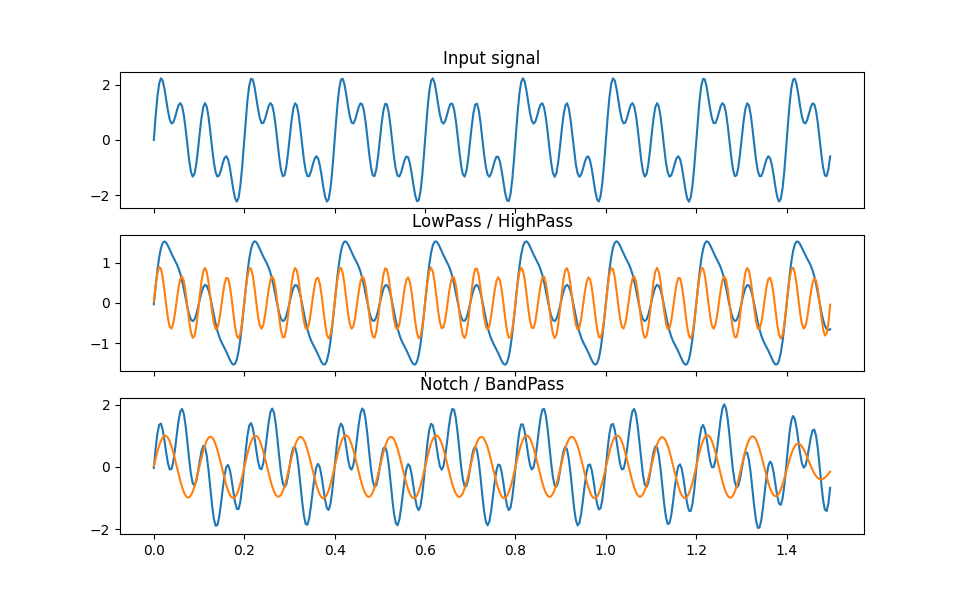
Let's generate a simple example on a sinusoidal 256 Hz signal with frequencies 5, 10, and 20 Hz:
>>> sample_rate = 256  # Hz
>>> sample_secs = 1.5  # s
>>> t = torch.arange(0, sample_secs, 1 / sample_rate)
>>> freqs = [5, 10, 20]
>>> x = sum(torch.sin(2 * torch.pi * f * t) for f in freqs)
We can design low-pass and high-pass filters and call them as any other module:
>>> lp = LowPass(15, sample_rate)
>>> x_lp = lp(x)
>>> hp = HighPass(15, sample_rate)
>>> x_hp = hp(x)
>>> notch = Notch(7, 12, sample_rate)
>>> x_notch = notch(x)
>>> bp = BandPass(7, 12, sample_rate)
>>> x_bp = bp(x)
Plotting these results:
>>> fig, (ax1, ax2, ax3) = plt.subplots(3, 1, sharex=True, figsize=(9.6, 6))
>>> ax1.plot(t, x)
>>> ax1.set_title('Input signal')
>>> ax2.plot(t, x_lp)
>>> ax2.plot(t, x_hp)
>>> ax2.set_title('LowPass / HighPass')
>>> ax3.plot(t, x_notch)
>>> ax3.plot(t, x_bp)
>>> ax3.set_title('Notch / BandPass')
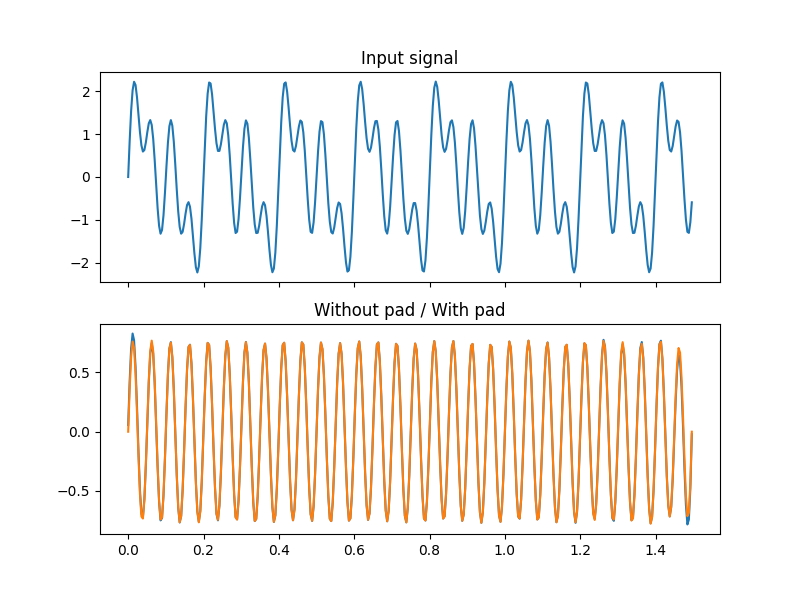
To decrease the edge effect, a wrapper module Pad is also provided
>>> filt = torch.nn.Sequential(hp, notch)
>>> filt_pad = Pad(
...     filt,
...     padlen=128,
... )
>>> x_f = filt(x)
>>> x_fpad = filt_pad(x)
>>> fig, (ax1, ax2) = plt.subplots(2, 1, sharex=True, figsize=(8, 6))
>>> ax1.plot(t, x)
>>> ax1.set_title('Input signal')
>>> ax2.plot(t, x_f)
>>> ax2.plot(t, x_fpad)
>>> ax2.set_title('Without pad / With pad')
>>> plt.show()
Contributing
Pull requests are most welcome! If there's any questions, open an issue so we can discuss further.
Dependencies and environments are managed with poetry. To get started developing for this package:
$ git clone https://github.com/BlakeJC94/torchaudio_filters
$ cd torchaudio_filters
$ poetry install
$ pytest
Branch main should be stable, all the latest changes will go onto the dev branch before being released on main.
1 maintainer

Metadata
1 maintainer
Release files for torchaudio-filters 0.2.1
For a detailed explanation of source distributions (sdists) and built distributions (wheels), please see the package formats documentation.
Source distribution (sdist)
| File | Size | Uploaded | Provenance | |
|---|---|---|---|---|
| torchaudio_filters-0.2.1.tar.gz | 16.1 kB | Without provenance | Details |
Built distribution (wheel)
| File | Interpreter | ABI | Platform | Reset |
|---|---|---|---|---|
| torchaudio_filters-0.2.1-py3-none-any.whl | Python 3 | none | any | Details |
Total release size: 33.0 kB
Release files / torchaudio_filters-0.2.1.tar.gz
| Download URL | torchaudio_filters-0.2.1.tar.gz |
|---|---|
| Size | 16.1 kB |
| Tags | Source |
|
SHA-256 checksum How to use checksums |
17092a594bf966f0ce0608b248e0faf440debb0b9793c3bde3a77a009b8d4907
|
|
BLAKE2b-256 checksum How to use checksums |
250f23cfa314d34013bd6f0df7d98037c14e4266b88f4fc8185ee249ec5cac72
|
| Upload date | |
|
Uploaded using Trusted Publishing? What is trusted publishing? |
No |
| Uploaded via |
poetry/1.7.1 CPython/3.11.8 Linux/6.6.10-76060610-generic
|
Release files / torchaudio_filters-0.2.1-py3-none-any.whl
| Download URL | torchaudio_filters-0.2.1-py3-none-any.whl |
|---|---|
| Size | 16.9 kB |
| Tags | Python 3 |
|
SHA-256 checksum How to use checksums |
fd9fc4b7f1d3dd080e815f2fd97c69884d4a937e58ca9d5e01bd9b1277e7116f
|
|
BLAKE2b-256 checksum How to use checksums |
0f269df99a0d3898bd5a76ee59d521a5a5ee0928e70be81fc2366fba42e42c32
|
| Upload date | |
|
Uploaded using Trusted Publishing? What is trusted publishing? |
No |
| Uploaded via |
poetry/1.7.1 CPython/3.11.8 Linux/6.6.10-76060610-generic
|
Security for torchaudio-filters 0.2.1
Provenance
Provenance describes where a file came from. On PyPI, provenance is shared via attestations, which provide a verifiable record of the build or publishing details. View details, limitations and caveats.
No provenance found
None of the files in this release were uploaded with provenance metadata.
A note on package security
PyPI is a repository for distributing packages, not a service for auditing them. While third-party security researchers and our staff do their best to detect and remove malicious packages, PyPI cannot guarantee the quality, security or suitability of any given package.
To learn more about protecting yourself from malicious actors, visit our package security documentation.














