



Description
Torchcolor is a lightweight Python package to enhance readability of printing and logging information into the terminal with Pytorch module coloring support.
Usage
Color library
As a color library, Torchcolor can be used independently of Pytorch as a python package for printing into the terminal with different colors and configurations.
Color & TextStyle
The simplest way to use Torchcolor is to create or use preset Colors and set them as foreground or background colors of a TextStyle object.
A TextStyle can take the following arguments:
- fg_style: a
Color/Gradientobject or thestrname of a preset color for the foreground of the style - bg_style: a
Color/Gradientobject or thestrname of a preset color for the background of the style - Some other properties: italic, underline, double_underline, crossed, darken, bold (not working on most terminal)
color_red = Color("red")
color_rgb = Color((120, 240, 70))
color_hex = Color("#F3115B")

style1 = TextStyle(fg_style=color_red, bg_style=color_rgb, italic=True, double_underline=True)
style2 = TextStyle(fg_style=color_hex, bg_style="bright cyan", crossed=True)

text = "This text has a torchcolor styling!"
print(style1.apply(text))
print(style2.apply(text))

Gradient & Color Palette
Torchcolor goes further than just using simple colors and allows for the creation of custom color Palette that can be stored and used inside Gradient object to give more complex stylisation to your text.
The following example creates a new Palette and 3 different styles that uses each a Gradient with different properties.
palette = Palette("viola", [
    Color("#3D348B"), Color("#7678ED"), Color("#F7B801"), Color("#F18701"), Color("#F35B04")
])

text = "Torchcolor is an easy-to-use coloring package in Python"

style_smooth = TextStyle(Gradient(palette))
style_discrete = TextStyle(Gradient(palette, interpolate=False))
style_repeat = TextStyle(Gradient(palette, repeat=True, window_size=2))

print(style_smooth.apply(text))
print(style_discrete.apply(text))
print(style_repeat.apply(text))

This next example simply print a smooth gradient on the text for all registered color palettes.
for palette in Palette._registry.values():
    print(TextStyle(Gradient(palette, interpolate=True)).apply(text))
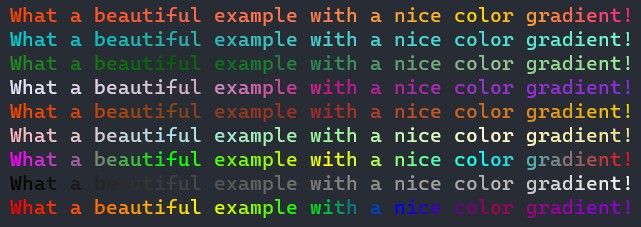
At last, as gradients can be used as a foreground and a background coloring, it is possible to display text with 2 gradients.
text = "This text has a foreground and a background gradient!"
style = TextStyle(
    fg_style=Gradient(Palette.get("rainbow")),
    bg_style=Gradient(Palette.get("monochrome")),
    underline=True
)
print(style.apply(text))

Function print_more
The same way the print built-in function of Python can take multiple arguments, we provide Torchcolor with a print_more function that can take both string and TextStyle object.
A TextStyle object will apply a style to the previous string.
little_style = TextStyle(fg_style=Gradient(Palette.get("rainbow")), bg_style=Color((75, 75, 75)), crossed=True)

print_more(
    "Lorem ipsum ", TextStyle("red"),
    "dolor sit amet", TextStyle(Gradient(Palette.get("warm_sunset")), underline=True),
    ", consectetur adipiscing ",
    "elit", TextStyle(bg_style="bright cyan", italic=True),
    ". ",
    "Nullam consequat", little_style,
    " lectus ",
    "eu quam iaculis", little_style,
    ", ",
    "vel blandit ligula sagittis.", TextStyle("green", darken=True),
    sep=""
)

Pytorch module for logging models
The strength of Torchcolor and its primary reason for having been developed is to easily customize the logging of torch.nn.Module with colors, gradients based on specific properties of each module.
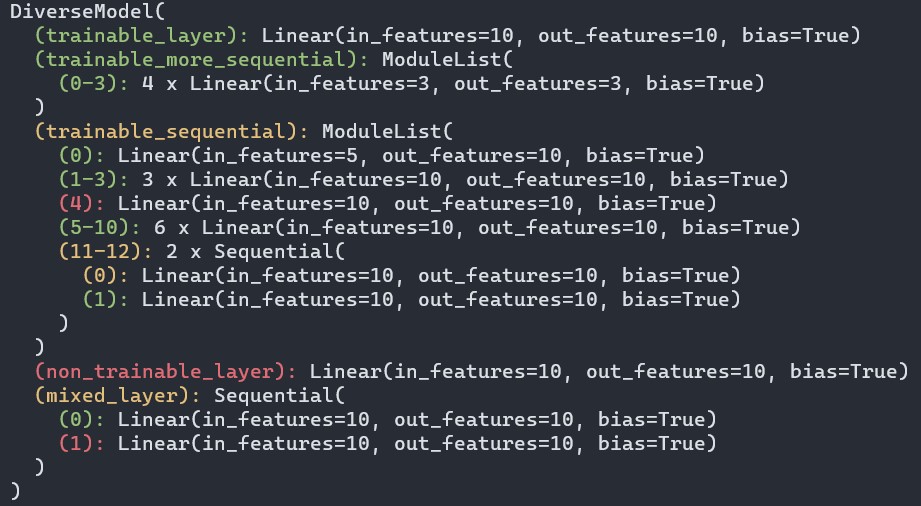
Consider the following model where multiple layers are set as non-trainable while other are trainable. This situation often arise when developing deep learning models and it can be tedious to understand which layer it as weights that are trainable or not.
Fortunately, Torchcolor comes with an easy to use Strategy class that can be derived with a method get_style that takes as input a torch.nn.Module and some tree properties (is_leaf, etc.) to return a customize ModuleStyle object based on the module properties.
class DiverseModel(nn.Module):
    def __init__(self):
        super().__init__()
        self.trainable_layer = nn.Linear(10, 10)  # Trainable by default
        self.trainable_more_sequential = nn.ModuleList(
            [nn.Linear(3, 3) for _ in range(4)]
        )

        self.trainable_sequential = nn.ModuleList(
            [nn.Linear(5, 10)] + [nn.Linear(10, 10) for _ in range(10)] +
            [nn.Sequential(nn.Linear(10, 10), nn.Linear(10, 10)) for _ in range(2)]
        )
        for param in self.trainable_sequential[4].parameters():
            param.requires_grad = False
        self.trainable_sequential[11][0].weight.requires_grad = False
        self.trainable_sequential[12][0].weight.requires_grad = False

        self.non_trainable_layer = nn.Linear(10, 10)
        for param in self.non_trainable_layer.parameters():
            param.requires_grad = False

        self.mixed_layer = nn.Sequential(
            nn.Linear(10, 10),  # Trainable
            nn.Linear(10, 10)  # Make this non-trainable
        )
        for param in self.mixed_layer[1].parameters():
            param.requires_grad = False
This ModuleStyle consists of 3 different TextStyle (or FunctionalStyle) that will be applied to different part of the module representative string.
Usually, a pytorch module is logged with the following pattern: (module_name): LayerName(extra_information).
To this use, the ModuleStyle will set the styling information for all three of these parts.
It is then possible to create a Strategy that can highlight trainable and non-trainable modules.
@ColorStrategy.register("trainable")
class TrainableStrategy(ColorStrategy):
    """Styling strategy that handles trainable, non-trainable and mixed trainable layers/modules"""
    def get_style(self, module, config):
        params = list(module.parameters(recurse=True))
        if not params:
            return ModuleStyle()
        elif all(not p.requires_grad for p in params):
            return ModuleStyle(name_style=TextStyle("red"))
        elif all(p.requires_grad for p in params):
            return ModuleStyle(name_style=TextStyle("green"))
        return ModuleStyle(name_style=TextStyle("yellow") if not config.is_root else None)
Then, one can easily call the strategy using a Printer and logged the model.
model = DiverseModel()
printer = Printer(strategy="trainable")
printer.print(model)
Using FunctionalStyle it is possible to easily render something like
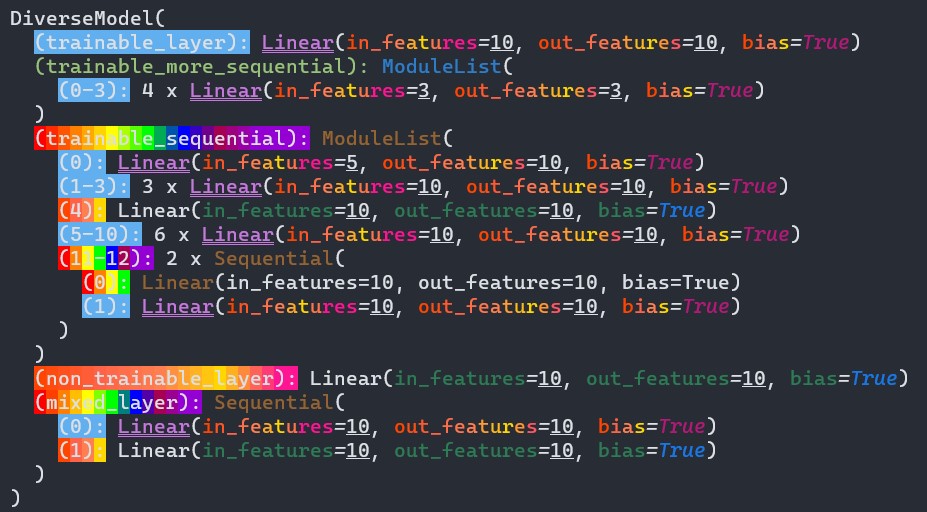
Click to see the Strategy for this picture
class CustomStrategy(ColorStrategy):
    def get_style(self, module, config):
        params = list(module.parameters(recurse=True))
        if not params:
            return ModuleStyle()
        elif all(not p.requires_grad for p in params):
            if config.is_leaf:
                return ModuleStyle(name_style=TextStyle(bg_style=Gradient("warm_sunset")), extra_style=FunctionalStyle(splitter=LAYER_SPLITTER, styles={
                    KeyType: TextStyle((45, 124, 85)),
                    AnyType: TextStyle(underline=True),
                    DelimiterType: TextStyle(italic=True),
                    bool: TextStyle((25, 120, 230), italic=True)
                }))
            else:
                return ModuleStyle(name_style=TextStyle("red"))
        elif all(p.requires_grad for p in params):
            if config.is_leaf:
                return ModuleStyle(
                    name_style=TextStyle(bg_style=Color("blue")),
                    layer_style=TextStyle("bright magenta", double_underline=True),
                    extra_style=FunctionalStyle(splitter=LAYER_SPLITTER, styles={
                        KeyType: TextStyle(Gradient("warm_sunset")),
                        AnyType: TextStyle(underline=True),
                        DelimiterType: TextStyle(italic=True),
                        bool: TextStyle((180, 25, 120), italic=True)
                    })
                )
            else:
                return ModuleStyle(
                    name_style=TextStyle("green"),
                    layer_style=TextStyle((45, 125, 201)),
                )
        return ModuleStyle(name_style=TextStyle(bg_style=Gradient("rainbow")), layer_style=TextStyle((150, 100, 50)) if not config.is_root else None)
1 maintainer

Metadata
1 maintainer
Release files for torchcolor 0.1.0
For a detailed explanation of source distributions (sdists) and built distributions (wheels), please see the package formats documentation.
Source distribution (sdist)
| File | Size | Uploaded | |
|---|---|---|---|
| torchcolor-0.1.0.tar.gz | 18.3 kB | Details |
Built distribution (wheel)
| File | Interpreter | ABI | Platform | Reset |
|---|---|---|---|---|
| torchcolor-0.1.0-py3-none-any.whl | Python 3 | none | any | Details |
Total release size: 33.6 kB
Release files / torchcolor-0.1.0.tar.gz
| Download URL | torchcolor-0.1.0.tar.gz |
|---|---|
| Size | 18.3 kB |
| Tags | Source |
|
SHA-256 checksum How to use checksums |
7497953f00fca866cbb1e4a5513abef91845188ed37d4cca26ff335937f4d827
|
|
BLAKE2b-256 checksum How to use checksums |
e5dd8432357fb4f37fbeff427ad6705342ee0761b1444d5a4e6222af3618fdc6
|
| Upload date | |
|
Uploaded using Trusted Publishing? What is trusted publishing? |
No |
| Uploaded via |
twine/6.0.1 CPython/3.9.7
|
Release files / torchcolor-0.1.0-py3-none-any.whl
| Download URL | torchcolor-0.1.0-py3-none-any.whl |
|---|---|
| Size | 15.3 kB |
| Tags | Python 3 |
|
SHA-256 checksum How to use checksums |
72c343812d9c31e64f61c1a0e881082708324235262b5581be5811fcc820a46c
|
|
BLAKE2b-256 checksum How to use checksums |
e24dc8f2a56d0a4201d9aa58472af2558f2e27a0e3178e9afac6771dc657d9bd
|
| Upload date | |
|
Uploaded using Trusted Publishing? What is trusted publishing? |
No |
| Uploaded via |
twine/6.0.1 CPython/3.9.7
|














