
TorNet - Cross-platform IP rotation using Tor with logging and automation

Project description











Automate public-IP rotation through the Tor network on Windows, macOS and Linux.
- 🛡️ Hide your real IP behind Tor exit nodes
- 🧅 Connect to
.onionaddresses on non-Tor browsers (e.g., Firefox) - 🔄 Rotate on a timer or on demand
- ⚙️ Self-installs missing prerequisites (
pip,requests[socks],Tor) - 📜 Clear, color-coded logs (all levels shown by default)
- 🐍 Tiny Python API for scripting
Installation
pip install tornet-mp
Tor binary required - if tor is not on your PATH, run
tornet-mp --auto-fix and the tool will install it where possible.
Development / editable install
git clone https://github.com/ErnestoLeiva/tornet-mp.git
cd tornet-mp

# optional but recommended: create and activate a virtual-env
python -m venv .venv           # use  py -m venv .venv  on Windows
# macOS/Linux:  source .venv/bin/activate
# Windows CMD:  .venv\Scripts\activate.bat
# Win PowerShell: .venv\Scripts\Activate.ps1

# install in editable (“-e”) mode
python -m pip install -e .
Quick start
# show current (Tor/non-Tor) exit IP and exit
tornet-mp --ip

# rotate every 60 seconds, 10 times (default)
tornet-mp

# rotate every 90 seconds, 5 times
tornet-mp --interval 90 --count 5

# rotate on a random interval between 60-120 seconds, forever
tornet-mp --interval "60-120" --count 0
Example output
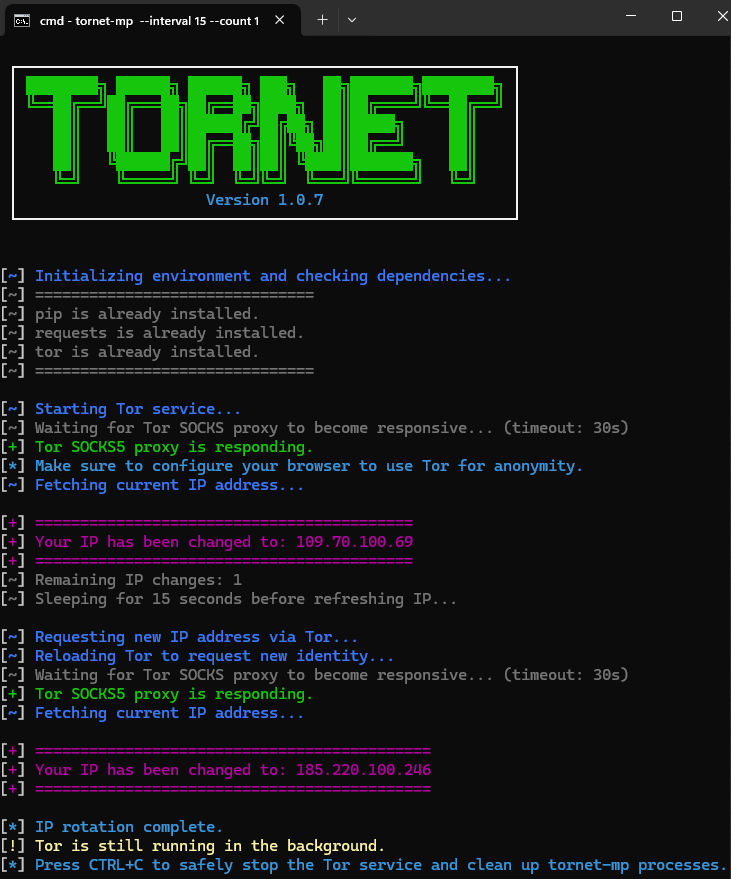
tornet-mp --interval 15 --count 1
CLI options
| Flag | Description | Default |
|---|---|---|
--interval SECONDS |
Delay (or range e.g. 60-120) between rotations |
60 |
--count N |
Rotation cycles; 0 = infinite |
10 |
--ip |
Show current exit IP and quit | — |
--auto-fix |
Re-install/upgrade dependencies and Tor | — |
--stop |
Stop Tor services and TorNet-MP processes | — |
-V / --version |
Print version | — |
Environment variables
| Variable | Purpose | Default |
|---|---|---|
TOR_SOCKS_HOST |
Hostname of Tor SOCKS proxy | 127.0.0.1 |
TOR_SOCKS_PORT |
Port of Tor SOCKS proxy | 9050 |
Configuring Your Browser to Use TorNet
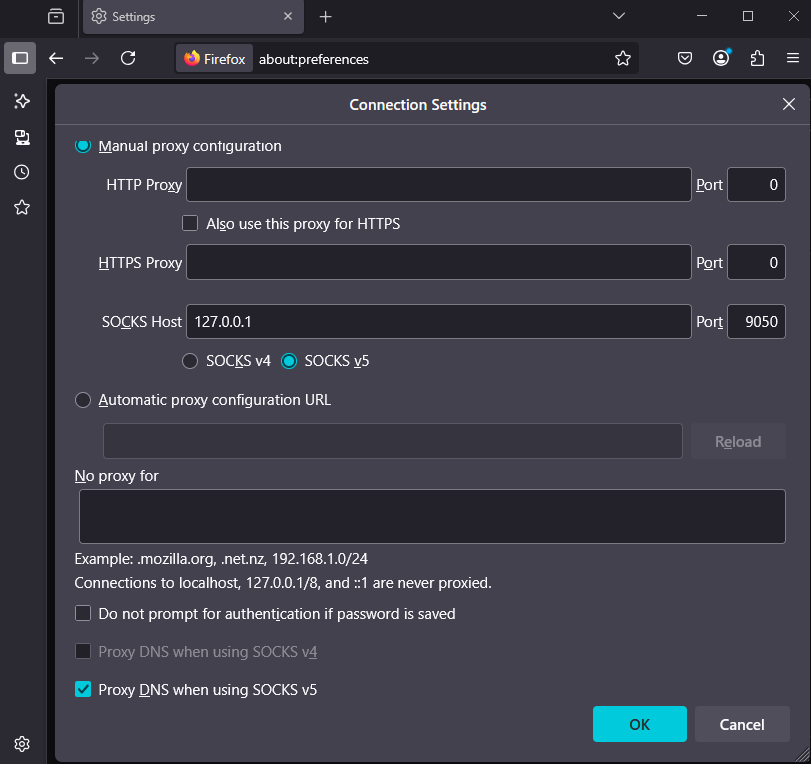
To ensure your browser uses the Tor network for anonymity, you need to configure it to use TorNet's proxy settings
⚠️ Chrome and Chromium-based browsers do not support SOCKS proxies natively without command-line flags or extensions. Use FoxyProxy or similar tools for full control
Firefox
- Go to
Preferences>General>Network Settings - Select
Manual proxy configuration - Enter
127.0.0.1forSOCKS Hostand9050for thePort(or your specified values if different) - Ensure the checkbox
Proxy DNS when using SOCKS v5is checked - Click
OK
Verifying Tor IP Validity
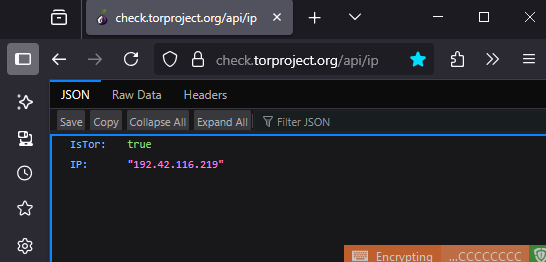
You can manually confirm your browser is routing traffic through the Tor network:
- Open your browser (configured to use the Tor proxy)
- Visit https://check.torproject.org/api/ip
- If the JSON output includes
"IsTor" : true, your browser is using a valid Tor exit node
⚠️ Note: Occasionally, you may see mismatched IPs due to stale circuits; This API always shows the most current and accurate exit node IP
Bonus: Access .onion Sites from Firefox
Once your browser is configured to use TorNet’s proxy, you can access .onion websites directly from Firefox.
Below is a screenshot of DuckDuckGo's onion site loaded in a regular Firefox browser using TorNet as the SOCKS5 proxy:
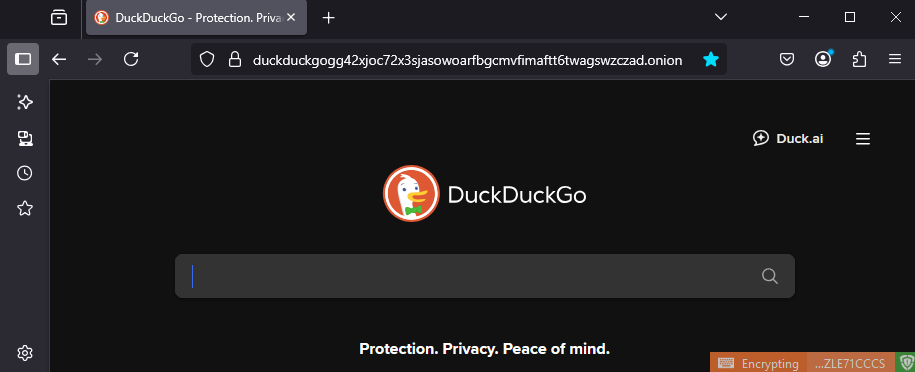
https://duckduckgogg42xjoc72x3sjasowoarfbgcmvfimaftt6twagswzczad.onion
Python use
from tornet_mp import initialize_environment, ma_ip, change_ip

initialize_environment()
print("Current IP:", ma_ip())
print("Switching…")
print("New Tor IP:", change_ip())
If Tor is already installed and running you can skip initialize_environment() and call ma_ip() / change_ip() directly.
How it works
-
Ensures Tor, requests[socks] and PySocks are present
-
Starts the Tor background service (systemd, Brew, or raw binary)
-
Retrieves current exit IP via https://check.torproject.org/api/ip
-
Sends SIGHUP / service reload to request a new circuit on schedule
-
Logs every step with colored categories (INFO, WARN, ERROR, etc.)
Contributing
Bug reports and PRs are welcome! Style is enforced with pre-commit. After cloning, run:
pip install pre-commit
pre-commit install
Lineage & Credits
This project began life as tornet by Mr Fidal.
It was later reimagined and extended independently by Ayad Seghairi.
TorNet-MP builds on both prior versions, refactoring the codebase, adding cross-platform support (Windows, macOS, Linux), modern packaging, richer logging, automatic dependency management, and a polished CLI/UI.
License
MIT © 2026 Ernesto Leiva
Release history Release notifications | RSS feed


Download files
Download the file for your platform. If you're not sure which to choose, learn more about installing packages.
Source Distribution
Built Distribution
Filter files by name, interpreter, ABI, and platform.
If you're not sure about the file name format, learn more about wheel file names.
Copy a direct link to the current filters
File details
Details for the file tornet_mp-1.0.11.tar.gz.
File metadata
- Download URL: tornet_mp-1.0.11.tar.gz
- Upload date:
- Size: 16.1 kB
- Tags: Source
- Uploaded using Trusted Publishing? No
- Uploaded via: twine/6.2.0 CPython/3.13.11
File hashes
| Algorithm | Hash digest | |
|---|---|---|
| SHA256 |
f3e2375ef5f534cc7c957d9e7e36fb0251e0c05b180904ba050149832a8af988
|
|
| MD5 |
b4df9e5400b9c04faf5fef98b735d4cc
|
|
| BLAKE2b-256 |
81c8a3c4a1eccbbf45855558d3615eb89ec06fbb7d73f87e991aade31d2a5002
|
File details
Details for the file tornet_mp-1.0.11-py3-none-any.whl.
File metadata
- Download URL: tornet_mp-1.0.11-py3-none-any.whl
- Upload date:
- Size: 15.0 kB
- Tags: Python 3
- Uploaded using Trusted Publishing? No
- Uploaded via: twine/6.2.0 CPython/3.13.11
File hashes
| Algorithm | Hash digest | |
|---|---|---|
| SHA256 |
5924fde44a6aa274bdf3c0b22f1927c8e074ff0587b770bc2ff8651e52235028
|
|
| MD5 |
e296e1a920a00d1fb6c89f4c1b71997e
|
|
| BLAKE2b-256 |
df75624ada8579c2485ce4f5ede1f17ae7e6fb7e3d65259b4391d4bbb5248683
|






