
Advanced Tor Network Controller for IP Rotation and Anonymity

Project description
TorNet v2.0.2


Automate IP address changes using Tor network with advanced features
TorNet is a Python package that automates IP address changes using Tor. It is a top tool for securing your networks by frequently changing your IP address, making it difficult for trackers to pinpoint your location.
Benefits
- Enhanced Privacy: By regularly changing your IP address, TorNet makes it much harder for websites and trackers to monitor your online activity.
- Increased Security: Frequent IP changes can help protect you from targeted attacks and make it more difficult for malicious actors to track your online presence.
- Anonymity: Using Tor, TorNet helps you maintain a high level of anonymity while browsing the internet.
- Ease of Use: TorNet is designed to be simple and easy to use, whether you prefer command-line tools or integrating it directly into your Python scripts.
- Protection from Tracking: With your IP address changing frequently, tracking services and advertisers will find it more challenging to build a profile on you.
- Peace of Mind: Knowing that your IP address is regularly changed can give you confidence in your online privacy and security.
Table of Contents
Features
- Automatic IP Rotation - Change your IP address at regular intervals
- Country Selection - Choose exit nodes from specific countries
- Kill Switch - Block all non-Tor traffic for maximum privacy
- DNS Leak Test - Verify your anonymity setup
- Auto-Fix - Automatic dependency installation
- Status Monitoring - Real-time system status display
- Logging - Detailed log file with follow capability
- Configurable - Custom configuration via YAML/JSON files
- Scheduling - Flexible scheduling options (seconds, minutes, hours, days)
Installation
pip install tornet==2.0.1
Quick Start
Basic Usage
# Display current IP address
tornet --ip

# Change IP once
tornet --change

# Change IP every 60 seconds, 10 times
tornet --interval 60 --count 10

# Change IP indefinitely every 30-120 seconds (random interval)
tornet --interval 30-120 --count 0

tornet --status
Start with Country Selection
# Use US exit nodes, change IP every minute
tornet --country us --interval 60

# Use German exit nodes
tornet --country de --interval 120

# Use random countries (default)
tornet --country auto --interval 60
Commands
Basic Commands
| Command | Description | Example |
|---|---|---|
--ip |
Display current IP address | tornet --ip |
--change |
Change IP once and exit | tornet --change |
--interval |
Time between changes (seconds or range) | tornet --interval 30 |
--count |
Number of IP changes (0 = infinite) | tornet --count 20 |
--stop |
Stop all Tor services | tornet --stop |
--version |
Show version | tornet --version |
Advanced Commands
| Command | Description | Example |
|---|---|---|
--status |
Show system status | tornet --status |
--country |
Specify exit country | tornet --country jp |
--schedule |
Schedule IP changes | tornet --schedule 5m |
--dns-leak-test |
Test for DNS leaks | tornet --dns-leak-test |
--kill-switch |
Toggle kill switch | tornet --kill-switch |
--log --follow |
View/follow logs | tornet --log --follow |
--json |
JSON output format | tornet --ip --json |
--config |
Use custom config | tornet --config myconfig.yml |
--auto-fix |
Auto-install dependencies | tornet --auto-fix |
--list-countries |
List country codes | tornet --list-countries |
--restore-default |
Restore default config | tornet --restore-default |
Schedule Formats
30s- Every 30 seconds5m- Every 5 minutes2h- Every 2 hours1d- Every 1 day
Interval Formats
60- Exactly 60 seconds30-120- Random between 30 and 120 seconds
Country Selection
List Available Countries
tornet --list-countries
Available Country Codes
US - United States        DE - Germany          JP - Japan
GB - United Kingdom       FR - France           CA - Canada
AU - Australia            NL - Netherlands      SE - Sweden
CH - Switzerland          NO - Norway           DK - Denmark
FI - Finland              RU - Russia           CN - China
IN - India                BR - Brazil           MX - Mexico
ZA - South Africa         SG - Singapore        HK - Hong Kong
TW - Taiwan               IT - Italy            ES - Spain
Using Country Selection
# Use specific country
tornet --country us --interval 60

# Use random countries (default)
tornet --country auto --interval 60

# Restore to default configuration
tornet --restore-default
Configuration
Configuration File
TorNet uses ~/.tornet/config.yml by default. Create a custom configuration:
# ~/.tornet/custom.yml
default:
  interval: 60
  count: 0
  country: auto
  schedule: null

network:
  proxy_port: 9050
  dns_port: 53
  control_port: 9051

security:
  kill_switch: false
  dns_protection: true
  log_level: info

advanced:
  max_retries: 3
  timeout: 30
  verify_ssl: true
Using Custom Config
tornet --config ~/.tornet/custom.yml --interval 120
Advanced Usage
Kill Switch
# Enable kill switch (requires root)
sudo tornet --kill-switch

# Disable kill switch
sudo tornet --kill-switch
DNS Leak Testing
tornet --dns-leak-test
Log Management
tornet --log
tornet --log --follow
JSON Output
tornet --ip --json
tornet --change --json
Complete Example
tornet --country us --interval 120-300 --count 50
tornet --country de --schedule 1h
tornet --config custom.yml --json --interval 30 --count 100
Troubleshooting
Common Issues
- Permission Denied Errors
sudo tornet --kill-switch
- Tor Not Starting
which tor
sudo systemctl start tor
# or
sudo service tor start
- Dependency Issues
tornet --auto-fix
python3 -c "import requests"
tor --version
- Connection Issues
curl -s https://api.ipify.org
curl --socks5 127.0.0.1:9050 https://api.ipify.org
Log Files
- TorNet Logs:
~/.tornet/tornet.log - Tor Configuration:
~/.tornet/torrc.custom - Country Settings:
~/.tornet/current_country
Status Information
tornet --status
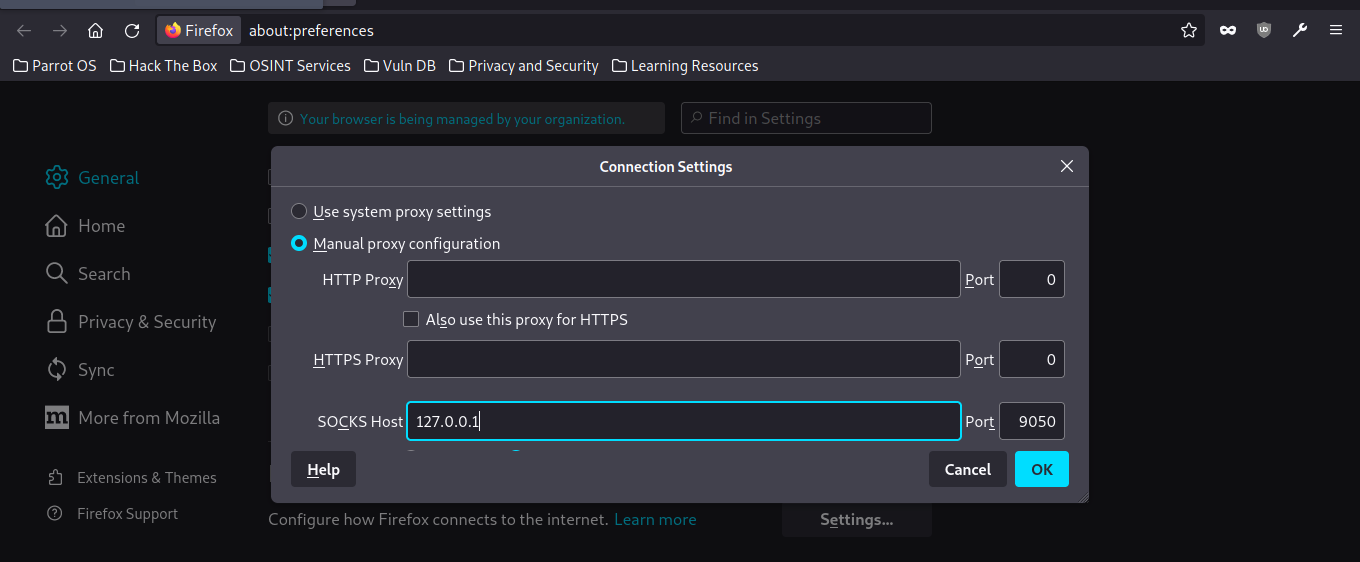
Configuring Your Browser to Use TorNet
Firefox:
- Go to
Preferences>General>Network Settings. - Select
Manual proxy configuration. - Enter
127.0.0.1forSOCKS Hostand9050for thePort. - Check
Proxy DNS when using SOCKS v5. - Click
OK.
Disclaimer
TorNet is intended for educational and privacy purposes only.
Important Notes:
- Legal compliance
- Terms of service
- Responsible use
- No warranty
- Privacy
- Security
Ethical Guidelines:
- Use for privacy protection and security testing
- Respect network resources
- Avoid excessive requests
- Obtain proper authorization before testing
Limitations:
- Tor exit nodes may be blocked
- Slower connection speed
- Some features require root
- Not all countries have reliable Tor exit nodes
Contributing
Contributions are welcome! Submit a Pull Request.
License
MIT License - see LICENSE file.
Author
- GitHub: @ByteBreach
Thanks to all contributors:
 Mr-Fidal |
 GH05T-HUNTER5 |
Support
- Give a star ⭐
- Report issues
- Suggest features
- Share with others
Acknowledgements
Thanks to the Tor project developers.
Release history Release notifications | RSS feed


Download files
Download the file for your platform. If you're not sure which to choose, learn more about installing packages.
Source Distribution
Built Distribution
Filter files by name, interpreter, ABI, and platform.
If you're not sure about the file name format, learn more about wheel file names.
Copy a direct link to the current filters
File details
Details for the file tornet-2.0.2.tar.gz.
File metadata
- Download URL: tornet-2.0.2.tar.gz
- Upload date:
- Size: 18.4 kB
- Tags: Source
- Uploaded using Trusted Publishing? No
- Uploaded via: twine/6.2.0 CPython/3.13.9
File hashes
| Algorithm | Hash digest | |
|---|---|---|
| SHA256 |
3c7f49d7e8fc879f6aab5dfb05895f3a05453d06c7602b7ae37626ff7bec1be7
|
|
| MD5 |
04adfcd5eea0980cfec44ccd143ea5f4
|
|
| BLAKE2b-256 |
cd6804917763683fb13e92292a52797fce797f9656c6809dd3e009f85d2c52e6
|
File details
Details for the file tornet-2.0.2-py3-none-any.whl.
File metadata
- Download URL: tornet-2.0.2-py3-none-any.whl
- Upload date:
- Size: 15.5 kB
- Tags: Python 3
- Uploaded using Trusted Publishing? No
- Uploaded via: twine/6.2.0 CPython/3.13.9
File hashes
| Algorithm | Hash digest | |
|---|---|---|
| SHA256 |
33402ea26cd2a2bdfbf4a9cc14c3184916d33437599e46aa249f1bc4312e6a19
|
|
| MD5 |
b98bf95883db67d22acf541951dcc8a6
|
|
| BLAKE2b-256 |
031989242710e5b2968f083fea78b51424a43e888bc600be3614bb0f641c564c
|






