
Torus
Stock research memory for Claude Code, Claude Desktop and Codex. Torus gives Claude a memory for your equity research. Before it answers, Claude sees what you already know about a company: your theses, the sourced facts behind them, its suppliers, customers and competitors, and the ideas you ruled out. New research builds on the old, and every new fact is saved with its source. When a new SEC filing or news story threatens a thesis, Torus warns you.
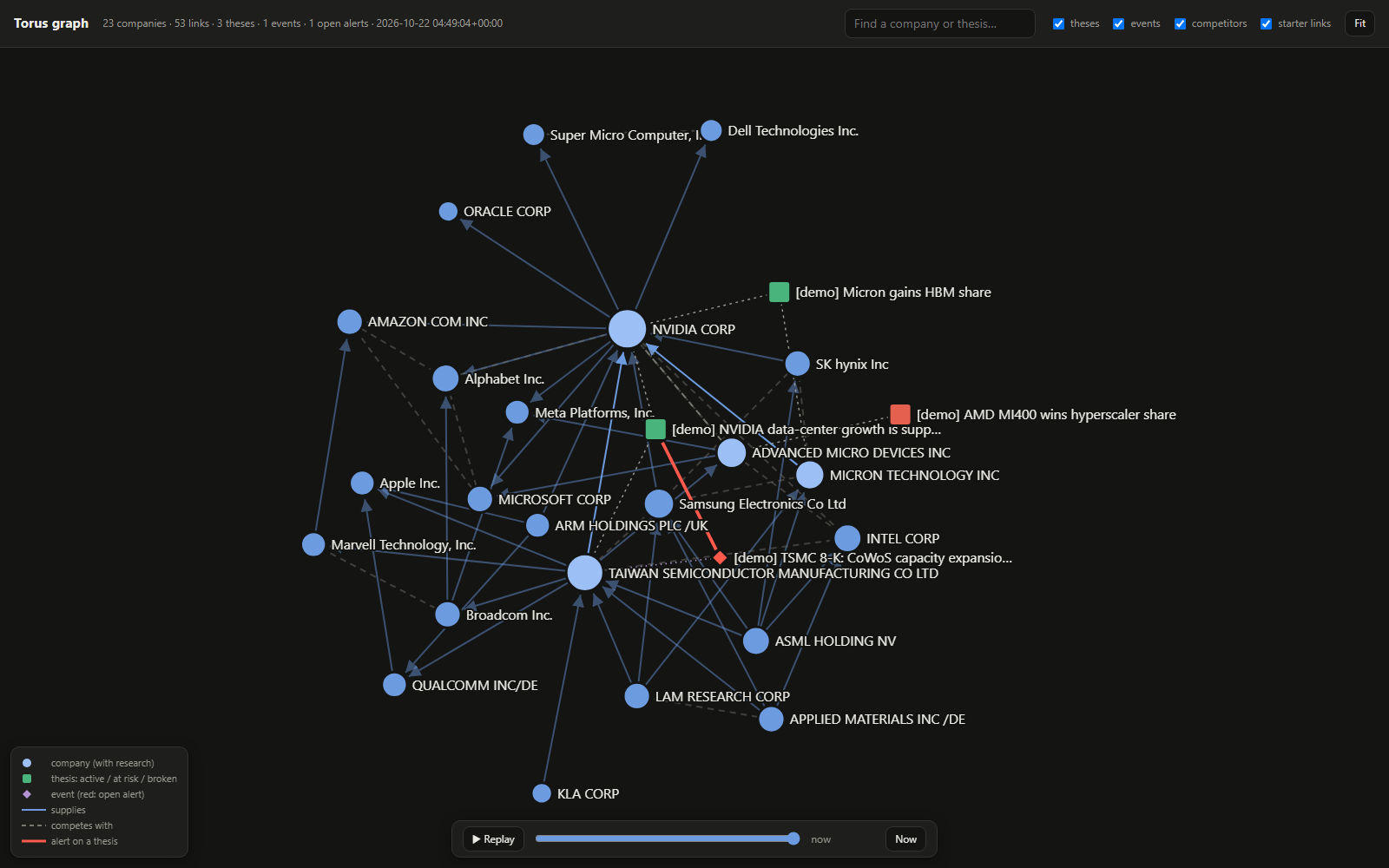
Ask Claude "Is NVIDIA still supply-bound?" and it starts from what you already concluded, not from scratch. Torus keeps:
- the companies you cover and how they connect: suppliers, customers, competitors
- claims about them, each tied to its source (a 10-K, an earnings call, an article)
- your investment theses: bullish or bearish, the claims they rest on, and what would break them
- ideas you ruled out, so you don't research them again
When a 10-K, 10-Q, 8-K or news item lands, Torus works out which of your theses it touches, through which supplier or customer link, and how much it matters. It also keeps the research honest (what's gone stale, what rests on one source, what a skeptic would say) and tracks how your calls did against the market.
Built for analysts, portfolio managers and serious individual investors.
- Your model, your subscription. Torus never calls an LLM itself. Claude does the reasoning, and cheaper Haiku subagents do the bookkeeping.
- Local-first. Your research stays in one SQLite file under
~/.torus(override withTORUS_HOME). - Time-aware. Every fact records when it was true and when you believed it, so you can ask what you thought on any past date. Nothing is deleted: corrections are new versions.
Torus is a research memory, not financial advice. See CHANGELOG.md for what's in each release.
Pick your app
Torus works in three apps. All of them share one graph on your machine, so you can research in one and pick up in another.
| Claude Desktop | Codex (desktop app and CLI) | Claude Code | |
|---|---|---|---|
| Prior research recalled before Claude answers | Yes (brief, prompted by the server's instructions) |
Yes (brief, prompted by the server's instructions) |
Yes, automatically on every prompt (hook) |
| Sources and claims recorded while researching | Yes (live capture) | Yes (live capture) | Yes (balanced capture, curator fills gaps) |
| "Torus recorded ..." receipt after each turn | Yes | Yes | Yes |
| Workflows: onboard, review alerts, challenge, memo... | Prompts in the "+" menu | Torus skills | /torus: commands |
| Filing and news alerts, audit, scorecard, memos, explorer | Yes | Yes | Yes |
| Background Haiku subagents (mapper, curator, challenger) | No: the same steps run in the chat | No: the same steps run in the chat | Yes |
Claude Desktop
pip install torus-kg
torus setup
The package is called torus-kg on PyPI; the command it installs is torus. torus setup asks
for the email the SEC requires, downloads the SEC ticker list, adds Torus to Claude Desktop's
settings (it keeps a .bak copy and leaves your other servers alone), and schedules the filing
watchers. Restart Claude Desktop, then try the Onboard companies prompt from the "+" menu
with a few tickers.
Codex
The same two commands. torus setup adds [mcp_servers.torus] to ~/.codex/config.toml (or
$CODEX_HOME) and installs the Torus skills (torus-research, torus-onboard, torus-review
and so on) under ~/.codex/skills. If you already wrote a [mcp_servers.torus] entry yourself,
setup leaves it as it is. Restart Codex, then ask it to onboard your tickers.
Claude Code
See Getting started below. torus setup also prints the two
/plugin commands.
torus setup configures the apps it finds; pass --claude-desktop or --codex to configure one
anyway, or --no-codex / --no-claude-desktop to skip one. torus doctor checks each app's
entry and that the server starts, and torus doctor --fix repairs what it can.
Just looking? torus demo builds a small sample graph (NVIDIA, TSMC, Micron and AMD theses,
an alert from a TSMC filing, the semis starter pack) in its own folder, TORUS_HOME/demo, and
opens it in the explorer. Your own graph is untouched, and every piece of sample research is
marked [demo].
How it works
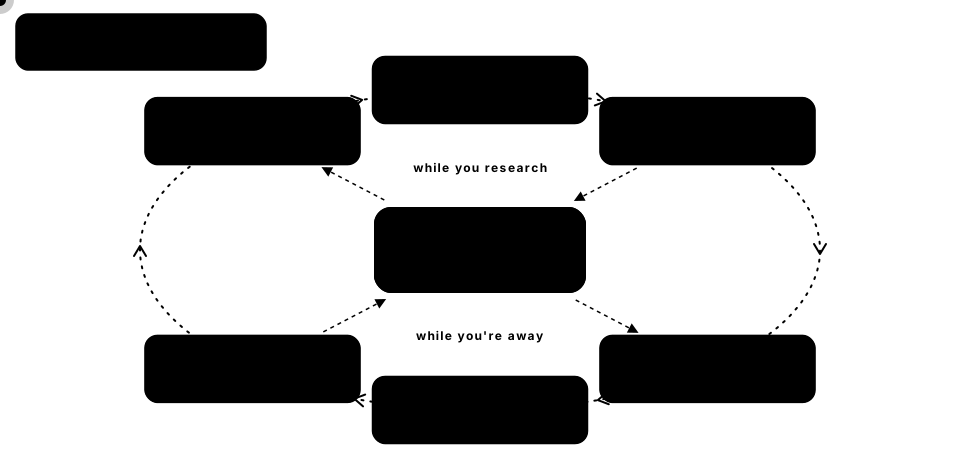
Why this helps. Research done in chat is usually thrown away: the next session starts from scratch, and nothing connects new information to what you already concluded. Torus keeps the working parts of the research, not just the final report:
| Without Torus | With Torus |
|---|---|
| Every session re-reads the same filings and rediscovers the same facts | Each session starts from earlier theses, claims and ruled-out ideas |
| A new tool starts empty, so it's useless for weeks | /torus:onboard maps your companies' suppliers, customers and competitors from their 10-Ks in minutes |
| A report says "TSMC capacity is the constraint", but not where that came from | Every claim links to its source, with a verbatim quote, a confidence and the date it was true |
| A TSMC filing arrives and nobody notices that it undermines your NVIDIA view | Impact analysis follows supplier and customer links and raises an alert on that thesis |
| Every routine filing pings you, so you stop looking | Alerts weigh what kind of event it is and whether it matches what you said would break the thesis |
| The changes in a 150-page 10-K are buried | Torus lists the new, dropped and reworded risk-factor sentences since the last filing |
| Old conclusions get overwritten, and wrong ones linger | Every change is versioned; the audit flags what's stale or thinly sourced; undo keeps history |
| Dead ends get explored again | Ruled-out ideas are recalled alongside the theses |
| Nobody checks whether high-conviction calls were actually right | The scorecard tracks each thesis against its stock and measures your calibration |
Getting started (about 5 minutes)
You need Python 3.11+ and Claude Code.
1. Install the torus command. The plugin's hooks and MCP server run it, so this step is
required:
pip install torus-kg
2. Set it up:
torus init --refresh-reference --contact you@example.com   # SEC ticker list (the SEC asks for an email)
torus config set sec_contact you@example.com               # used when reading and watching filings
torus doctor                                               # check that everything is in order
3. Add the plugin in Claude Code:
/plugin marketplace add sekhar14/torus
/plugin install torus@torus
You'll be asked for a capture mode:
| Mode | What Claude records while researching | The curator (Haiku) records later |
|---|---|---|
balanced (default) |
theses, key claims with sources, ideas ruled out | supporting claims, extra sources, links |
live |
everything | anything missed |
curator |
theses and ideas ruled out | everything else |
4. Tell Torus what you cover (recommended). In Claude Code:
/torus:onboard NVDA AMD TSM AVGO
or from a portfolio or watchlist export: torus onboard --file portfolio.csv (any CSV with a
ticker or symbol column), then /torus:onboard to finish the mapping. Torus adds the
companies, watches their SEC filings, suggests matching starter packs, and a Haiku subagent maps
each company's suppliers, customers, competitors and customer concentration from its latest
annual report, citing the filing.
5. Keep the watchers running:
torus schedule install # checks filings, news and prices every hour
This uses Task Scheduler on Windows, launchd on macOS and cron on Linux.
6. Research as usual, e.g. "Is NVIDIA still supply-bound? Check TSMC's CoWoS plans." The
next time you mention NVIDIA, Claude sees the earlier thesis, claims and ruled-out ideas before it
starts. After each turn Torus tells you what it recorded ("Torus recorded 1 thesis, 3 claims
and 2 sources this turn"), and /torus:undo reverts anything you don't want.
What you can ask
You don't need to remember commands; ask in plain words and Claude uses the right Torus tools.
| You say | What happens |
|---|---|
| "Is NVIDIA still supply-bound?" | Claude starts from your earlier NVIDIA research, then records new claims, sources and the updated thesis |
| "What changed in TSMC's latest 20-F risk factors?" | Torus lists the new, dropped and reworded sentences against last year's filing |
| "Add this earnings call transcript to Torus" | The transcript becomes sourced claims linked to the theses it bears on |
| "Any news that affects my theses?" | Open alerts, each with the path that explains it, judged one thesis at a time |
| "What happens to my theses if TSMC's Arizona fab is delayed a year?" | Every thesis the event would reach, through which links, and the likely direction |
| "Poke holes in my Micron thesis" | A skeptic subagent researches the counter-case; you approve any risks it proposes |
| "Is my research still current?" | The audit: expired assumptions, theses past their horizon, single-source claims, conflicts |
| "How have my calls done?" | Returns against SPY in each thesis's direction, outcomes, and how calibrated your confidence is |
| "Write up my NVIDIA thesis to share" | A memo with every claim traced to its source |
| "Undo what you just recorded about AMD" | Those records are retracted or archived; history keeps them |
Commands in Claude Code
| Command | What it does |
|---|---|
/torus:onboard |
Start covering companies: watch them, seed starter packs, map their links from 10-Ks |
/torus:status |
Theses at risk, open alerts, recent changes, graph health |
/torus:review |
Judge open alerts: did the event support, weaken or break the thesis? |
/torus:ingest |
Read a filing, transcript, PDF or page into sourced claims; or what changed since the last filing |
/torus:whatif |
Which theses would a hypothetical event reach, and how? Records nothing |
/torus:challenge |
A devil's-advocate subagent stress-tests a thesis and proposes risks and triggers |
/torus:audit |
Find expired, thinly sourced or conflicting research and theses past their horizon |
/torus:scorecard |
How your theses did against a benchmark, and whether your confidence is calibrated |
/torus:memo |
Write a thesis up as a sourced memo (Markdown and HTML) |
/torus:undo |
See what recent sessions recorded and revert any of it |
/torus:distill |
Have the Haiku curator add past sessions' findings to the graph |
/torus:explore |
Open the visual graph explorer |
Behind them, the MCP server gives Claude 44 tools, from brief, recall and record_claim to
filing_diff, whatif and scorecard. Claude Desktop and Codex see 32 of them by default (the
analyst toolset): the queue and low-level graph tools are hidden. Set TORUS_TOOLSET=full in
the server's env to show them all.
Claude Desktop and Codex in detail
Neither app loads the Claude Code plugin, so the MCP server carries the workflow itself. When
TORUS_HARNESS is claude-desktop or codex (torus setup sets it):
- Instructions. The server tells the model to call
briefwith the user's question before researching a company, to record sources and claims as it goes (capture modelive, since no curator reads the chat later), and to end each turn with a "Torus recorded ..." receipt. The wording is model-neutral, since Codex runs OpenAI models. - Workflows. Each
/torus:command is also an MCP prompt (Claude Desktop's "+" menu) and a Codex skill, rendered from the same source insrc/torus/workflows/. Steps a Claude Code subagent would do (mapping companies from their 10-Ks, arguing the counter-case) run in the chat instead. - Save this chat. With no curator, the Save this chat to Torus prompt (or asking "save this chat to Torus") records whatever the chat found and didn't record yet.
- Undo. Records are tracked per chat, so "what did you record?" and "undo that" work as in
Claude Code (
recent_records,undo_records).
Claude in a web browser, ChatGPT and Copilot can't use Torus: they only reach MCP servers at a public address, and Torus runs on your machine.
Configuring by hand. torus setup writes these for you. In Claude Desktop (Settings >
Developer > Edit Config; %APPDATA%\Claude\claude_desktop_config.json on Windows,
~/Library/Application Support/Claude/claude_desktop_config.json on macOS):
{
  "mcpServers": {
    "torus": {
      "command": "/full/path/to/torus",
      "args": ["serve"],
      "env": { "TORUS_HARNESS": "claude-desktop" }
    }
  }
}
In Codex (~/.codex/config.toml):
[mcp_servers.torus]
command = "/full/path/to/torus"
args = ["serve"]

[mcp_servers.torus.env]
TORUS_HARNESS = "codex"
Use the full path (where torus on Windows, which torus on macOS and Linux): desktop apps don't
see your shell's PATH. If you set TORUS_HOME, add it under env so every app shares one
graph. Other env settings: TORUS_CAPTURE_MODE (live, balanced, curator) and
TORUS_TOOLSET (analyst, full). Other MCP clients (Cursor, VS Code and so on) may work
with the same entry, but they aren't tested.
Reading SEC filings
Torus reads filings from EDGAR for Claude, so research cites primary sources instead of summaries of them:
- By section. A 10-K, 10-Q or 20-F is split into its items, so Claude can read just
business,risk_factors,mdna,legal,market_riskorfinancials(or an item number), page by page. Any earlier filing of the same form is available too. - What changed. Torus compares a section with the same section of the previous filing and returns the new, dropped and reworded sentences, most rewritten first.
- Cited. Claims from a filing carry the filing's URL as evidence (kind
filing) and a verbatim quote, and count as primary sources in the audit and the challenge.
Filings are downloaded once and cached as text in TORUS_HOME/sources/edgar. Reading them needs
sec_contact set: the SEC asks every client for a contact email.
The visual explorer
torus explore                 # the whole graph
torus explore NVDA --hops 2   # NVIDIA and everything within two links
torus explore --no-open       # write the file without opening a browser
This writes a single self-contained HTML file (default ~/.torus/explorer.html) and opens it in
your browser. It works offline and needs nothing installed, so you can share the file.
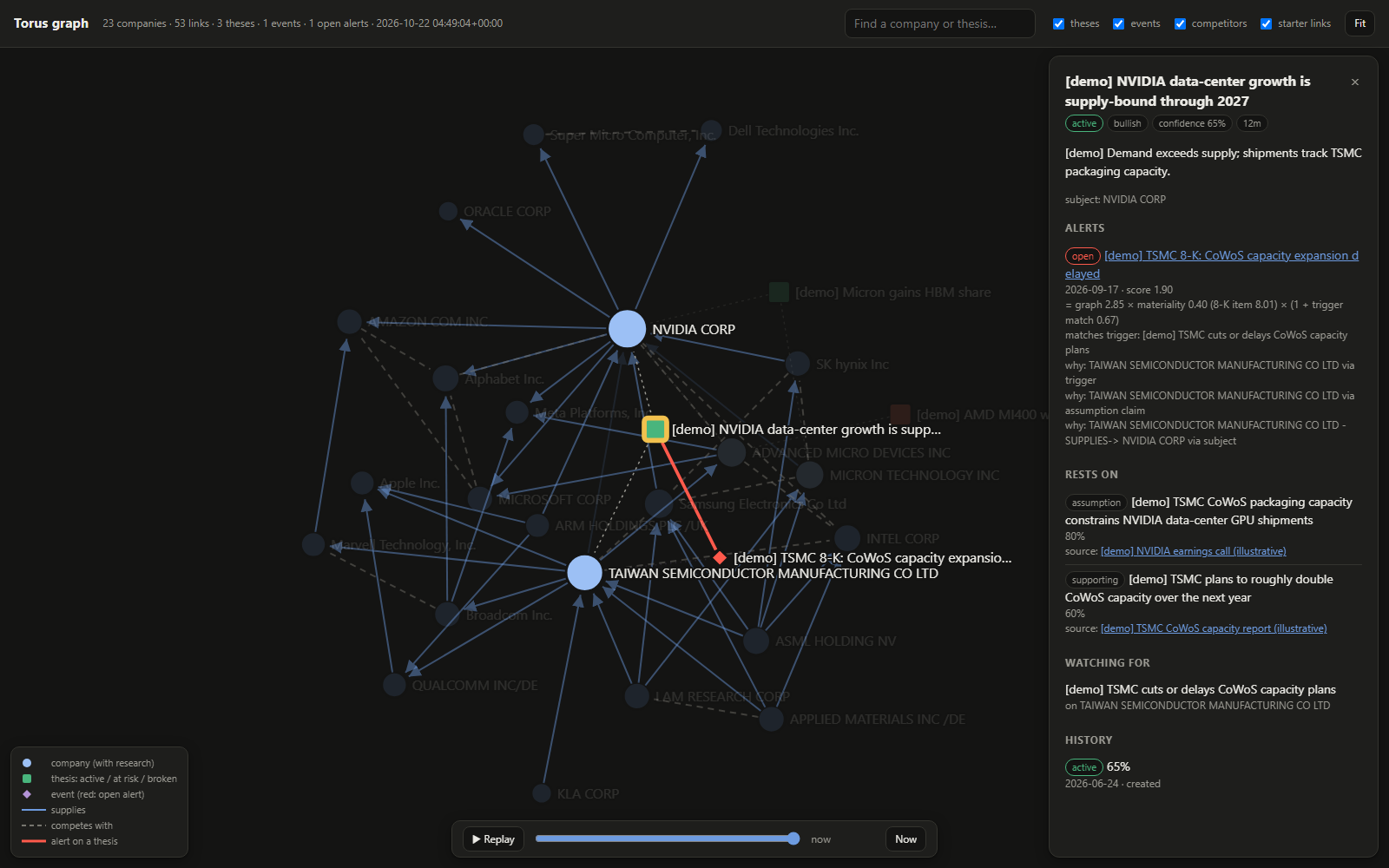
The screenshots use the semis starter pack plus illustrative [demo] research
(scripts/seed_demo.py). In the one above, the [demo] NVIDIA thesis is selected. A TSMC 8-K
raised an alert on it, and the panel shows why: the thesis has a trigger on TSMC, an assumption
claim that names TSMC, and TSMC supplies NVIDIA, the thesis's subject. It also shows how the
score was built: a strong graph connection, a low-materiality 8-K item (8.01, "other events"),
boosted because the filing's wording matches the thesis's trigger.
- Nodes: companies are blue circles; darker means you have research on them. Theses are squares coloured by status (green active, amber at risk, red broken). Events are diamonds, red when they have an open alert.
- Lines: solid arrows mean supplies, dashed lines mean competes with, and a thick red line is an alert from an event to a thesis. Faint lines come from a starter pack and haven't been confirmed by your research yet.
- Click any node for details. A company shows its links, theses, recent claims with sources, and ideas ruled out. A thesis shows what it rests on, its triggers, its history and its alerts, with the path that explains each one.
- Move around: drag nodes, scroll to zoom, drag the background to pan, and press Fit to reset. Double-click a node to release it.
- Search by name or ticker. Filters hide theses, events, competitor links or starter links.
- Go back in time: drag the slider at the bottom to see the graph as it stood on an earlier date (what Torus knew then, and each thesis's status at the time), or press Replay to watch the research grow. Links retired since then don't reappear.
- Link to a node or a date: add
#select=and a name or ticker to the file's address, e.g.explorer.html#select=NVDA, to open with that node selected, or#at=2026-09-20to open the graph as it stood that day. Combine them with&:#select=NVDA&at=2026-09-20.
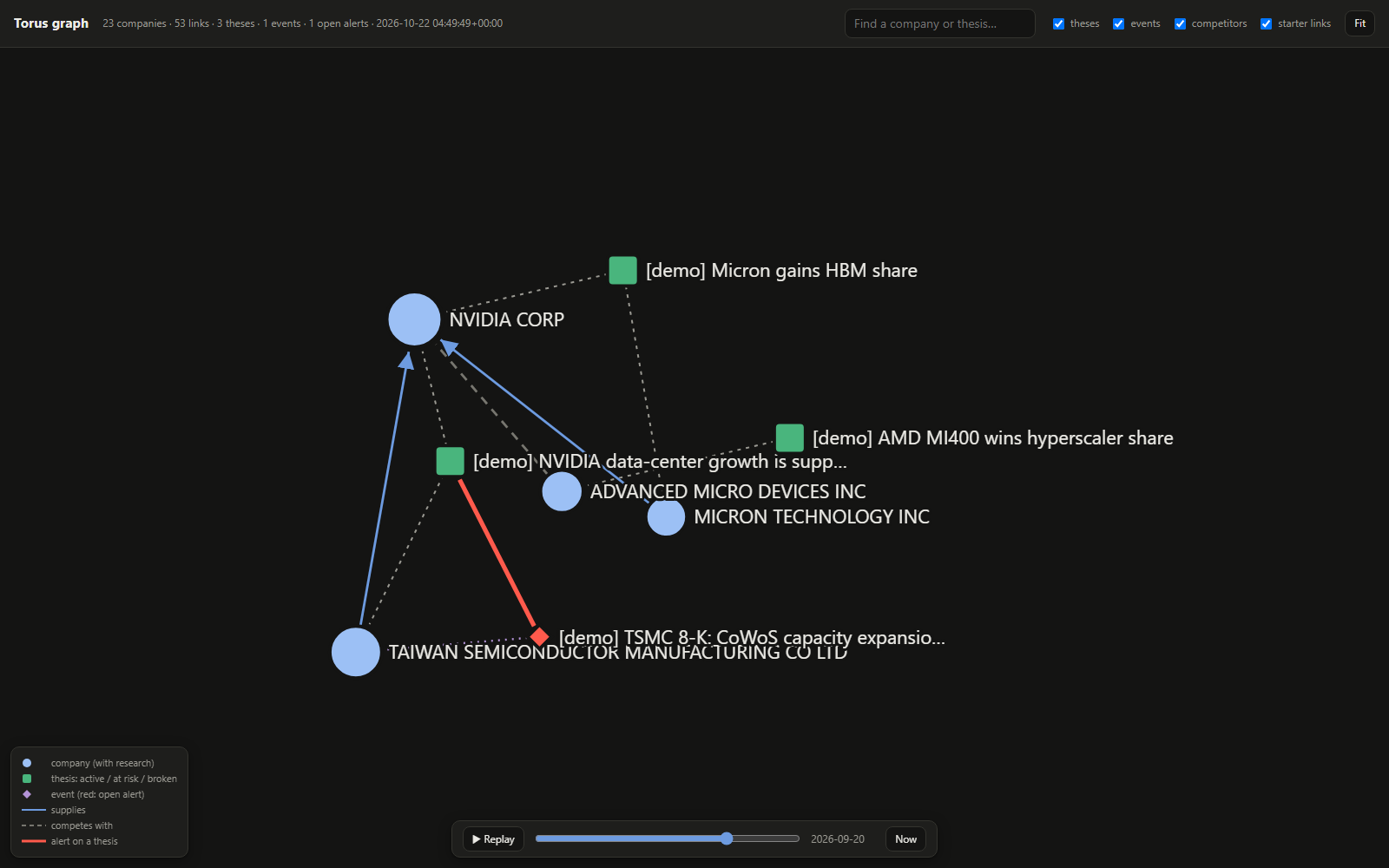
The same demo graph as it stood on 20 September: the starter pack wasn't added yet, the AMD thesis was still active (it broke in October), and the TSMC alert had just arrived.
The file is a snapshot. Run torus explore again after new research.
Starter packs and graph tools
Starter packs give impact analysis a web of widely reported links from day one. Each link is marked as a starter link until research confirms it, and never overrides a link your research recorded.
| Pack | Covers | Companies | Links |
|---|---|---|---|
semis |
Chip equipment, foundry and memory, chip designers, their big buyers | 23 | 52 |
software |
Hyperscale clouds and the software that runs on them; databases, apps, observability, security | 19 | 34 |
banks |
Large US banks, card networks and issuers, payments, bank technology | 18 | 25 |
energy |
Integrated majors, US producers, oilfield services, refiners, pipelines, LNG | 19 | 26 |
pharma |
Drugmakers and biotechs, lab suppliers, wholesalers, pharmacy benefit managers | 20 | 25 |
torus graph packs                      # the packs above
torus graph seed software              # add one (safe to repeat)
torus graph neighbors TSM --hops 2     # links around a company
torus graph paths ASML AMD             # how two companies connect: ASML -SUPPLIES-> TSMC -SUPPLIES-> AMD
Claude has the same tools through MCP (neighbors, find_paths, impact, seed_starter_pack).
When research re-records a starter link, it becomes yours.
Watchers: filings and news become alerts
torus watch run checks once:
- SEC EDGAR: new filings (8-K, 10-Q, 10-K, 20-F, 6-K, ...) by watched companies. New 10-K, 10-Q and 20-F events also say what changed in the risk factors since the previous filing ("Risk factors: 12 new, 8 reworded, 3 dropped sentences. New: ...").
- RSS/Atom feeds: items that mention companies already in your graph.
- Prices: daily closes for theses on the scorecard.
Each new item becomes an event. Torus then walks the graph (suppliers, customers, competitors)
and opens alerts on theses it may affect. Review them with /torus:review.
torus watch add NVDA                            # optional: onboarded companies and open theses' companies are watched automatically
torus feed add https://example.com/semis.rss --name "Semis wire"
torus watch list                                # what is watched, and why
torus watch run                                 # one pass; exit code 1 if any source failed
torus schedule install                          # run it every hour; --every 6 for every 6 hours
torus schedule status                           # or: torus schedule remove
The first check of a company or feed looks back 7 days. After that, only new items are processed.
Alerts that matter
A routine supplier 10-Q shouldn't interrupt you; a bankruptcy filing should. Each alert scores
graph score × materiality × (1 + trigger match):
- graph score: how closely the event's companies connect to the thesis: its subject, a company its assumptions name, or a supplier, customer or competitor one or two links away.
- materiality: what kind of event it is. 8-K items are weighted (bankruptcy 1.0, results 0.9, material agreement 0.8, shareholder vote results 0.1), a 10-Q is 0.4, and news wording raises or caps it ("export controls" 0.9, "3 stocks to buy" 0.2). Events you add yourself count fully.
- trigger match: how much of one of the thesis's triggers the event's wording covers, so "TSMC delays CoWoS expansion" boosts a thesis whose trigger is "CoWoS capacity slips". Write triggers in the words a headline would use.
Each alert shows how its score was built, with a label to read it by: strong (1.0 and up, as much as a fully material event about the thesis's own subject), moderate (0.5 and up) or weak. To tune them:
torus alerts list                               # open alerts and how each scored
torus alerts stats --days 90                    # share judged related, by source, form, hops, materiality
torus alerts threshold 0.3                      # global minimum score (default 0.2)
torus alerts threshold 0.5 --thesis ID          # per thesis
torus alerts mute ID --entity TSM --form 10-Q   # no alerts on this thesis for TSMC 10-Qs
torus alerts mutes                              # list mutes; torus alerts unmute MUTE_ID
/torus:review suggests a mute when a thesis keeps getting the same kind of unrelated alert.
Keeping the research honest
- Audit (
torus audit,/torus:audit): assumptions past their validity date, theses past their horizon or unchanged for 90 days, assumptions resting on one non-filing source or on an unsourced opinion, claims about the same company that may conflict, inferences built on retracted claims, and starter links that alerts depend on but research never confirmed. Claude walks through the findings with you and fixes the ones you agree to. In the terminal, long runs of low findings of one kind (say, every starter link after seeding a pack) are summarised after the first three;torus audit --alllists them all. - Horizons are dates. A thesis's horizon ("12m", "18 months", "FY2026", "Q3 2026", "2027-06-30") is read as a due date, so the audit and the scorecard know when it's up.
- Challenge (
/torus:challenge): Torus lists a thesis's weak points (thin or expiring assumptions, strong supplier or customer links it never mentions, triggers that can't fire, opposing theses and verdicts) and a devil's-advocate subagent researches the counter-case. You approve any risks or triggers it proposes; it never changes the thesis itself. - What if (
torus whatif "TSMC fab outage halts CoWoS" TSM,/torus:whatif): runs the alert logic on a hypothetical event and shows every thesis it would reach, through which links, and whether it would raise an alert. Nothing is recorded. - Receipts and undo (
/torus:undo): after each turn Torus says what it recorded. Undo retracts claims (or restores the version a correction replaced), archives theses the session created, retires links (restoring a starter link it replaced) and withdraws ruled-out ideas. History keeps everything, so "what did we believe on date X" still works.
Scorecard and calibration
Track a thesis against its stock and see how the call is doing:
torus scorecard track THESIS_ID           # default: the subject's ticker, entry = the close when recorded
torus scorecard --refresh                 # fetch closes, then show returns and calibration
torus scorecard outcome THESIS_ID right   # right, wrong, unclear or clear; your call beats the automatic one
torus scorecard import NVDA prices.csv    # load closes yourself (date,close)
Each tracked thesis shows its return against a benchmark (SPY unless set) in the direction of its stance, so a bearish thesis gains when the stock lags, and its worst drawdown. Theses get an outcome when you mark them confirmed or broken, or by price when they reach their horizon. Calibration compares your initial confidence with how often you were right: a Brier score (0 is perfect; always saying 50% scores 0.25) and a table by confidence band, e.g. "your 80%+ calls were right 6 times out of 10". It covers every decided thesis, whether or not it's tracked against a price, and says so when fewer than 10 are decided: below that it's an anecdote, not a measure.
Prices come from Yahoo Finance's public chart endpoint, which needs no key but is unofficial and
can change. If it fails, import closes from a CSV, or set price_source to none. The scorecard
is a record of your own calls, not advice.
Memos
torus memo THESIS_ID --open (or /torus:memo) writes a thesis up as Markdown and a standalone
HTML page in TORUS_HOME/memos: what it rests on, each claim with its sources and verbatim
quotes, the claims inferences derive from, triggers, the events since and how they were judged,
ruled-out ideas, the scorecard and the full history. In Claude Code, /torus:memo also writes a
short summary from what the memo says.
Automation
- Watchers on a schedule:
torus schedule install(see above).torus doctorwarns when companies are watched but nothing runs the watchers. - Distilling sessions: research sessions are queued when they end, and the Haiku curator adds
what Claude didn't record. With
auto_distillatask(the default), Claude offers to run/torus:distillwhen sessions are waiting. Set it toonand a background curator runs (claude -pon Haiku, Torus tools only) when a session ends; this uses your subscription. One curator runs at a time, and its own session is never captured.
Settings
torus config set KEY VALUE (omit the value to reset; torus config get KEY to read):
| Key | Default | What it does |
|---|---|---|
sec_contact |
Email sent to the SEC in the User-Agent (required for filings) | |
alert_threshold |
0.2 |
Minimum alert score for theses without their own |
auto_distill |
ask |
ask: Claude offers /torus:distill when sessions are queued. on: a background Haiku curator runs when a session ends. off: neither |
capture_receipts |
on |
Tell you after each turn what Torus recorded |
filing_diffs |
on |
Summarise risk-factor changes in new 10-K/10-Q/20-F events |
benchmark |
SPY |
What the scorecard measures theses against |
price_source |
yahoo |
yahoo or none |
What leaves your machine
Torus keeps your research local. It only makes these requests, all of them reads:
- SEC EDGAR (
sec.gov): the ticker list, watched companies' filing lists, and filings Claude reads or the watcher diffs. Yoursec_contactemail is sent as the User-Agent, as the SEC requires. - Your RSS/Atom feeds, if you add any.
- Yahoo Finance, for daily closes of tracked tickers and their benchmark, if any thesis is on
the scorecard and
price_sourceisn'tnone.
Claude's own web research goes through the app you use, as usual.
Maintenance
torus doctor                  # health check (schema, integrity, search index, hooks, watchers, schedule)
torus doctor --fix            # fix what it flags (see below)
torus doctor --repair         # only rebuild the search index and close duplicate links
torus export                  # back up everything to TORUS_HOME/exports/*.jsonl
torus import backup.jsonl     # restore into a fresh TORUS_HOME
torus status                  # row counts and queue state
torus doctor --fix rebuilds a broken search index, closes duplicate links, saves the SEC email
(it asks, or pass --contact EMAIL), downloads the SEC ticker list when it's missing or more than
30 days old, installs the watcher schedule when companies are watched but nothing runs the
watchers, and rewrites a broken Claude Desktop or Codex entry (keeping a backup, and leaving a
Codex entry you wrote yourself alone). It says what it did and what it skipped, then checks
again.
Upgrading migrates the database automatically the next time any torus command opens it. Hook
activity is logged to ~/.torus/logs/hooks.log, background curator output to
~/.torus/logs/curator.log. Hooks never block or fail your session.
Development
python -m venv .venv
.venv/Scripts/python -m pip install -e ".[dev]"   # .venv/bin/python on macOS/Linux
.venv/Scripts/python -m pytest                    # unit + integration (no network)
.venv/Scripts/python -m pytest -m perf tests/perf # performance checks on a 100k-claim graph
License
Apache License 2.0. See LICENSE.
Torus is a research memory, not financial advice.
1 maintainer

Metadata
1 maintainer
Release files for torus-kg 0.3.1
For a detailed explanation of source distributions (sdists) and built distributions (wheels), please see the package formats documentation.
Source distribution (sdist)
| File | Size | Uploaded | Provenance | |
|---|---|---|---|---|
| torus_kg-0.3.1.tar.gz | 899.1 kB | With provenance | Details |
Built distribution (wheel)
| File | Interpreter | ABI | Platform | Reset |
|---|---|---|---|---|
| torus_kg-0.3.1-py3-none-any.whl | Python 3 | none | any | Details |
Total release size: 1.1 MB
Release files / torus_kg-0.3.1.tar.gz
| Download URL | torus_kg-0.3.1.tar.gz |
|---|---|
| Size | 899.1 kB |
| Tags | Source |
|
SHA-256 checksum How to use checksums |
e43301045f725e98dec4b241577381d6066c78fcb43e995036c044f538ada43e
|
|
BLAKE2b-256 checksum How to use checksums |
e4eeb40dfcc9fde5f4a859d97f3902057b5d365aef70f256f6c7d6cc4c1c30f7
|
| Upload date | |
|
Uploaded using Trusted Publishing? What is trusted publishing? |
Yes |
| Uploaded via |
twine/7.0.0 CPython/3.13.16
|
Provenance
Provenance describes where a file came from. On PyPI, provenance is shared via attestations, which provide a verifiable record of the build or publishing details. View details, limitations and caveats.


PyPI Publish Attestation
PyPI verified that this artifact, at this checksum, originated from the publisher listed below.
Signed by GitHub Actions, verified by PyPI on Oct 23, 2026.
Transparency logRelease files / torus_kg-0.3.1-py3-none-any.whl
| Download URL | torus_kg-0.3.1-py3-none-any.whl |
|---|---|
| Size | 245.7 kB |
| Tags | Python 3 |
|
SHA-256 checksum How to use checksums |
d25c444f57e0c9b8a40fe76c3a08fc746b03a2aededf1152fa6ba04c093ba8b4
|
|
BLAKE2b-256 checksum How to use checksums |
e10d1b8c2c09947fc97ca9622c3687a720a2603c5477e5e7e3dfec78f6923226
|
| Upload date | |
|
Uploaded using Trusted Publishing? What is trusted publishing? |
Yes |
| Uploaded via |
twine/7.0.0 CPython/3.13.16
|
Provenance
Provenance describes where a file came from. On PyPI, provenance is shared via attestations, which provide a verifiable record of the build or publishing details. View details, limitations and caveats.
PyPI Publish Attestation
PyPI verified that this artifact, at this checksum, originated from the publisher listed below.
Signed by GitHub Actions, verified by PyPI on Oct 23, 2026.
Transparency logSecurity for torus-kg 0.3.1
Provenance
Provenance describes where a file came from. On PyPI, provenance is shared via attestations, which provide a verifiable record of the build or publishing details. View details, limitations and caveats.
Full provenance
All 2 files in this release have been uploaded with provenance metadata.
Attestation for torus_kg-0.3.1.tar.gz
PyPI Publish Attestation
PyPI verified that this artifact, at this checksum, originated from the publisher listed below.
Signed by GitHub Actions, verified by PyPI on Oct 23, 2026.
Transparency logA note on package security
PyPI is a repository for distributing packages, not a service for auditing them. While third-party security researchers and our staff do their best to detect and remove malicious packages, PyPI cannot guarantee the quality, security or suitability of any given package.
To learn more about protecting yourself from malicious actors, visit our package security documentation.














