
tosclib
Generate and edit Touch OSC templates with XML trees through a few custom classes and functions that help navigate the structure of the .tosc file.
Disclaimer: This project has no relation to Hexler, the developer of TouchOSC. Backup your templates before editing them with third party tools.




Documentation here!
$ pip install tosclib
Contribute:
Feel free to make a fork and contribute to the tosclib or documentation or whatever.
Requirements dev:
tox==3.25.0
numpy==1.22.3
Pillow==9.1.1
pytest==7.1.2
setuptools==61.2.0
pytest-cov==3.0.0
Requirements docs:
sphinx==4.5.0
furo==2022.4.7
sphinx_copybutton==0.5.0
For testing run:
$ tox
Design:
0.3.0:
elements -> controls -> tosc -> layout
- Elements are mostly data classes and enums (named tuples) that define the basic xml element parts, like valid attributes, children elements like: Property, Values, OSC and MIDI messages, etc.
- Controls are classes with specific attributes that are analogous to Touch OSC's Controls, like Fader, Button, Label, Group, etc. can be used as templates to construct xml trees.
- ElementTOSC is the wrapper class that handles the Control's xml tree: Node->(Properties, Messages, Values and Children). Tosclib is sort of built around it.
- Layout contains functions that help manipulate many ElementTOSC objects like automatic children arrangement, color gradients, copying properties, etc.
Those are the basics, the goal is to build on top of that and have a solid 1.0 version with plenty of layout features and that can be fun to use.
In the future this could have "modules" or "templates" on top of "layout" which would consist of a few templates that can be built programatically with custom parameters, for example a pop up menu for entering digits or a radial menu for settings, etc.
Demo Projects:
New location for Demo Projects is here.
custom-property.py
You can insert your own XML elements into Touch OSC files and the Editor will respect them. This means you can access those properties in lua and they will keep their values after you save and exit the Touch OSC editor. For example:
--This is lua code inside the touch osc editor--
function onValueChanged(key, value)
  if key == "touch" and self.values.touch == true then
    print(self.parent.CustomProperty)
    self.parent.CustomProperty = self.parent.children.label2.values.text
  end
end
You can use custom-property.py to insert new properties in your .tosc file and use them as globals or config parameters. Console:
image-tosc.py
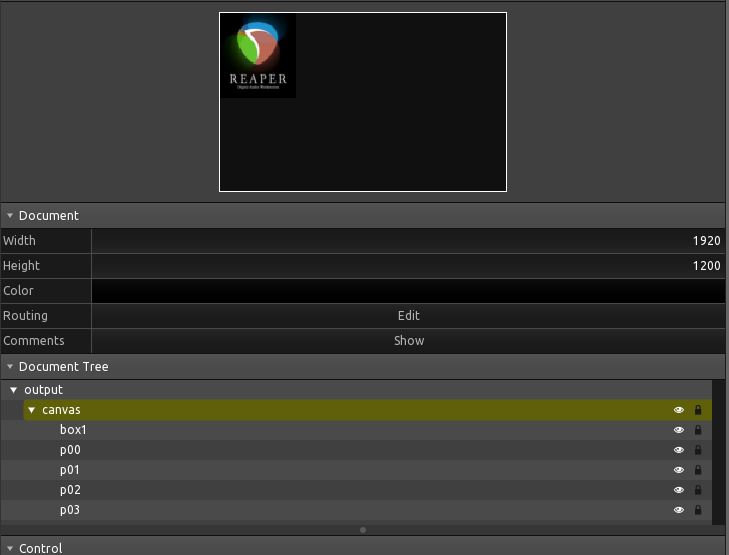
Convert a .jpg image to .tosc using small boxes as pixels. This will look for a Target group object to place the boxes into.
This means the image will be scaled down to 64x64 but the "pixel" boxes in Touch OSC will be of size 8. I don't recommend going above 256x256 for image_size as performance and filesize take a hit. Plus the XML tree is stored in memory, not streamed, so it can cause issues when generating it.
Example output:
1 maintainer

Metadata
1 maintainer
Release files for tosclib 0.3.5
For a detailed explanation of source distributions (sdists) and built distributions (wheels), please see the package formats documentation.
Source distribution (sdist)
| File | Size | Uploaded | |
|---|---|---|---|
| tosclib-0.3.5.tar.gz | 19.4 kB | Details |
Built distribution (wheel)
| File | Interpreter | ABI | Platform | Reset |
|---|---|---|---|---|
| tosclib-0.3.5-py3-none-any.whl | Python 3 | none | any | Details |
Total release size: 38.1 kB
Release files / tosclib-0.3.5.tar.gz
| Download URL | tosclib-0.3.5.tar.gz |
|---|---|
| Size | 19.4 kB |
| Tags | Source |
|
SHA-256 checksum How to use checksums |
dc89545be7eb1c5175741080f616baa918b9c1b5b33f77797db914b7fc203bcb
|
|
BLAKE2b-256 checksum How to use checksums |
a3cf1e5cba4ba9ded41ec4fd534e9f4dce662e422ee9a1342a31ed2f1751870b
|
| Upload date | |
|
Uploaded using Trusted Publishing? What is trusted publishing? |
No |
| Uploaded via |
twine/4.0.1 CPython/3.10.4
|
Release files / tosclib-0.3.5-py3-none-any.whl
| Download URL | tosclib-0.3.5-py3-none-any.whl |
|---|---|
| Size | 18.7 kB |
| Tags | Python 3 |
|
SHA-256 checksum How to use checksums |
feea4272cae498bf3c683642e54ca363b9a784e5dade44aea1bbd823dc3519d9
|
|
BLAKE2b-256 checksum How to use checksums |
fdb0db2f581560c590ee87c39514aced72df37c026056987beeec386d9ddf560
|
| Upload date | |
|
Uploaded using Trusted Publishing? What is trusted publishing? |
No |
| Uploaded via |
twine/4.0.1 CPython/3.10.4
|














