




Touch pHAT is a simple add-on for your Pi or Pi Zero that includes 6 touch sensitive pads. Use it to add touch control to your projects.
Installing
Full install (recommended):
We've created an easy installation script that will install all pre-requisites and get your Touch pHAT up and running with minimal efforts. To run it, fire up Terminal which you'll find in Menu -> Accessories -> Terminal on your Raspberry Pi desktop, as illustrated below:
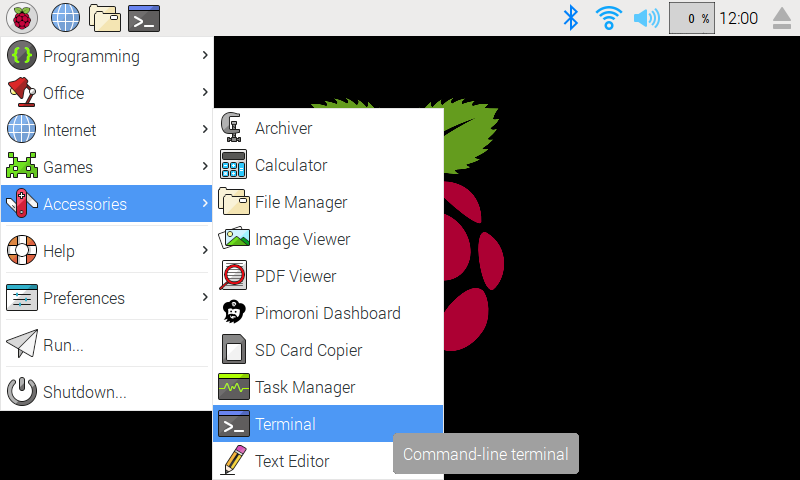
In the new terminal window type the command exactly as it appears below (check for typos) and follow the on-screen instructions:
curl https://get.pimoroni.com/touchphat | bash
Alternatively, on Raspbian, you can download the pimoroni-dashboard and install your product by browsing to the relevant entry:
sudo apt-get install pimoroni
(you will find the Dashboard under 'Accessories' too, in the Pi menu - or just run pimoroni-dashboard at the command line)
If you choose to download examples you'll find them in /home/pi/Pimoroni/touchphat/.
Manual install:
You'll need to enable i2c:
sudo raspi-config nonint do_i2c 0
Library install for Python 3:
sudo python3 -m pip install touchphat
Library install for Python 2:
sudo python2 -m pip install touchphat
Development:
If you want to contribute, or like living on the edge of your seat by having the latest code, you should clone this repository, cd to the library directory, and run:
sudo python3 setup.py install
(or sudo python3 setup.py install whichever your primary Python environment may be)
In all cases you will have to enable the i2c bus.
Documentation & Support
- Guides and tutorials - https://learn.pimoroni.com/touch-phat
- Function reference - http://docs.pimoroni.com/touchphat/
- GPIO Pinout - https://pinout.xyz/pinout/touch_phat
- Get help - http://forums.pimoroni.com/c/support
Changelog
0.0.2
- Enhancement: Migrate to setup.cfg, linting and tidyup
- Enhancement: Defer setup to avoid import side-effects
- BugFix: ValueError now returned on invalid pad number or name, instead of TypeError
0.0.1
- Initial release
1 maintainer

Release files for touchphat 0.0.2
For a detailed explanation of source distributions (sdists) and built distributions (wheels), please see the package formats documentation.
Source distribution (sdist)
| File | Size | Uploaded | |
|---|---|---|---|
| touchphat-0.0.2.tar.gz | 5.4 kB | Details |
Built distribution (wheel)
| File | Interpreter | ABI | Platform | Reset |
|---|---|---|---|---|
| touchphat-0.0.2-py3-none-any.whl | Python 3 | none | any | Details |
Total release size: 10.2 kB
Release files / touchphat-0.0.2.tar.gz
| Download URL | touchphat-0.0.2.tar.gz |
|---|---|
| Size | 5.4 kB |
| Tags | Source |
|
SHA-256 checksum How to use checksums |
c7d7ca143f772b6f23c0a1554ca26a43ff6ec92b8a251b8a11e1ad38f4c1c95f
|
|
BLAKE2b-256 checksum How to use checksums |
5c3d9ae73f40c56b2f6d597935a9f177818305a19cb165eab4039d7ebda0a190
|
| Upload date | |
|
Uploaded using Trusted Publishing? What is trusted publishing? |
No |
| Uploaded via |
twine/3.2.0 pkginfo/1.6.1 requests/2.22.0 setuptools/45.2.0 requests-toolbelt/0.9.1 tqdm/4.54.1 CPython/3.8.10
|
Release files / touchphat-0.0.2-py3-none-any.whl
| Download URL | touchphat-0.0.2-py3-none-any.whl |
|---|---|
| Size | 4.8 kB |
| Tags | Python 3 |
|
SHA-256 checksum How to use checksums |
8d048601e114ffe39d286ab2f7f9a53b1f2156ccf45decf246dd3037a761420b
|
|
BLAKE2b-256 checksum How to use checksums |
566fd04bca7e2bf343ff5168b85b60fdac64e1a0f9293e1c612b9a92fe33b02c
|
| Upload date | |
|
Uploaded using Trusted Publishing? What is trusted publishing? |
No |
| Uploaded via |
twine/3.2.0 pkginfo/1.6.1 requests/2.22.0 setuptools/45.2.0 requests-toolbelt/0.9.1 tqdm/4.54.1 CPython/3.8.10
|














