






tox automation project
Command line driven CI frontend and development task automation tool
At its core tox povides a convenient way to run arbitrary commands in isolated environments to serve as a single entry point for build, test and release activities.
tox is highly configurable and pluggable.
Example: run tests with Python 2.7 and Python 3.7
tox is mainly used as a command line tool and needs a tox.ini or a
tool.tox section in pyproject.toml containing the configuration.
To test a simple project that has some tests, here is an example with
a tox.ini in the root of the project:
[tox]
envlist = py27,py37

[testenv]
deps = pytest
commands = pytest
$ tox

[lots of output from what tox does]
[lots of output from commands that were run]

__________________ summary _________________
  py27: commands succeeded
  py37: commands succeeded
  congratulations :)
tox created two testenvs - one based on Python2.7 and one based on
Python3.7, it installed pytest in them and ran the tests. The report at
the end summarizes which testenvs have failed and which have
succeeded.
Note: To learn more about what you can do with tox, have a look at the collection of examples in the documentation or existing projects using tox.
How it works
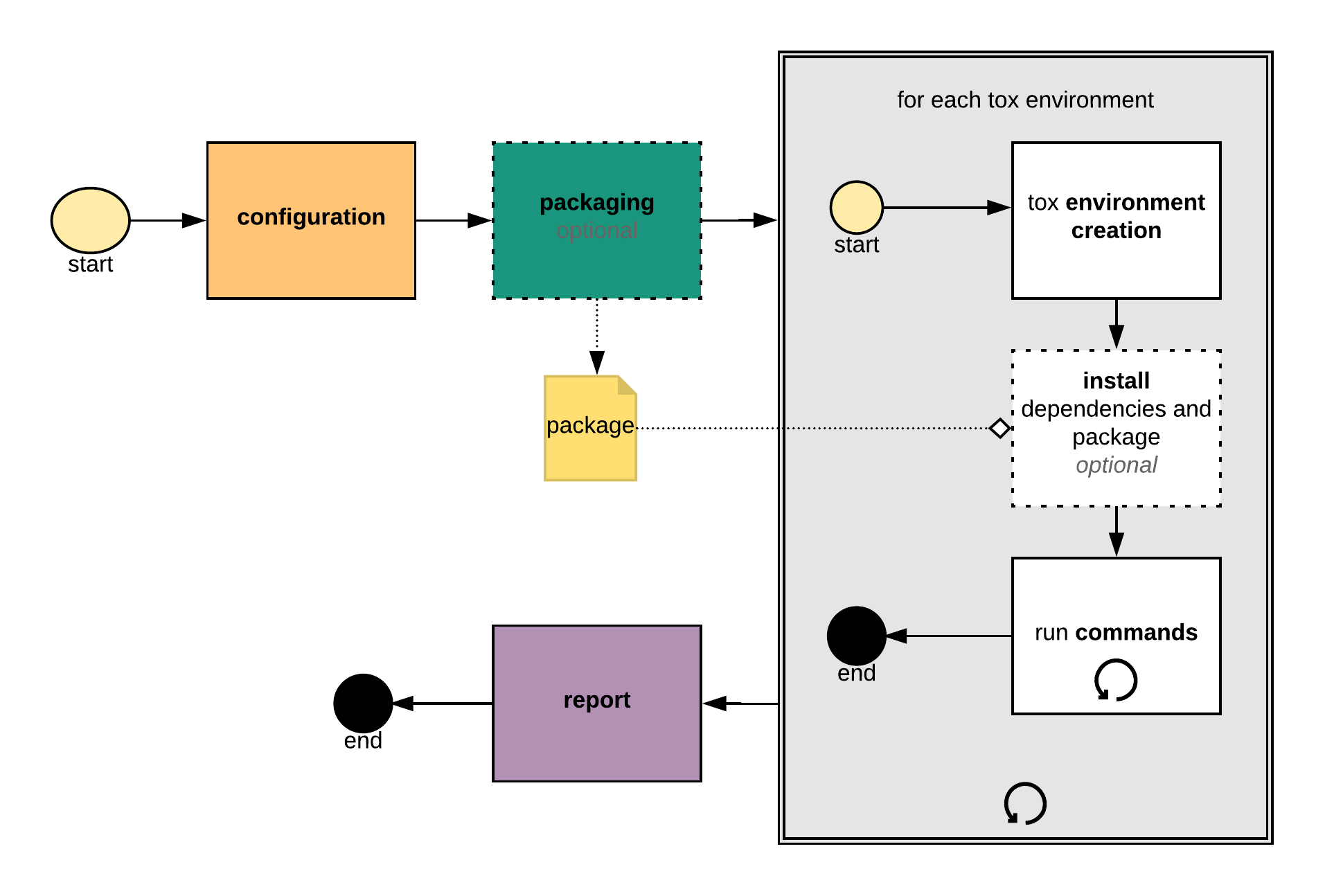
tox creates virtual environments for all configured so called
testenvs, it then installs the project and other necessary
dependencies and runs the configured set of commands. See system
overview for
more details.
tox can be used for ...
- creating development environments
- running static code analysis and test tools
- automating package builds
- running tests against the package build by tox
- checking that packages install correctly with different Python versions/interpreters
- unifying Continuous Integration and command line based testing
- building and deploying project documentation
- releasing a package to PyPI or any other platform
- limit: your imagination
Documentation
Documentation for tox can be found at Read The Docs.
Communication and questions
If you have questions or suggestions you can first check if they have already
been answered or discussed on our issue tracker
on Stack Overflow (tagged with tox).
If you want to discuss topics or propose changes that might not (yet) fit into an issue, you can get in touch via mail through tox-dev@python.org.
We also have a Gitter community.
Contributing
Contributions are welcome. See contributing and our Contributor Covenant Code of Conduct.
Currently the code and the issues are hosted on Github.
The project is licensed under MIT.
Metadata
Release files for tox 3.11.0
For a detailed explanation of source distributions (sdists) and built distributions (wheels), please see the package formats documentation.
Source distribution (sdist)
| File | Size | Uploaded | Provenance | |
|---|---|---|---|---|
| tox-3.11.0.tar.gz | 283.9 kB | Without provenance | Details |
Built distribution (wheel)
| File | Interpreter | ABI | Platform | Reset |
|---|---|---|---|---|
| tox-3.11.0-py2.py3-none-any.whl | Python 3, Python 2 | none | any | Details |
Total release size: 360.1 kB
Release files / tox-3.11.0.tar.gz
| Download URL | tox-3.11.0.tar.gz |
|---|---|
| Size | 283.9 kB |
| Tags | Source |
|
SHA-256 checksum How to use checksums |
5358eae59e3bdba5d9bd0794331854e36250e62fa3cf7d4059ae730bfe5ca432
|
|
BLAKE2b-256 checksum How to use checksums |
358ce01021d200756c0e75a625d606569f43f17c47a4316124923e0afa5d638a
|
| Upload date | |
|
Uploaded using Trusted Publishing? What is trusted publishing? |
No |
| Uploaded via |
twine/1.13.0 pkginfo/1.5.0.1 requests/2.21.0 setuptools/41.0.1 requests-toolbelt/0.9.1 tqdm/4.32.1 CPython/3.7.2
|
Release files / tox-3.11.0-py2.py3-none-any.whl
| Download URL | tox-3.11.0-py2.py3-none-any.whl |
|---|---|
| Size | 76.2 kB |
| Tags | Python 2 Python 3 |
|
SHA-256 checksum How to use checksums |
b7f8eb013c1c5fd758b272d4af97eeba168e6ea3fb604004582fce5aef0771c2
|
|
BLAKE2b-256 checksum How to use checksums |
c78c919ec5bbbe0b9bc91a3088e5f42ceec7cfa3f8141b5db914574eb4e7fdd0
|
| Upload date | |
|
Uploaded using Trusted Publishing? What is trusted publishing? |
No |
| Uploaded via |
twine/1.13.0 pkginfo/1.5.0.1 requests/2.21.0 setuptools/41.0.1 requests-toolbelt/0.9.1 tqdm/4.32.1 CPython/3.7.2
|
Security for tox 3.11.0
Provenance
Provenance describes where a file came from. On PyPI, provenance is shared via attestations, which provide a verifiable record of the build or publishing details. View details, limitations and caveats.
No provenance found
None of the files in this release were uploaded with provenance metadata.
A note on package security
PyPI is a repository for distributing packages, not a service for auditing them. While third-party security researchers and our staff do their best to detect and remove malicious packages, PyPI cannot guarantee the quality, security or suitability of any given package.














