
A package for generating toy tracking data.

Project description
ToyTrack

ToyTrack is a Python library for generating toy tracking events for particle physics.
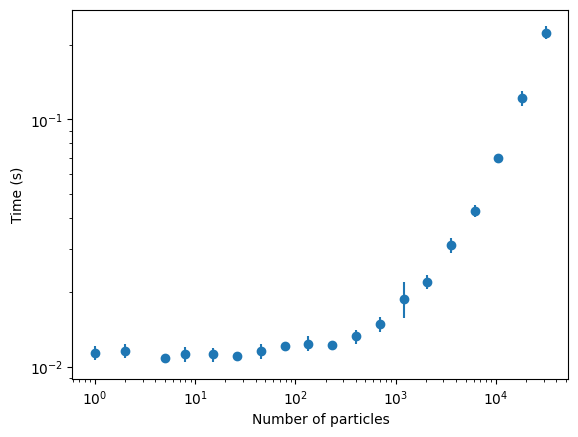
The goal: To produce a "good-enough" event simulation, in as few lines as possible (currently 3 lines), as quickly as possible (currently 0.07 seconds for a 10,000-particle event).
Installation
Use the package manager pip to install ToyTrack.
pip install toytrack
Optionally, there are Pytorch dataloaders available for convenience. These require the torch package.
pip install toytrack[torch]
Usage
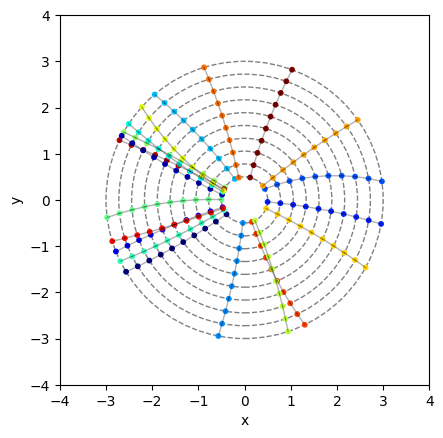
Vanilla Event
from toytrack import ParticleGun, Detector, EventGenerator

# Initialize a particle gun which samples uniformly from pt between 2 and 20 GeV,
# initial direction phi between -pi and pi, and creation vertex vx and vy between -0.1 and 0.1 cm
# and which fires a normally-distributed number of particles with mean 20 and standard deviation 5
particle_gun = ParticleGun(num_particles=[20, 5, 'normal'], pt=[2, 20], pphi=[-np.pi, np.pi], vx=[-0.1, 0.1], vy=[-0.1, 0.1])

# Initialize a detector, a barrel-like detector with inner radius of 0.5 cm, and outer radius of 3 cm,
# with 10 layers
detector = Detector(dimension=2).add_from_template('barrel', min_radius=0.5, max_radius=3, number_of_layers=10)

# Initialize an event generator and generate an event
event = EventGenerator(particle_gun, detector).generate_event()

# Access the particles, hits and tracks as needed
particles = event.particles
hits = event.hits
tracks = event.tracks

# Plot the event
event.display()
Event with Track Holes
... # as above

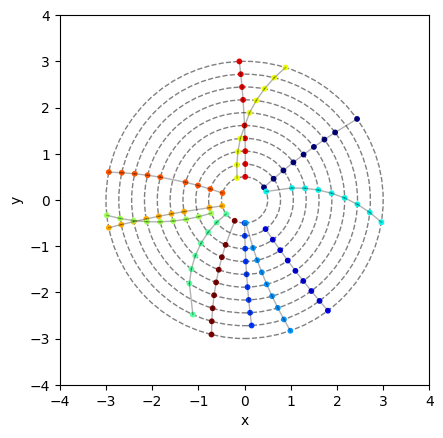
# Initialize a detector that randomly drops 10% of hits. If an int N is given, then exactly
# N hits per track are dropped
detector = Detector(dimension=2, hole_inefficiency=0.1).add_from_template('barrel', min_radius=0.5, max_radius=3, number_of_layers=10)

... # as above

# Plot the event
event.display()
Event with Noise Hits
... # as above

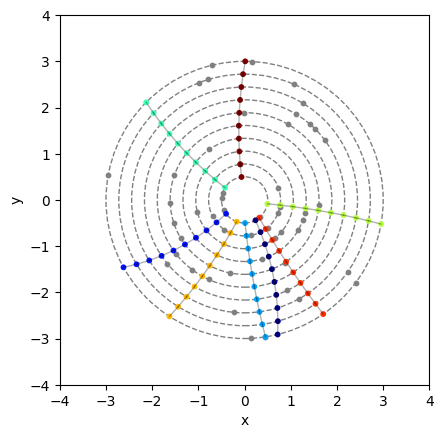
# Generate event with between 30% and 70% noise hits per real hits. E.g. If the event has 100
# real hits, then between 30 and 70 noise hits will be generated. If an int N is given, then
# the absolute value of N noise hits are generated
event = EventGenerator(particle_gun, detector, noise=[0.3, 0.7]).generate_event()

... # as above

# Plot the event
event.display()
Event with Multiple Particle Guns
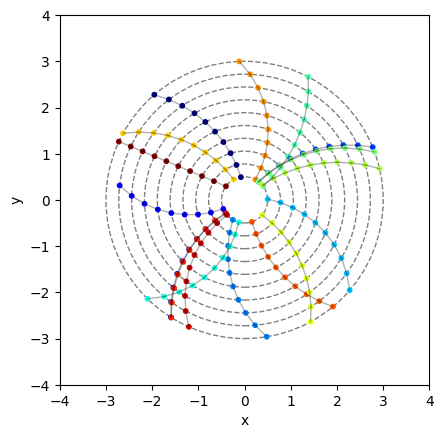
# Initialize one particle gun which samples uniformly from pt between 2 and 3 GeV,
# initial direction phi between -pi and pi, and creation vertex vx and vy between -0.1 and 0.1 cm
particle_gun_1 = ParticleGun(num_particles=[20, 5, 'normal'], pt=[2, 3], pphi=[-np.pi, np.pi], vx=[-0.1, 0.1], vy=[-0.1, 0.1])

# Initialize another particle gun which samples uniformly from pt between 100 and 200 GeV,
# initial direction phi between -pi and pi, and creation vertex vx and vy between -0.1 and 0.1 cm
particle_gun_2 = ParticleGun(num_particles=1, pt=[100, 200], pphi=[-np.pi, np.pi], vx=[-0.1, 0.1], vy=[-0.1, 0.1])

... # as above

# Initialize an event generator with a list of particle guns
event = EventGenerator([particle_gun_1, particle_gun_2], detector).generate_event()

... # as above

# Plot the event
event.display()
Detector with Layer Safety Guarantee
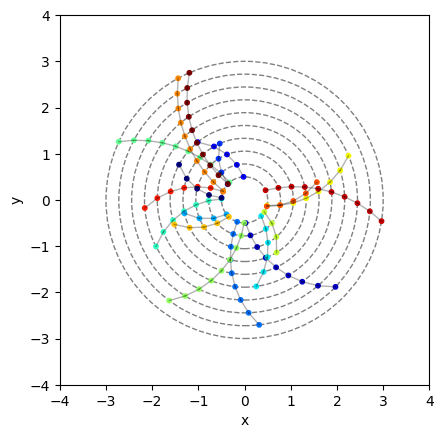
We can ensure that each particle has exactly one hit per layer by setting the layer_safety_guarantee flag to True.
Consider an event with low pT particles:
particle_gun = ParticleGun(num_particles=[20, 5, 'normal'], pt=[1, 3], pphi=[-np.pi, np.pi], vx=[-0.1, 0.1], vy=[-0.1, 0.1])

detector = Detector(dimension=2, layer_safety_guarantee=False).add_from_template('barrel', min_radius=0.5, max_radius=3, number_of_layers=10)

event = EventGenerator(particle_gun, detector).generate_event()

event.display()
... # as above

# Initialize a detector WITH layer safety guarantee
detector = Detector(dimension=2, layer_safety_guarantee=True).add_from_template('barrel', min_radius=0.5, max_radius=3, number_of_layers=10)

... # as above

event.display()
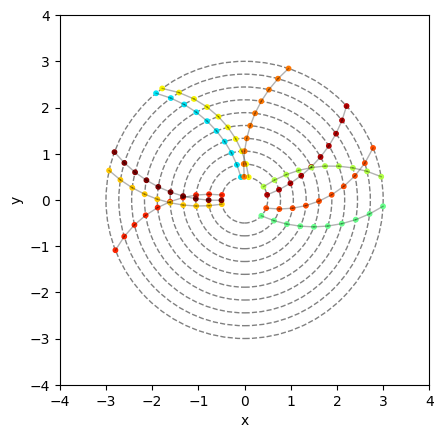
Observe that particles with such low pT that they "curled" before the final layer are now removed.
Performance
ToyTrack is designed to be fast. The following benchmarks were performed on a 64-core AMD EPYC 7763 (Milan) CPU.
Data Loading
Pytorch Dataset
The TracksDataset class is a Pytorch dataset which can be used with a Pytorch dataloader.
config = {
    "detector": {
        "dimension": 2,
        "hole_inefficiency": 0,
        "min_radius": 0.5,
        "max_radius": 3.,
        "number_of_layers": 10
    },
    "particle_guns": [
        {
            "num_particles": [20, 5, 'normal'],
            "pt": [2, 20],
            "pphi": [-3.14159, 3.14159],
            "vx": [-0.1, 0.1],
            "vy": [-0.1, 0.1]
        }
    ],
    "outputs": {
        "x": True,
        "mask": True,
        "pids": True,
        "event": True
    }
}

# initialize dataloader
dataset = TracksDataset(config)

# iterate over dataset
for batch in dataset:
    x, mask, pids, event = batch["x"], batch["mask"], batch["pids"], batch["event"]
    # Do something with the batch!
Pytorch DataLoader
from torch.utils.data import DataLoader

dataloader = DataLoader(dataset, batch_size=100, collate_fn=collate_fn)

# iterate over dataloader
for batch in dataloader:
    x, mask, pids, event = batch["x"], batch["mask"], batch["pids"], batch["event"]
    # Do something with the batch (which now has an extra batch dimension of size 100)
Release history Release notifications | RSS feed


Download files
Download the file for your platform. If you're not sure which to choose, learn more about installing packages.
Source Distribution
Built Distribution
Filter files by name, interpreter, ABI, and platform.
If you're not sure about the file name format, learn more about wheel file names.
Copy a direct link to the current filters
File details
Details for the file toytrack-0.1.14.tar.gz.
File metadata
- Download URL: toytrack-0.1.14.tar.gz
- Upload date:
- Size: 13.7 kB
- Tags: Source
- Uploaded using Trusted Publishing? No
- Uploaded via: twine/3.8.0 pkginfo/1.8.2 readme-renderer/32.0 requests/2.26.0 requests-toolbelt/0.9.1 urllib3/1.26.7 tqdm/4.62.3 importlib-metadata/4.11.1 keyring/23.5.0 rfc3986/2.0.0 colorama/0.4.4 CPython/3.8.5
File hashes
| Algorithm | Hash digest | |
|---|---|---|
| SHA256 |
96bad5ddd4fea0fdba24b33d3f9d4e4228ccfe9708676dfa6dc7b4bcf1243c1d
|
|
| MD5 |
877770baab597b3fafb8c14996b03cb0
|
|
| BLAKE2b-256 |
cb5957e929ed167eb6f092eb6f2306b246ad75dc22e242b58482fc68a5008538
|
File details
Details for the file toytrack-0.1.14-py3-none-any.whl.
File metadata
- Download URL: toytrack-0.1.14-py3-none-any.whl
- Upload date:
- Size: 13.1 kB
- Tags: Python 3
- Uploaded using Trusted Publishing? No
- Uploaded via: twine/3.8.0 pkginfo/1.8.2 readme-renderer/32.0 requests/2.26.0 requests-toolbelt/0.9.1 urllib3/1.26.7 tqdm/4.62.3 importlib-metadata/4.11.1 keyring/23.5.0 rfc3986/2.0.0 colorama/0.4.4 CPython/3.8.5
File hashes
| Algorithm | Hash digest | |
|---|---|---|
| SHA256 |
0db16e9111224ee0a8f50e610a113f5eec35c538116355b4b0e5e27853ddcb80
|
|
| MD5 |
8cd1ddb883ff869afa7465f9c03343f7
|
|
| BLAKE2b-256 |
d03c0f1c811e72f7163a3d97c9e522406cf4d63667b9da2067af424725d2ad02
|






