
A Textual TUI for interactively testing TextFSM and TTP templates with live parsing, JSON/table results, and exportable Python snippets.

Project description
tptpy
A terminal UI for interactively testing TextFSM and TTP templates against network device output — with live parsed results and auto-generated Python snippets you can drop straight into your automation.
What this is for and why
Writing TextFSM and TTP templates is an iterative process: tweak the template, run it, check the output, repeat. Most workflows involve bouncing between a text editor, a Python REPL, and maybe a browser-based tool that doesn't have your files.
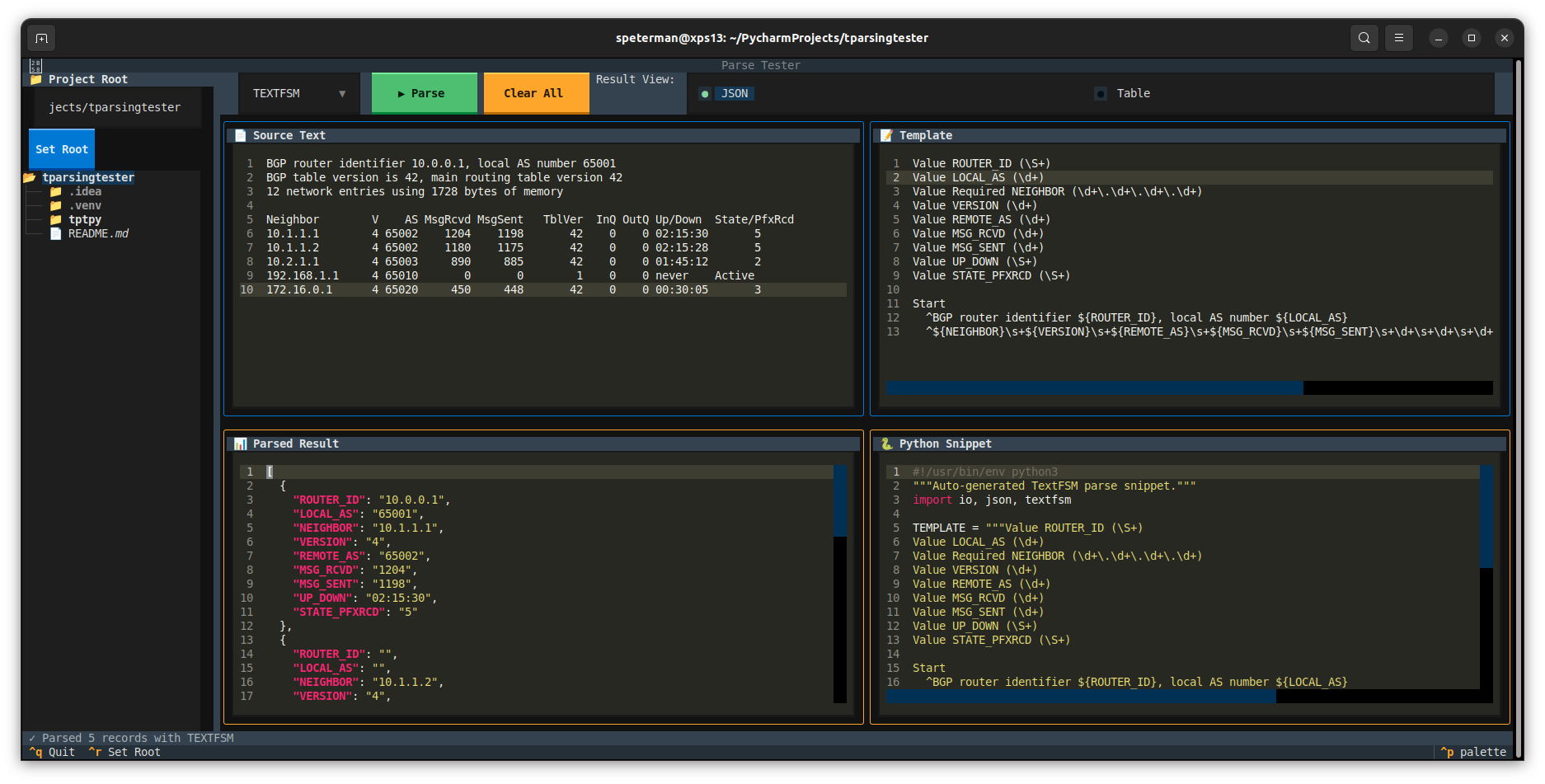
tptpy puts everything in one screen:
- Source text (left top) — paste or load device output from the file tree
- Template (right top) — your TextFSM or TTP template
- Parsed result (left bottom) — JSON or table view, updated on each parse
- Python snippet (right bottom) — a self-contained script embedding your source + template, ready to copy
The directory tree auto-routes files: .textfsm, .template, .ttp, and .tpl extensions load into the template pane; everything else loads into the source pane.
Installation
From PyPI
pip install tptpy
From Source
git clone https://github.com/scottpeterman/tptpy.git
cd tptpy
pip install .
Development
git clone https://github.com/scottpeterman/tptpy.git
cd tptpy
pip install -e ".[dev]"
Usage
# Launch in current directory
tptpy

# Launch rooted at a specific project
tptpy ~/templates/bgp

# Or run as a module
python -m tptpy ~/templates/bgp
Keyboard Shortcuts
| Key | Action |
|---|---|
Ctrl+P |
Run parse |
Ctrl+S |
Save source pane (directory picker) |
Ctrl+T |
Save template pane (directory picker) |
Ctrl+R |
Focus the root path input |
F2 |
Rename selected file/folder |
Delete |
Delete selected file/folder |
Ctrl+Q |
Quit |
Supported Parsers
| Parser | Template Style | Best For |
|---|---|---|
| TextFSM | Value declarations + regex state machine | Structured CLI output (show commands) |
| TTP | Template with {{ variable }} placeholders |
Output that closely mirrors the template shape |
Features
- Four-pane layout — source, template, results, and snippet visible simultaneously
- File tree with smart routing — template extensions auto-load to the template pane
- File management — create, rename, and delete files and folders directly from the sidebar
- Save with directory picker — save source or template content to any location in your project tree
- JSON and table views — toggle between structured JSON and a tabular DataTable
- Actionable error messages — parse failures include line numbers, context, and fix hints
- Auto-generated snippets — each successful parse produces a standalone Python script
- Filtered directory tree — shows only text and template files (
.txt,.log,.cfg,.textfsm,.ttp,.yaml,.json, etc.)
Quick Example
- Launch
tptpypointed at a directory containing your show command output and templates - Click a
.txtor.logfile — it loads into Source Text - Click a
.textfsmfile — it loads into Template - Hit
Ctrl+Por click ▶ Parse - Review results in JSON or Table view; grab the Python snippet for your project
- Hit
Ctrl+Sto save source orCtrl+Tto save your template — pick the directory and filename
Requirements
- Python 3.10+
- Textual — TUI framework
- TextFSM — Google's template-based state machine parser
- TTP — Template Text Parser
Project Structure
tptpy/
├── pyproject.toml
├── README.md
├── screenshots/
│   └── tui1.png
└── tptpy/
    ├── __init__.py
    └── __main__.py
License
MIT
Author
Scott Peterman — Principal Infrastructure Engineer, network automation toolsmith. Part of a broader toolkit for practical network engineering: github.com/scottpeterman
Release history Release notifications | RSS feed


Download files
Download the file for your platform. If you're not sure which to choose, learn more about installing packages.
Source Distribution
Built Distribution
Filter files by name, interpreter, ABI, and platform.
If you're not sure about the file name format, learn more about wheel file names.
Copy a direct link to the current filters
File details
Details for the file tptpy-1.0.0.tar.gz.
File metadata
- Download URL: tptpy-1.0.0.tar.gz
- Upload date:
- Size: 13.3 kB
- Tags: Source
- Uploaded using Trusted Publishing? No
- Uploaded via: twine/6.2.0 CPython/3.10.12
File hashes
| Algorithm | Hash digest | |
|---|---|---|
| SHA256 |
84b99847867d13c5fb740001c066f20cb52035940620537fad566a574c07f3cb
|
|
| MD5 |
41b4a9c11f641b334c2162386a063ead
|
|
| BLAKE2b-256 |
235cece9feb30cd267fcd1c55f07d4a42ca698c3fb4201ca9517ccfffda7365f
|
File details
Details for the file tptpy-1.0.0-py3-none-any.whl.
File metadata
- Download URL: tptpy-1.0.0-py3-none-any.whl
- Upload date:
- Size: 11.3 kB
- Tags: Python 3
- Uploaded using Trusted Publishing? No
- Uploaded via: twine/6.2.0 CPython/3.10.12
File hashes
| Algorithm | Hash digest | |
|---|---|---|
| SHA256 |
c394e509800d6715cac06ce271d245aeba7f2740f85b39666f678c59f6151677
|
|
| MD5 |
7c73d0846dee82b336ee776455ee4172
|
|
| BLAKE2b-256 |
b54376c14b05fd42bf65bff9ac3a6f8b5b153cf8f49c84b7ce1686b827a6057d
|






