
Automatically take good care of your preemptible TPUs

Project description
TPU Care
Automatically take good care of your preemptible TPUs
Table of Contents
Features
- Reliable code execution: TPU Care starts a TPU, ensures it's set up as specified and continues the experiment whenever the node dies. Think of it like TerraForm + Ansible for machine learning.
- Maintenance of large swarms: When running multiple nodes, TPU Care will automatically delete dead instances while keeping as many alive as possible.
- Code generation: To simplify setup, TPU Care efficiently clones your git repository and ensures trustable
execution of your
run_commandthat continues even during outages. - Optimized management: When a node dies, TPU Care deletes it within five minutes and creates a new one the second there is capacity.
Getting Started
Installation
python3 -m pip install tpucare
Examples
We've been using TPU Care for a while at HomebrewNLP. In fact, this library is just
the branched out core of the original production-ready HomebrewNLP code. At HomebrewNLP, there were two major use-cases
for this library. We started both massive hyperparameter sweeps which consumed 900,000 TPU-core hours within three
months and stable training on large TPU pods. Below, you can see a list of TPUs which are largely managed by TPU
Care:
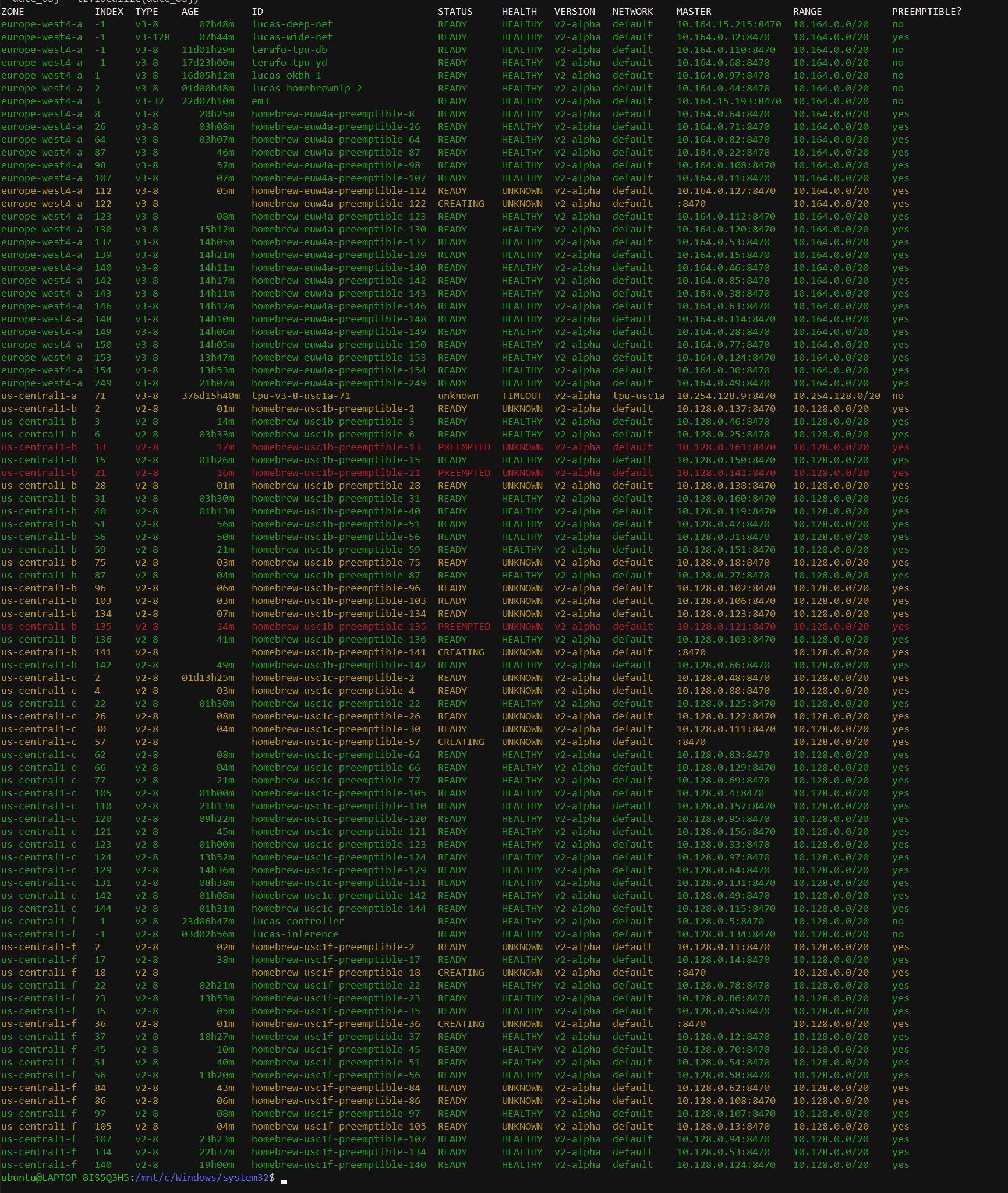
Screenshot from TPUnicorn, a CLI-based TPU managed software
In the following sections, you'll learn how we use at massive scale with minimal code effort.Long-running preemptible training
For example, the following code can be used to create a production-ready v3-256 using the HomebrewNLP-Jax codebase ( see examples/pod.py for an executable version):
import dataclasses
import typing
from netrc import netrc

import yaml

from tpucare import exec_command, exec_on_tpu, send_to_tpu, start_single


@dataclasses.dataclass
class Context:
    retry: int


ZONE = "europe-west4-a"
HOST = "big-pod"
RUN_NAME = "256-core-tpu"


def load_config(ctx: Context):
    with open("config.yaml", 'r') as f:
        config = f.read()
    config = yaml.safe_load(config)

    wandb_api = wandb.Api()
    config["training"]["do_checkpoint"] = True
    base_checkpoint_path = config["training"]["checkpoint_path"]

    start_step = 0
    for run in wandb_api.runs(f"{config['wandb']['entity']}/{config['wandb']['project']}"):
        if run.name == config['wandb']['name']:
            start_step = run.summary["_step"]
            break
    start_step -= start_step % config["training"]["checkpoint_interval"]

    config["training"]["start_step"] = start_step
    config["wandb"]["name"] = f"{RUN_NAME}-{ctx.retry}"
    if ctx.retry > 0:
        config["training"]["checkpoint_load_path"] = config["training"]["checkpoint_path"]
    config["training"]["checkpoint_path"] = f"{base_checkpoint_path}-{ctx.retry}"
    return yaml.dump(config)


def start_fn(ctx: Context, worker: int):
    """
    This function gets executed in threads to start a run on a new TPU. It receives the context object returned by
    `creation_callback` as well as the worker id which corresponds to the slice id this code was executed on in a
    multi-host setup. For single-host setups, such as v3-8s, the "worker" will always be set to 0.
    Ideally, it'd copy necessary files to the TPU and then run those. Here, `exec_command` can be used to create an
    execution command that automatically spawns a `screen` session which persists even when the SSH connection gets cut.
    """
    send_to_tpu(HOST, ZONE, "config.yaml", load_config(ctx), worker)
    cmd = exec_command(repository="https://github.com/HomebrewNLP/HomebrewNLP-Jax", wandb_key=wandb_key)
    send_to_tpu(HOST, ZONE, "setup.sh", cmd, worker)
    exec_on_tpu(HOST, ZONE, "bash setup.sh", worker)


def creation_callback(host: str, ctx: typing.Optional[Context]) -> Context:
    """
    The `creation_callback` is called once whenever a new TPU gets created and can be used to persist state
    (such as retry counters) across multiple invocations.
    """
    if ctx is None:  # first invocation
        return Context(0)
    ctx.retry += 1
    return ctx


def main(service_account: str, tpu_version: int = 3, slices: int = 32, preemptible: bool = True):
    start_single(host=HOST, tpu_version=tpu_version, zone=ZONE, preemptible=preemptible,
                 service_account=service_account, slices=slices, start_fn=start_fn,
                 creation_callback=creation_callback)
Sweeps
Similarly, large swarms of instances can be launched trivially using tpucare. Here, we largely do the same setup as
above, but call launch_multiple instead of launch_single which takes the additional argument tpus specifying the
number of TPUs that should be launched and babysit. Depending on capacity and quota, the actual number of TPUs you get
might be lower than the number of TPUs specified.
def main(service_account: str, tpus: int, tpu_version: int = 3, slices: int = 32, preemptible: bool = True):
    start_multiple(prefix=HOST, tpu_version=tpu_version, zone=ZONE, preemptible=preemptible,
                   service_account=service_account, slices=slices, start_fn=start_fn,
                   creation_callback=creation_callback, tpus=tpus)
However, this would simply launch the same run many times. If you instead plan to register them with a
WandB Sweep, we need to modify the start_fn to join the wandb
sweep.
By patching in the code below, tpucare will start and maintain a large swarm of TPUs all working towards the same
hyperparameter optimization problem.
import wandb

with open("sweep.yaml", 'r') as f:  # sweep config passed straight to wandb
    config = yaml.safe_load(f.read())
sweep_id = wandb.sweep(config, entity="homebrewnlp", project="gpt")


def start_fn(ctx: Context, worker: int):
    cmd = exec_command(repository="https://github.com/HomebrewNLP/HomebrewNLP-Jax", wandb_key=wandb_key,
                       run_command=f"/home/ubuntu/.local/bin/wandb agent {sweep_id}")
    send_to_tpu(HOST, ZONE, "setup.sh", cmd, worker)
    exec_on_tpu(HOST, ZONE, "bash setup.sh", worker)
The full executable code can be found in examples/sweep.py.
Similarly, the start_fn could be adapted to start an inference server
for HomebrewNLP
or Craiyon or even execute machine learning unit-tests in
parallel.
Citation
@software{nestler_lucas_2022_6837312,
  author       = {Nestler, Lucas},
  title        = {TPU Care},
  month        = jul,
  year         = 2022,
  publisher    = {Zenodo},
  version      = {0.0.2},
  doi          = {10.5281/zenodo.6837312},
  url          = {https://doi.org/10.5281/zenodo.6837312}
}```
Release history Release notifications | RSS feed


Download files
Download the file for your platform. If you're not sure which to choose, learn more about installing packages.
Source Distribution
Built Distribution
Filter files by name, interpreter, ABI, and platform.
If you're not sure about the file name format, learn more about wheel file names.
Copy a direct link to the current filters
File details
Details for the file tpucare-0.4.3.tar.gz.
File metadata
- Download URL: tpucare-0.4.3.tar.gz
- Upload date:
- Size: 8.7 kB
- Tags: Source
- Uploaded using Trusted Publishing? No
- Uploaded via: twine/4.0.2 CPython/3.10.6
File hashes
| Algorithm | Hash digest | |
|---|---|---|
| SHA256 |
cd1450aeac443f0407015ff7ed90a73acd8768afaf65abbe4033cbf23790c8c4
|
|
| MD5 |
6ebfe2174c5350debb8218d62958d02d
|
|
| BLAKE2b-256 |
8ca29dedeb546832af67c246c5c4a56958cdb445ff72afbf13cb79e91062003a
|
File details
Details for the file tpucare-0.4.3-py3-none-any.whl.
File metadata
- Download URL: tpucare-0.4.3-py3-none-any.whl
- Upload date:
- Size: 8.6 kB
- Tags: Python 3
- Uploaded using Trusted Publishing? No
- Uploaded via: twine/4.0.2 CPython/3.10.6
File hashes
| Algorithm | Hash digest | |
|---|---|---|
| SHA256 |
0ededf571148e3b0a413982f7e6c58cd2f9eaa1cd5df4910fadb64dae72f2a61
|
|
| MD5 |
15c7333917aa038d205e5c8f02c2dfc1
|
|
| BLAKE2b-256 |
e6a3e8dd2ce4b0e72add4b6c09705a8d56c7a5324b79018d4a70ff877ca543a6
|






