
A standalone trace management platform for observability and continuous improvement of LLM-based agents.


Project description
TraceBrain: An Open-Source Framework for Agentic Trace Management 🧠🚀


|

|

|

|

|
TraceBrain is an open-source platform for collecting, managing, and analyzing execution traces from LLM agents.
The system standardizes heterogeneous agent logs into a unified trace format, enabling consistent inspection, evaluation, and downstream analysis across different frameworks.
By organizing historical traces as structured artifacts, TraceBrain supports agent observability, human oversight, and iterative improvement of agent workflows.
✨ Key Features
📥 Ingestion Layer (Standardization)
- Standardized Trace Format: Capture agent workflows using a unified OTLP-based schema.
- Framework-Agnostic Integration: Lightweight SDK and converters support agents built with various frameworks (e.g., LangChain, SmolAgents) or custom implementations.
- Delta-based Tracing: Stores only incremental context updates (
new_content) to reduce redundant prompt storage.
🛡️ Governance Layer (Human-in-the-loop)
- Active Help Request: Allows agents to escalate uncertain decisions to human experts during execution.
- Command Center UI: Visualize multi-step agent traces and enable expert inspection and feedback.
- Semi-Automated Evaluation: An AI Judge generates draft evaluations (e.g.,
rating,confidence,error_type, andfeedback) that experts can review and finalize.
🧠 Cognitive Layer (Trace-driven Learning)
- Experience Retrieval: Agents can query past successful trajectories to guide reasoning via in-context learning.
- Automated Curriculum Generation: Using error classifications produced by the AI Judge, a Curator agent analyzes clustered failure traces and synthesizes targeted training tasks.
- Hybrid Trace Search (Vector + Keyword): Reciprocal Rank Fusion (RRF) combines
pgvectorsimilarity with PostgreSQL full-text search for robust retrieval. SQLite gracefully falls back to basic keyword matching.
🏗️ Architecture
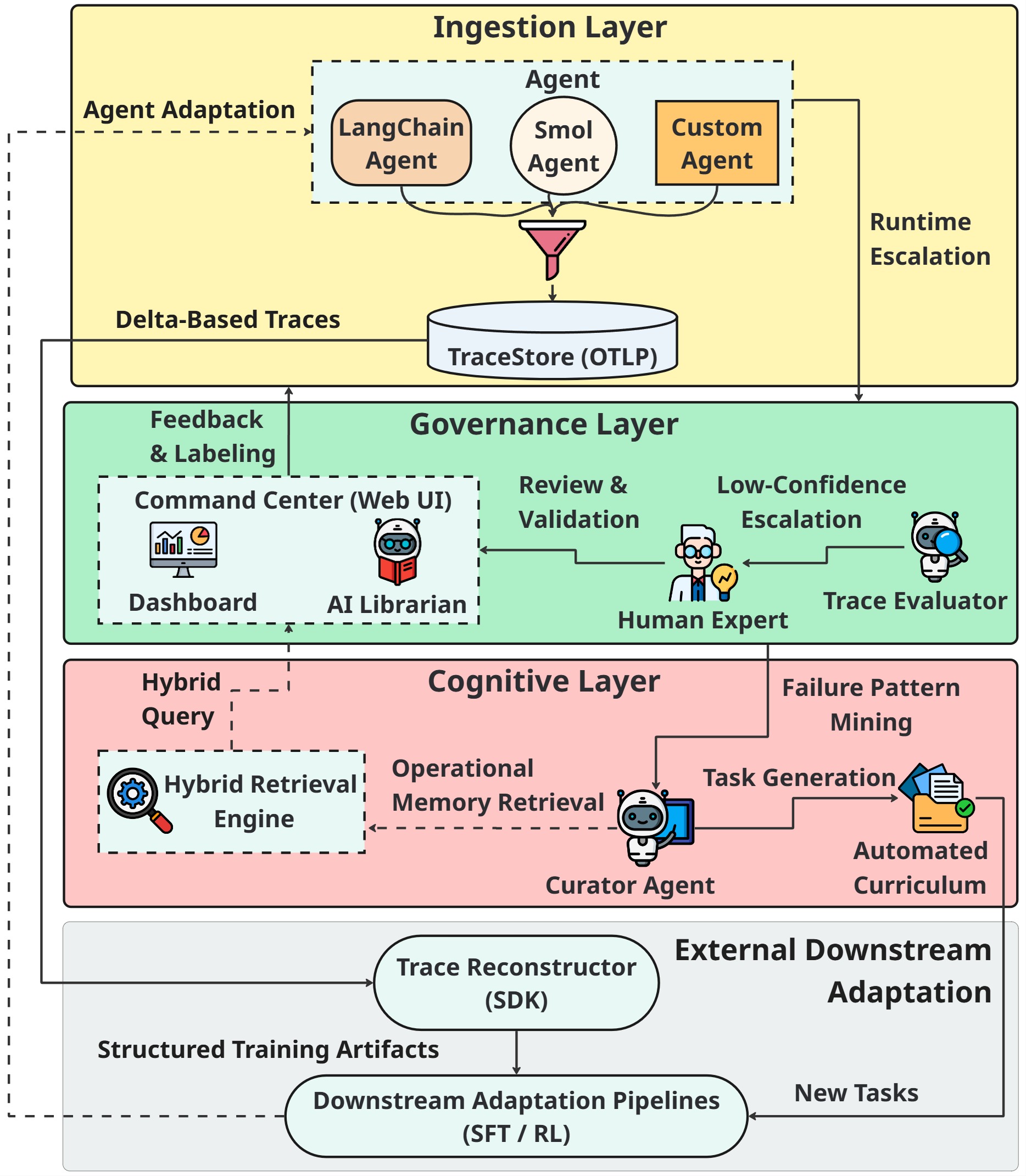
- Your AI Agent: Any agent framework. Uses the TraceClient SDK to send data.
- TraceStore API: The central FastAPI server. Ingests, stores, and serves trace data.
- Database: The persistence layer (PostgreSQL or SQLite).
- Admin Panel UI: A React client in
web/that consumes the TraceStore API.
Tech Stack:
- Backend: FastAPI, SQLAlchemy 2.0, Pydantic V2
- Database: PostgreSQL (production), SQLite (development), pgvector (semantic search)
- Frontend: React (Vite + MUI) in
web/ - Deployment: Docker Compose
- AI Integration: LibrarianAgent + AI Judge + Curriculum Curator with multi-provider LLM support
- Embeddings: sentence-transformers (local) or OpenAI/Gemini (cloud)
📸 Platform Showcase
Take a look at the TraceBrain Command Center in action:
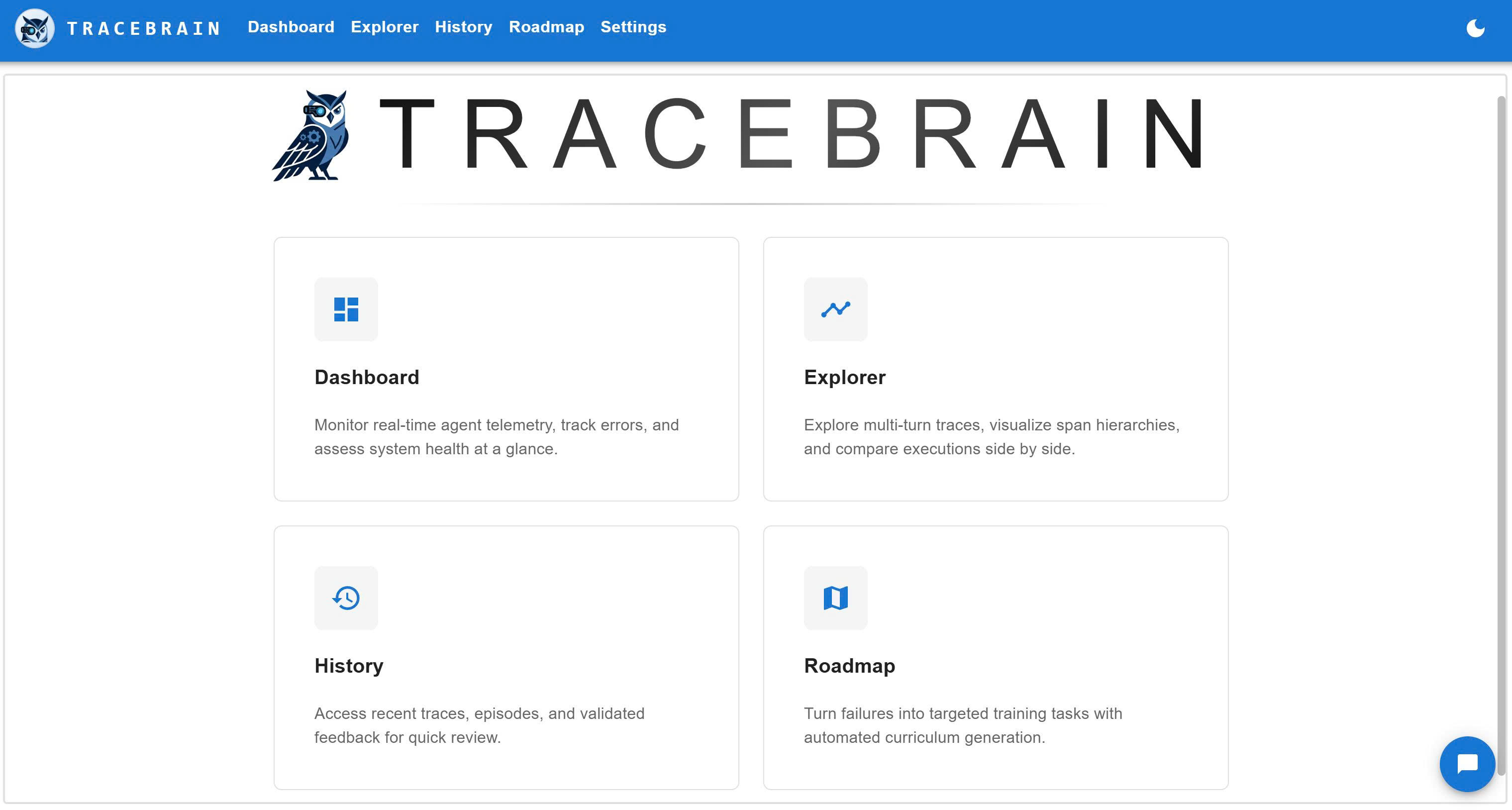
🌐 Welcome to the Command Center
The central hub for agentic trace management, featuring a clean, intuitive, and modern interface.
|
📊 Command Center Dashboard Real-time error distribution, confidence metrics, and active filters. 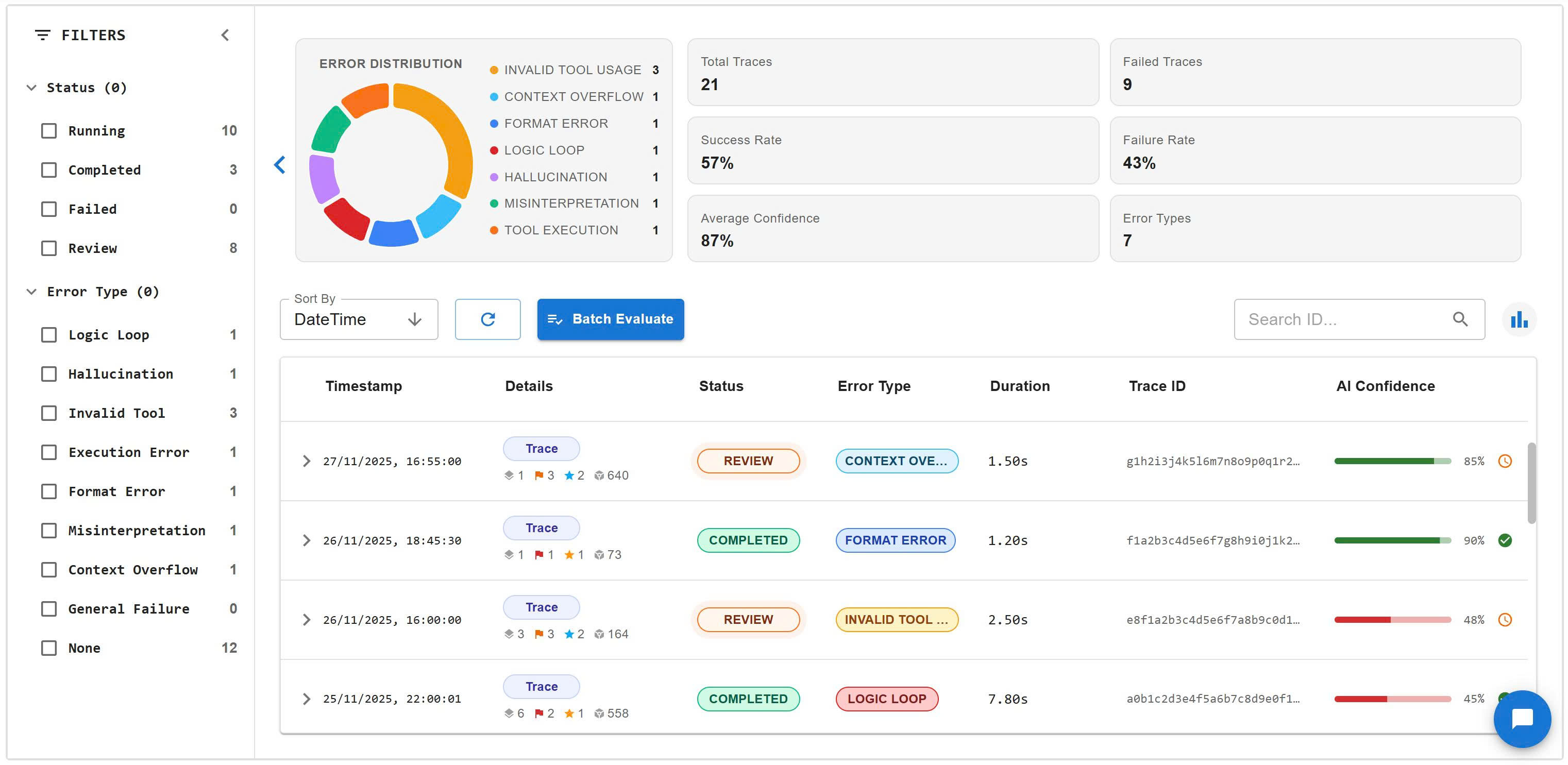
|
🔍 Trace Explorer & AI Judge Side-by-side view of the execution tree, span properties, and Human-AI collaborative labeling. 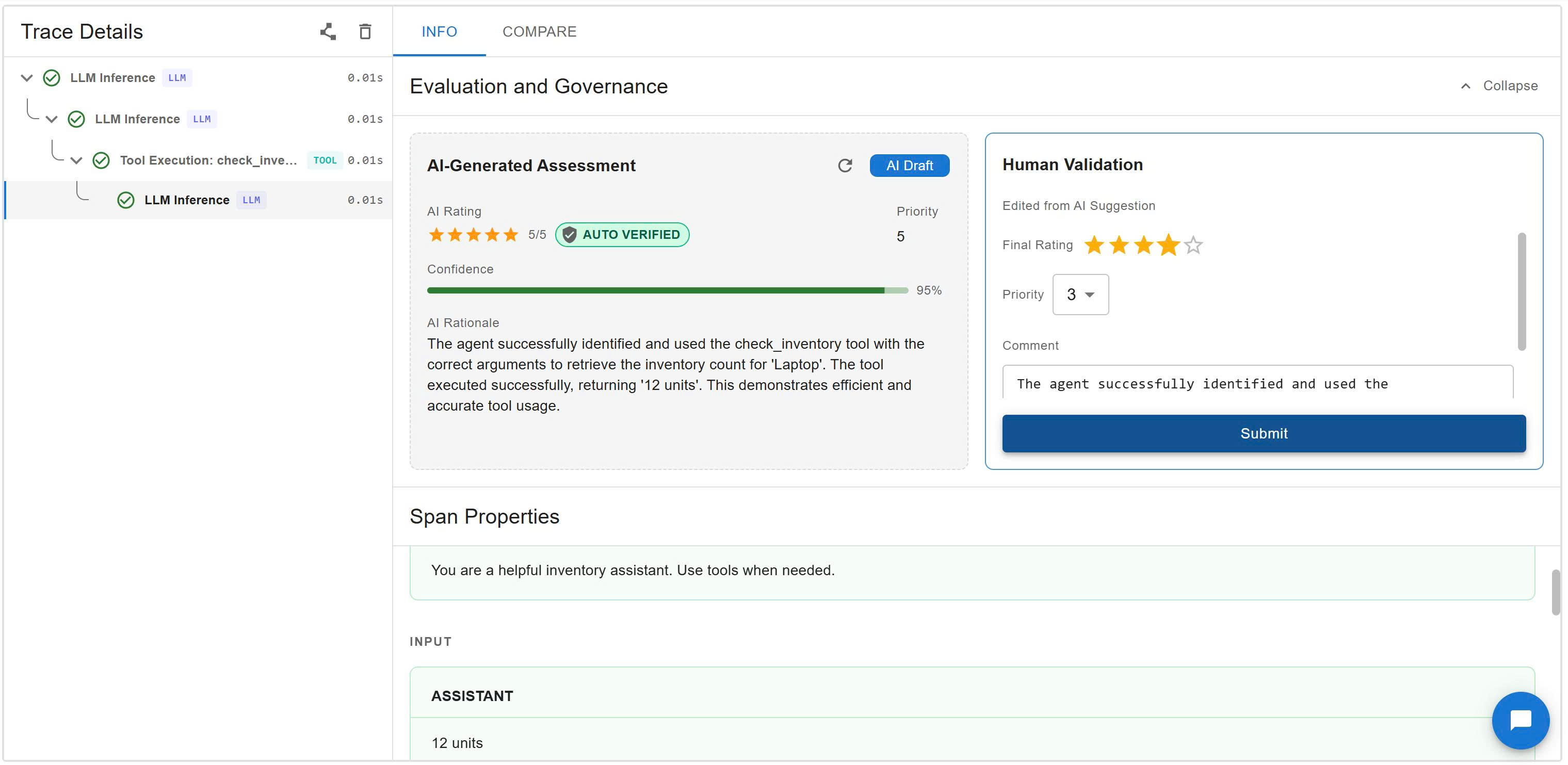
|
|
🤖 AI Librarian Query your trace database using natural language and intent-based UI filters. 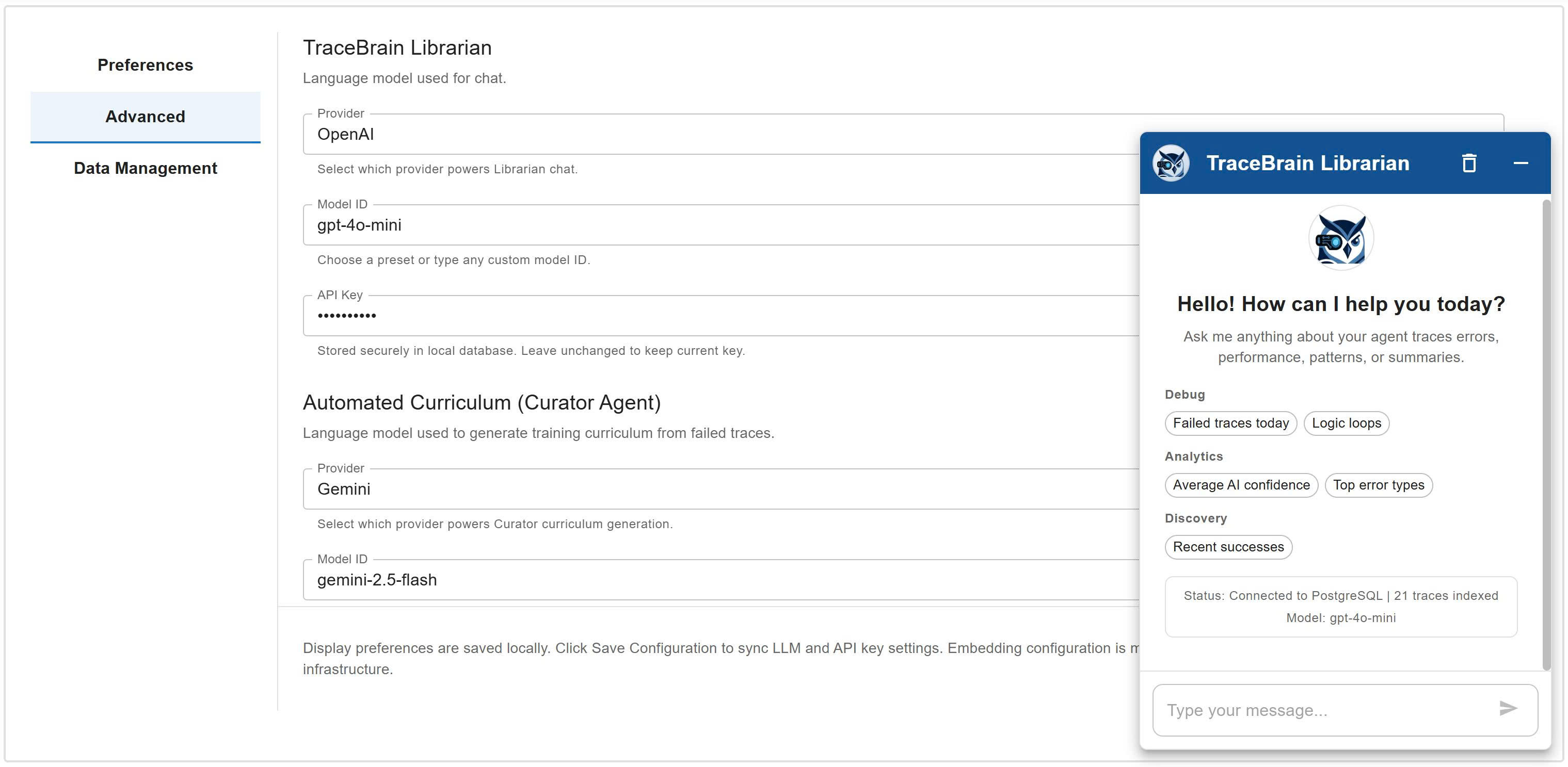
|
🗺️ Automated Curriculum Transform diagnosed failures into targeted training tasks ready for export. 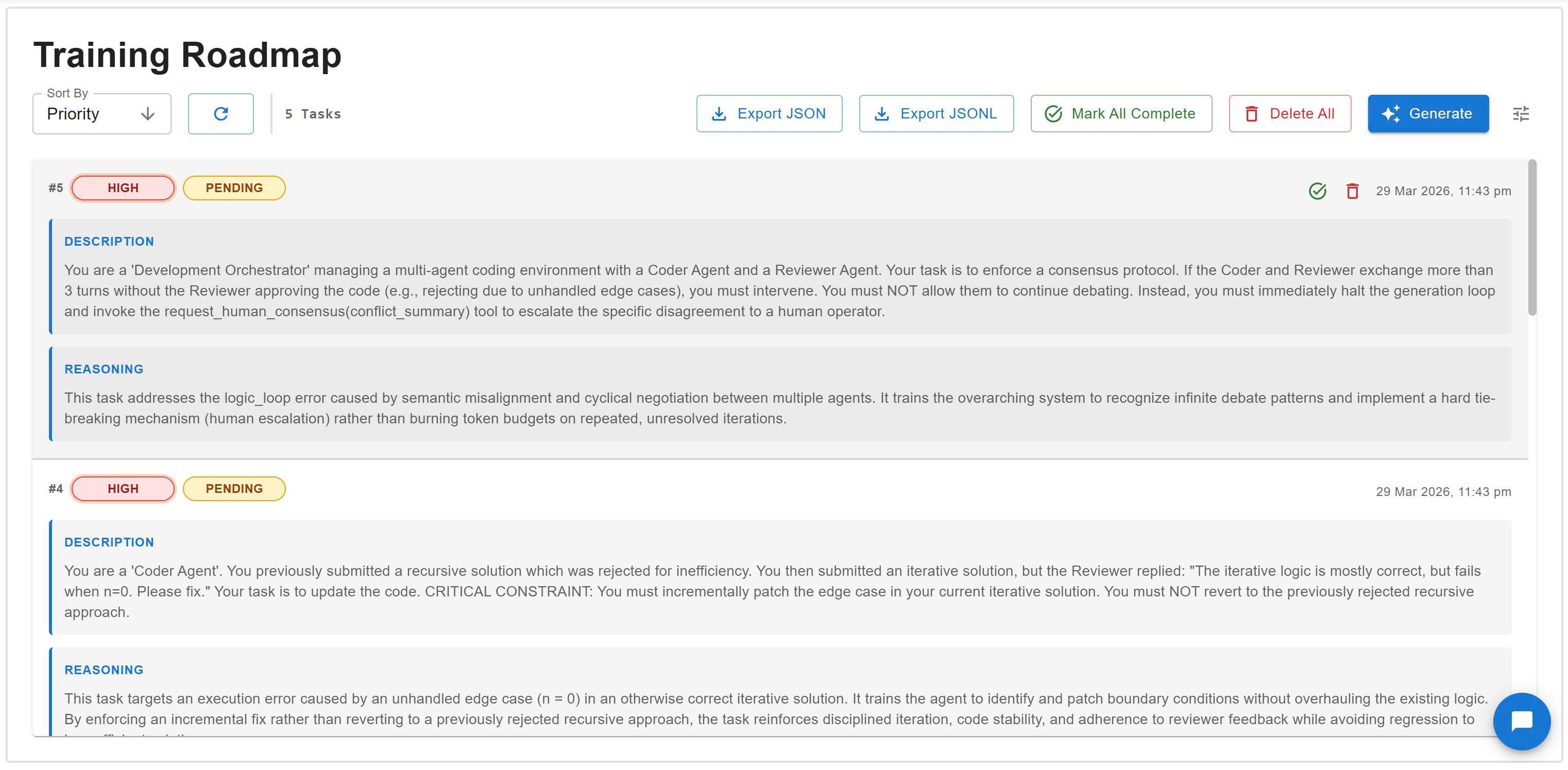
|
🚀 Quick Start
Choose one of three installation paths based on your needs. Each option ends with the same user experience: a unified UI + API at http://localhost:8000.
Option 1: Docker (Recommended)
This is the default path for most users. It automatically provisions a production-ready PostgreSQL + pgvector environment. Option 1 uses pre-built images from Docker Hub.
-
Install the CLI
pip install tracebrain
-
Initialize
tracebrain initThis creates a template
.envfile for API keys and configuration.Open the
.envfile and add your API keys before continuing. If you skip this step, the containers will start but AI features (Librarian, Judge) will fail. -
Start the platform
tracebrain up
# or lightweight profile:
tracebrain up --slim
Access: http://localhost:8000 (UI + API)
Note: Option 1 uses pre-built images from Docker Hub, so you don't need Node.js or local build tools.
Docker image profiles:
quyk67uet/tracebrain:latest(Full, ~2.8GB): includes local embedding stack and supportsEMBEDDING_PROVIDER=local.quyk67uet/tracebrain:slim(Lite, ~400-500MB): faster to pull, optimized for cloud embeddings (EMBEDDING_PROVIDER=openaiorgemini).
If you use Docker, you only need pip install tracebrain to get the CLI. You do not install model
dependencies on your host machine; they come from the selected image profile (latest or slim).
Option 2: Local with SQLite (Portable Mode)
Best for fast evaluation without Docker.
-
Install the CLI
pip install tracebrain
-
Initialize
tracebrain init -
Create local DB
tracebrain init-dbThis creates a local SQLite file and prepares tables.
-
Launch
tracebrain start
Access: http://localhost:8000 (UI + API)
Technical note: the Python backend serves the bundled React build from its internal static directory, so no separate frontend build step is required.
If you run locally without Docker and want to keep the environment light, install the core package
first (pip install tracebrain). When you need a specific provider, add only that extra (for example
pip install tracebrain[openai]).
Option 3: Development Setup (Contributor Mode)
For contributors who plan to modify TraceBrain source code.
-
Clone the repository
git clone https://github.com/ToolBrain/TraceBrain.git
cd TraceBrain
-
Backend (editable install)
pip install -e .
tracebrain start
-
Frontend (HMR)
cd web
npm install
npm run dev
Access:
- Frontend: http://localhost:5173 (Hot Module Replacement)
- API: http://localhost:8000
📦 Installation
TraceBrain supports optional extras to minimize dependencies. Install only what you need.
pip install tracebrain

# Optional extras
pip install tracebrain[embeddings-local]   # local embeddings
pip install tracebrain[openai]             # OpenAI provider
pip install tracebrain[anthropic]          # Anthropic provider
pip install tracebrain[huggingface]        # Hugging Face provider SDK
pip install tracebrain[all-llms]           # OpenAI + Anthropic + Hugging Face
📖 Usage
CLI Commands
| Command | Description |
|---|---|
tracebrain init |
Create a template .env file in the current directory. |
tracebrain init-db |
Initialize a local SQLite database. |
tracebrain up |
Launch Docker-based infrastructure using full image profile. |
tracebrain up --slim |
Launch Docker-based infrastructure using slim image profile. |
tracebrain start |
Run the standalone FastAPI server. |
API Endpoints
Concepts
- Trace: A single execution attempt (an "experiment").
- Episode: A logical group of traces (attempts) aimed at solving a single user task.
Traces
POST /api/v1/traces- Create a new tracePOST /api/v1/traces/init- Initialize a trace before spans are availableGET /api/v1/traces- List all tracesGET /api/v1/traces/{trace_id}- Get trace detailsPOST /api/v1/traces/{trace_id}/feedback- Add feedback to a traceGET /api/v1/export/traces- Export raw OTLP traces as JSONL (supports status, min_rating, error_type, min_confidence, max_confidence, start_time, end_time)
Episodes
GET /api/v1/episodes- List all episodes along with their full tracesGET /api/v1/episodes/summary- List episodes with aggregated metricsGET /api/v1/episodes/{episode_id}- Get episode details with trace summariesGET /api/v1/episodes/{episode_id}/traces- Get all full traces in an episode
Analytics
GET /api/v1/stats- Get overall statisticsGET /api/v1/analytics/tool_usage- Get tool usage analytics
Natural Language Queries
POST /api/v1/natural_language_query- Query traces with natural language- Uses Librarian provider/model from Settings (stored in DB)
- Requires the matching provider API key in environment (
{PROVIDER}_API_KEY) - Supports
session_idfor chat memory and returnssuggestions
GET /api/v1/librarian_sessions/{session_id}- Load stored chat history
AI Evaluation
POST /api/v1/ai_evaluate/{trace_id}- Evaluate a trace using the configured Judge provider/modelPOST /api/v1/ops/batch_evaluate- Run AI judge over recent traces missingtracebrain.ai_evaluationPOST /api/v1/tracestriggers background evaluation when no AI draft exists
Operations
DELETE /api/v1/ops/traces/cleanup- Delete traces that match cleanup filters
Semantic Search
GET /api/v1/traces/search- Find similar traces using vector similarity
Governance Signals
POST /api/v1/traces/{trace_id}/signal- Update trace status/priority
Curriculum
POST /api/v1/curriculum/generate- Generate tasks from failed/low-rated traces using configured Curator provider/modelGET /api/v1/curriculum- List pending curriculum tasksGET /api/v1/curriculum/export- Export curriculum tasks as JSONLDELETE /api/v1/curriculum/{task_id}- Delete a curriculum taskDELETE /api/v1/curriculum- Delete all curriculum tasksPATCH /api/v1/curriculum/{task_id}/complete- Mark a curriculum task as completePATCH /api/v1/curriculum/complete- Mark all curriculum tasks as complete
History
GET /api/v1/history- Retrieve history of viewed traces and episodesPOST /api/v1/history- Add or update last time trace or episode was viewedDELETE /api/v1/history- Clear all traces and episodes in viewed history
Settings
GET /api/v1/settings- Retrieve current LLM routing settingsPOST /api/v1/settings- Update LLM routing + provider API keys (librarian_*,judge_*,curator_*,*_api_key)
Trace Status and Needs Review
Trace status is stored in both the database column status and in
attributes.tracebrain.trace.status for UI and API consistency.
Supported statuses:
running- Trace is in progress or not finalized.completed- Trace has been reviewed and finalized.needs_review- Trace requires human attention.failed- Trace is marked as failed.
When needs_review is set:
- Agent Signal: The agent calls
request_human_intervention(Active Help Request). - AI Judgment:
tracebrain.ai_evaluation.confidence< 0.75, ortracebrain.ai_evaluation.error_typeis one of:logic_loop,hallucination,invalid_tool_usage,tool_execution_error,format_error,misinterpretation,context_overflow. - System Error: Any span has
otel.status_code=ERROR.
Configuration (Settings + Provider Keys)
TraceBrain now separates configuration into two layers:
- Runtime routing settings (DB-backed): provider/model for Librarian, Judge, Curator.
- Secrets and infra flags (env): provider API keys, embedding config, debug flags.
Runtime settings are editable from the UI or POST /api/v1/settings, and are persisted in the database.
On first startup (when DB settings row does not exist), values are bootstrapped from DEFAULT_* env variables.
For a complete, up-to-date template, copy from .env.example (same content as tracebrain init).
0) Database + server baseline
# SQLite (default for development)
DATABASE_URL=sqlite:///./tracebrain_traces.db

# PostgreSQL (for production)
# DATABASE_URL=postgresql://tracebrain:tracebrain_2026_secure@localhost:5432/tracestore
POSTGRES_USER=tracebrain
POSTGRES_PASSWORD=tracebrain_2026_secure
POSTGRES_DB=tracestore

HOST=127.0.0.1
PORT=8000
LOG_LEVEL=info
1) Provider API keys (environment variables)
Use provider-specific key names only:
OPENAI_API_KEY=your_openai_api_key_here
GEMINI_API_KEY=your_gemini_api_key_here
# ANTHROPIC_API_KEY=your_claude_api_key_here
# HUGGINGFACE_API_KEY=your_huggingface_api_key_here
Optional provider base URLs:
# Optional: custom endpoints/proxies
# OPENAI_BASE_URL=https://your-openai-compatible-endpoint/v1
# ANTHROPIC_BASE_URL=https://your-anthropic-endpoint
# HUGGINGFACE_BASE_URL=http://localhost:8000
If TraceBrain runs inside Docker and your provider runs on the host machine,
use host.docker.internal instead of localhost in base URLs.
Ollama (OpenAI-compatible) quick setup:
# Local host mode (TraceBrain not in Docker)
OPENAI_BASE_URL=http://localhost:11434/v1
OPENAI_API_KEY=ollama

# Docker mode (TraceBrain in container, Ollama on host)
# OPENAI_BASE_URL=http://host.docker.internal:11434/v1
Then in TraceBrain Settings:
- Provider:
OpenAI - Model ID: your Ollama model (for example
qwen2.5:32b)
TraceBrain uses a resilient OpenAI adapter: it tries /v1/responses first, and
automatically falls back to /v1/chat/completions when the endpoint is not supported.
Hugging Face local inference (vLLM/TGI):
If you run a local inference server (vLLM or TGI), set HUGGINGFACE_BASE_URL to your server URL.
When this is set, TraceBrain routes Hugging Face traffic to your local endpoint instead of the
Hugging Face cloud API.
# Example: local vLLM/TGI endpoint
HUGGINGFACE_BASE_URL=http://localhost:8000
HUGGINGFACE_API_KEY=your_token_if_required
2) Bootstrap defaults for first run (environment variables)
These defaults are used only when settings are not yet stored in DB:
DEFAULT_LIBRARIAN_PROVIDER=openai
DEFAULT_LIBRARIAN_MODEL=gpt-4o-mini

DEFAULT_JUDGE_PROVIDER=gemini
DEFAULT_JUDGE_MODEL=gemini-2.5-flash

DEFAULT_CURATOR_PROVIDER=gemini
DEFAULT_CURATOR_MODEL=gemini-2.5-flash
3) System + embedding configuration
LIBRARIAN_MODE=api
LLM_DEBUG=false

# Optional for Docker mode
# TRACEBRAIN_IMAGE=quyk67uet/tracebrain:latest
# TRACEBRAIN_IMAGE=quyk67uet/tracebrain:slim

EMBEDDING_PROVIDER=local
EMBEDDING_MODEL=all-MiniLM-L6-v2

# For cloud embeddings
# EMBEDDING_API_KEY=your_embedding_api_key_here
# EMBEDDING_BASE_URL=https://your-embedding-endpoint/v1
Important:
- LLM routing (Librarian/Judge/Curator provider + model) can be changed at runtime from Settings without breaking existing traces.
- Embedding engine (
EMBEDDING_PROVIDER+EMBEDDING_MODEL) is infrastructure-level for a database lifecycle. - Do not switch embedding provider/model on an existing database unless you run a full re-embedding migration. Mixing vector dimensions (for example 384 vs 1536) will break semantic search and experience retrieval.
- For safety, embedding is configured through
.envand shown as read-only status in the Settings UI.
Settings API payload
GET /api/v1/settings and POST /api/v1/settings use this shape:
{
    "librarian_provider": "openai",
    "librarian_model": "gpt-4o-mini",
    "judge_provider": "gemini",
    "judge_model": "gemini-2.5-flash",
    "curator_provider": "gemini",
    "curator_model": "gemini-2.5-flash",
    "openai_api_key": "sk-...abcd",
    "gemini_api_key": "AIza...wxyz",
    "anthropic_api_key": null,
    "huggingface_api_key": null
}
Notes:
GET /api/v1/settingsreturns masked API keys for safety.POST /api/v1/settingsaccepts plain-text API keys when you want to add or rotate keys.- If a DB key is empty, TraceBrain falls back to the corresponding environment variable (
OPENAI_API_KEY,GEMINI_API_KEY,ANTHROPIC_API_KEY,HUGGINGFACE_API_KEY). - For OpenAI-compatible local endpoints (Ollama, vLLM, TGI, LM Studio), set
OPENAI_BASE_URLand keep provider asOpenAIin Settings.
Example API Usage:
import requests

# Create a trace
response = requests.post("http://localhost:8000/api/v1/traces", json={
    "trace_id": "trace-001",
    "spans": [
        {
            "span_id": "span-001",
            "trace_id": "trace-001",
            "name": "User Request",
            "start_time": "2024-01-01T10:00:00Z",
            "end_time": "2024-01-01T10:00:05Z",
            "attributes": {
                "tracebrain.span.type": "user_request",
                "tracebrain.content.new_content": "What's the stock price of NVIDIA?"
            }
        }
    ]
})

# Add feedback
requests.post("http://localhost:8000/api/v1/traces/trace-001/feedback", json={
    "rating": 5,
    "tags": ["accurate", "fast"],
    "comment": "Great response!",
    "metadata": {
        "outcome": "success",
        "efficiency_score": 0.95
    }
})
React Frontend
The admin UI provides:
- Trace Browser: View all traces with filters
- Trace Details: Expandable span tree visualization and compare related traces
- Feedback Form: Rate and tag traces
- Analytics Dashboard: Stats, tool usage charts
- AI Librarian: Session-aware chat with suggestions and history restore
- AI Evaluation: AI draft is auto-generated and experts verify or edit before finalizing
- Governance Signal: Mark traces with status and priority
- Curriculum: Generate and review training tasks
Frontend dev server (local development only):
cd web
npm install
npm run dev
Embeddings and Semantic Search
Semantic search is used in these places:
- API:
GET /api/v1/traces/searchfor vector similarity over traces - Experience Retrieval:
search_similar_tracesandsearch_past_experiencesagent tools - AI Librarian: uses semantic search to surface relevant past traces when enabled
Configure embeddings for vector search and experience retrieval:
# local (default)
EMBEDDING_PROVIDER=local
EMBEDDING_MODEL=all-MiniLM-L6-v2

# cloud (OpenAI/Gemini)
EMBEDDING_PROVIDER=openai
EMBEDDING_API_KEY=your-key
EMBEDDING_MODEL=text-embedding-3-small

# optional for OpenAI-compatible endpoints
EMBEDDING_BASE_URL=https://your-endpoint/v1
When embeddings run: embeddings are created at trace ingest time, not during server startup.
Critical rule: Pick one embedding provider/model per database and keep it stable. Changing embedding dimensions mid-lifecycle can cause pgvector similarity queries to fail.
Do I need local embeddings? No. You can skip embeddings-local entirely and still run the platform. If no embedding provider is configured, traces still ingest and all non-semantic features work normally; only vector search (and features that rely on it) are unavailable.
🔌 Integration with Your Agent
Using the TraceStore Client (read/query)
This section focuses on read/query operations. For logging traces, see the
trace_scope section below.
import json

from tracebrain.sdk.client import TraceClient, TraceScope

client = TraceClient(base_url="http://localhost:8000")

# Query traces
traces = client.list_traces()

# Export traces as JSONL
jsonl_payload = client.export_traces(min_rating=4, limit=100)

# Parse JSONL into Python objects
trace_items = [json.loads(line) for line in jsonl_payload.splitlines() if line.strip()]

# Reconstruct messages or turns from OTLP
trace_data = client.get_trace("my-trace-001")

# to_messages: rebuilds chat message list (role/content) from spans
messages = TraceScope.to_messages(trace_data)
# Example: messages[:2] -> [{"role": "user", "content": "..."}, {"role": "assistant", "content": "..."}]

# to_turns: groups messages into conversation turns for UI/analysis
turns = TraceScope.to_turns(trace_data)
# Example: turns[0] -> {"user": "...", "assistant": "..."}

# to_tracebrain_turns: returns TraceBrain-native turn objects with metadata
tracebrain_turns = TraceScope.to_tracebrain_turns(trace_data)
# Example: tracebrain_turns[0] -> {"turn_id": "...", "messages": [...], "span_ids": [...]}
Trace Init and trace_scope (recommended for all runs)
Use trace_scope for every agent run you plan to log. It pre-registers a trace
via /api/v1/traces/init, sets the trace ID in a context-local store (safe for
async and multi-thread usage), and uploads the trace when the scope exits. This
is required if your agent might call request_human_intervention (Active Help
Request) so the help signal is attached to the correct trace.
Recommended: use trace_scope (auto init + auto log)
from tracebrain import TraceClient
from my_converters import convert_smolagent_to_otlp

client = TraceClient(base_url="http://localhost:8000")

with client.trace_scope(system_prompt="You are a helpful assistant") as trace:
    agent = MyAgent(system_prompt="You are a helpful assistant")
    agent.run("Summarize this report")

    otlp_trace = convert_smolagent_to_otlp(agent)
    trace["spans"] = otlp_trace.get("spans", [])
Advanced: manual trace ID + manual log
from tracebrain import TraceClient
from tracebrain.sdk.trace_context import set_trace_id, get_trace_id
from my_converters import convert_smolagent_to_otlp

client = TraceClient(base_url="http://localhost:8000")
set_trace_id("trace_123")

agent = MyAgent(system_prompt="You are a helpful assistant")
agent.run("Summarize this report")

otlp_trace = convert_smolagent_to_otlp(agent)
otlp_trace["trace_id"] = get_trace_id() or "trace_123"
client.log_trace(otlp_trace)
Agent Tools (Experience Retrieval + Active Help Request)
When to use:
- Use
search_past_experiencesto fetch high-quality, previously successful traces for similar tasks. - Use
search_similar_traceswhen you need semantic similarity over trace content. - Use
request_human_interventionwhen the agent is blocked, uncertain, or needs clarification.
from tracebrain.sdk import (
    search_past_experiences,
    search_similar_traces,
    request_human_intervention,
)

# Retrieve prior successful experiences
experiences = search_past_experiences("resolve a tool error", min_rating=4, limit=3)

# Semantic search over traces
similar = search_similar_traces("multi-step planning", min_rating=4, limit=3)

# Escalate to human when the agent is blocked
help_request = request_human_intervention("User request is ambiguous, need clarification")
Building a Custom Converter
TraceBrain uses the TraceBrain OTLP (OpenTelemetry Protocol) format - a delta-based trace schema with parent_id chains for conversation reconstruction.
See docs/Converter.md for:
- OTLP schema explanation (parent_id, new_content, delta-based design)
- Step-by-step conversion recipe
- Python template code with examples
Quick Example:
import uuid

from tracebrain.core.schema import TraceBrainAttributes, SpanType

def convert_my_agent_to_otlp(agent_data):
    spans = []
    parent_id = None
    for step in agent_data.steps:
        spans.append({
            "span_id": str(uuid.uuid4()),
            "parent_id": parent_id,  # Chain spans together
            "name": step.action,
            "attributes": {
                TraceBrainAttributes.SPAN_TYPE: SpanType.LLM_INFERENCE,
                TraceBrainAttributes.LLM_NEW_CONTENT: step.output,  # Delta content only
                TraceBrainAttributes.TOOL_NAME: step.tool_name,
            }
        })
        parent_id = spans[-1]["span_id"]
    return {"trace_id": agent_data.id, "spans": spans}
📁 Project Structure
TraceBrain/
├── src/
│   ├── tracebrain/                  # Core package logic
│   │   ├── api/v1/                   # FastAPI REST endpoints
│   │   ├── core/                     # TraceStore, schema, agent logic
│   │   ├── db/                       # Database session management
│   │   ├── resources/                # Bundled Docker + sample data
│   │   ├── static/                   # Bundled React build artifacts
│   │   ├── sdk/                      # Client SDK
│   │   ├── cli.py                    # CLI commands
│   │   └── main.py                   # FastAPI app entry
├── docs/                            # Documentation
├── web/                             # React source code (contributors)
├── pyproject.toml                   # Project metadata
└── README.md
🛠️ Development
Running Tests
No automated test suite is included yet.
Seeding Sample Data
tracebrain seed
Database Migrations
No migration tooling is included yet. For schema changes:
- Update models in
src/tracebrain/db/base.py - Recreate the database:
- SQLite (local): delete
tracebrain_traces.db, then runtracebrain init-db - PostgreSQL (Docker):
docker compose -f src/tracebrain/resources/docker/docker-compose.yml down -vthentracebrain up
- SQLite (local): delete
Working with JSONB Queries (PostgreSQL)
When querying JSONB fields:
from sqlalchemy import func, cast
from sqlalchemy.dialects.postgresql import JSONB

# Extract text from JSONB
span_type = func.jsonb_extract_path_text(Span.attributes, "tracebrain.span.type")

# Cast for complex queries
rating = func.jsonb_extract_path_text(cast(Trace.feedback, JSONB), "rating")
📚 Documentation
- Building Your Own Trace Converter - Complete guide for integrating custom agent frameworks
- LLM Provider Guide - Use TraceBrain LLM providers and attach usage metadata
- Trace Reconstruction Guide - Rebuild full context from delta traces for training
- Sample OTLP Traces - Example trace files
- API Documentation - Interactive OpenAPI docs (when server is running)
- Docker Setup Guide - Docker-specific instructions
🤝 Contributing
Contributions are welcome! Here's how to get started:
- Fork the repository
- Create a feature branch:
git checkout -b feature/amazing-feature - Make your changes and test thoroughly
- Commit with clear messages:
git commit -m 'Add amazing feature' - Push to your fork:
git push origin feature/amazing-feature - Open a Pull Request
Development Guidelines:
- Follow PEP 8 style guide
- Add tests for new features
- Update documentation as needed
- Ensure Docker builds pass
🐛 Troubleshooting
Docker changes not reflected
If code changes aren't picked up after tracebrain up --build:
tracebrain down
docker compose -f src/tracebrain/resources/docker/docker-compose.yml build --no-cache
tracebrain up
PostgreSQL connection errors
Ensure PostgreSQL is running and check connection string in src/tracebrain/config.py:
DATABASE_URL = "postgresql://traceuser:tracepass@localhost:5432/tracedb"
Tool usage analytics showing incorrect data
After updating store.py, rebuild Docker containers to apply JSONB query fixes.
📄 License
This project is licensed under the MIT License - see the LICENSE file for details.
🙏 Acknowledgments
- Built with FastAPI
- Database powered by SQLAlchemy
- UI with React (Vite) + MUI
- Inspired by OpenTelemetry standards
Made with ❤️ for the AI agent community
For questions or support, please open an issue on GitHub.
Release history Release notifications | RSS feed


Download files
Download the file for your platform. If you're not sure which to choose, learn more about installing packages.
Source Distribution
Built Distribution
Filter files by name, interpreter, ABI, and platform.
If you're not sure about the file name format, learn more about wheel file names.
Copy a direct link to the current filters
File details
Details for the file tracebrain-0.2.0.tar.gz.
File metadata
- Download URL: tracebrain-0.2.0.tar.gz
- Upload date:
- Size: 2.2 MB
- Tags: Source
- Uploaded using Trusted Publishing? No
- Uploaded via: twine/6.2.0 CPython/3.12.10
File hashes
| Algorithm | Hash digest | |
|---|---|---|
| SHA256 |
d3bbb5c8033260566ad16f20bd56a9b0dd3aa2a584ba28aa18eaf30adfa460f4
|
|
| MD5 |
d7f133341014549dc4868ff27b090206
|
|
| BLAKE2b-256 |
beed940d8887f7e5e80abfdd1d04b4bdcdd2681f5aec1dfd0a1309be4a1886bf
|
File details
Details for the file tracebrain-0.2.0-py3-none-any.whl.
File metadata
- Download URL: tracebrain-0.2.0-py3-none-any.whl
- Upload date:
- Size: 2.2 MB
- Tags: Python 3
- Uploaded using Trusted Publishing? No
- Uploaded via: twine/6.2.0 CPython/3.12.10
File hashes
| Algorithm | Hash digest | |
|---|---|---|
| SHA256 |
0c3dc57e7fbf3341e087aca53a2dc13574c22ece9a0bb1e0d927324c75fa2126
|
|
| MD5 |
5627e9a81472c546f6a4c25563f090ad
|
|
| BLAKE2b-256 |
09276d13d2153603ab44d5227b44dbaf6e53320a67f74c215be18d7ce6b7826e
|






