

TraceForge
Framework-Agnostic Execution Replay & Analysis Platform


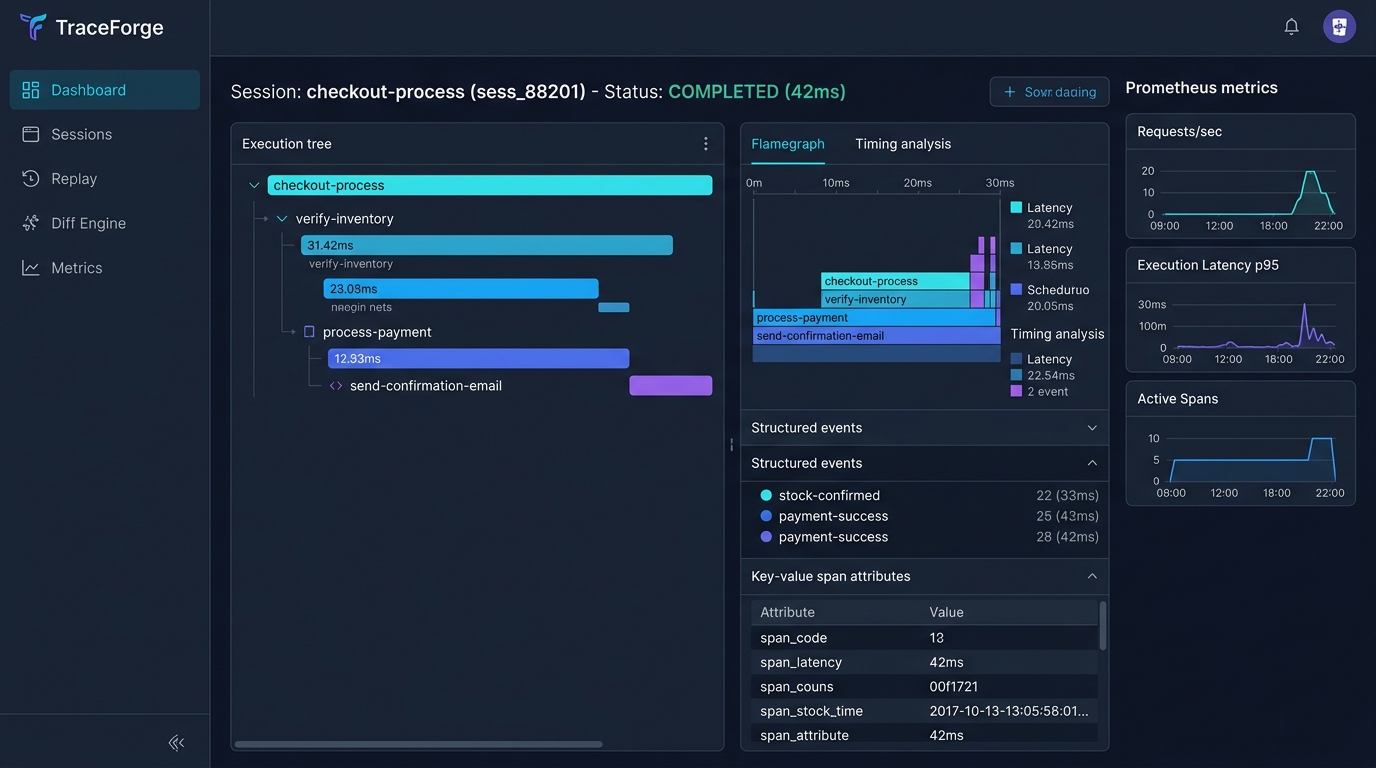
⚡ Overview
TraceForge is a complete, developer-first execution tracing, replay, and analysis platform for Python software. It helps software teams capture the exact execution graph of their applications—nested spans, parent-child relationships, durations, structured events, exceptions, state snapshots, and context propagation—across synchronous and asynchronous workflows.
TraceForge provides an end-to-end ecosystem comprising:
- Python SDK: Zero-dependency hot-path tracing with thread & task isolation (
contextvars). - Storage & Query Engine: High-performance SQLite batch writer & append-only repositories.
- Replay & Execution Diff Engine: Historical execution tree reconstruction and deep diff comparisons.
- FastAPI HTTP Gateway & Web Dashboard: Production-grade REST API, JWT authentication, Prometheus
/metrics, and embedded Web UI. - Command-Line Interface (
traceforge): Modular CLI for server lifecycle, replay analysis, visualization export, and project bootstrap. - Plugin Subsystem: Dynamic plugin loading, registration, and isolated lifecycle execution.
💡 Why TraceForge?
Most Python observability tools are either heavy APM platforms (requiring external SaaS collectors, agents, and complex cloud infrastructure) or simple logging libraries that lack execution graph awareness. TraceForge bridges this gap as a lightweight, SQLite-native platform with zero external infrastructure dependencies. Unlike standard OpenTelemetry setups, TraceForge includes a built-in execution replay engine to reconstruct historical function trees offline and a structural diff engine to compare execution paths and latency regressions across runs. It installs in seconds via pip and runs entirely within your local or self-hosted environment.
🌟 Key Features
| Feature | Description |
|---|---|
| Async-First Tracing | Native support for with and async with context managers, functions, and decorators. |
| Execution Replay | Reconstruct full historical execution graphs, session trees, timeline events, and state snapshots. |
| Execution Diff Engine | Compare two sessions/traces to detect timing regressions, structural execution branch shifts, and exceptions. |
| High-Performance Storage | Lock-free lockless ring-buffer async writer with SQLite persistence and zero-overhead hot-path emission. |
| Security Layer | JWT authentication, role-based access control (RBAC), and token rate-limiting middleware. |
| Web Dashboard & REST API | Embedded static dashboard (/dashboard), OpenAPI interactive docs (/docs), and /metrics. |
| Modular CLI | Comprehensive CLI tool (traceforge) to manage server instances, replay traces, export data, and inspect graphs. |
| Extensible Plugin System | Modular plugin registry and manager supporting lifecycle hooks (initialize, enable, shutdown). |
🏗️ Architecture Flow
External Clients / CLI / Web Dashboard
                 │
                 ▼
  Authentication & Security (JWT, RBAC, Rate-Limiter)
                 │
                 ▼
      FastAPI Gateway / REST API Engine
                 │
                 ▼
      TraceForgeApiService Facade
        ┌────────┴────────┬─────────────────┐
        ▼                 ▼                 ▼
   Query Engine     Replay Engine   Execution Diff Engine
        │                 │                 │
        └────────┬────────┴─────────────────┘
                 ▼
     Storage Engine (SQLite Batch Writer)
                 ▲
                 │
           Recorder Engine
                 ▲
                 │
      Tracer / SDK Core (ContextVars Propagation)
📦 Installation
# Basic installation from source
pip install .

# Installation with development dependencies (pytest, mypy, ruff, httpx)
pip install ".[dev]"

# Installation with optional features
pip install ".[websocket,yaml]"
Requires Python 3.12+.
🚀 Quickstart
1. Python SDK Usage
import traceforge

# Initialize Tracer & Recorder
tracer = traceforge.Tracer("order-service")
recorder = traceforge.Recorder(
    storage=traceforge.MemoryStorage(),
    exporters=[traceforge.ConsoleExporter()],
).start()
tracer.add_hook(recorder)

# Track execution with nested spans
with tracer.start_span("process-order") as span:
    span.set_attribute("customer.id", "cust_99812")

    with tracer.start_span("validate-inventory") as inv_span:
        inv_span.add_event("inventory-checked", payload={"sku": "ITEM-42", "qty": 1})

    with tracer.start_span("charge-card") as pay_span:
        pay_span.set_attribute("payment.method", "credit_card")

# Stop recorder when done
recorder.stop()
2. Async Context & Decorators
from traceforge import traced, Tracer

tracer = Tracer()

@traced(name="fetch-external-api")
async def fetch_user_data(user_id: str):
    # Async span automatically created and context-propagated
    return {"user_id": user_id, "status": "active"}

async with tracer.start_span("async-pipeline") as span:
    data = await fetch_user_data("usr_100")
    span.set_attribute("pipeline.complete", True)
3. Execution Replay & Diff Analysis
from traceforge.service.service import TraceForgeApiService
from traceforge.storage.drivers.sqlite import SQLiteStorageDriver

# Connect to database
driver = SQLiteStorageDriver("traceforge.db")
service = TraceForgeApiService(driver.connection_manager.get_connection())

# Replay session execution graph
session_replay = service.replay_session("sess_12345")
print(f"Session Status: {session_replay.session.status}")
print(f"Recorded Nodes: {len(session_replay.nodes)}")

# Compute execution diff between two sessions
diff_result = service.compare_sessions("sess_12345", "sess_67890")
print(f"Duration Change: {diff_result.duration_delta_ms:.2f}ms")
💻 Command-Line Interface (CLI)
TraceForge comes with a modular CLI tool:
# Initialize a new TraceForge project workspace
traceforge init --name my-project

# Launch the FastAPI Gateway server & Web Dashboard
traceforge server --host 0.0.0.0 --port 8000 --db traceforge.db

# Replay an execution session directly from the CLI
traceforge replay sess_12345 --db traceforge.db

# Generate visualization models (graph, timeline, flamegraph)
traceforge visualize sess_12345 --type flamegraph --db traceforge.db

# Export session traces to JSON or Markdown
traceforge export sess_12345 --format markdown --output session_report.md
🌐 Web Dashboard & REST API
Launch the HTTP Gateway:
python -m traceforge.gateway.server
- Web Dashboard:
http://localhost:8000/dashboard - Interactive API Documentation (Swagger):
http://localhost:8000/docs - Prometheus Metrics:
http://localhost:8000/metrics - Health Check:
http://localhost:8000/health
Key API Endpoints
POST /api/v1/auth/token: Acquire JWT Bearer tokensGET /api/v1/sessions: List recorded sessions with filtersGET /api/v1/sessions/{id}/replay: Retrieve historical session replay graphGET /api/v1/visualize/timeline/{id}: Fetch timeline visualization modelPOST /api/v1/diff/sessions: Compare two sessions for performance regressions
⚙️ Configuration System
TraceForge uses a hierarchical, immutable configuration loader:
- CLI Arguments (highest priority)
- Environment Variables (e.g.
TRACEFORGE_STORAGE__DATABASE_URI=app.db) - Configuration Files (
traceforge.yaml,traceforge.toml,traceforge.json) - Default Settings (lowest priority)
🧪 Testing & Verification
Run the test suite with coverage:
pytest --cov=traceforge
Run code formatting and type checks:
ruff check traceforge/
ruff format --check traceforge/
mypy traceforge/
📄 License
This project is licensed under the MIT License — see the LICENSE file for details.
1 maintainer

Download files
Download the file for your platform. If you're not sure which to choose, learn more about installing packages.
Source Distribution
Built Distribution
Filter files by name, interpreter, ABI, and platform.
If you're not sure about the file name format, learn more about wheel file names.
Copy a direct link to the current filters
File details
Details for the file traceforge_sdk-1.0.0.tar.gz.
File metadata
- Download URL: traceforge_sdk-1.0.0.tar.gz
- Upload date:
- Size: 315.5 kB
- Tags: Source
- Uploaded using Trusted Publishing? No
- Uploaded via:
twine/7.0.0 CPython/3.13.3
File hashes
| Algorithm | Hash digest | |
|---|---|---|
| SHA256 |
85ac1f463856a274ef4d646f196994c5bcf2a0563694ffd4e826af8e22a61ef5
|
|
| MD5 |
2010835cae8012b69203d180b398a812
|
|
| BLAKE2b-256 |
d38f9f437c5f434d1abf4908293caac37796ab52e1366ce158fef7d62caf8448
|
File details
Details for the file traceforge_sdk-1.0.0-py3-none-any.whl.
File metadata
- Download URL: traceforge_sdk-1.0.0-py3-none-any.whl
- Upload date:
- Size: 407.5 kB
- Tags: Python 3
- Uploaded using Trusted Publishing? No
- Uploaded via:
twine/7.0.0 CPython/3.13.3
File hashes
| Algorithm | Hash digest | |
|---|---|---|
| SHA256 |
0cb3c50616f52c0b82112252a7b3e7d9f8878e7d3f04da6ac8cbb038a6a98261
|
|
| MD5 |
b960fe2fee1381616284dcb8f9592500
|
|
| BLAKE2b-256 |
4ce24705a7cf6b3b8c1ce802be478fab911d59d146ce16a4198c661eb88b9967
|














