
TraceMotive
TraceMotive v0.3 is a local-first tracing and debugging tool for AI agent execution. It records sanitized Canonical traces and spans, keeps them in a persistent local SQLite Collector, and helps compare two observed runs by showing the first evidence-supported behavioral divergence and a safe place to begin investigating.
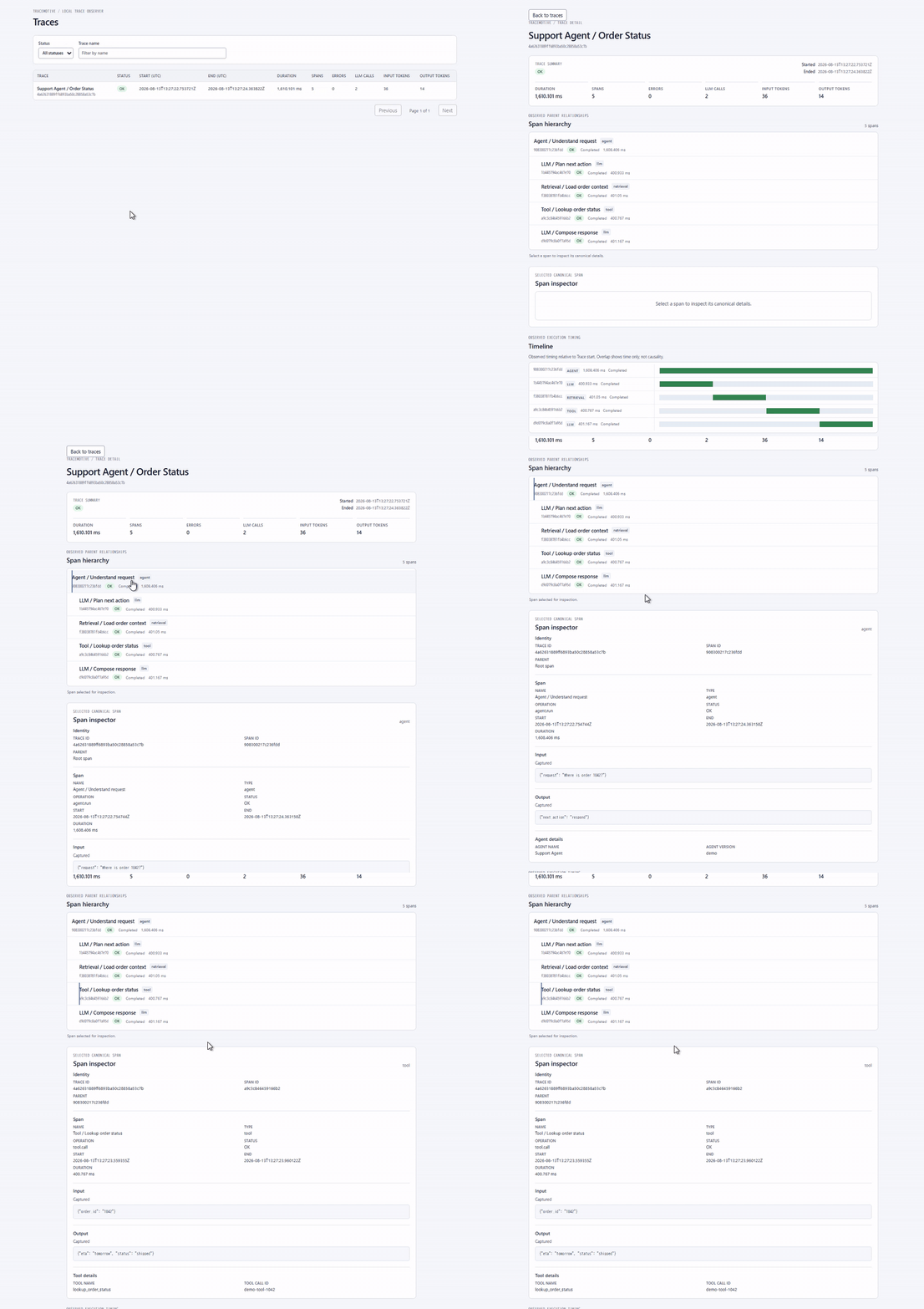
The long-term vision describes TraceMotive as “the causal debugger for AI agents”. The current v0.3 product provides evidence-supported behavioral divergence, deterministic findings, an investigation summary, and the existing v0.2 structural detail view. It does not provide automatic RCA, causal proof, replay, cloud sync, authentication, remote collectors, or additional framework adapters. See the long-term vision for non-normative future context.
Release and distribution status
The Python distribution and import package are both tracemotive. Releases
are distributed on PyPI as tracemotive. This checkout declares package
version 0.3.0. After publication, normal users can install the released
package from PyPI as described below. The fresh-checkout instructions later in
this README are for contributors and local development.
The OpenAI Agents SDK range supported by this release is >=0.17,<0.18; that
same range is declared in pyproject.toml.
Install from PyPI
For a normal installation of the released package:
pip install tracemotive
If you will run the local Collector, install the server extra:
pip install "tracemotive[server]"
The OpenAI Agents SDK integration is optional. To use it, install the
openai-agents extra:
pip install "tracemotive[openai-agents]"
To use both the Collector and the OpenAI Agents SDK integration, install both extras together:
pip install "tracemotive[server,openai-agents]"
Requirements
- Python 3.10 or newer. The package metadata declares
Requires-Python >=3.10; this checkout was locally validated with Python 3.12. - Node.js and npm are needed only for frontend development and release builds; normal installed-wheel users do not need them.
- An OpenAI API key is needed only for the real OpenAI Agents example, not for the deterministic test suite or core SDK smoke.
Quick trial — deterministic v0.3 investigation demo
This is a short first-run path for evaluation. It uses the deterministic Python SDK trace below, so it does not require an OpenAI API key. The released wheel contains the production UI; Node.js/npm are not required.
-
In a fresh Python environment, install the server extra:
python -m pip install "tracemotive[server]"
-
Start the single-command local experience:
tracemotive serve
It binds only to
127.0.0.1:8765, serves the packaged UI and APIs from the same origin, and stores sanitized traces in the platform-safe persistent database path. Usetracemotive serve --db :memory:only for an explicit ephemeral session. -
In a second terminal, run the deterministic demo seed command:
tracemotive demo
It creates a fresh reference/changed pair through the public SDK and local Collector path. No model, API key, or external network request is made.
-
Open the printed comparison URL in a browser. The v0.3 investigation view should show the first supported policy-output observation, later observed evidence, and uncertainty/context boundaries without claiming causality. The detailed v0.2 comparison remains available below the insight. Each invocation creates a fresh pair; if a later seed step fails, any already-persisted demo trace remains untouched and can be inspected or left in place for a subsequent run. OpenAI Agents example is the alternative path if you want to try a real framework integration; it makes a real model request and requires its documented extra and API key.
-
Share what worked, what was unclear, and what you expected to see in a GitHub Issue. Include your OS and Python/Node versions plus sanitized setup output, and do not include API keys or other credentials. Use SECURITY.md for security-sensitive reports.
Install from a fresh checkout
For contributors and local development, create and activate a virtual environment, then install the package from this repository and the Uvicorn server extra.
PowerShell:
python -m venv .venv
.venv\Scripts\Activate.ps1
python -m pip install -e ".[server]"
POSIX shells:
python3 -m venv .venv
. .venv/bin/activate
python -m pip install -e ".[server]"
The core install contains FastAPI only as its third-party runtime dependency.
The server extra adds Uvicorn. The optional openai-agents extra is not
installed by the core path:
python -m pip install -e ".[server,openai-agents]"
This is a development install from a repository checkout, distinct from the PyPI installation above.
Start the local server
For normal use, start both the Collector and packaged production UI together:
tracemotive serve
The server is loopback-only and has no configurable host. It always binds to
127.0.0.1; remote, LAN, and 0.0.0.0 serving are not supported. Check that
it is ready at http://127.0.0.1:8765/api/v1/health.
tracemotive serve uses persistent SQLite by default. The path precedence is
explicit --db, TRACEMOTIVE_DB, then the platform-safe default documented in
the release readiness checklist.
Startup/path failures are explicit; the server never silently falls back to
:memory: or another port.
For development and v0.1 compatibility, the direct Uvicorn Collector factory remains available:
python -m uvicorn tracemotive.collector:create_app --factory --host 127.0.0.1 --port 8765
Programmatic Repository() and bare create_app() calls still default to
SQLite :memory: for v0.1 compatibility.
Frontend development
The frontend development server is for contributors and frontend work only:
cd frontend
npm ci
npm run dev
Open http://127.0.0.1:5173. Vite proxies /api to the loopback Collector.
The production UI is embedded in the Python wheel and served by
tracemotive serve; normal users do not need this development workflow.
Minimal Python SDK usage
TraceMotive and content capture are independently disabled by default. A minimal local trace is:
import tracemotive

tracemotive.configure(
    enabled=True,
    endpoint="http://127.0.0.1:8765",
    capture_content=False,
)

with tracemotive.trace("demo"):
    with tracemotive.span("work"):
        pass

tracemotive.flush()
The stable Python SDK surface remains configure, trace, span, and flush.
Tracing failures, an unavailable Collector, and queue overflow do not fail the
instrumented Agent execution.
OpenAI Agents SDK integration and example
For a PyPI installation, install the optional integration in the active environment:
pip install "tracemotive[openai-agents]"
If the Collector is also being installed from PyPI, use
tracemotive[server,openai-agents] instead.
The supported range is openai-agents>=0.17,<0.18. Compatibility probes were
run against versions 0.17.0, 0.17.4, and 0.17.8 for the tracing processor
callbacks, span-data fields, processor registration functions,
ModelSettings.tool_choice, and the example's Agent settings.
Set OPENAI_API_KEY in the shell used to run the example. PowerShell and POSIX
examples are:
$env:OPENAI_API_KEY = "<your-key>"
export OPENAI_API_KEY="<your-key>"
With the Collector already running, execute:
python -m examples.openai_agents_example
The example uses local_only=True, which replaces the OpenAI Agents SDK
global tracing processor list with TraceMotive. This controls framework tracing
processors; it does not make model traffic local. OpenAI model requests may
still leave the machine. With local_only=False, existing OpenAI or
third-party processors remain active and may export framework traces
remotely. See the integration notes and
the example README.
Privacy and security
- TraceMotive is disabled by default and has no analytics or external TraceMotive telemetry. Its supported transport is the configured loopback Collector.
capture_content=Falseis the default even when TraceMotive is enabled. Turn it on only when local content capture is intentional.- Model-provider traffic is separate from TraceMotive telemetry. For example, the OpenAI example sends the model request to OpenAI.
- Tracing and content capture are independent controls: enabling tracing does not enable content capture.
- A framework adapter converts framework data into TraceMotive's Canonical representation. The shared v0.1 privacy boundary then normalizes and sanitizes sensitive values before an event enters the transport queue.
- The in-memory transport queue retains serialized Canonical event bytes only; it does not retain raw framework objects or unsanitized source values.
- The Collector persists only sanitized Canonical data in its configured local SQLite database. SQLite journal/WAL/SHM sidecars may also exist. TraceMotive does not provide local database encryption; protect the local data directory with the operating system's access controls.
- Redaction is part of this shared pre-transport boundary, not an independent redaction policy that each framework adapter is expected to define. The policy covers known/specified sensitive keys and recognizable credential patterns; it does not guarantee detection of every possible secret.
- Captured runtime content is untrusted data. The frontend renders it as data and does not execute embedded HTML, script, or arbitrary code.
Trace status and troubleshooting
Trace status describes the observed top-level workflow outcome: unset, ok,
or error. An error in a child Span does not automatically change the Trace
status; the UI also reports Span error counts separately.
If the example or SDK smoke reports that the Collector is unavailable, check
the health URL, confirm the Collector terminal is still running on
127.0.0.1:8765, and ensure the frontend is using 127.0.0.1:5173. The SDK
keeps Agent execution non-fatal when local telemetry cannot be delivered, but
the trace may be absent or incomplete. Restarting the default persistent
Collector keeps committed traces; an explicitly selected :memory: Collector
is cleared on restart.
Local validation
Python tests:
python -m unittest discover -s tests -v
Frontend tests and build:
cd frontend
npm ci
npm test
npm run build:package
Local wheel/sdist build and installed-package checks are documented in release readiness. These are maintainer and developer validation steps; end users should install TraceMotive from PyPI as described above.
Contributing
Contributions are welcome. Before making changes, read CONTRIBUTING.md. New contributors can start with issues labeled good first issue. Keep changes focused and within the Frozen v0.1 contract.
Security
Do not report security vulnerabilities in public Issues or pull requests. Read SECURITY.md and use GitHub Private Vulnerability Reporting from the repository Security page.
1 maintainer

Download files
Download the file for your platform. If you're not sure which to choose, learn more about installing packages.
Source Distribution
Built Distribution
Filter files by name, interpreter, ABI, and platform.
If you're not sure about the file name format, learn more about wheel file names.
Copy a direct link to the current filters
File details
Details for the file tracemotive-0.3.0.tar.gz.
File metadata
- Download URL: tracemotive-0.3.0.tar.gz
- Upload date:
- Size: 185.2 kB
- Tags: Source
- Uploaded using Trusted Publishing? No
- Uploaded via: twine/7.0.0 CPython/3.14.6
File hashes
| Algorithm | Hash digest | |
|---|---|---|
| SHA256 |
fa78210e8b64bd0c26401560638be922ebd244c6a22417de8e91722b9d0de00c
|
|
| MD5 |
ab532b247b3bb406dde98460c2cdfaff
|
|
| BLAKE2b-256 |
175b079ef5922ecf8dcc53dcc4b738c1d2ea0b904d753132f80a511c9878efa9
|
File details
Details for the file tracemotive-0.3.0-py3-none-any.whl.
File metadata
- Download URL: tracemotive-0.3.0-py3-none-any.whl
- Upload date:
- Size: 192.2 kB
- Tags: Python 3
- Uploaded using Trusted Publishing? No
- Uploaded via: twine/7.0.0 CPython/3.14.6
File hashes
| Algorithm | Hash digest | |
|---|---|---|
| SHA256 |
bf622200fb1d48f83ad781551e24862287194ef0fb0c63048b4935a9b7b5b551
|
|
| MD5 |
932819d45b5f5836dc54c5fba435a891
|
|
| BLAKE2b-256 |
266bebb0780c50c5e303d382c5ef6c98af5b7feb3811d7007a74b49a3a99ba36
|







