
Static map generator with points plots.

Project description
Traceplot
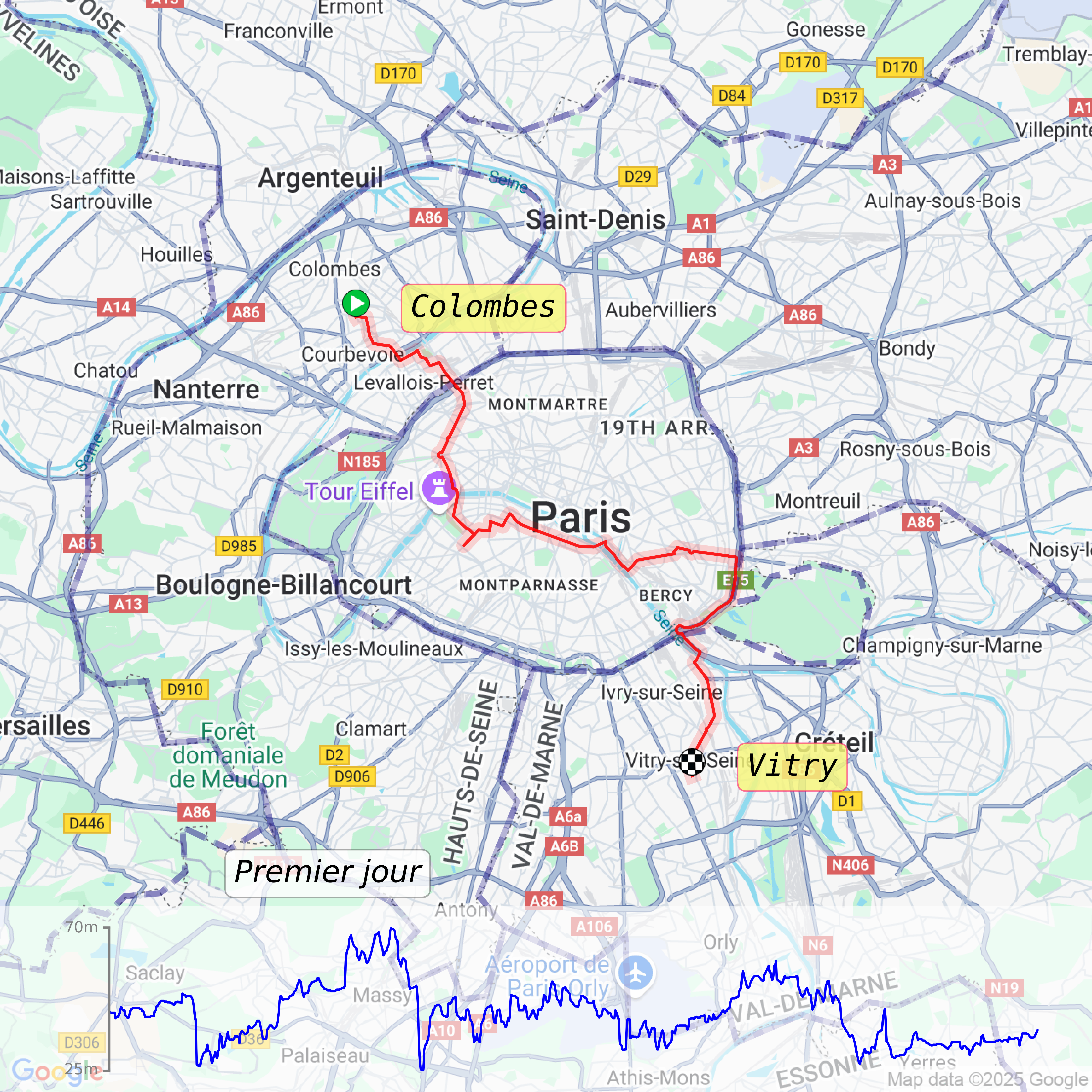
Traceplot is a library to generate static maps and plot points on it. You can download background maps from mapping services (Google Maps, Mapbox, OSM, ...) and plot your points on top. You can add markers, title, elevation graphs and more.
Here is a result you can get:
Installation
Traceplot is available on Pypi:
# Using uv
uv add traceplot
# Using pip
pip install traceplot
Usage
See more code in examples folder for loading points from GPX.
from traceplot.Trace import Trace
from traceplot.types import PointGeo
from traceplot.BackgroundImage import BackgroundImage

points_geo_manual: list[PointGeo] = [
    PointGeo(2.282259089265323, 48.88677456721743, 50),
    PointGeo(2.2746338, 48.8589385, 52),
    PointGeo(2.3850533122051463, 48.82797239213328, 60),
]

t: Trace = Trace(points_geo=points_geo_manual)

t.addBackgroundImage(
    background_img=BackgroundImage(
        bbox=(2.117, 48.704, 2.557, 48.994), image_path="out/background_paris.png"
    )
)
t.addMarker(
    points_geo[0],
    img_path="img/marker_start.png",
    label_text="Start",
    marker_scale=0.5,
    label_offset_x=0.05,
    label_box=dict(
        boxstyle="round",
        edgecolor=(1.0, 0.1, 0.4, 0.6),
        facecolor=(1.0, 0.8, 0.8, .7),
    ),
    fontfamily="monospace",
)
t.addPolygon(
    [PointGeo(2.1, 48.1, 10), PointGeo(2.1, 49.1, 20)],
    fill=False,
    linewidth=4.0,
    edgecolor=(36/255, 28/255, 143/255, 0.3),
    linestyle="--",
)
t.addElevationGraph(height_pct=0.17, backgroundColor="white", backgroundColorAlpha=0.6)
t.plotPoints(format_string="-r", linewidth=6, alpha=.25)
t.addTitle("Around Paris", center_x=0.5, center_y=0.2, fontsize=30, fontstyle="italic")
t.save("out/day_one.png")
t.show()
t.close()
Maps providers
Current implemented maps providers are:
- [done] Google Maps Static API
- [todo] Mapbox
- [todo] OSM
- [todo] Geoapify
Developpement
Here are some useful commands for developpement:
# Run tests
make test
# Run lint
make lint
# Format code
make format
# Type checking
make mypy
# Get coverage
make coverage
These commands are available in Makefile.


Download files
Download the file for your platform. If you're not sure which to choose, learn more about installing packages.
Source Distribution
Built Distribution
Filter files by name, interpreter, ABI, and platform.
If you're not sure about the file name format, learn more about wheel file names.
Copy a direct link to the current filters
File details
Details for the file traceplot-1.0.4.tar.gz.
File metadata
- Download URL: traceplot-1.0.4.tar.gz
- Upload date:
- Size: 73.0 kB
- Tags: Source
- Uploaded using Trusted Publishing? No
- Uploaded via: uv/0.8.2
File hashes
| Algorithm | Hash digest | |
|---|---|---|
| SHA256 |
5ffba8f0c6fedf993bdaacec2923feb8e3ec2f37be947e7593dde7927c4344d9
|
|
| MD5 |
ef3122650427586ae0338bbd81ffa92d
|
|
| BLAKE2b-256 |
8e867dbb72abb3d02c3ca372972d6767c60ed5953aacedc107d4d69f628dd8d1
|
File details
Details for the file traceplot-1.0.4-py3-none-any.whl.
File metadata
- Download URL: traceplot-1.0.4-py3-none-any.whl
- Upload date:
- Size: 10.3 kB
- Tags: Python 3
- Uploaded using Trusted Publishing? No
- Uploaded via: uv/0.8.2
File hashes
| Algorithm | Hash digest | |
|---|---|---|
| SHA256 |
3c5726fa360e98d92a186568f38948f7a42063799815db716634a54b0f320c04
|
|
| MD5 |
47111fb719b7e1cae0925266e2a516a0
|
|
| BLAKE2b-256 |
8ba5e01b01fbbddc337ea57a392d4a72c685dbe3ff6a316354a9fc1de3ec0bd7
|






