
Human-readable HTML tracebacks for Python exceptions

Project description
Tracebacks for Humans (and Machines)
Fixing bugs is easier with well formatted error messages. Console, HTML and JSON.




Installation
Python scripts or REPL
pip install tracerite
import tracerite; tracerite.load()
Any error message after that call will be prettified. Handles any syntax errors and uncaught exceptions, even captures logging.exception (optionally).
IPython or Jupyter Notebook
%pip install tracerite
%load_ext tracerite
This enables tracebacks in text or HTML format depending on where you are running. Add to ~/.ipython/profile_default/startup/tracerite.ipy to make it load automatically for all your ipython and notebook sessions. Alternatively, put the two lines at the top of your notebook.
If you are using UV, consider running with your other dependencies:
uvx --with tracerite --with numpy jupyter lab
FastAPI
Add the extension loader at the top of your app module:
from tracerite import patch_fastapi; patch_fastapi()
This monkeypatches Starlette error handling and FastAPI routing to work with HTML tracebacks. Note: this runs regardless of whether you are in production mode or debug mode, so you might want to call that function only conditionally in the latter.
Sanic
Comes with TraceRite built in. HTML reports are available in debug mode, and console messages are always formatted by Tracerite.
Clarity in complex situations
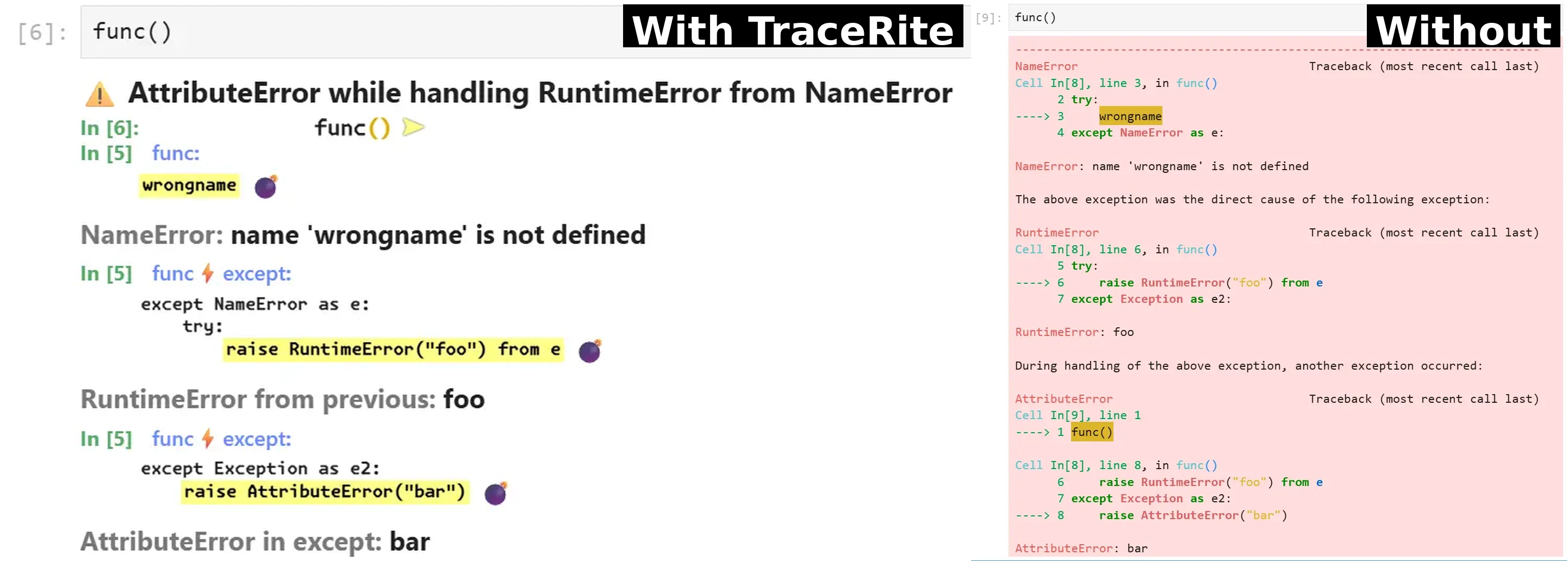
What you see is always in the order it was executed
Context manager enter/exit
When a with or async with fails, the built in handling of Python 3.11 marks the whole block, and 3.12.9+ marks the initializing expression like it was the culprit (e.g. function call marked incorrectly). We bypass that logic and differentiate between (1) the expression failing, (2) entering and (3) exiting the block.

Features
- Chronological order - Single timeline with the program entry point is at top, and the finally uncaught exception bottom.
- Minimalistic output - Smart pruning to show only relevant pieces of information, excluding library internals where not relevant and avoiding any repetition.
- ExceptionGroups - Full tracebacks of the subexceptions from exceptions that occurred in parallel execution.
- Variable inspection - See the values of your variables in a pretty printed HTML format, Terminal or JSON-compatible machine-readable dict.
- JSON output - Intermediady dict format is JSON-compatible, useful for machine processing and used by our HTML and TTY modules.
- HTML output - Works in Jupyter, Colab, and web frameworks such as FastAPI and Sanic as the debug mode error handler.
- TTY output - Colorful, formatted tracebacks for terminal applications and Python REPL.
- Custom Styling - Theme with your colors by defining CSS variables or tty.COLORS.
- Automatic dark mode - Saves your eyes.

except* handling are shown clearly in both HTML and terminal output.
Documentation
For the public API — including HTML rendering, terminal output, and the machine-readable chain format returned by extract_chain — see the API documentation. For contributors, see the Development guide.
License
Public Domain or equivalent.
Release history Release notifications | RSS feed


Download files
Download the file for your platform. If you're not sure which to choose, learn more about installing packages.
Source Distribution
Built Distribution
Filter files by name, interpreter, ABI, and platform.
If you're not sure about the file name format, learn more about wheel file names.
Copy a direct link to the current filters
File details
Details for the file tracerite-2.6.0.tar.gz.
File metadata
- Download URL: tracerite-2.6.0.tar.gz
- Upload date:
- Size: 105.0 kB
- Tags: Source
- Uploaded using Trusted Publishing? No
- Uploaded via: uv/0.11.29 {"installer":{"name":"uv","version":"0.11.29","subcommand":["publish"]},"python":null,"implementation":{"name":null,"version":null},"distro":{"name":"Ubuntu","version":"24.04","id":"noble","libc":null},"system":{"name":null,"release":null},"cpu":null,"openssl_version":null,"setuptools_version":null,"rustc_version":null,"ci":true}
File hashes
| Algorithm | Hash digest | |
|---|---|---|
| SHA256 |
3534f1563fb61308d6e3edaeefcfb8636d849b12b75bc72f37b7f04c8676f1e5
|
|
| MD5 |
999b6210be63a46c9130c72a221150f4
|
|
| BLAKE2b-256 |
6ddf95f9ce5940191cbdea4bfae84d19f7f5f608e1d3a6abb47ac63843d9c6ff
|
File details
Details for the file tracerite-2.6.0-py3-none-any.whl.
File metadata
- Download URL: tracerite-2.6.0-py3-none-any.whl
- Upload date:
- Size: 111.4 kB
- Tags: Python 3
- Uploaded using Trusted Publishing? No
- Uploaded via: uv/0.11.29 {"installer":{"name":"uv","version":"0.11.29","subcommand":["publish"]},"python":null,"implementation":{"name":null,"version":null},"distro":{"name":"Ubuntu","version":"24.04","id":"noble","libc":null},"system":{"name":null,"release":null},"cpu":null,"openssl_version":null,"setuptools_version":null,"rustc_version":null,"ci":true}
File hashes
| Algorithm | Hash digest | |
|---|---|---|
| SHA256 |
163efc0261889fc3b4b586193ce20c1ca34f82fb3c7d9c4c39ac1b4dc1168989
|
|
| MD5 |
71d301c7257f0197fcfbea77c95e08c7
|
|
| BLAKE2b-256 |
e795e182db02724d6d52caadf3b1ef81281a08a4d0565466c7348a1d54387954
|






