
traceroutine
Process mining for LLM agent traces — where the tokens and the time actually go.
Observability platforms attribute spend by who: per user, per team, per API key.
traceroutine attributes it by how — per execution path.
An agent's cost is a property of its trajectory, not of its request.
One command, zero instrumentation
If you use Claude Code, the data is already on your disk. No exporter, no collector, no account, no arguments:
$ uvx traceroutine
reading ~/.claude/projects as claude-code — nothing leaves this machine
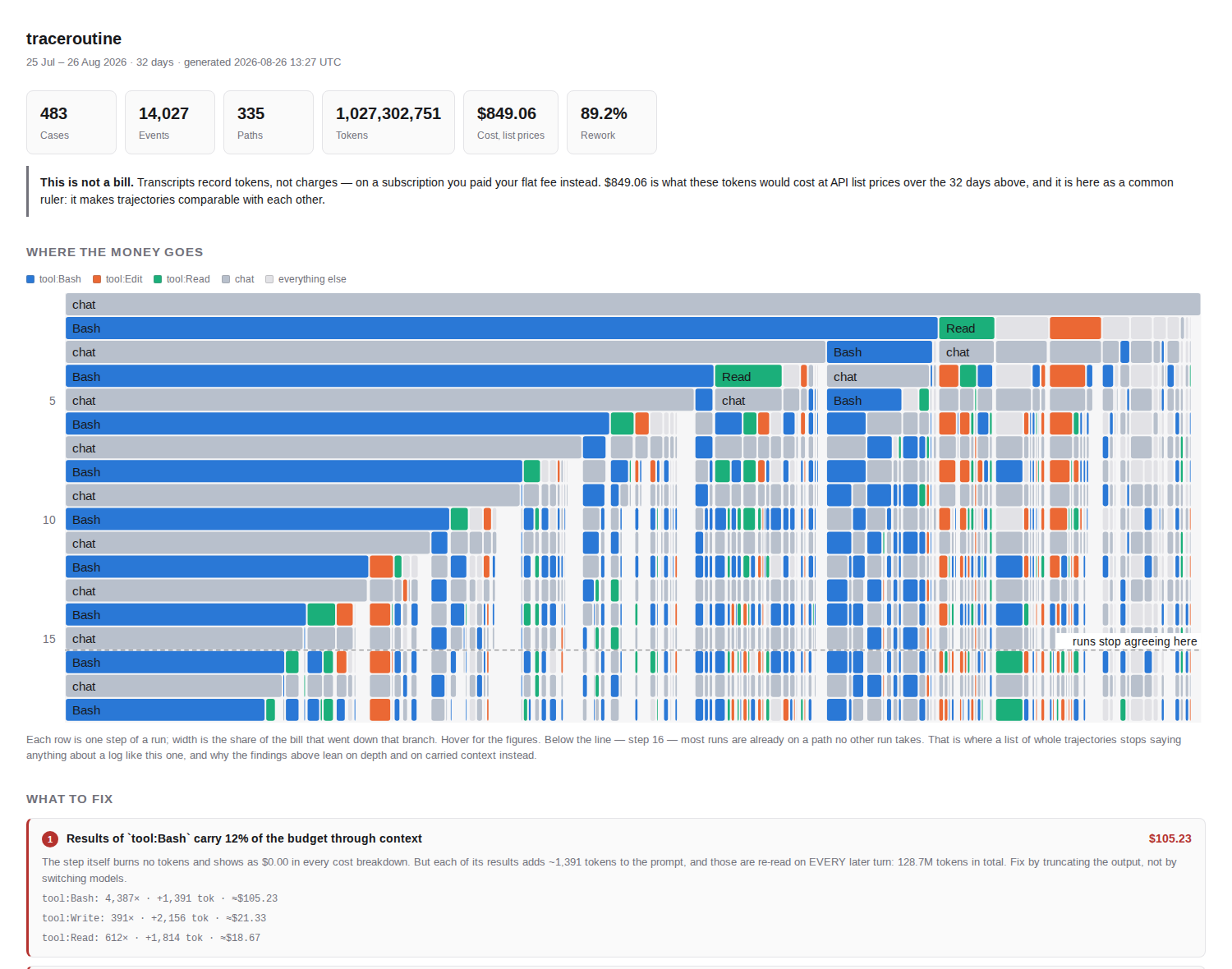
471 cases · 329 paths · $804.69 at list prices · rework 89.1% -> report.html
  1. Results of `tool:Bash` carry 12% of the budget through context (up to $96.05)
  2. Loop `chat → tool:Edit` runs an extra time (up to $51.33)
  3. Working rhythm `chat → tool:Bash` — 40% of the budget
Three seconds, and that is my own history. The first finding is the whole thesis:
Results of
tool:Bashcarry 12% of the budget through context. The step itself burns no tokens and shows as $0.00 in every cost breakdown. But each of its results adds ~1,400 tokens to the prompt, and those are re-read on every subsequent turn: 116M tokens carried in total. Fix by truncating output, not by switching models.
A tool call costs nothing when it happens and keeps costing for the rest of the run. That is why the unit of cost is the path, not the request.
Context re-reading is a known phenomenon — vendors document it. What is missing everywhere else is the attribution: not "context grows", but which step's results carried how many dollars across the rest of the trajectory.
The dollars are API list prices, not an invoice. I pay a $20 subscription, so this is what those tokens would have cost — which is its own small finding: a flat fee hides a month that prices out at $805. Cross-checked against ccusage on the same instant: the two agree to within 0.1% on every token category.
Does it read my code?
A fair question: you are pointing a tool at your entire working history.
Nothing leaves your machine. The command above makes no network calls at all. There is no telemetry, no config in your home directory, no account.
What the event log holds: activity names (tool:Bash, chat), timestamps, token
counters, cost, opaque IDs, and the basename of the project directory. No message
text, no tool arguments, no file paths, no commands. That is enforced in the adapter
rather than in the report — because reports get shared — and it is tested:
test_no_message_content_leaks_into_spans, test_project_name_is_basename_only.
One command can talk to a cloud, and only if you ask it to. traceroutine abstract --backend anthropic sends the list of distinct activity names — a few dozen short
strings — to group them semantically. Nothing else: no events, no counters, no content.
The default path above never runs it. To see that list before trusting anyone with it,
look at the mapping: keys in activity_map.yaml; they are exactly what would be sent.
--backend ollama keeps the step on your own machine.
Install
uvx traceroutine                 # no install
pip install traceroutine         # or into your environment
When there is more to ask
The one-shot is ingest → abstract → report with sensible defaults. Each is also a
command, for when the defaults are not what you want:
ingest <src> |
traces → a canonical event log (parquet) |
abstract <log> |
raw span labels → activity_map.yaml, a semantic vocabulary |
report <log> |
findings + process graph: -f html or -f md |
check <log> |
conformance against a declared process.yaml; exit codes for CI |
diff <a> <b> |
compare two logs: a prompt release, a model swap, two cohorts |
- The guide — sources, the case notion that decides everything, the abstraction layer, what gets computed, architecture.
- Conformance — declaring how the agent is supposed to work, and failing CI when it stops doing that. This is the part no dashboard does.
Reading a log other than Claude Code's: traceroutine --from <file-or-directory>.
OpenTelemetry JSON and OpenAI-style chat transcripts are detected automatically.
When this will not help you
Stated up front, because a tool that always returns five findings eventually returns five invented ones.
Variant analysis has a measured limit. Path uniqueness climbs from 17% at 1–3 steps
to 100% at 26+. Above roughly 13 steps trajectories stop repeating, and "rare paths eat
the budget" becomes the tautology "expensive runs are expensive". So the variant lens
fits short structured agents — RAG, support, routing — and not long ones. When repeated
paths drop below 50%, traceroutine says so and suppresses those findings instead of
dressing up a tautology.
What still works on long runs: context inflation, cohort diff, and conformance — all
three get stronger with trace length rather than degenerating.
Status
Alpha, and honest about it: it runs end to end on three sources, its cost accounting agrees with an independently written tool to within 0.1%, and it has 153 tests. The interactive graph renderer is not built yet.
License
Apache-2.0
1 maintainer

Download files
Download the file for your platform. If you're not sure which to choose, learn more about installing packages.
Source Distribution
Built Distribution
Filter files by name, interpreter, ABI, and platform.
If you're not sure about the file name format, learn more about wheel file names.
Copy a direct link to the current filters
File details
Details for the file traceroutine-0.2.0.tar.gz.
File metadata
- Download URL: traceroutine-0.2.0.tar.gz
- Upload date:
- Size: 509.9 kB
- Tags: Source
- Uploaded using Trusted Publishing? No
- Uploaded via:
twine/7.0.0 CPython/3.14.3
File hashes
| Algorithm | Hash digest | |
|---|---|---|
| SHA256 |
88a50201fb21289fe660c9cff99359ea6dabdff5e0a928c232e343201735cbb5
|
|
| MD5 |
27ee8eea2a028cec0be562c2eed4e6b0
|
|
| BLAKE2b-256 |
70a7e3de297fe82ee30232262b83835ad6bce7712b4d908c4349b5ca7f5d3e34
|
File details
Details for the file traceroutine-0.2.0-py3-none-any.whl.
File metadata
- Download URL: traceroutine-0.2.0-py3-none-any.whl
- Upload date:
- Size: 82.8 kB
- Tags: Python 3
- Uploaded using Trusted Publishing? No
- Uploaded via:
twine/7.0.0 CPython/3.14.3
File hashes
| Algorithm | Hash digest | |
|---|---|---|
| SHA256 |
18ab53eef29968547e54126c6f9de6bcf576786a7b64b61cb013fac0102618a6
|
|
| MD5 |
d486f35f937d19c32c84377f2a0d5217
|
|
| BLAKE2b-256 |
cc0eafdb3cfc6835fb569630f8eedec391f0418d201a089ba44d372e5c1bc37e
|







