
Tracking by Association with Transformers


Project description





Trackastra - Tracking by Association with Transformers
Trackastra is a cell tracking approach that links already segmented cells in a microscopy timelapse by predicting associations with a transformer model that was trained on a diverse set of microscopy videos.

Reference
Paper: Trackastra: Transformer-based cell tracking for live-cell microscopy
@inproceedings{gallusser2024trackastra,
  title={Trackastra: Transformer-based cell tracking for live-cell microscopy},
  author={Gallusser, Benjamin and Weigert, Martin},
  booktitle={European conference on computer vision},
  pages={467--484},
  year={2024},
  organization={Springer}
}
Examples
| Nuclei tracking | Bacteria tracking |
|---|---|
Installation
This repository contains the Python implementation of Trackastra.
Please first set up a Python environment (with Python version 3.10 or higher), preferably via conda or mamba.
Simple installation
Trackastra can then be installed from PyPI using pip:
pip install trackastra
With ILP support
For tracking with an integer linear program (ILP, which is optional)
conda create --name trackastra python=3.10 --no-default-packages
conda activate trackastra
conda install -c conda-forge -c gurobi -c funkelab ilpy
pip install "trackastra[ilp]"
📄 Development installation
conda create --name trackastra python=3.10 --no-default-packages
conda activate trackastra
conda install -c conda-forge -c gurobi -c funkelab ilpy
git clone https://github.com/weigertlab/trackastra.git
pip install -e "./trackastra[ilp,dev]"
📄 Notes/Troubleshooting
-
For the optional ILP linking, this will install
motileand binaries for two discrete optimizers:-
The Gurobi Optimizer. This is a commercial solver, which requires a valid license. Academic licenses are provided for free, see here for how to obtain one.
-
The SCIP Optimizer, a free and open source solver. If
motiledoes not find a valid Gurobi license, it will fall back to using SCIP.
-
-
On MacOS, installing packages into the conda environment before installing
ilpycan cause problems. -
2024-06-07: On Apple M3 chips, you might have to use the nightly build of
torchandtorchvision, or worst case build them yourself.
Usage: Tracking with a pretrained model
The input to Trackastra is a sequence of images and their corresponding cell (instance) segmentations.
The available pretrained models are described in detail here.
Tracking with Trackastra can be done via:
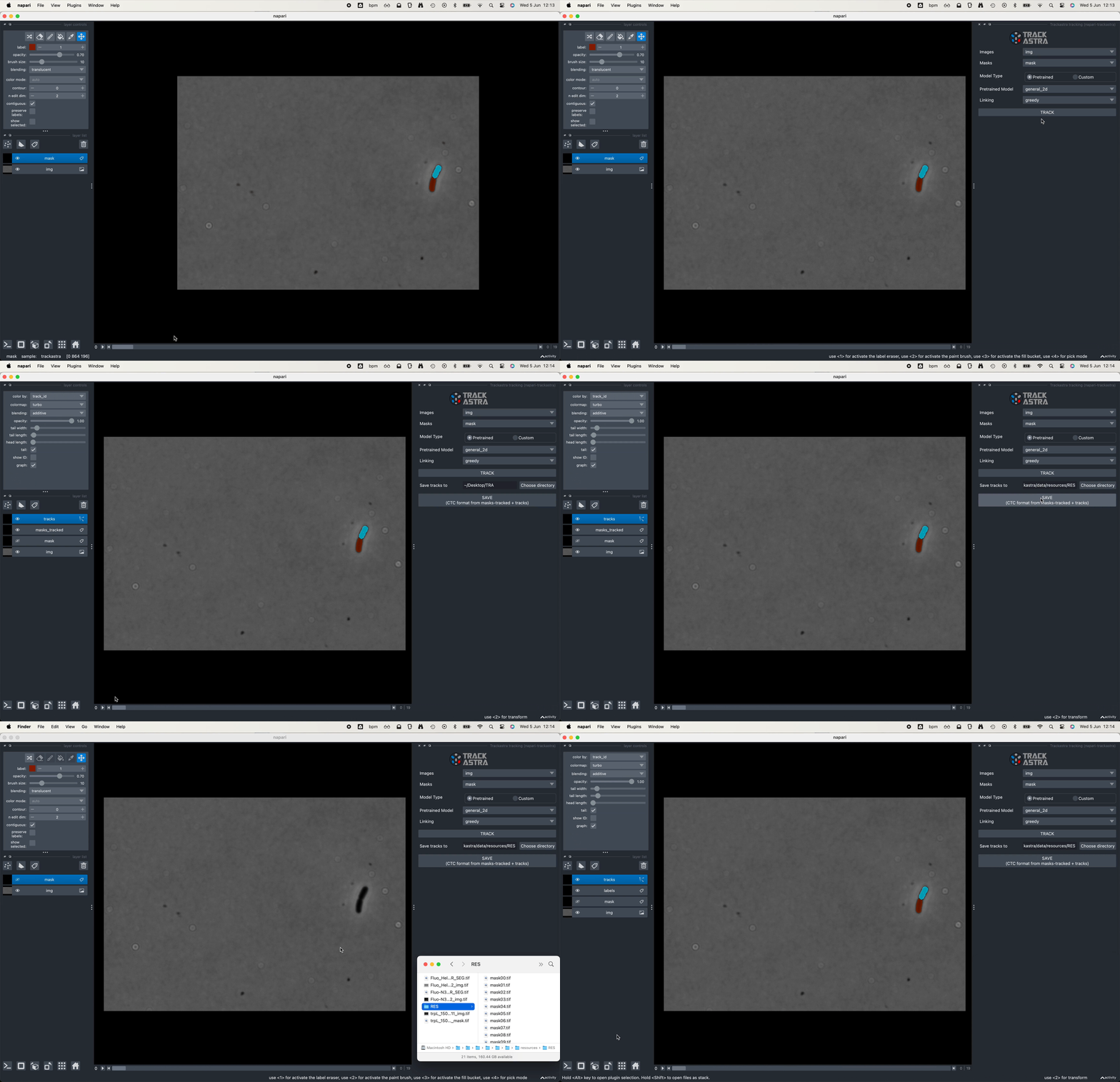
 Napari plugin
For a quick try of Trackastra on your data, please use our napari plugin, which already comes with pretrained models included.
 Python API
All you need are the following two numpy arrays:
imgs: a microscopy time lapse of shapetime,(z),y,x.masks: corresponding instance segmentation of shapetime,(z),y,x.
The predicted associations can then be used for linking with several modes:
greedy_nodiv(greedy linking with no division) - fast, no additional dependenciesgreedy(greedy linking with division) - fast, no additional dependenciesilp(ILP based linking) - slower but more accurate, needsmotile
Apart from that, no hyperparameters to choose :)
📄 Show python example
import torch
from trackastra.model import Trackastra
from trackastra.tracking import graph_to_ctc, graph_to_napari_tracks, write_to_geff
from trackastra.data import example_data_bacteria

device = "automatic" # explicit choices: [cuda, mps, cpu]

# load some test data images and masks
imgs, masks = example_data_bacteria()

# Load a pretrained model
model = Trackastra.from_pretrained("general_2d", device=device)

# or from a local folder
# model = Trackastra.from_folder('path/my_model_folder/', device=device)

# Track the cells
track_graph, masks_tracked = model.track(imgs, masks, mode="greedy")  # or mode="ilp", or "greedy_nodiv"

# Relabel the masks and write to cell tracking challenge format (CTC),
ctc_tracks, ctc_masks = graph_to_ctc(
    track_graph,
    masks_tracked,
    outdir="tracked_ctc",
)

# Or write to the graph exchange file format (GEFF)
write_to_geff(
    track_graph,
    masks_tracked,
    outdir="tracked_geff.zarr",
)
You then can visualize the tracks with napari:
# Visualise in napari
napari_tracks, napari_tracks_graph, _ = graph_to_napari_tracks(track_graph)

import napari
v = napari.Viewer()
v.add_image(imgs)
v.add_labels(ctc_masks)
v.add_tracks(data=napari_tracks, graph=napari_tracks_graph)
 Fiji (via TrackMate)
Trackastra is one of the available trackers in TrackMate. For installation and usage instructions take a look at this tutorial.
 Docker images
Some of our models are available as docker images on Docker Hub. Currently, we only provide CPU-based docker images.
Track within a docker container with the following command, filling the <VARIABLES>:
docker run -it -v <LOCAL_DATA_DIR>:/data -v <LOCAL_RESULTS_DIR>:/results bentaculum/trackastra-track:<MODEL_TAG> --input_test /data/<DATASET_IN_CTC_FORMAT> --detection_folder <TRA/SEG/ETC>"
📄 Show example with Cell Tracking Challenge model:
wget http://data.celltrackingchallenge.net/training-datasets/Fluo-N2DH-GOWT1.zip
chmod -R 775 Fluo-N2DH-GOWT1
docker pull bentaculum/trackastra-track:model.ctc-linking.ilp
docker run -it -v ./:/data -v ./:/results bentaculum/trackastra-track:model.ctc-linking.ilp --input_test data/Fluo-N2DH-GOWT1/01 --detection_folder TRA
 Command Line Interface
After installing Trackastra, simply run in your terminal
trackastra track --help
to build a command for tracking directly from images and corresponding instance segmentation masks saved on disk as two series of TIF files.
Usage: Training a model on your own data
To run an example
- clone this repository and got into the scripts directory with
cd trackastra/scripts. - download the Fluo-N2DL-HeLa dataset from the Cell Tracking Challenge into
data/ctc.
Now, run
python train.py --config example_config.yaml
Generally, training data needs to be provided in the Cell Tracking Challenge (CTC) format, i.e. annotations are located in a folder containing one or several subfolders named TRA, with masks and tracklet information.
Release history Release notifications | RSS feed


Download files
Download the file for your platform. If you're not sure which to choose, learn more about installing packages.
Source Distribution
Built Distribution
Filter files by name, interpreter, ABI, and platform.
If you're not sure about the file name format, learn more about wheel file names.
Copy a direct link to the current filters
File details
Details for the file trackastra-0.4.1.tar.gz.
File metadata
- Download URL: trackastra-0.4.1.tar.gz
- Upload date:
- Size: 52.0 MB
- Tags: Source
- Uploaded using Trusted Publishing? No
- Uploaded via: twine/6.1.0 CPython/3.13.7
File hashes
| Algorithm | Hash digest | |
|---|---|---|
| SHA256 |
e62be9b6c0a107aa1612f12a7c044e8dda996609b6459f79ae24a639fe0c8f1b
|
|
| MD5 |
512e1e307e3763b69d67ccc925ad3aa6
|
|
| BLAKE2b-256 |
a73fd708a4d6ca11e724a92ce09801abbf622d1c4ca748bd26f88a14b70b4360
|
File details
Details for the file trackastra-0.4.1-py3-none-any.whl.
File metadata
- Download URL: trackastra-0.4.1-py3-none-any.whl
- Upload date:
- Size: 50.5 MB
- Tags: Python 3
- Uploaded using Trusted Publishing? No
- Uploaded via: twine/6.1.0 CPython/3.13.7
File hashes
| Algorithm | Hash digest | |
|---|---|---|
| SHA256 |
75406988419459e7ab1fe3d7a947ce3aaee24717fe42b5fe0ab5c5bd5550f419
|
|
| MD5 |
ab2a05b88de87353649943da9e5b5e94
|
|
| BLAKE2b-256 |
44bd5b244ee659c2ff6a60a07108828ab532d69404ecb2c0ea8816740b1e51be
|






