
Trackflow


Real-time people and object tracking in Python and in the browser. Trackflow runs current detectors (RF-DETR, RT-DETRv2, D-FINE, DEIMv2, YOLO26) with ByteTrack, BoT-SORT, OC-SORT or BoostTrack, streams or exports track data (Parquet, JSONL, CSV, MOTChallenge, HTML), and includes text-based track search, a local run inspector with 4-point floorplan projection, and anonymization.
trackflow run crossing.mp4 with the default settings, at 12 FPS on an Apple M4 Pro CPU. Footage: 8 seconds of DiagonalCrosswalkYongeDundas.webm by Raysonho, CC0.
trackflow inspect on the same clip: scrubbing with live video frames, jumping to recovery events, searching Track Cards with natural language, and comparing ByteTrack against BoT-SORT.
Try it in the browser without installing anything: obendidi.github.io/trackflow.
Quickstart
One command for your hardware — no system CUDA Toolkit, cuDNN, or TensorRT setup required:
| Environment | Zero-install (uvx) |
Installed (pip) |
Notes |
|---|---|---|---|
| CPU / macOS (default) | uvx trackflow-python run street.mp4 |
pip install trackflow-python |
Auto-pins Apple Silicon to P-cores (~14 FPS on M4 Pro CPU) |
| macOS GPU (CoreML) | uvx trackflow-python run street.mp4 --device coreml |
pip install trackflow-python |
Runs detector + static-batch OSNet Re-ID on Apple GPU |
| NVIDIA CUDA | uvx trackflow-python-cuda run street.mp4 |
pip install trackflow-python-cuda |
Bundles CUDA + cuDNN; auto-selects CUDA (~37–105 FPS on T4) |
| NVIDIA TensorRT (Py 3.11+) | uvx trackflow-python-tensorrt run street.mp4 |
pip install trackflow-python-tensorrt |
Bundles CUDA 13 + TensorRT 10 FP16; cached engines (~94–136 FPS on T4) |
Or run via Docker with zero Python setup (--target cpu, cuda, or tensorrt in Dockerfile):
docker build --target tensorrt -t trackflow:tensorrt .
docker run --rm --gpus all -v "$PWD:/work" \
  -v "$HOME/.cache/huggingface:/root/.cache/huggingface" \
  -v "$HOME/.cache/trackflow:/root/.cache/trackflow" \
  trackflow:tensorrt run /work/street.mp4
After a run finishes, open the local visual inspector:
trackflow inspect          # opens the most recent run
trackflow info             # checks GPU, execution providers, and recommended command
Each run writes to a new folder (runs/run-1, runs/run-2, …). Pass -o <dir> to choose one yourself; it must be empty, so a new run never mixes with files from an old one.
Model weights download from Hugging Face on first run and are cached locally. Every preset is pinned to a specific model revision, so the same command gives the same weights later. ONNX Runtime picks CUDA or CPU automatically; --device cpu|cuda|coreml|tensorrt forces one and fails loudly with the exact install command if the matching runtime isn't present. TensorRT builds and caches its engine once per model under ~/.cache/trackflow/trt_cache/ (subsequent runs load in <1s) and automatically keeps rfdetr-* in FP32 so DINOv2 activations don't overflow. Never keep both onnxruntime and onnxruntime-gpu in the same environment—they share the onnxruntime import path and silently break GPU providers.
Verified NVIDIA T4 GPU throughput & parity (CUDA FP32 vs TensorRT 10 FP16)
Measured on an isolated venv (system CUDA/TRT paths stripped, proving zero-config pip library preloading) on an NVIDIA Tesla T4 (vtest.avi, 5-frame box IoU parity vs CPU + 40-frame steady-state timing):
| Model | CUDA FP32 | TensorRT FP16 (warm) | Speedup vs CUDA | Mean IoU vs CPU | Cold build → Warm load |
|---|---|---|---|---|---|
rtdetr-v2-r18 (default) |
26.4 ms (37.9 FPS) | 8.95 ms (111.7 FPS) | 3.0x | 0.988 (37/37) |
205 s → 0.95 s |
dfine-s |
21.5 ms (46.5 FPS) | 8.21 ms (121.8 FPS) | 2.6x | 0.980 (54/53) |
262 s → 0.68 s |
dfine-m |
33.7 ms (29.6 FPS) | 10.65 ms (93.9 FPS) | 3.2x | 0.984 (42/42) |
247 s → 1.32 s |
yolo26n (AGPL) |
11.5 ms (86.8 FPS) | 7.37 ms (135.6 FPS) | 1.6x | 0.985 (26/26) |
261 s → 0.16 s |
rfdetr-nano |
18.1 ms (55.4 FPS) | FP32 (trt_fp16=False) |
— | 1.000 (30/30) |
Kept in FP32 (FP16 overflows DINOv2) |
rfdetr-medium |
40.5 ms (24.7 FPS) | FP32 (trt_fp16=False) |
— | 1.000 (31/31) |
Kept in FP32 (FP16 overflows DINOv2) |
osnet Re-ID (8 crops) |
19.2 ms | 10.5 ms (static B=8) | 1.8x | 1.000 cos (0.99996) |
0.15 s load |
Usage
Tracking and exports
trackflow run crowd.mp4 \
  --model rfdetr-medium \
  --tracker botsort --reid osnet \
  --classes person,backpack \
  --export parquet,jsonl,csv,mot,html
The source can be a video file, a folder of images (read in natural order, frame_2 before frame_10; set the rate with --fps), an RTSP/HTTP stream URL, or a camera index. Press Ctrl-C to stop a run: Trackflow stops reading frames and still writes every output, including the track cards that trackflow search and trackflow inspect read. A second Ctrl-C aborts without writing them.
The Parquet export can be queried directly with DuckDB:
SELECT track_id, COUNT(*) AS frames, AVG(confidence) AS avg_conf
FROM 'runs/run-1/tracks.parquet'
GROUP BY track_id ORDER BY frames DESC;
--export mot writes tracks.txt in MOTChallenge format, which TrackEval scores directly (HOTA, IDF1, MOTA).
Trackers
--tracker |
Algorithm | How it works |
|---|---|---|
bytetrack (default) |
ByteTrack (ECCV 2022) | Matches boxes by overlap, then uses low-confidence detections to keep tracks through partial occlusion. The fastest option. |
botsort |
BoT-SORT (2022) | ByteTrack plus camera-motion compensation, and appearance matching with --reid osnet. |
ocsort |
OC-SORT (CVPR 2023) | Trusts detections over motion predictions: after an occlusion it re-matches a track to its last observed box and corrects the motion model along the gap. |
boosttrack |
BoostTrack++ (2024) | Raises the confidence of weak detections that fit a track or look like a new object, and matches with motion, shape and, with --reid osnet, appearance. Compensates for camera motion. |
All four keep a person and a bag in the same box as separate tracks, and only give out an ID once a track has been seen on more than one frame. OC-SORT and BoostTrack report a track again after a miss once it has matched three frames in a row; in between, the annotated video shows it as a coasting box. The browser playground uses ByteTrack.
Benchmarks across 4 official datasets (81 videos, ~59,800 frames)
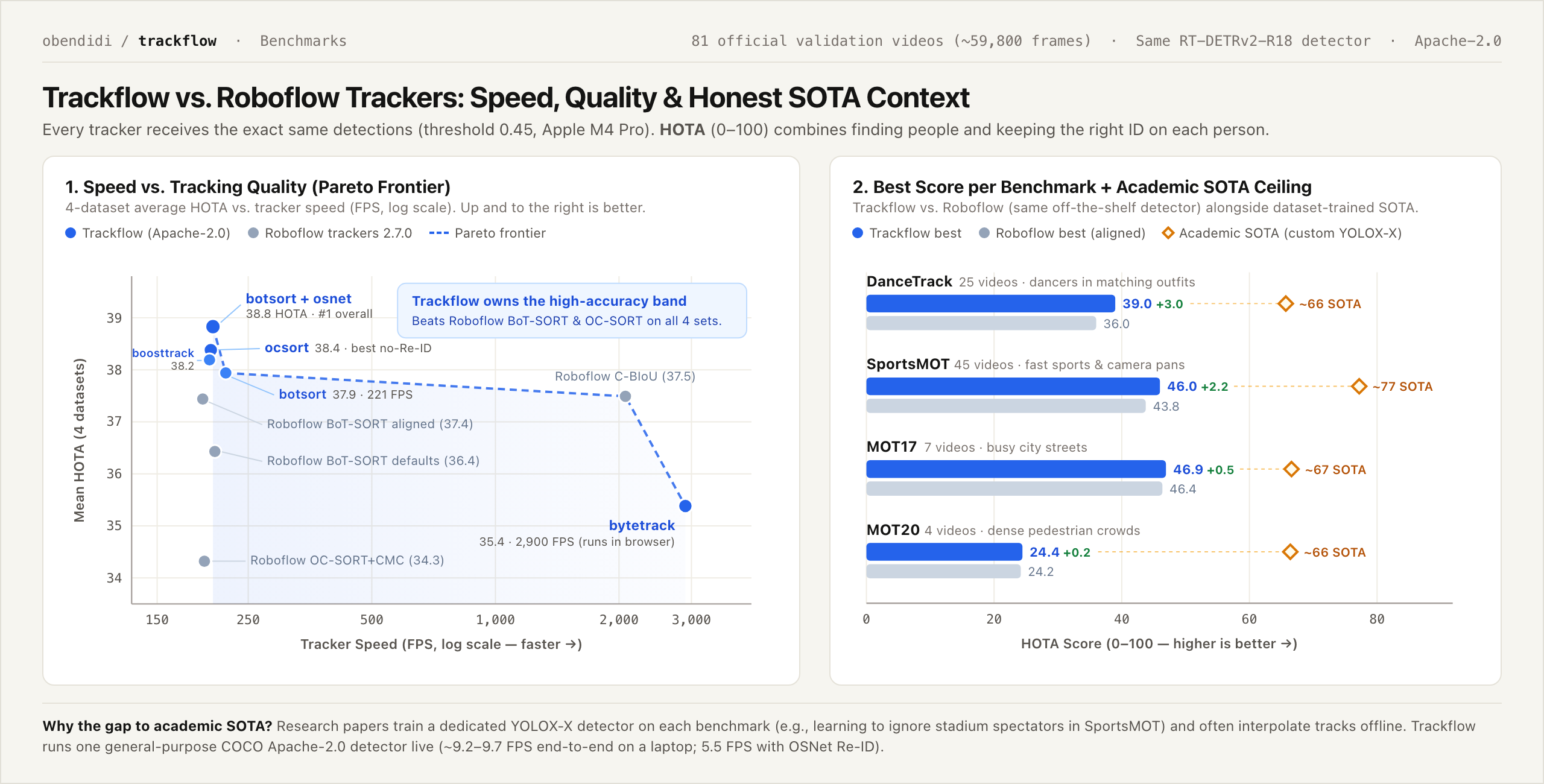
Every tracker below receives the exact same detections from Trackflow's default Apache-2.0 detector (rtdetr-v2-r18, confidence threshold 0.45, Apple M4 Pro) so the comparison isolates the tracking algorithm.
| Tracker | DanceTrack (25) | SportsMOT (45) | MOT17 (7) | MOT20 (4) | Mean HOTA | Total ID switches | Tracker FPS | End-to-End FPS |
|---|---|---|---|---|---|---|---|---|
botsort --reid osnet |
39.0 | 45.0 | 46.9 | 24.4 | 38.8 | 6,435 | 205 | 5.5 |
ocsort (no Re-ID) |
37.9 | 46.0 | 46.3 | 23.3 | 38.4 | 5,501 | 203 | 9.2 |
boosttrack (no Re-ID) |
37.5 | 44.4 | 46.9 | 24.0 | 38.2 | 5,549 | 201 | 9.2 |
botsort (no Re-ID) |
36.7 | 44.3 | 46.5 | 24.3 | 37.9 | 6,475 | 221 | 9.3 |
bytetrack (also in browser) |
33.1 | 39.8 | 45.1 | 23.5 | 35.4 | 7,038 | 2,900 | 9.7 |
Roboflow cbiou (0.45/0.50) |
36.0 | 43.4 | 46.4 | 24.2 | 37.5 | 7,533 | 2,072 | 9.6 |
Roboflow botsort (0.45/0.50) |
35.9 | 43.6 | 46.3 | 24.0 | 37.4 | 6,922 | 194 | 9.2 |
Roboflow ocsort+cmc (0.45) |
33.4 | 43.8 | 44.2 | 15.9 | 34.3 | 8,057 | 196 | 9.2 |
Roboflow botsort (defaults 0.60/0.70) |
39.6 | 50.0 | 42.6 | 13.6 | 36.4 | 4,349 | 207 | 9.2 |
How to read this chart and table:
- HOTA (0–100, higher is better): Overall tracking accuracy. It combines two halves equally: finding the right people in each frame and keeping the same ID on each person as they move and cross paths.
- ID switches (lower is better): How many times a tracker accidentally swaps or resets a person's ID mid-video.
- Tracker FPS vs. End-to-End FPS: Tracker FPS is the matching step alone; End-to-End FPS includes running the object detector (and person Re-ID crops when enabled) on every frame on a laptop.
- The 4 benchmarks: DanceTrack (25 videos of dancers wearing identical outfits—tests motion tracking when appearance doesn't help), SportsMOT (45 fast-moving basketball, football, and volleyball clips with panning cameras), MOT17 (7 busy street scenes), and MOT20 (4 dense pedestrian crowds, second halves).
- Why academic SOTA is higher (~66–77 HOTA): Leaderboard papers train a specialist detector (usually YOLOX-X) directly on each benchmark—so it learns, for example, to ignore spectators in SportsMOT stands—and often fill gaps offline after the video ends. Trackflow runs one off-the-shelf, general-purpose Apache-2.0 COCO detector live, frame by frame. On SportsMOT, Roboflow's high default threshold (
0.60/0.70) similarly filters out blurry spectators (50.0HOTA), at the cost of dropping occluded pedestrians on MOT17 (42.6) and MOT20 (13.6). Pass--threshold 0.6in Trackflow on sports broadcasts if you want the same crowd filtering.
scripts/eval_benchmarks.py reproduces all four datasets and the Roboflow trackers==2.7.0 controls (scored with trackers eval, which matches TrackEval). Scenes vary widely, so test on footage like yours with trackflow compare or --export mot.
Text search and re-identification
# Highlight matching people live (uses CLIP by default; --vlm embeddinggemma for clothing and accessories)
trackflow run mall.mp4 --query "person in red jacket with a backpack"

# Search a completed run later without re-running detection
# (requires a run created with --query or --vlm clip|siglip|siglip2|embeddinggemma)
trackflow search runs/run-1 "person carrying a suitcase"

# Export top search hits as time windows + normalized boxes for SAM 3 or a VLM
trackflow search runs/run-1 "person in red jacket" --top-k 5 --pad-s 1.0 --export-prompts prompts.json

# Give people who leave and come back their earlier ID (opt-in, uses person Re-ID)
trackflow run mall.mp4 --reid osnet --reid-merge
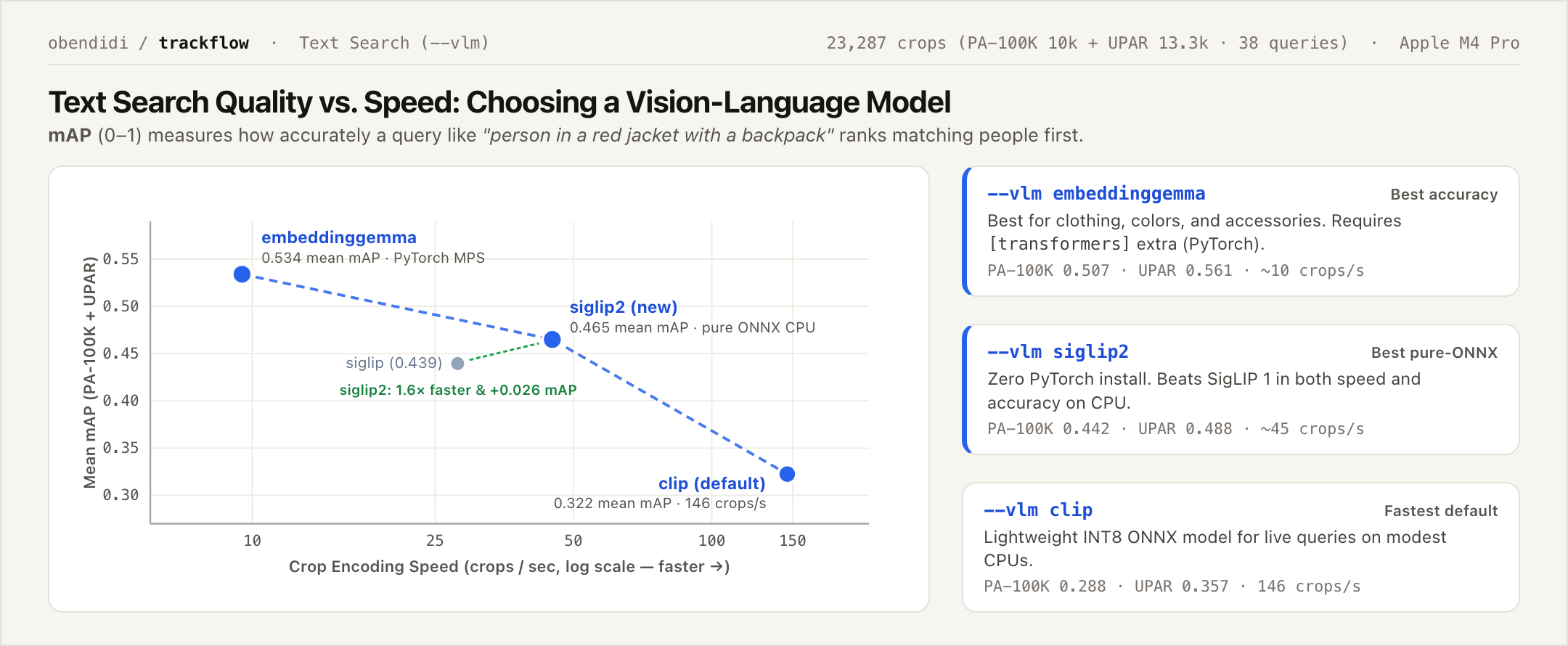
Tested across all 23,287 labeled pedestrian crops in the PA-100K (10,000 crops, 18 clothing/accessory queries) and UPAR (13,287 crops, 20 color/attribute queries) validation sets, measured with mAP (Mean Average Precision, 0–1: how accurately matching people rank at the top of search results) via scripts/eval_text_search.py:
--vlm embeddinggemma(PyTorch, needspip install "trackflow-python[transformers]"): highest accuracy (0.507 PA-100K / 0.561 UPAR mAP, ~10 crops/s on M4 Pro MPS).--vlm siglip2(pure ONNX INT8, zero PyTorch): best lightweight choice (0.442 PA-100K / 0.488 UPAR mAP at ~45 crops/s on CPU—both faster and more accurate than SigLIP 1 at0.420 / 0.459and ~28 crops/s).--vlm clip(default, pure ONNX INT8): fastest option (146 crops/s on CPU,0.288 / 0.357mAP).
CLIP, SigLIP, SigLIP 2 and EmbeddingGemma 2 match images to text; they cannot reliably distinguish two people in similar clothes, so they are never used for identity. --reid osnet runs a dedicated person re-identification model. Re-entry merging only considers people who left before the new track appeared and stayed gone longer than the tracker's own recovery window, and merges only when one earlier person is clearly the best match; look-alikes stay separate. It can still make mistakes on low-resolution footage, which is why it is off by default.
Inspector, tracker comparison, and floorplan projection
# Compare ByteTrack and BoT-SORT on the same video and open the inspector
trackflow compare crowd.mp4 --trackers bytetrack,botsort --inspect

# Open the inspector on any existing run
trackflow inspect runs/run-1
trackflow inspect starts a local web UI where you can scrub through frames, jump to flagged ID switches or recoveries, search track cards, compare two runs, and click 4 ground corners to project 2D tracks onto a top-down floorplan.
Line counting
# Count people crossing a doorway, in each direction
trackflow run entrance.mp4 --line "door=640,300,640,720"
--line takes a line segment in image pixels as name=x1,y1,x2,y2 (the name is optional) and can be repeated. A track crosses when the bottom center of its box moves from one side of the segment to the other and stays there for 0.3 seconds, so a box edge that jumps back and forth when people overlap doesn't count each jump. A crossing to the right of the direction from the first point to the second counts as in, the other way as out. For a line drawn left to right, in means moving down the frame, and the annotated video shows an arrow on the in side. Every crossing counts, so someone who steps back over the line adds one in each direction. Put the line where people's feet stay in view: when someone closer to the camera hides a person's legs, that person's box ends higher, and a line just above their feet can count a crossing that didn't happen.
The totals go to the run summary, summary.json (line_counts) and the HTML report. Each crossing is also a line_crossed event in events.json, with the track ID, class and direction. In Python, pass lines=[CountingLine("door", (640, 300), (640, 720))] to TrackflowPipeline; stream() reports crossings in each frame's events.
Anonymization
# Blur the top of each person box, where the head usually is
trackflow run lobby.mp4 --anonymize face-blur

# Draw stick figures on a blank canvas (box-based, no pose model; no video pixels saved)
trackflow run lobby.mp4 --anonymize skeleton
Available modes are face-blur, blur, pixelate, and skeleton. Anonymization covers every detected person box (including low-confidence detections and people briefly missed by the tracker), even when you track other classes, and anonymized runs do not write person crops or thumbnails. It is best effort: if the detector misses someone in a frame, that person is not blurred in that frame.
face-blur runs no face detector. It blurs an ellipse over the top 30% of each person box, so it misses a face that isn't there, for example on someone lying down, bending over or holding their arms up. Use blur or pixelate to cover the whole person.
Benchmarking
trackflow benchmark crowd.mp4 --models rfdetr-nano,rtdetr-v2-r18 --trackers bytetrack,botsort --split-screen
Runs the selected detector/tracker pairs on a video (or a generated synthetic clip if no video is given) and writes a Markdown and JSON report. --split-screen also renders the first run's annotated video next to a panel with the 2017 version's published speed. The 2017 README only gives that number, not per-frame results to replay.
FPS and track counts don't tell you whether IDs are right. For accuracy, run on a labeled sequence with --export mot and score the result with TrackEval.
Models
Weights download automatically from Hugging Face on first use. trackflow models lists every preset (--json for scripts).
| Preset | Model | Size (FP32) | License | Notes |
|---|---|---|---|---|
rtdetr-v2-r18 (default) |
RT-DETRv2 ResNet-18 (640×640) | ~81 MB | Apache-2.0 | Balanced default for crowded scenes |
rfdetr-nano |
RF-DETR Nano (384×384) | ~108 MB | Apache-2.0 | Fast on Apple Silicon and WebGPU |
rfdetr-small |
RF-DETR Small (512×512) | ~115 MB | Apache-2.0 | |
rfdetr-medium |
RF-DETR Medium (576×576) | ~121 MB | Apache-2.0 | |
rfdetr-base |
RF-DETR Base (560×560) | ~108 MB | Apache-2.0 | |
rfdetr-large |
RF-DETR Large (704×704) | ~136 MB | Apache-2.0 | Most accurate preset; needs the transformers extra |
dfine-n |
D-FINE Nano (640×640) | ~15 MB | Apache-2.0 | Small download |
dfine-s |
D-FINE Small (640×640) | ~42 MB | Apache-2.0 | Compact COCO-only ONNX |
dfine-m |
D-FINE Medium (640×640) | ~79 MB | Apache-2.0 | Highest Apache-2.0 ONNX MOT17 HOTA |
yolo26n … yolo26x |
YOLO26 Nano to XLarge (640×640) | 10–223 MB | AGPL-3.0 | Commercial use needs an Ultralytics license |
deimv2-atto |
DEIMv2 Atto (320×320) | ~2 MB | Non-commercial | Tiny edge model, FP32 only |
deimv2-s |
DEIMv2 Small, DINOv3 backbone (640×640) | ~41 MB | Non-commercial + DINOv3 | FP32 only |
Most presets also have --precision fp16 and int8 variants. Trackflow itself is Apache-2.0, but each model's weights carry their own license, so check the table before shipping a product. With ByteTrack on the MOT17 split used for the tracker scores:
| Preset | HOTA | IDF1 | MOTA |
|---|---|---|---|
dfine-m |
46.5 | 55.1 | 39.2 |
rtdetr-v2-r18 (default) |
45.1 | 53.9 | 39.8 |
rfdetr-large |
44.3 | 51.1 | 35.9 |
rfdetr-medium |
42.9 | 49.7 | 34.8 |
yolo26n |
37.4 | 41.4 | 27.9 |
rfdetr-nano |
36.5 | 40.5 | 28.2 |
dfine-m scores highest here (46.5 HOTA with ByteTrack, 46.9 with BoT-SORT) while rtdetr-v2-r18 remains the faster default (10.0 vs 7.3 FPS on M4 Pro CoreML). Test on footage like yours before switching.
You aren't limited to presets. -m also takes any compatible ONNX repo on Hugging Face (owner/repo), a local .onnx file, or, with the extra installed, any Transformers object-detection checkpoint as hf:owner/repo:
pip install "trackflow-python[transformers]"
trackflow run crowd.mp4 -m rfdetr-large
trackflow run crowd.mp4 -m hf:PekingU/rtdetr_v2_r50vd --device mps
Re-ID and text-search models:
| Flag | Model | Size | License | Used for |
|---|---|---|---|---|
--reid osnet |
OSNet-AIN x1.0 person Re-ID | ~9 MB | MIT code; weights trained on MSMT17 (check dataset terms for commercial use) | BoT-SORT and BoostTrack appearance, and --reid-merge |
--vlm clip |
CLIP ViT-B/32 (INT8) | ~153 MB | MIT | Default for --query and search |
--vlm siglip |
SigLIP Base (INT8) | ~205 MB | Apache-2.0 | Better on fine clothing/attribute queries |
--vlm siglip2 |
SigLIP 2 Base (INT8) | ~378 MB | Apache-2.0 | Strongest pure-ONNX search (no PyTorch) |
--vlm embeddinggemma |
EmbeddingGemma 2 (PyTorch, needs [transformers]) |
~1.5 GB | Apache-2.0 | Best on clothing and accessory queries |
Python API
Run a video and write the same files as the CLI:
from trackflow import TrackflowPipeline

pipeline = TrackflowPipeline(
    model="rfdetr-medium",
    tracker="botsort",
    reid="osnet",                         # person Re-ID for BoT-SORT
    query="person wearing a red jacket",  # scored with CLIP (vlm="clip" by default when query is set)
    anonymize="face-blur",
)
summary = pipeline.run("crowd.mp4")       # or output_dir="runs/crowd"
print(f"{summary.unique_tracks} unique tracks at {summary.avg_fps:.1f} FPS")
Or feed frames from your own loop and get tracks back, with nothing written to disk:
import cv2
from trackflow import TrackflowPipeline

pipeline = TrackflowPipeline(model="rfdetr-nano")
cap = cv2.VideoCapture("rtsp://camera.local/stream")

def frames():
    while True:
        ok, frame = cap.read()
        if not ok:
            return
        yield frame  # BGR uint8

for result in pipeline.stream(frames(), fps=25):
    for track in result.tracks:
        print(result.frame_idx, track.track_id, track.class_name, track.bbox)
To use your own model, pass any object with a detect(frame_bgr) -> list[Detection] method as detector=. A custom tracker goes in tracker_factory=, which takes any object with update(detections, frame_bgr=None) -> list[Track]. The built-in trackers are exported too (ByteTracker, BotSortTracker, OcSortTracker, BoostTracker), so you can tune one, for example tracker_factory=lambda: BoostTracker(use_cmc=False) for a fixed camera. The package ships type hints (py.typed), and Detector and Tracker are exported as protocols.
Agent skills
Use Trackflow — and its ONNX computer-vision deployment checklist — from Claude Code, Codex, Antigravity, Cursor, or OpenCode by installing the bundled skills (or point doc-fetchers at llms.txt):
trackflow: run local tracking, line counting, text search, floorplan projection, anonymization, and exports.onnx-vision-deploy: empirical checklist for ONNX vision deployment across CPU, CUDA, Apple Silicon CoreML, and browser WebGPU/WASM parity.
npx skills add obendidi/trackflow
Migration & integration guides
- Migrating from Google Cloud Video Intelligence (
OBJECT_TRACKING) - Migrating from AWS Rekognition (
StartPersonTracking/ People Pathing) - Using Trackflow alongside SAM 3 (track & filter locally, segment selectively)
Changelog
What changed in each version is in CHANGELOG.md and on the releases page.
License
Apache-2.0 — see LICENSE. Model weights are downloaded separately and keep their own licenses (see Models).
The original 2017 Tracking-with-darkflow codebase (YOLOv2 + DeepSORT + TensorFlow 1.0) is kept on the legacy-2017 branch and v1.0-legacy-2017 tag under GPL-3.0.
1 maintainer

Metadata
1 maintainer
Release files for trackflow-python-cuda 0.6.1
For a detailed explanation of source distributions (sdists) and built distributions (wheels), please see the package formats documentation.
Source distribution (sdist)
| File | Size | Uploaded | Provenance | Actions |
|---|---|---|---|---|
| trackflow_python_cuda-0.6.1.tar.gz | 104.3 kB | With provenance | Details for trackflow_python_cuda-0.6.1.tar.gz |
Built distribution (wheel)
| File | Interpreter | ABI | Platform | Actions Reset |
|---|---|---|---|---|
| trackflow_python_cuda-0.6.1-py3-none-any.whl | Python 3 | none | any | Details for trackflow_python_cuda-0.6.1-py3-none-any.whl |
Total release size: 217.4 kB
Release files / trackflow_python_cuda-0.6.1.tar.gz
| Download URL | trackflow_python_cuda-0.6.1.tar.gz |
|---|---|
| Size | 104.3 kB |
| Tags | Source |
|
SHA-256 checksum How to use checksums |
645bbc37e90acdedc5e194bbeb8d7926ba138d688c25c62537a9c143376bfc3c
|
|
BLAKE2b-256 checksum How to use checksums |
297522cc3f43ac58802791c3ead0634888af67833614dd868cc403ad6eb41f03
|
| Upload date | |
|
Uploaded using Trusted Publishing? What is trusted publishing? |
Yes |
| Uploaded via |
twine/7.0.0 CPython/3.13.16
|
Provenance
Provenance describes where a file came from. On PyPI, provenance is shared via attestations, which provide a verifiable record of the build or publishing details. View details, limitations and caveats.


PyPI Publish Attestation
PyPI verified that this artifact, at this checksum, originated from the publisher listed below.
Signed by GitHub Actions, verified by PyPI on Nov 27, 2026.
Transparency logRelease files / trackflow_python_cuda-0.6.1-py3-none-any.whl
| Download URL | trackflow_python_cuda-0.6.1-py3-none-any.whl |
|---|---|
| Size | 113.2 kB |
| Tags | Python 3 |
|
SHA-256 checksum How to use checksums |
49519dcbdafaaad41d79d9c0ae06b4f9e3cfef1c3e1d319d482baf42e6b99ab2
|
|
BLAKE2b-256 checksum How to use checksums |
3e5b8fad589b0488978857d4cae0a8be11226d23567412c2010f553a6c9dd6c5
|
| Upload date | |
|
Uploaded using Trusted Publishing? What is trusted publishing? |
Yes |
| Uploaded via |
twine/7.0.0 CPython/3.13.16
|
Provenance
Provenance describes where a file came from. On PyPI, provenance is shared via attestations, which provide a verifiable record of the build or publishing details. View details, limitations and caveats.
PyPI Publish Attestation
PyPI verified that this artifact, at this checksum, originated from the publisher listed below.
Signed by GitHub Actions, verified by PyPI on Nov 27, 2026.
Transparency logSecurity for trackflow-python-cuda 0.6.1
Provenance
Provenance describes where a file came from. On PyPI, provenance is shared via attestations, which provide a verifiable record of the build or publishing details. View details, limitations and caveats.
Full provenance
Both files in this release have been uploaded with provenance metadata.
Attestation for trackflow_python_cuda-0.6.1.tar.gz
PyPI Publish Attestation
PyPI verified that this artifact, at this checksum, originated from the publisher listed below.
Signed by GitHub Actions, verified by PyPI on Nov 27, 2026.
Transparency logA note on package security
PyPI is a repository for distributing packages, not a service for auditing them. While third-party security researchers and our staff do their best to detect and remove malicious packages, PyPI cannot guarantee the quality, security or suitability of any given package.
To learn more about protecting yourself from malicious actors, visit our package security documentation.













