
trackmend

trackmend repairs a macOS Music library full of local files: YouTube rips, old MP3 collections, albums saved as one long file. It cleans the titles, finds the real artwork, album, year, genre and track number, adds lyrics, removes duplicate copies and cuts full albums into one track per song.
It works through the Music app itself, not just on a folder of files. It reads the
library from Music, finds each track by its persistent ID, and makes Music take every
change. Every command only shows what it would do until you add --apply, every change
is backed up first, and trackmend undo puts everything back.
What it does
| Command | What it does |
|---|---|
scan |
Read-only report: missing artwork, artist or album, titles full of video noise, YouTube channels as artists, duplicates, wrong durations, long files, files that are not music |
tags |
Cleans the title ((Official Video), VEVO, - Topic, Artist - Title), then finds the track on Deezer and writes the title, artist, album, album artist, year, genre, track number and 1000×1000 artwork |
review |
Shows the doubtful matches tags did not dare to write, with the old and new artwork side by side, and writes the ones you accept |
lyrics |
Adds missing lyrics from LRCLIB, checked against the duration |
dedup |
Finds the same song twice (same artist and title, duration within 4 s) and keeps the best copy (favorite, most played, with lyrics, best bit rate) |
split |
Cuts a full album or a mix into tracks, from YouTube chapters, a text track list or a Deezer album lined up on the silences, then replaces the long file in Music |
reimport |
Adds again the tracks whose duration Music shows wrongly |
undo |
Puts back the tags, artwork, lyrics and tracks a run changed |
It never downloads music. It only works on the files already in your library.
Report preview
A sample library of twelve YouTube-style files (real names, silent audio), before and
after tags, lyrics and dedup, run against the real Deezer, LRCLIB and iTunes
services (and a YouTube search for the last-resort thumbnail):
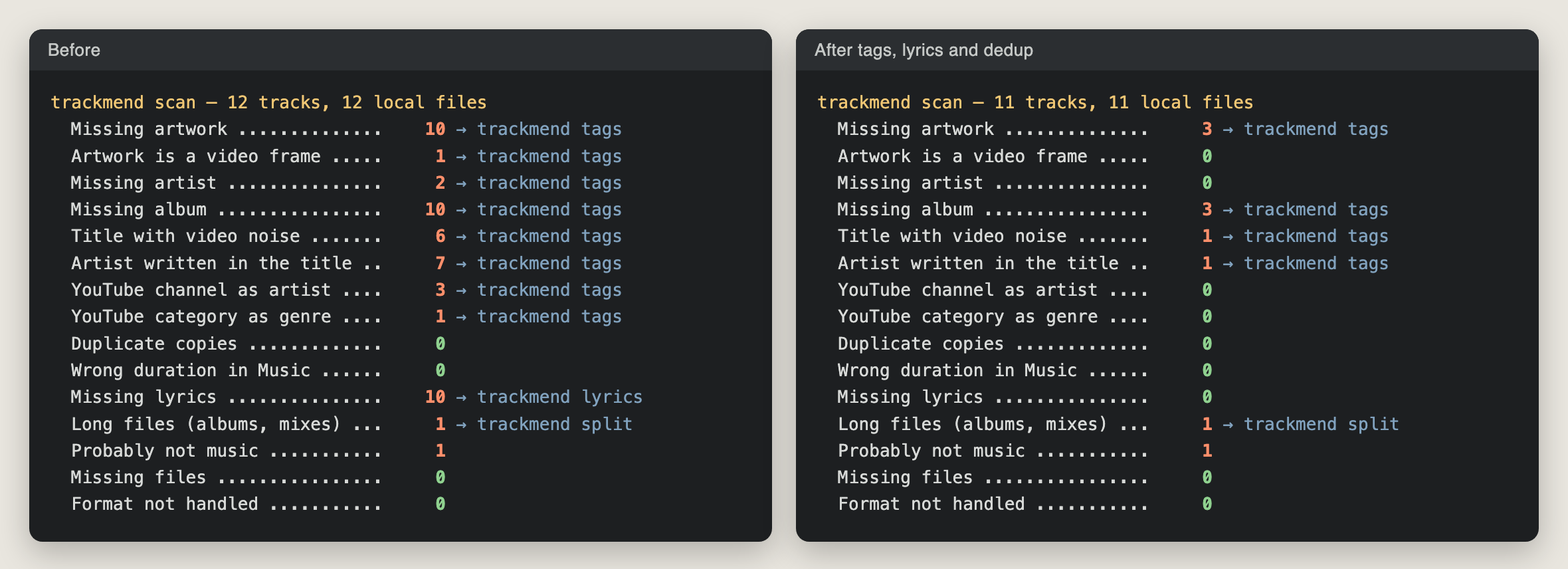
What tags --apply did on it:
10 tracks to look up
  Bon Iver – Skinny Love (Live) [HD]
      → Bon Iver - Skinny Love (Live)  (cleanup only; the catalogue only has other versions)
  KoЯn - Freak On a Leash (Official HD Video)
      → KoЯn - Freak On a Leash  [Follow The Leader, 1998, artwork: Deezer]  (deezer strong, ±2 s)
  Indila - Dernire danse (Clip officiel)
      → Indila - Dernière danse  [Mini World, 2014, artwork: Deezer]  (deezer strong, ±2 s)
  Youre Beautiful  [James Blunt]
      → James Blunt - You're Beautiful  [Back to Bedlam, 2005, artwork: Deezer]  (deezer strong, ±3 s)
  Kendrick Lamar - HUMBLE. (Official Video)
      → Kendrick Lamar - HUMBLE.  [DAMN., 2017, artwork: Deezer]  (deezer medium, ±13 s)
  Bruxelles arrive  [Roméo Elvis, Le Motel]
      → Roméo Elvis, Le Motel - Bruxelles arrive  (tags unchanged)
      ? artwork to review: YouTube thumbnail of a video of the same length
  Stromae - papaoutai (Official Video)
      → Stromae - Papaoutai  [racine carrée, 2013, artwork: Deezer]  (deezer strong, ±0 s)
  ...
8 matched on Deezer, 1 cleaned only, 0 left as they were, 0 errors (written).
1 doubtful matches wait for you: trackmend review --open
What is left after the run is on purpose: the live take keeps its live title and gets no
studio artwork, the only artwork found for one track is a video thumbnail that waits for
review, and the full album waits for split.
Installation
You need macOS with the Music app, and Python 3.10 or later.
brew install pipx ffmpeg      # ffmpeg is only needed by split, reimport and artwork cropping
pipx install git+https://github.com/Bouliw/trackmend.git
The first time a command talks to Music, macOS asks whether your terminal may control Music. Say yes, or allow it later in System Settings > Privacy & Security > Automation.
split --chapters with a link also needs yt-dlp
(brew install yt-dlp). It only reads the chapter list; nothing is downloaded.
Usage
Start with a report. It changes nothing:
trackmend scan
trackmend scan --details        # list the tracks behind each number
Try every command on a small playlist first. Make a playlist in Music, put a few
tracks in it, and add --playlist:
trackmend tags --playlist "trackmend test"            # shows what it would write
trackmend tags --playlist "trackmend test" --apply    # writes what it is sure of
trackmend review --open                                 # the doubtful ones, artwork side by side
trackmend review --accept 1,3 --apply                   # write the ones you checked
trackmend undo --apply                                  # and back
Then the whole library, in this order: names first, then artwork (both by tags), and
lyrics last, because lyrics are looked up with the artist and the title:
trackmend tags --apply
trackmend lyrics --apply
trackmend dedup --apply
trackmend split "Discovery (Full Album)" --deezer-album https://www.deezer.com/album/302127 --apply
trackmend split 4F2A0C1B9E77D3A1 --chapters "https://www.youtube.com/watch?v=..." --apply
trackmend split "Live at the Hall" --tracklist tracks.txt --apply
When tags or review later renames a track whose lyrics were not found with its old
names, its lyrics are looked up again right away (--no-lyrics turns this off), and
lyrics itself looks again at any track renamed since its last search, even by hand.
A track list for split has one song per line, with start times (00:00 Intro),
durations (Intro 3:45) or only titles. With only titles, the cuts go into the
longest silences.
Other useful options:
trackmend lyrics --track "Bruxelles arrive" --apply  # one track, written at once
trackmend tags --report plan.csv                     # the planned changes as a spreadsheet
trackmend tags --apply --write-via music             # let Music write (see below)
trackmend tags --no-youtube --no-musicbrainz         # fewer sources
trackmend undo --list                                # every run, and what can be undone
Safety
- Nothing changes without
--apply. Without it, every command prints what it would do. - Backup first. Before a file is written, its complete tag block and artwork are saved
in the run folder (
~/Library/Application Support/trackmend/runs/). - Journal written before and after each change, flushed to disk, so a crash or a
power cut never leaves a change that
undodoes not know about. - Nothing is deleted. A track taken out of Music (duplicate, long file that was
split) has its file moved into the run folder, not to the Trash, and
undoadds it back. Removing tracks always asks for confirmation (or--yes). - Written as it goes. Tags and lyrics are written track by track (in batches of ten for lyrics), not after an hour of searching. Stop a run at any time: run the same command again and it carries on where it stopped.
- One run at a time. A lock file stops a second trackmend command from working on
the library while one is running (
scanis read-only and can always run). - Other scripts. While another script drives Music through AppleScript,
--write-via auto(the default) asks Music to change the fields and the artwork itself instead of writing into the files behind its back.
How matching works
A local name is first read into an artist, a title and its version words:
- every kind of dash and bar splits the artist from the title (
-,–,—,|,//), includingTitle - ArtistandAlbum - 01. Title, andfeat/ftwith or without a dot; - YouTube channels in the artist field are recognised (
FooVEVO,Foo - Topic,Foo Official,Foo Records,COLORS,NPR Music...): the artist then comes from the title; - version words are kept: live, session, acoustic, remix, cover, demo, edit, sped up...; sessions from COLORS, Tiny Desk or KEXP count as live versions.
A Deezer result is accepted only if:
- the artist matches on whole words (a short name like
((( O )))only matches itself) and the title is the same once normalised. Accents lost by old files (Inachevs,Youre) still match, and the catalogue spelling is taken; - part numbers agree (
Pt. IIis notPt. III); - it is the same version: a live, remix or sped-up result never replaces a studio file, and a live or session file is never given the studio title, album or artwork;
- the duration is within 6 s, or within 45 s with exactly the same title (video versions often have a longer intro). Original albums win over compilations;
- tracks with no artist, or whose artist field only held a channel name (
Inconnu,Lofi Girl), get a second, stricter pass: same title, duration within 2 s. A known artist is never replaced by another one found through the title and the length: a cover can be almost as long (France Gallwould turn into the artist of a cover). The same goes for lyrics: those of another artist are never used for a track that has one.
Some matches cannot be trusted on their own, so tags never writes them directly:
- the catalogue writes the artist in another script (
福居良forRyo Fukui). Same title and same length are not enough (that is howJojiturns intoGabry Ponte), so the match also needs one of: the same album already in the library, MusicBrainz knowing the local name as a name of that artist, or iTunes having the track under the local name with the same length (within 3 s); - the file has no artist and the track was found by title and length only;
- the only artwork found is a video thumbnail.
Without a confirmation they wait for trackmend review, which lists them, writes a page
with the current and proposed artwork side by side, and writes only what you accept.
Rejected matches are not proposed again.
The catalogue does not always win. Guests it leaves out are kept in the title, and an
artist credit with more names (Roméo Elvis, Le Motel) or a styled spelling (KoЯn) is
kept. Katakana readings added to Latin titles are removed. YouTube categories found in
the genre field (Music, People & Blogs, Gaming...) are emptied.
Artwork, when the matched release has none or there is no match:
- another track of the same album in the library,
- the album on Deezer, then on the iTunes Search API (US, French and Japanese stores), then on MusicBrainz with the Cover Art Archive (1200 px),
- the same song in another version (artwork only; never for live, session or cover versions),
- last, the thumbnail of a YouTube video of the same length (found with yt-dlp, which only
reads the search results), cut to a square and always sent to
reviewfirst.
Artwork that is a frame from a video (16:9 or 4:3, often with black bars) has its bars
removed with ffmpeg's cropdetect and is cut to a centred square.
Lyrics come from LRCLIB. When artist and title are exactly the same, a duration gap of up to two minutes is accepted and the closest version wins (radio edits and video versions differ from the album). When they only look alike, the duration must agree within 4 s. A last search is made with the main artist alone and the title without brackets.
Music app quirks it works around
refreshmakes Music read a file's tags again, but it never empties a field that was removed from the file and never recomputes the duration. trackmend empties such fields through Music directly.refreshalso crashes when called from JavaScript for Automation, so it goes through AppleScript.- After a new image is written into the file and Music is asked to refresh, the file
holds the new artwork and AppleScript counts one artwork, yet Music keeps showing the
image it had in memory (or the grey note). So artwork never relies on
refresh: trackmend hands the image to Music itself (set data of artwork 1 … as JPEG picture), turning PNG images into JPEG first, and does the same when it undoes a run. - When "Keep Music Media folder organized" is on, Music renames and moves a file right
after a refresh, and other scripts may swap a file for another version (
.mp3for.m4a). trackmend never keeps a list of paths: it asks Music for a track's location, by persistent ID, just before each write, and again for any file that is no longer where the export said. - Some AAC files rewritten by other tools show 0:02 for a four-minute song.
scanfinds them (Music's duration against the file's) andreimportadds them again, keeping play count and favorite. - Removing a track by script sends its file to the Trash when it sits in the Music folder. trackmend moves the file to its run folder first.
- Music cannot read files on the Desktop, in Documents or in Downloads when a script asks
it to add them. New files are put in
~/Music/trackmendinstead. - Every command exports the library to its own temporary file, so two scripts never share one.
How trackmend compares
| Works on | Lyrics | Tags and artwork | Music app | |
|---|---|---|---|---|
| LRCGET | a folder | synced lyrics saved as .lrc files next to the music |
no | Music does not read .lrc files |
| beets + lyrics plugin | its own database, after importing your collection | LRCLIB, Genius, lrcmux, and more; written to tags if asked | yes (MusicBrainz) | Music does not see the changes until each track is read again |
| lrxy | files | fetched (LRCLIB, Apple Music, Musixmatch) and embedded, or saved | no | same as above |
| trackmend | the Music library | LRCLIB, written through Music | Deezer and iTunes | reads and writes through Music, by persistent ID |
LRCGET and lrxy are the right tools for a folder of files and synced lyrics. beets is the right tool to keep a whole collection in order with MusicBrainz. trackmend is for the case they do not cover: a library that lives in the Music app, where Music keeps its own copy of every tag and has to be told about each change.
Data sources
- Deezer API: public search, no account or key. Kept under 50 requests per 5 seconds; quota errors are retried after a pause.
- LRCLIB: free and open lyrics database. When it is overloaded it answers HTTP 503 at random (it is not a limit per address), so trackmend asks again quickly: after 1.5 s, 2.5 s, 3.5 s… up to ten times, then once more at the end of the run. A search that still fails is noted "to redo", never "not found", and the next run makes it again.
- iTunes Search API: artwork and second opinions, about 20 requests per minute, with long pauses after an HTTP 403.
- MusicBrainz and the Cover Art Archive: artist names in every script and album artwork, one request per second.
- YouTube search results, through yt-dlp when it is installed: only for the last-resort thumbnails.
Every answer is cached (cache.sqlite), so running a command again does not ask twice.
Tests
pip install -e ".[test]"
pytest
The tests run on audio files made by ffmpeg on the fly (MP3, AAC and AIFF) and on a stand-in
for the Music app that copies its odd behaviours: refresh that keeps emptied fields
and the old artwork on screen, files renamed after a refresh, the Trash on delete, aliases that follow moved files. No
test touches a real library or the network. CI also compiles the AppleScript and
JavaScript files on macOS.
Limitations
- macOS only: it talks to the Music app. Formats: MP3, AAC/ALAC (
.m4a) and AIFF. - Tracks from the Apple Music catalogue or iCloud Music Library uploads are not local files and are left alone.
reimportloses the track's place in playlists (Music has no way to keep it).splitcuts without re-encoding, so cuts land on the nearest audio frame (about 26 ms).- Matching is careful rather than complete: a track left unchanged is better than a
wrong album.
--retrylooks up the misses again later.
Development
git clone https://github.com/Bouliw/trackmend.git
cd trackmend
python3 -m venv .venv && . .venv/bin/activate
pip install -e ".[test]"
pytest
Code layout: text.py (names, comparison keys), deezer.py, lrclib.py, musicbrainz.py,
artwork.py, youtube.py (lookups), confirm.py (second opinions), audio.py (tags,
backups), music.py and osa/ (the Music app), store.py (lock, journal, progress), one
module per command.
More tools by Bouliw
- Roughcut: Turns talking-head footage into a rough cut you finish in Final Cut Pro.
- Vigie: Sigma detection on Windows, Linux and macOS logs, with a report mapped to MITRE ATT&CK.
- Earshot: Live, on-device transcription of any app on your Mac, with speaker names.
- doc-indexer-macos: On-device OCR for a folder of paperwork, ready for grep or an AI agent.
- Lantern: A stylish Jellyfin client for desktop, LG webOS TVs and phones.
- Boulito: A voice assistant that runs 100% on your Mac.
- Takeline: A teleprompter that follows your voice, entirely on your Mac.
- mac-toolkit: Small tools I use every day on my Mac.
All projects: bouliw.github.io
License
MIT. Lyrics, artwork and metadata belong to their owners; trackmend only fetches them for the files in your own library.
1 maintainer

Metadata
1 maintainer
Release files for trackmend 0.1.0
For a detailed explanation of source distributions (sdists) and built distributions (wheels), please see the package formats documentation.
Source distribution (sdist)
| File | Size | Uploaded | Provenance | Actions |
|---|---|---|---|---|
| trackmend-0.1.0.tar.gz | 98.0 kB | With provenance | Details for trackmend-0.1.0.tar.gz |
Built distribution (wheel)
| File | Interpreter | ABI | Platform | Actions Reset |
|---|---|---|---|---|
| trackmend-0.1.0-py3-none-any.whl | Python 3 | none | any | Details for trackmend-0.1.0-py3-none-any.whl |
Total release size: 180.6 kB
Release files / trackmend-0.1.0.tar.gz
| Download URL | trackmend-0.1.0.tar.gz |
|---|---|
| Size | 98.0 kB |
| Tags | Source |
|
SHA-256 checksum How to use checksums |
2fa7088c73729ca27bd7e46175d51065d341ece0deab1bb6ac274b053749a449
|
|
BLAKE2b-256 checksum How to use checksums |
80caf46a7b4c6f74ebf274f433d005cebe43ef64067477c16236d21af9cd823f
|
| Upload date | |
|
Uploaded using Trusted Publishing? What is trusted publishing? |
Yes |
| Uploaded via |
twine/7.0.0 CPython/3.13.16
|
Provenance
Provenance describes where a file came from. On PyPI, provenance is shared via attestations, which provide a verifiable record of the build or publishing details. View details, limitations and caveats.


PyPI Publish Attestation
PyPI verified that this artifact, at this checksum, originated from the publisher listed below.
Signed by GitHub Actions, verified by PyPI on Nov 15, 2026.
Transparency logRelease files / trackmend-0.1.0-py3-none-any.whl
| Download URL | trackmend-0.1.0-py3-none-any.whl |
|---|---|
| Size | 82.6 kB |
| Tags | Python 3 |
|
SHA-256 checksum How to use checksums |
2be89c8ef408999bf61aa4b7f2f7411160b0d32dc7125d0095d2407c55d2cb20
|
|
BLAKE2b-256 checksum How to use checksums |
7603fd941b7e4d2b01125f23f97bc9201eb2026c5903cbe4d0c6ba2fa04c668f
|
| Upload date | |
|
Uploaded using Trusted Publishing? What is trusted publishing? |
Yes |
| Uploaded via |
twine/7.0.0 CPython/3.13.16
|
Provenance
Provenance describes where a file came from. On PyPI, provenance is shared via attestations, which provide a verifiable record of the build or publishing details. View details, limitations and caveats.
PyPI Publish Attestation
PyPI verified that this artifact, at this checksum, originated from the publisher listed below.
Signed by GitHub Actions, verified by PyPI on Nov 15, 2026.
Transparency logSecurity for trackmend 0.1.0
Provenance
Provenance describes where a file came from. On PyPI, provenance is shared via attestations, which provide a verifiable record of the build or publishing details. View details, limitations and caveats.
Full provenance
Both files in this release have been uploaded with provenance metadata.
Attestation for trackmend-0.1.0.tar.gz
PyPI Publish Attestation
PyPI verified that this artifact, at this checksum, originated from the publisher listed below.
Signed by GitHub Actions, verified by PyPI on Nov 15, 2026.
Transparency logA note on package security
PyPI is a repository for distributing packages, not a service for auditing them. While third-party security researchers and our staff do their best to detect and remove malicious packages, PyPI cannot guarantee the quality, security or suitability of any given package.
To learn more about protecting yourself from malicious actors, visit our package security documentation.














