
tracon
Air traffic control for parallel Claude Code subagents. A live terminal and browser monitor that spots stuck, blocked and drifting agents, and the worktree file conflicts headed for your merge.




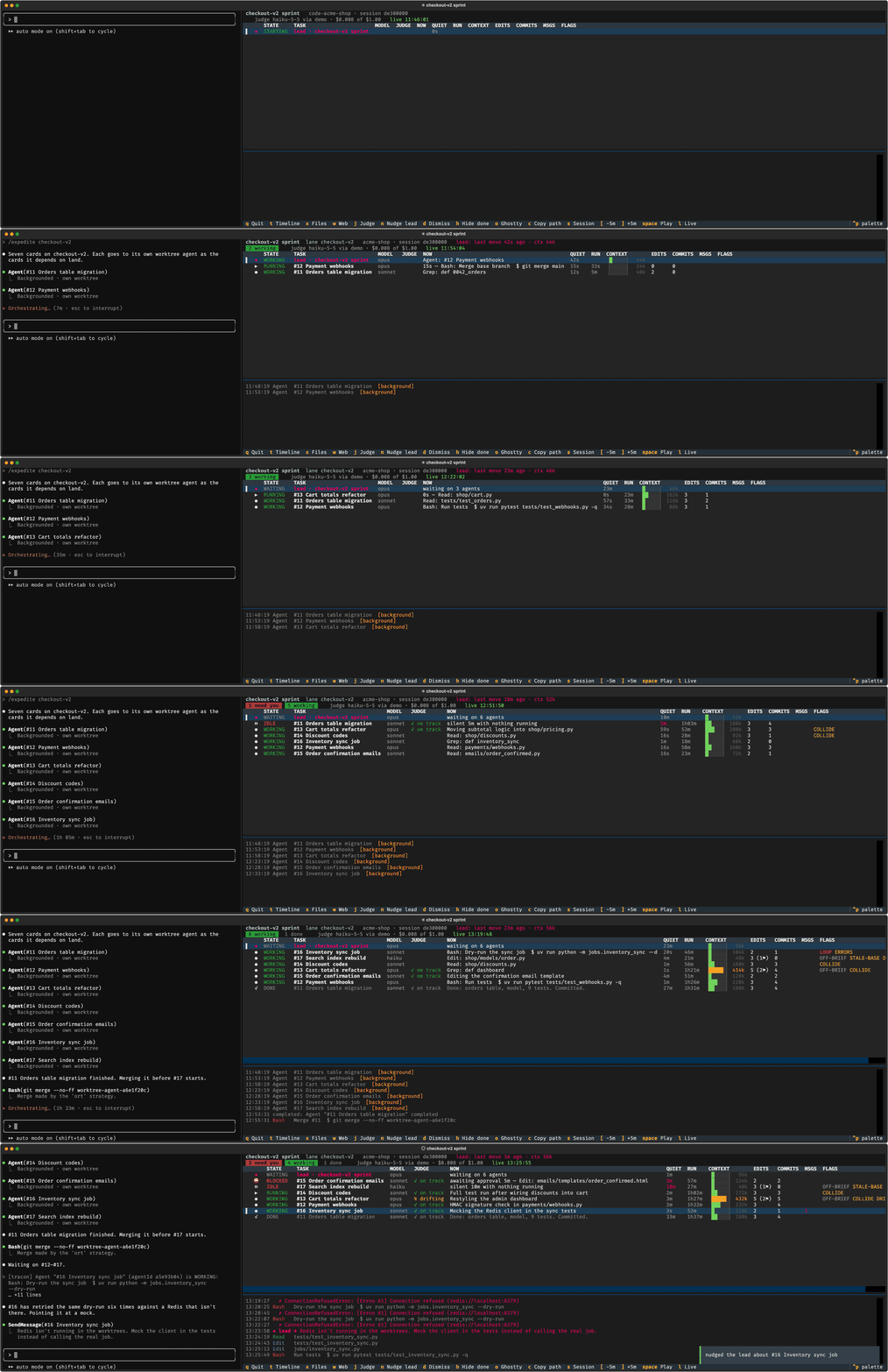
Left: a Claude Code session orchestrating seven worktree agents. Right: tracon in a split next to it.
A made-up run from tracon --demo, sped up.
uvx tracon --demo     # look around a made-up run; no Claude Code session needed
uvx tracon            # watch your newest Claude Code session that has subagents
You dispatched six agents an hour ago. One has been waiting 40 minutes on a permission prompt
nobody can see. Two are editing shop/cart.py at the same time. One is restyling the admin
pages its brief said to leave alone, and another has run the same failing command six times.
Claude Code's status line shows none of it.
Like a TRACON
controller watching every aircraft on one scope, tracon shows every agent at once: what it
is doing, whether it is holding, whether it has drifted off its brief, and whether two of them
are on a collision course in the same file. Run it in a split next to your session.
- Read-only and local. It reads the transcripts Claude Code already writes to disk and
never writes to your repository. It sends something to a session only when you press
n. See What it touches. - No setup. No hooks, no config, no account. Point it at a project, or let it find the newest session.
- Optional LLM judge. A small model checks each busy agent against its brief, for about
a tenth of a cent a check, with a hard per-run budget.
--no-judgeturns it off.
tracon is an independent project. It is not affiliated with, endorsed by or sponsored by Anthropic. "Claude" and "Claude Code" are trademarks of Anthropic.
What it catches
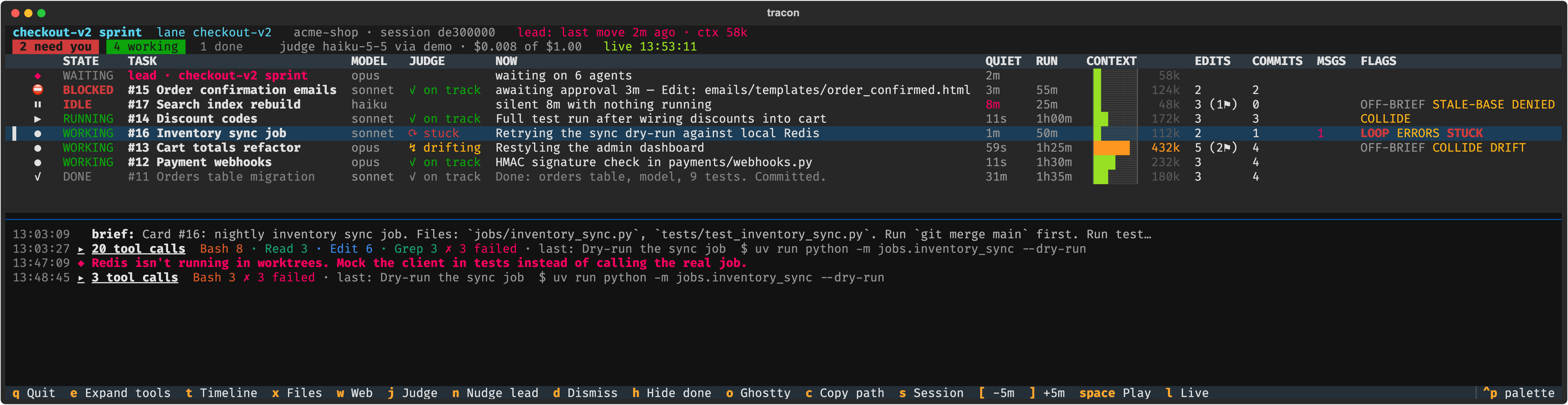
Every agent on one scope
Agents waiting on a permission prompt nobody can answer, agents that went quiet, hung test runs, processes left behind, loops, edits to the wrong checkout or on a stale base, two agents changing the same file, and (with the optional judge) agents drifting from their brief. Red needs you now; amber is worth a look.
Why one is in trouble
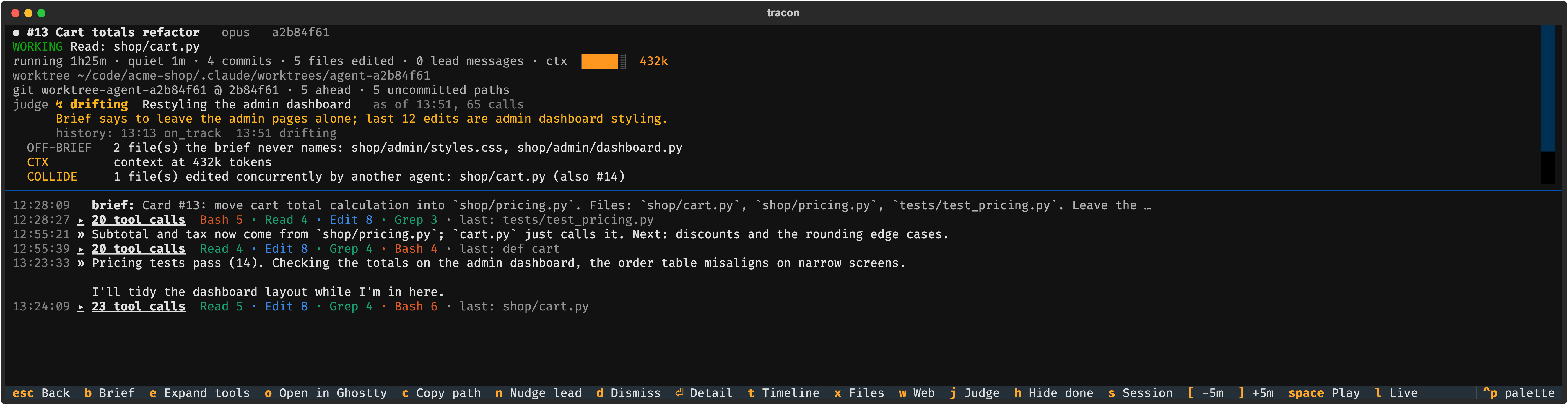
enter opens an agent: what it is doing, the judge's concern and how the verdict changed,
every flag explained, the files it touched outside its brief, and a live tail of what it said,
in full. The tool calls between two messages fold into one line (▸ 23 tool calls Read 5 · Edit 8 …); click it to open that run, or press e to open them all.
Merge conflicts before the merge
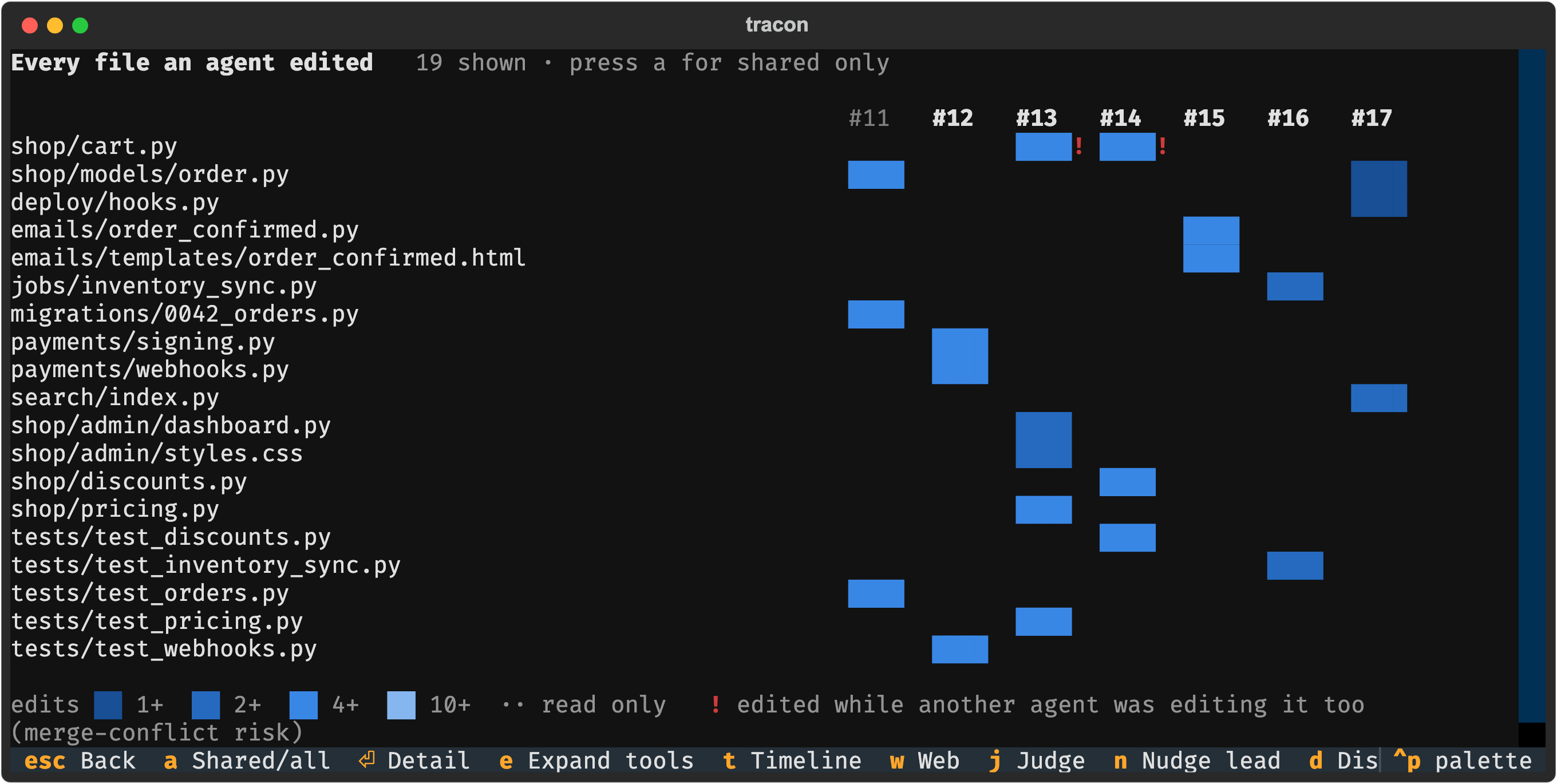
x shows which agent edited which file. ! marks a file two agents were editing at the same
time.
Nudge the lead in one key
n nudges your orchestrating session about the selected agent: tracon drafts a note with
the agent's state, flags, the judge's concern and what to do, and sends it straight away (see
Nudging the lead).
Replay the whole run
t is the timeline. [ and ] rewind and forward, space plays it back, and
--at "07:20" opens any past session as it stood at that time.
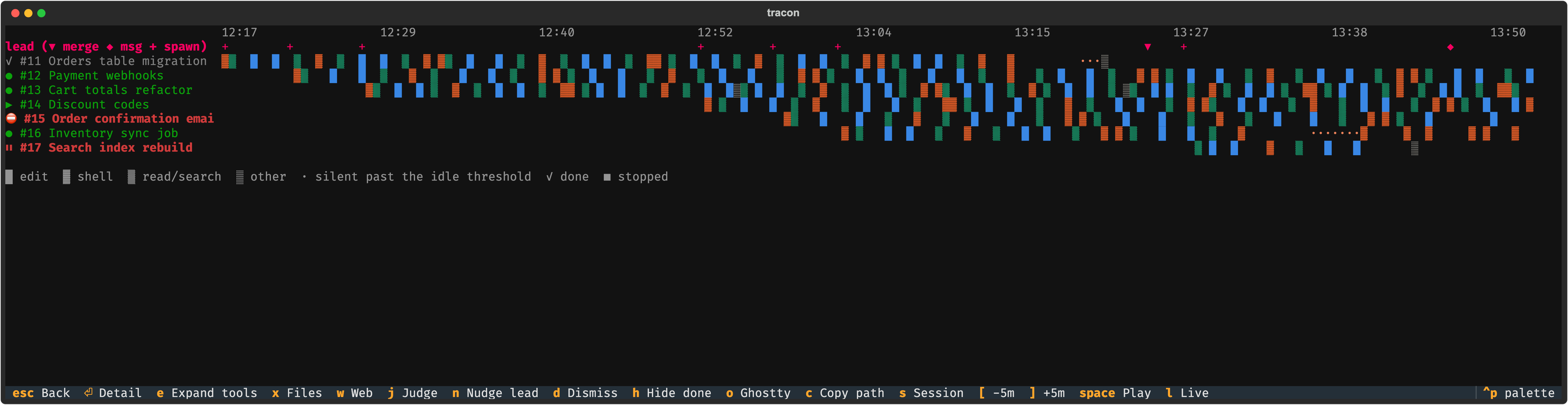
Reading the screen lists every state and flag, what it means, and what to do about it.
With --notify, a desktop notification fires when an agent needs you. The terminal title is
set to the watched session's name (◎ <name>, mirroring Claude Code's ✳ <name>), so the
split reads as part of that session.
Install
Requires Python 3.12+, on macOS or Linux.
uv tool install tracon            # or: pipx install tracon
uv tool install 'tracon[api]'     # optional: judge through the Anthropic API instead of `claude -p`
Or run it without installing: uvx tracon. From source:
git clone https://github.com/phalladar/tracon && cd tracon
uv tool install --editable .
Use
cd your-project && tracon     # newest session with subagents in this project (or anywhere)
tracon --demo                 # a made-up run, to look around
tracon web                    # browser view only
tracon --list                 # recent sessions that spawned subagents
tracon -s 4f2a                # pick a session by id prefix
tracon --at "2026-10-11 07:20"   # replay a session as it stood at that time
tracon --once                 # print one snapshot and exit
A good layout: your orchestrating session on one side, tracon in a split next to it
(in Ghostty, cmd+d).
Terminal keys
| Key | |
|---|---|
enter |
agent detail: state, judge verdict, flags, files, live processes, and what the agent said, with the lead's messages and its tool calls folded between them (e or a click unfolds them) |
e |
open or fold every run of tool calls, in the pane under the table and in the detail (a click on ▸ does one) |
t |
timeline: every agent across the run, coloured by activity, with the lead's merges and messages |
x |
files heatmap: which agents edited which files, concurrent edits marked ! |
w |
open the browser view |
j |
ask the judge about the selected agent now |
d |
dismiss the judge's drifting or stuck verdict on the selected agent (press again to restore) |
n |
nudge the lead about the selected agent: sends a note with its state, flags and what to do (live only) |
[ ] / { } |
rewind / forward 5 / 30 min (enters replay) · space play · l back to live |
o / c |
open the agent's worktree in a new terminal window (Ghostty if installed) / copy its path |
h / s / q |
hide finished agents / next session / quit |
Browser view
w in the terminal, or tracon web, serves a page on 127.0.0.1:
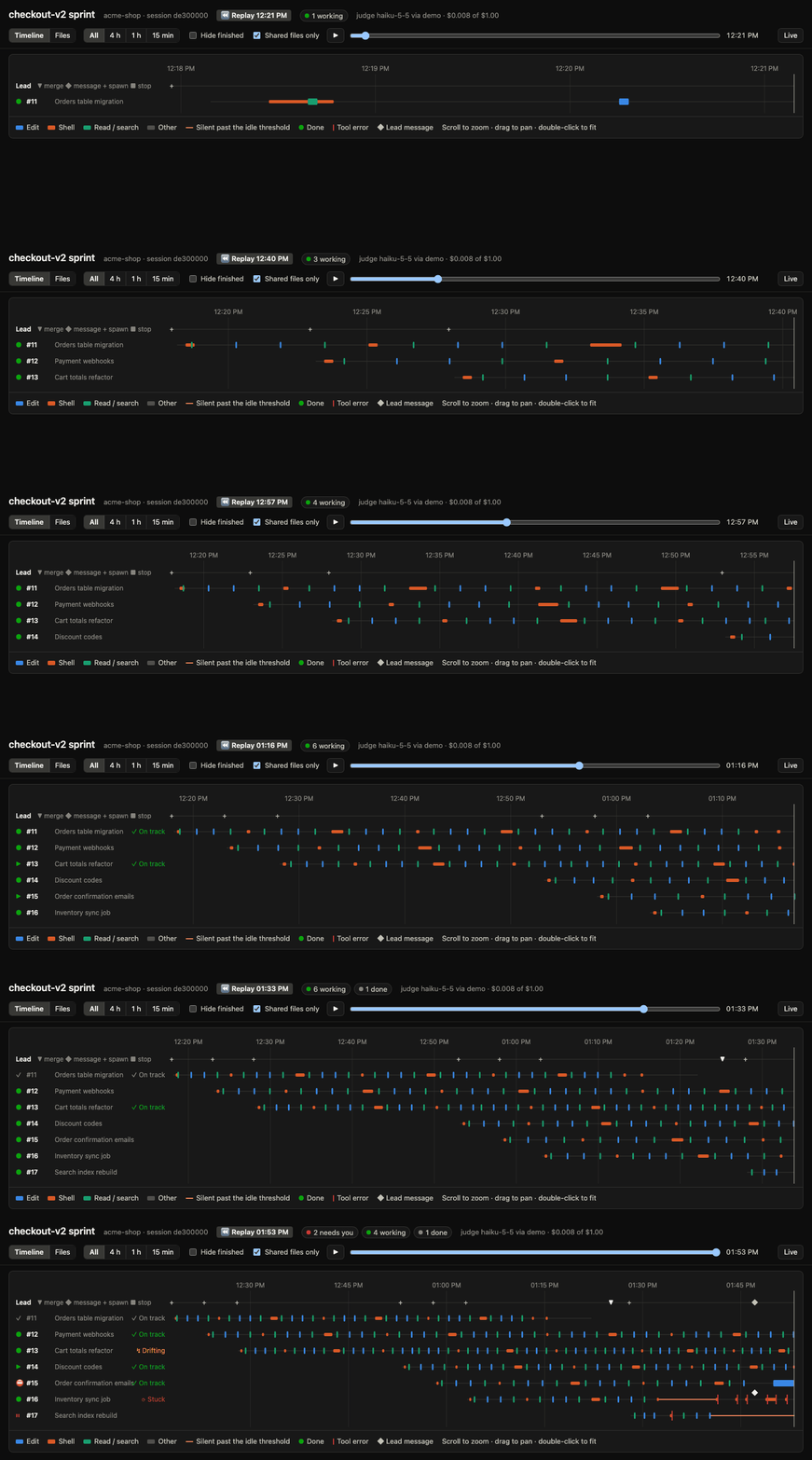
- Timeline: zoom with the scroll wheel, drag to pan, double-click to fit. Hover any bar for the calls it covers. Silent stretches past the idle threshold are drawn in orange.
- Files: heatmap of edits per file per agent, shared files first.
- Replay scrubber: drag through the run, or press ▶ to play it back.
- Click an agent for its detail drawer and live activity feed.
Reading the screen
Each agent row has a state (what it is doing now), a JUDGE column (the LLM's read of
whether it is on brief), and any number of flags (things worth a look). Press enter on a
row for the detail, which shows the judge's one-line concern and every flag's explanation.
You don't control agents from tracon; it is read-only. When something needs action, you act in your orchestrating session: answer the prompt there, or ask the lead to message, stop or re-dispatch the agent.
Columns
| Column | Shows |
|---|---|
| STATE | What it is doing now (below) |
| TASK | The description the lead gave the agent; the pinned row is the lead itself |
| MODEL | The model it runs on |
| JUDGE | The judge's latest verdict (below) |
| NOW | Its current or latest action |
| QUIET | Time since its transcript last moved; red past the 5 min idle threshold |
| RUN | Time since it started |
| CONTEXT | Context size in tokens; amber above 300k, red above 450k |
| EDITS | Files it edited; (n⚑) counts those the brief never names |
| COMMITS | git commit calls it made |
| MSGS | Messages the lead sent it |
| FLAGS | Things worth a look (below) |
Colours
| Colour | Browser label | Means |
|---|---|---|
| red | Needs you | act now: the agent can't continue, or is doing damage |
| amber | Check | have a look when you can; often fine |
| green | Working | nothing to do |
| grey | Done / Note | finished, or history kept for context |
Once an agent has finished, its flags turn grey: they are history, not action. Only OUTSIDE and ORPHAN stay loud, because what they describe outlives the agent.
States
| State | Means | What to do |
|---|---|---|
| BLOCKED | An instant call (Edit, Read, git status) has been open for 45 s, or a shell call with nothing running: it is waiting on a permission prompt |
Answer the prompt if it is showing in your session. If nobody can see it, allow that tool in your permission settings, or have the lead stop and re-dispatch the agent |
| IDLE | No transcript activity for 5 min and nothing running | Check the last lines of its feed: it often hit an error or is waiting for input it will never get. Have the lead message it or stop it |
| STALLED | A process has run for 20 min with no file change or commit | Usually a hung test or a watcher that never exits. Check the process in the detail; kill it, or have the lead stop the agent |
| ORPHANED | Silent, but a detached process it started is still running after its parent died | Kill the process (pid in the detail) |
| WAITING | Its turn has ended (or it is quiet) while background work it launched still runs | Usually nothing: it resumes when that work finishes. If the work is stuck, see STALLED |
| PENDING | Replay only: a tool call was open, and without process data tracon can't tell a long run from a prompt | Nothing; go live to see which it is |
| RUNNING | A tool call is in progress (a build, a test run) | Nothing |
| WORKING | Making calls normally | Nothing |
| STARTING | Dispatched, no activity yet | Nothing |
| DONE | Finished: handed back a report, the lead was told it completed, or it ended with a final answer and nothing running | Read its report; merge |
| STOPPED | Stopped by the lead, failed, or killed | Check why if you didn't expect it |
A pinned ◆ lead row shows the orchestrating session itself (running, working, or waiting on its agents or on you), so its activity is never mistaken for a subagent's.
Flags
| Flag | Means | What to do |
|---|---|---|
| LOOP | The same call 3× in a row with no edit in between | It is spinning. Have the lead tell it what it is missing, or stop it |
| ERRORS | Its last 3 tool calls failed | Look at the errors in the feed; it may recover on its own |
| DENIED | Tool calls were denied, with the classifier's reasons (e.g. "Modify Shared Resources"), or refused by a guard (Claude Code's worktree isolation or its sleep block, which say what to do instead). A denial is amber for 30 min, then grey. A guard refusal stays grey while the agent's next call gets through, and turns amber only when it is refused twice in a row | For a denial, decide whether it should have that permission; if so, allow it and have the lead tell it to retry. For an amber refusal, have the lead tell it to do what the refusal says, or to report what it can't do |
| OUTSIDE | A worktree agent edited the main checkout instead of its worktree | Check git status in your main checkout and undo or move those edits |
| BRANCH | Its worktree is on a different branch from the one it was given | Check it hasn't committed to the wrong branch before you merge |
| STALE-BASE | It started editing before merging the base branch, after the lead had already merged something. Live, git has the last word: no flag once its HEAD contains the base, and the flag says how many commits behind it is | Expect conflicts; have it merge the base before it goes further |
| COLLIDE | Another agent edited the same file while both were running. Press x for the heatmap |
The second merge may conflict. Decide which agent owns the file, or plan the merge order |
| OFF-BRIEF | It edited files the brief never names (grey: often legitimate) | Glance at the list; worth a question only if the files look unrelated |
| BG | It launched background or detached runs. Amber when its brief says to run in the foreground and nowhere allows a background or nohup run |
If amber, it is ignoring the brief; have the lead remind it |
| UNCOMMITTED | Edits left uncommitted for 45 min | Work at risk if the worktree is cleaned up; have it commit |
| CTX | Context above 300k (amber) or 450k (red) tokens | It will slow down and forget earlier instructions. Have it wrap up and hand back, or re-dispatch the rest fresh |
| ORPHAN | A detached process is still running from its worktree. Grey while the agent is still working (usually it is polling its own nohup run); red once the agent goes quiet or finishes |
Kill it once you're sure nothing needs it |
| DRIFT | The judge says it is drifting (below), and you haven't dismissed it | See below |
| STUCK | The judge says it is stuck (below), and you haven't dismissed it | See below |
Judge verdicts
The JUDGE column shows the latest verdict from the optional LLM check.
It is a small model's opinion of the brief against the last 40 actions, so treat it as a
prompt to look, not a fact. The detail view (enter) shows what the agent is doing, the
judge's concern, and how the verdict has changed over time.
| Verdict | Means | What to do |
|---|---|---|
| ✓ on track | Its recent actions serve the brief's steps, even if slowly | Nothing |
| ↯ drifting (amber, adds DRIFT) | It is doing work the brief doesn't ask for, widening scope, or breaking a rule the brief states (running tests in the background when told to run them in the foreground, editing files it was told not to touch). The concern names an action it can see; growth that still serves the brief, or a baseline taken on the base branch, doesn't count | Read the concern in the detail. If it is real, have the lead message the agent to get back to the brief, or stop it. If the extra work is fine (your brief was narrower than you meant), have the lead tell the agent so with SendMessage: the judge treats the lead's messages as part of the brief and checks again after the agent's next action. If it is a false alarm, press d to dismiss it |
| ⟳ stuck (red, adds STUCK) | It repeats actions without progress, retries a failure without changing approach, or waits on something that won't come | Find the repeated failure in the feed. Give it the missing piece through the lead, or stop it and re-dispatch with a better brief. If it is a false alarm, press d to dismiss it |
| ? unclear | Too little activity to tell | Nothing; wait |
| … judging | A check is in progress | Nothing |
| blank | Not judged yet (it needs 5 tool calls), or the judge is off | Nothing |
Verdicts refresh at most every 3 min per agent, after 5 more tool calls. Press j to re-check
the selected agent now, for example after the lead has nudged it. Finished agents are never
judged; their last verdict stays, greyed out, and DRIFT and STUCK are dropped.
Dismissing. d on a drifting or stuck agent marks that verdict as dismissed: it shows
greyed out as "· dismissed", DRIFT or STUCK goes away, the nudge leaves the concern out, and
the next check lists it to the judge as a concern you've cleared, so it shouldn't be raised
again on the same actions. A new concern flags as usual. d again restores the verdict.
The judge (optional, on by default)
Rules catch mechanical failures. For drift, tracon periodically asks a small model
(Claude Haiku 5.5) to read an agent's brief, the lead's messages to it, and its last 40
actions, and answer on_track, drifting, stuck or unclear with a one-line summary.
The lead's messages amend the brief, so work the lead approved isn't drifting. Failed calls
reach it with their whole message, so it can tell an agent doing what a refusal told it (split
the command, use another tool) from one rewording its way around it.
See Judge verdicts for what each one means.
- When: only active agents, at most every 3 min each, and only after 5 new tool calls. One exception: after a drifting or stuck verdict, a message from the lead to that agent gets one early re-check as soon as the agent acts on it. Finished and idle agents are never judged.
- Cost: about $0.001 per check. On one day of real runs, 85 checks across 15 agents cost $0.09 in all, and the busiest agent under 2 cents. A per-run budget (default $1.00) stops judging when reached, and the spend is shown in the header.
- Backends: with
ANTHROPIC_API_KEYset and the[api]extra installed, it uses the Anthropic SDK. Otherwise it usesclaude -pon your Claude Code login, counting against your plan. - Privacy: checks send the brief and summaries of recent tool calls (commands, file
paths, error text) to Anthropic, as your sessions already do.
--no-judgeturns it off.
Judgments are cached in ~/.cache/tracon/judgments.json and dismissals in
dismissed.json beside it, so replays and restarts show them. Each verdict records the
version of the prompt that made it; when an update changes the prompt, each active agent
gets one re-check instead of keeping a verdict the old prompt made.
Nudging the lead
Most of the "What to do" advice above is "have the lead…". Press n on an agent (in the table
or its detail) and tracon nudges the lead with that note: the agent's id, state, flags, the
judge's concern, and the matching advice, phrased for the lead's own tools (SendMessage,
TaskStop). When the note is about refusals, drift or a stuck agent and the agent has been
refused anything, it quotes the last refusal word for word, so the lead can check the claim
without opening the transcript. It is sent as soon as you press the key; a notification confirms it.
It is delivered through Claude Code's cross-session inbox: tracon finds the lead's process in
~/.claude/sessions/ and writes one message to the Unix socket listed there. The lead sees it
as a message from another session, between tool calls or as a new turn if it is idle, and it
can't approve permission prompts. If the lead's crossSessionInbound setting is hold (or
its permission mode makes Claude Code review peer messages), the message waits for you to
approve it in that session. If the lead isn't running, n copies the note to the
clipboard instead. tracon never reads the inbox auth keys; the socket accepts unauthenticated
messages from your own user on macOS and Linux.
Options
| Flag | Default | |
|---|---|---|
--project PATH |
current dir | which project's sessions to watch |
--session ID |
newest | session id or prefix |
--at TIME |
live | replay as of a local time (07:20 or 2026-10-11 07:20) |
--idle MIN |
5 | silence before IDLE |
--stall MIN |
20 | running without change before STALLED |
--notify |
off | desktop notifications when an agent needs you (osascript on macOS, notify-send on Linux) |
--no-judge |
turn the LLM check off | |
--judge-model |
claude-haiku-5-5 |
model for the check |
--judge-backend |
auto |
api or cli |
--judge-budget USD |
1.00 | stop judging after this much per run |
--judge-every MIN |
3 | minimum time between checks of one agent |
--demo |
watch a made-up run instead of a real session | |
--port |
8765 | browser view port (the next free one if taken) |
--title-prefix |
◎ |
prefix for the terminal title tracon sets to the session's name |
--no-title |
leave the terminal title alone |
What it touches
tracon is read-only. This is everything it does outside its own process:
| Reads | Transcripts in ~/.claude/projects/; ~/.claude/sessions/<pid>.json to find a running lead's inbox (never the *.key auth files) |
| Runs | lsof (macOS) or /proc (Linux), ps, and read-only git (status, rev-parse, rev-list, branch) in each agent's worktree |
| Writes | ~/.cache/tracon/ (judge verdicts and your dismissals). Nothing in your repository or ~/.claude/ |
| Sends | One message to the lead's inbox socket when you press n, never on its own and never to a subagent. Judge checks to Anthropic (or claude -p), unless --no-judge |
| Listens | The browser view, on 127.0.0.1 only, once you open it (w or tracon web) |
No telemetry, no account, no config files.
How it works
Claude Code writes, per session:
~/.claude/projects/<encoded project path>/
  <session>.jsonl                     the orchestrating ("lead") session
  <session>/subagents/agent-<id>.jsonl  each subagent's transcript
  <session>/subagents/agent-<id>.meta.json  description, model, worktree, branch
tracon tails these files incrementally. Every few seconds it also checks, per worktree,
which processes are running there (lsof and ps, keeping only what Claude launched, plus
orphans) and the git state (branch, commits ahead, dirty files). States and flags are derived
from both.
tracon/
  transcript.py  JSONL -> compact events (all knowledge of the transcript format lives here)
  session.py     find sessions, track the lead and its agents
  probe.py       live processes and git state per worktree
  signals.py     one agent -> state + flags (pure, testable)
  lane.py        whole-run view: file collisions, judge results, assess_all()
  judge.py       the optional LLM check, its scheduling, budget and cache
  advice.py      the nudge `n` sends the lead
  demo.py        the made-up run behind `--demo`
  inbox.py       find a live session's inbox socket and send to it
  app.py         Textual TUI
  web.py         local HTTP server + JSON API; static/index.html is the page
  cli.py         entry point
Limitations
- Transcript files are Claude Code internals, not a public API. A format change may break
parsing; the fix belongs in
transcript.py. The same goes for the session registry and inbox socket used byn, ininbox.py. - Developed on macOS; tests run on macOS and Linux. On Linux, processes are read from
/proc(nolsofneeded), notifications usenotify-send, copy useswl-copy,xcliporxsel(else the terminal's OSC 52), andoopens Ghostty orx-terminal-emulator. Windows isn't supported; WSL should behave like Linux. - In replay there is no process data, so a long-running shell call shows as PENDING rather than RUNNING or BLOCKED.
Development
uv sync --group dev
uv run pytest                      # synthetic transcripts; no Claude Code or network needed
uv run tracon --once --no-judge   # quick check against your latest session
uv run --with pillow python scripts/screenshots.py   # regenerate docs/screenshots from the demo (macOS, Chrome)
uv run --with pillow python scripts/hero.py          # regenerate the README's split-terminal hero.gif
See CLAUDE.md for architecture notes and conventions.
License
1 maintainer

Metadata
1 maintainer
Release files for tracon 0.1.0
For a detailed explanation of source distributions (sdists) and built distributions (wheels), please see the package formats documentation.
Source distribution (sdist)
| File | Size | Uploaded | |
|---|---|---|---|
| tracon-0.1.0.tar.gz | 82.0 kB | Details |
Built distribution (wheel)
| File | Interpreter | ABI | Platform | Reset |
|---|---|---|---|---|
| tracon-0.1.0-py3-none-any.whl | Python 3 | none | any | Details |
Total release size: 159.6 kB
Release files / tracon-0.1.0.tar.gz
| Download URL | tracon-0.1.0.tar.gz |
|---|---|
| Size | 82.0 kB |
| Tags | Source |
|
SHA-256 checksum How to use checksums |
23c2ee8de67c96ef7036c6591d96924f032ce75adead31d8690fa60baef6b1ef
|
|
BLAKE2b-256 checksum How to use checksums |
42d638ea372b021f406f5627dc6c57610b9b5e55fa25d38373b62fb99ee04fe1
|
| Upload date | |
|
Uploaded using Trusted Publishing? What is trusted publishing? |
Yes |
| Uploaded via |
twine/7.0.0 CPython/3.13.14
|
Provenance
Provenance describes where a file came from. On PyPI, provenance is shared via attestations, which provide a verifiable record of the build or publishing details. View details, limitations and caveats.


PyPI Publish Attestation
PyPI verified that this artifact, at this checksum, originated from the publisher listed below.
Signed by GitHub Actions, verified by PyPI on Oct 11, 2026.
Transparency logRelease files / tracon-0.1.0-py3-none-any.whl
| Download URL | tracon-0.1.0-py3-none-any.whl |
|---|---|
| Size | 77.6 kB |
| Tags | Python 3 |
|
SHA-256 checksum How to use checksums |
32b2042ef6bec45cb89920a0072b72ef35fadde364c7c14b35dc616228dd8418
|
|
BLAKE2b-256 checksum How to use checksums |
97aff2c6dd5eee524480fabca60cbb31684d71554746d5fcc4ad8a1a75d305fd
|
| Upload date | |
|
Uploaded using Trusted Publishing? What is trusted publishing? |
Yes |
| Uploaded via |
twine/7.0.0 CPython/3.13.14
|
Provenance
Provenance describes where a file came from. On PyPI, provenance is shared via attestations, which provide a verifiable record of the build or publishing details. View details, limitations and caveats.
PyPI Publish Attestation
PyPI verified that this artifact, at this checksum, originated from the publisher listed below.
Signed by GitHub Actions, verified by PyPI on Oct 11, 2026.
Transparency log













