
trade-sandbox
A unified, mode-agnostic execution sandbox for testing and running trading strategies.




trade-sandbox is a high-performance Python library designed to bridge the gap between backtesting and live trading. Write your trading strategies once against a single interface, and run them seamlessly across historical backtests, live paper-trading feeds, or warm-start transitions—without modifying a single line of strategy code.
Key Features
- Mode-Agnostic Strategy API: The same strategy runs identically in a backtest (
HistoricalWindow), paper trading (LiveWindow), or a sequential warm-start handoff (HistoricalWindow + LiveWindow). - Arbitrary Precision Money Math: Enforces Python's
Decimaltype across all transactions, cash pools, fees, and positions to prevent floating-point representation bugs. - Execution Quality Realism: Configurable knobs for execution latency queueing, tick-to-fill slippage (absolute/percentage spreads), and composable transaction fees (flat + percentage).
- Multi-Currency Portfolio & FX: Built-in support for trading across assets in different currencies with automatic FX rate conversion and base-currency portfolio valuation.
- Pre-Trade & Post-Trade Risk Guardrails: Composable risk modules to enforce drawdown limit halts, gross leverage thresholds, and position concentration caps.
- FIFO Trade Matching: Analyzes raw fill logs using a First-In, First-Out queueing pipeline to reconstruct realized trades and compute exact performance metrics (Sharpe, Sortino, Calmar, Profit Factor).
Architecture
trade-sandbox separates the time clock, order matching, and account state from the strategy logic. This ensures that strategies are isolated from their execution context.
graph TD
    Data[Data Ingestion / Ticks] -->|Chronological Feed| Session[Session Harness]
    Session -->|Market Price Updates| Portfolio[Portfolio Manager]
    Session -->|on_tick Callback| Strategy[User Strategy]

    Strategy -->|submit_order| Broker[Paper Broker]
    Broker -->|Pre-Trade Checks| Risk[Risk Engine]
    Risk -->|Check Order & Portfolio| Engine[Matching Engine]

    Engine -->|Queue Latency Delay| Book[Simulated Order Book]
    Book -->|Fills / Slippage / Fees| Broker
    Broker -->|apply_fill| Portfolio
    Broker -->|on_order_filled| Strategy

    style Data fill:#f5f7f8,stroke:#cfd8dc,stroke-width:1px,color:#37474f
    style Strategy fill:#e8f4fd,stroke:#b3e5fc,stroke-width:1px,color:#0277bd
    style Portfolio fill:#eef7ee,stroke:#c8e6c9,stroke-width:1px,color:#2e7d32
    style Engine fill:#fffbee,stroke:#ffe082,stroke-width:1px,color:#f57f17
    style Risk fill:#fdf2f2,stroke:#ffcdd2,stroke-width:1px,color:#c62828
During a Warm Start transition, the session context shifts from simulated time (historical replay) to real wall-clock time (live execution) without resetting strategy memory:
sequenceDiagram
    autonumber
    participant Hist as Historical Feed (Simulated Clock)
    participant Live as Live Feed (Wall Clock)
    participant Strategy as Strategy API
    participant Engine as Matching Engine

    Note over Hist,Strategy: Phase 1: Warm Start / Historical Replay
    rect rgba(30, 144, 255, 0.05)
        Hist->>Strategy: Feed Historical Ticks (UTC)
        Strategy->>Engine: Submit Orders
        Engine->>Strategy: Return Simulated Fills
    end

    Note over Live,Strategy: Phase 2: Live Transition (Seamless handoff)
    rect rgba(46, 139, 87, 0.05)
        Live->>Strategy: Stream Real-Time Ticks (UTC)
        Strategy->>Engine: Submit Orders
        Engine->>Strategy: Return Live Fills
    end
Installation
Install trade-sandbox from PyPI:
pip install trade-sandbox
Or install from source in editable mode:
git clone https://github.com/arnav-agarwal/trade-sandbox.git
cd trade-sandbox
pip install -e .
To install development dependencies (for running tests):
pip install -e .[dev]
Quick Start Example
This example defines a simple Exponential Moving Average (EMA) crossover strategy, runs it against a simulated historical window, and checks performance metrics.
import datetime
from decimal import Decimal
from trade_sandbox import Session, HistoricalWindow, Strategy, Tick, ConstantSlippageModel

class EMACrossover(Strategy):
    def __init__(self, fast: int = 3, slow: int = 8):
        super().__init__()
        self.fast_span = fast
        self.slow_span = slow
        self.prices = []

    def on_tick(self, tick: Tick):
        self.prices.append(tick.last)
        if len(self.prices) < self.slow_span:
            return

        # Simple moving average calculations
        fast_ma = sum(self.prices[-self.fast_span:]) / self.fast_span
        slow_ma = sum(self.prices[-self.slow_span:]) / self.slow_span

        # Check current position size
        current_pos = self.portfolio.positions.get(tick.symbol)
        position_size = current_pos.size if current_pos else Decimal("0")

        if fast_ma > slow_ma and position_size <= 0:
            # Buy signal: go long
            qty = Decimal("1")
            if position_size < 0:
                qty += abs(position_size)
            self.submit_order(tick.symbol, "BUY", "MARKET", qty)
            print(f"[{tick.timestamp}] BUY Order Submitted @ {tick.last}")

        elif fast_ma < slow_ma and position_size >= 0:
            # Sell signal: go short
            qty = Decimal("1")
            if position_size > 0:
                qty += position_size
            self.submit_order(tick.symbol, "SELL", "MARKET", qty)
            print(f"[{tick.timestamp}] SELL Order Submitted @ {tick.last}")

    def on_order_filled(self, fill):
        print(f"  -> Filled: {fill.size} units @ {fill.price:.2f} (Fee: {fill.fee:.2f})")

# 1. Define the historical timeframe
window = HistoricalWindow(
    start="2026-08-01T09:30:00Z",
    end="2026-08-01T10:30:00Z",
    resolution="1m"
)

# 2. Setup the strategy and backtesting harness
strategy = EMACrossover()
session = Session(
    strategy=strategy,
    market="BINANCE:BTCUSDT",
    window=window,
    initial_cash=Decimal("50000.00"),
    base_currency="USDT",
    slippage_model=ConstantSlippageModel(percent=Decimal("0.0005"))  # 0.05% slippage
)

# 3. Create mock historical ticks
start_dt = datetime.datetime(2026, 8, 1, 9, 30, tzinfo=datetime.timezone.utc)
ticks = [
    Tick(
        timestamp=start_dt + datetime.timedelta(minutes=i),
        symbol="BINANCE:BTCUSDT", exchange="BINANCE", currency="USDT",
        bid=Decimal("60000.00") + (i * 10),
        ask=Decimal("60010.00") + (i * 10),
        last=Decimal("60005.00") + (i * 10),
        bid_size=Decimal("5.0"), ask_size=Decimal("5.0"), volume=Decimal("100")
    )
    for i in range(30)
]

# 4. Run the session
result = session.run(ticks)

# 5. Check performance
print("\n--- Summary Statistics ---")
print(f"Final Value:    {result.equity_curve[-1].total_equity_base_ccy:.2f} USDT")
print(f"Total Return:   {result.performance_metrics['total_return']:.2%}")
print(f"Sharpe Ratio:   {result.performance_metrics['sharpe_ratio']:.2f}")
print(f"Win Rate:       {result.performance_metrics['win_rate']:.2%}")
print(f"Profit Factor:  {result.performance_metrics['profit_factor']:.2f}")
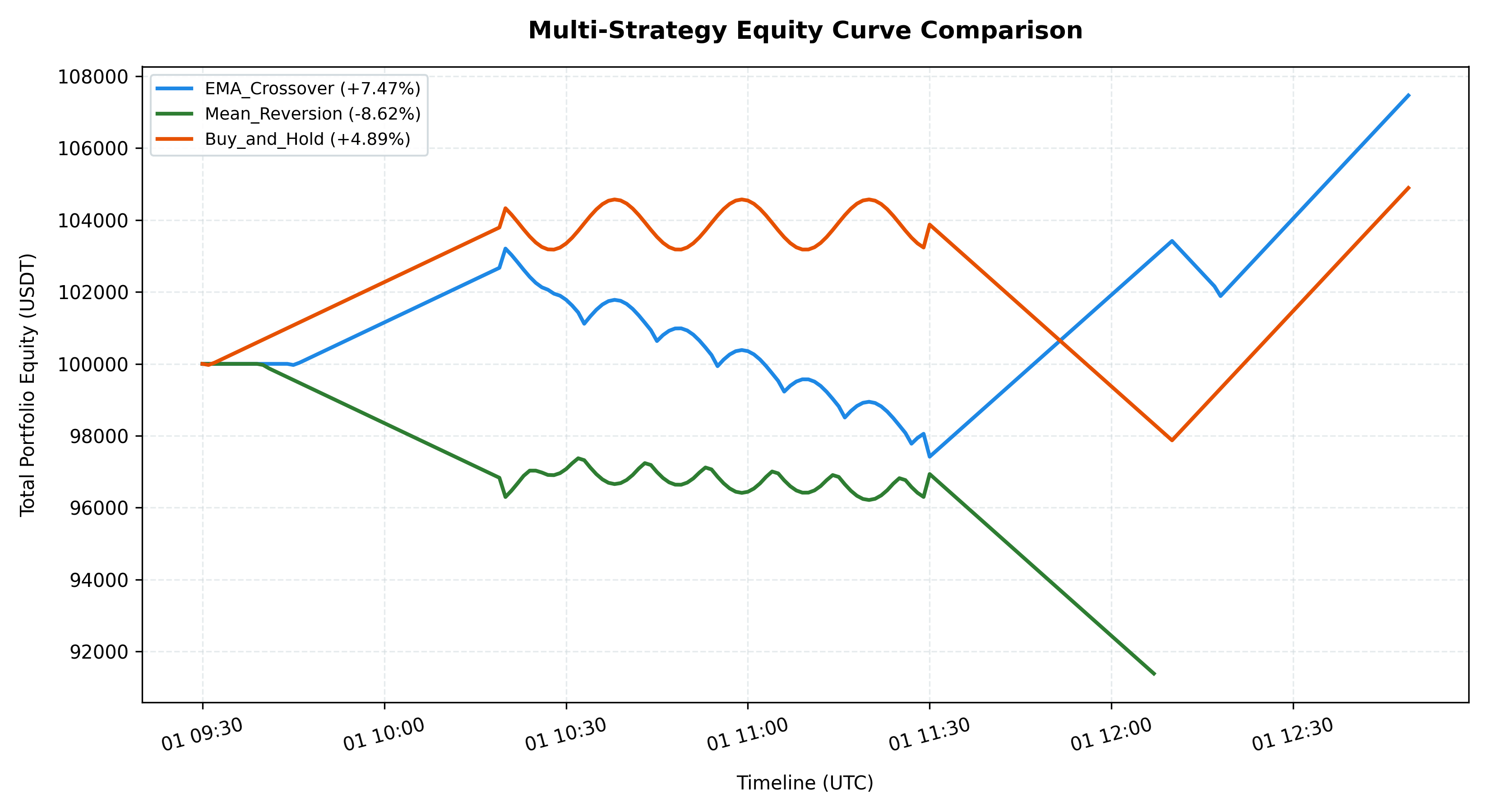
To run the pre-configured demonstration script, which evaluates 3 different strategies simultaneously using Session.compare, displays a performance leaderboard, and plots their equity curves:
python demo.py
Multi-Strategy Leaderboard Output:
====================================================
                Strategy Leaderboard
====================================================
| Rank | Strategy ID    | Total Return | Sharpe Ratio | Sortino Ratio | Max Drawdown | Fills |
|------|----------------|--------------|--------------|---------------|--------------|-------|
| 1    | EMA_Crossover  | 7.47%        | 0.24         | 0.34          | 5.61%        | 9     |
| 2    | Buy_and_Hold   | 4.89%        | 0.16         | 0.26          | 6.41%        | 1     |
| 3    | Mean_Reversion | -8.62%       | -0.44        | -0.49         | 8.62%        | 15    |
====================================================
Comparative Equity Chart:
API Reference
[!TIP] For a highly detailed module-by-module breakdown, parameter types, financial equations, and custom extension guides, check out the complete API Guide.
Strategy Lifecycle Hook Methods
When developing a strategy, you subclass Strategy and implement any of these event callbacks:
class MyStrategy(Strategy):
    def on_session_start(self):
        """Executed when the session begins initialization."""

    def on_tick(self, tick: Tick):
        """Executed whenever a new price update tick arrives."""

    def on_order_filled(self, fill: Fill):
        """Executed whenever one of the strategy's orders has been executed."""

    def on_order_rejected(self, order: Order, reason: str):
        """Executed if an order is rejected by the Risk Engine."""

    def on_session_end(self):
        """Executed when the session has finished processing."""
Within these handlers, you can access strategy properties:
self.portfolio: Reference to your active Portfolio.self.broker: Reference to the Broker client.self.submit_order(symbol, side, order_type, size, ...): Submits an order.
Composable Time Windows
Set up your time execution boundaries:
HistoricalWindow(start: Union[str, datetime], end: Union[str, datetime], resolution: str)LiveWindow(duration: Optional[Union[str, timedelta]], until: Optional[Union[str, datetime]])
Combine them using the + operator to run a warm start backtest that transitions directly into live paper trading:
window = HistoricalWindow(start="30d ago", end="now") + LiveWindow(duration="4h")
Verification & Testing
We enforce code correctness through automated unit and integration tests covering the matching engine, portfolio cash revaluations, drawdown checks, order queues, and seed reproducibility:
# Run pytest test suite
$env:PYTHONPATH="src;."; python -m pytest tests/
Roadmap
- Phase 1: Core Framework [COMPLETED]: Simulated execution queues, Decimal-safe portfolio manager, pre/post-trade risk limits, and historical replays.
- Phase 2: Gym/Gymnasium Wrapper: Reinforcement Learning (RL) wrappers built over the core simulation engine.
- Phase 3: Real-time Paper Trading: Connect the paper broker directly to live CCXT websocket feeds.
- Phase 4: Multi-Calendar & Multi-Market: Integrate timezone-aware exchange trading calendars and multi-market assets.
- Phase 5: Performance Reports: Add advanced analytics tearsheets, walk-forward testing, and Monte Carlo risk stress test suites.
- Phase 6: Live Execution Gateway: Multi-broker gateways (Binance, IBKR, regional APIs) for real capital allocation.
License
This project is licensed under the terms of the MIT License.
1 maintainer

Metadata
1 maintainer
Release files for trade-sandbox 0.1.3
For a detailed explanation of source distributions (sdists) and built distributions (wheels), please see the package formats documentation.
Source distribution (sdist)
| File | Size | Uploaded | |
|---|---|---|---|
| trade_sandbox-0.1.3.tar.gz | 33.9 kB | Details |
Built distribution (wheel)
| File | Interpreter | ABI | Platform | Reset |
|---|---|---|---|---|
| trade_sandbox-0.1.3-py3-none-any.whl | Python 3 | none | any | Details |
Total release size: 62.5 kB
Release files / trade_sandbox-0.1.3.tar.gz
| Download URL | trade_sandbox-0.1.3.tar.gz |
|---|---|
| Size | 33.9 kB |
| Tags | Source |
|
SHA-256 checksum How to use checksums |
0885b52e59ef44674db6473fd7cd9085c115879a51f7cfc7aa72772b61c86ea3
|
|
BLAKE2b-256 checksum How to use checksums |
77fc8d626d8e1333281a7a138960978196cf3e3c59580c8ef734fb3b61326c0e
|
| Upload date | |
|
Uploaded using Trusted Publishing? What is trusted publishing? |
No |
| Uploaded via |
twine/7.0.0 CPython/3.11.9
|
Release files / trade_sandbox-0.1.3-py3-none-any.whl
| Download URL | trade_sandbox-0.1.3-py3-none-any.whl |
|---|---|
| Size | 28.6 kB |
| Tags | Python 3 |
|
SHA-256 checksum How to use checksums |
2d725758cb19cf03a77284a3402bb409cc575026183a814c4decd58f1f342112
|
|
BLAKE2b-256 checksum How to use checksums |
c0917e2b776fedd6c3bd44a06d65db1df32c97a51e052992d6564e92ef34ddf7
|
| Upload date | |
|
Uploaded using Trusted Publishing? What is trusted publishing? |
No |
| Uploaded via |
twine/7.0.0 CPython/3.11.9
|













