
TradeAgent
English | 简体中文
An AI analyst picks the trade. Plain, tested Python places it.




TL;DR
- What it is: an AI trading agent for US stocks and ETFs on Robinhood. Every morning Codex reviews the market's most unusual movers; deterministic Python sizes, places and exits the trade through Robinhood's official agentic trading API.
- What's different: the model never touches the broker, and every forecast is frozen before the market answers, then scored against quant signals, a random pick and SPY.
- What you get: a daily autopilot that paper-trades every session on its own, one-command live trades with hard caps and an automatic exit, and a local dashboard that shows what is running, what the AI picked and why, and how each approach scores. Options trading (calls and puts) is coming soon.
- Start: follow Quick start to install and sign in to Codex and Robinhood.
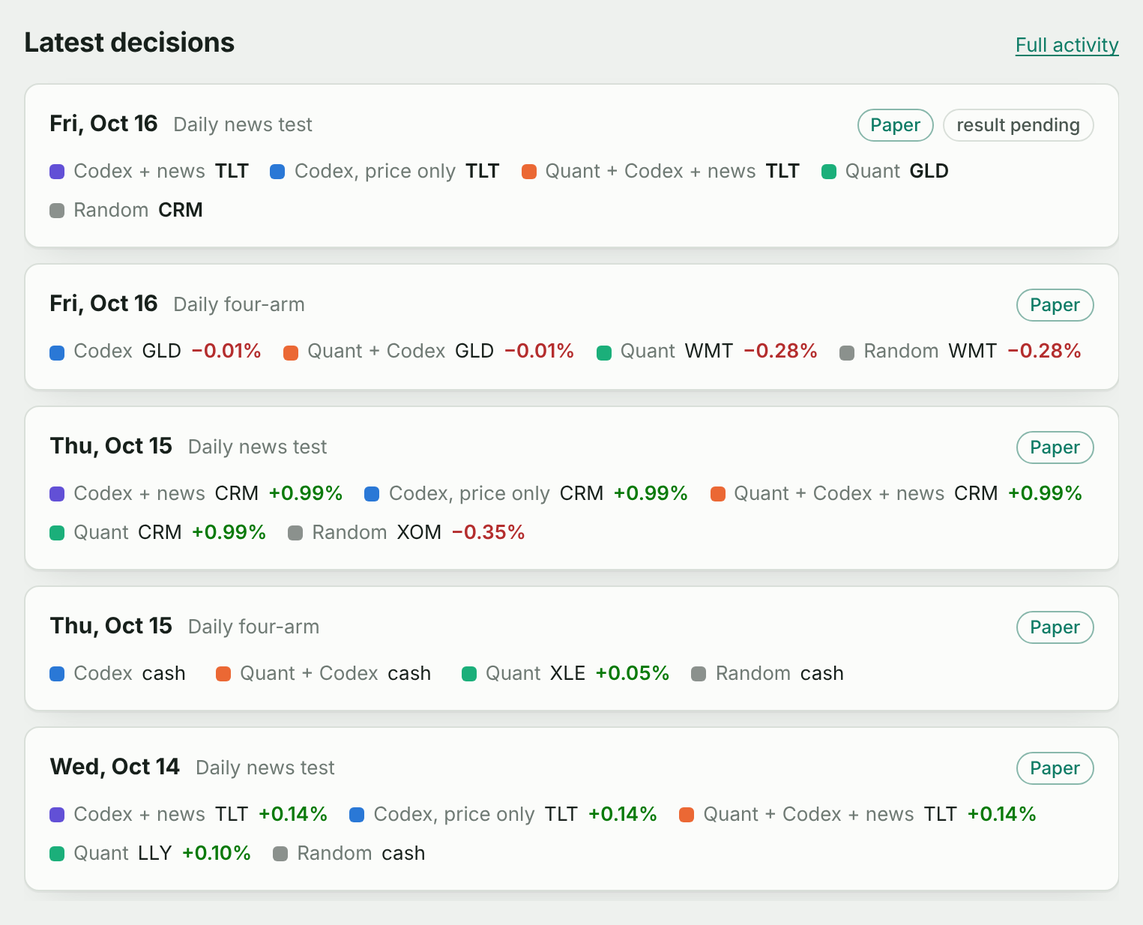
The dashboard on real Paper data, Oct 14–16, 2026.
How it works
flowchart LR
    A[Market data<br/>31 stocks & ETFs] --> B[Scanner]
    B -->|top 3 movers| C[Codex review]
    B --> D[Quant signals]
    C --> E{TradePlan}
    D --> E
    E -->|NO_TRADE| F[Recorded & scored later]
    E -->|BUY| G[Risk checks]
    G --> H[Robinhood order]
    H --> I[Timed exit & P&L]
The model decides what is worth a look. Sizing, limits, orders, exits and reconciliation are ordinary Python, covered by 1,000+ offline tests.
Why TradeAgent
Built on what already works: Robinhood's official agentic trading MCP for data and orders, and Codex for analysis on your ChatGPT plan, with no per-token API bill.
| Instead of | TradeAgent gives you |
|---|---|
| An LLM wired straight to the broker | Order tools the model can't reach: limits enforced in code, every order journaled so a timeout can't double it, a scheduled exit, and a score for every call. |
| "AI hedge fund" repos (ai-hedge-fund, TradingAgents) | Real orders on a real account, analysis on your ChatGPT plan instead of API keys. |
| Unofficial Robinhood libraries (robin_stocks) | The official API and a browser sign-in; your password never leaves Robinhood. |
| Backtesting frameworks (backtrader, vectorbt, LEAN) | Live evidence: forecasts frozen before the outcome exists, so nothing is fitted after the fact. |
Real-market results
Live market data, Paper trading: Codex picked TLT on Oct 14, 2026 (+0.14% net) and CRM on Oct 15, 2026 (+0.99% net) in the daily news test.
Quick start
Linux or WSL2, Python 3.12+. Run these commands as the same Linux user, inside WSL
if you use Windows. Keep state under your Linux home, on ext4/btrfs/xfs, not /mnt/c
or a network share. If pipx uses an older Python, add --python python3.12 to its
install command.
pipx install tradeagent   # Ubuntu/WSL: sudo apt install pipx first
pipx ensurepath
curl -fsSL https://chatgpt.com/codex/install.sh | sh  # official Codex CLI installer
Open a new terminal, then sign in to the two services separately:
codex login              # ChatGPT browser sign-in; requires Codex access
codex login status       # verify Codex sign-in; tradeagent doctor only detects the CLI
tradeagent login         # Robinhood browser sign-in; creates the starter TOML
tradeagent doctor        # offline setup checklist
tradeagent live-check    # read-only account, permissions and quotes check
tradeagent dashboard     # opens the local dashboard; Ctrl+C stops it
Codex CLI is required for the AI analyst and Autopilot. TradeAgent starts
codex exec automatically;
you do not need to keep a Codex window open. If the CLI or its login is missing,
AI assessments are unavailable; the dashboard and manual trading do not require Codex.
See the official installation guide for other install methods.
tradeagent login uses Robinhood OAuth for its separate agentic account.
live-check can report NOT READY outside market hours; you can still view the dashboard.
tradeagent.toml is the one file that controls real money:
[live]
symbols = ["QQQ", "IWM"]   # the only symbols it may buy
max_notional = "25"        # hard ceiling per entry, in dollars
[entry]
dollar_amount = "5"        # each entry spends exactly this
[exit]
hold_seconds = 3600        # sell automatically after an hour
Daily use
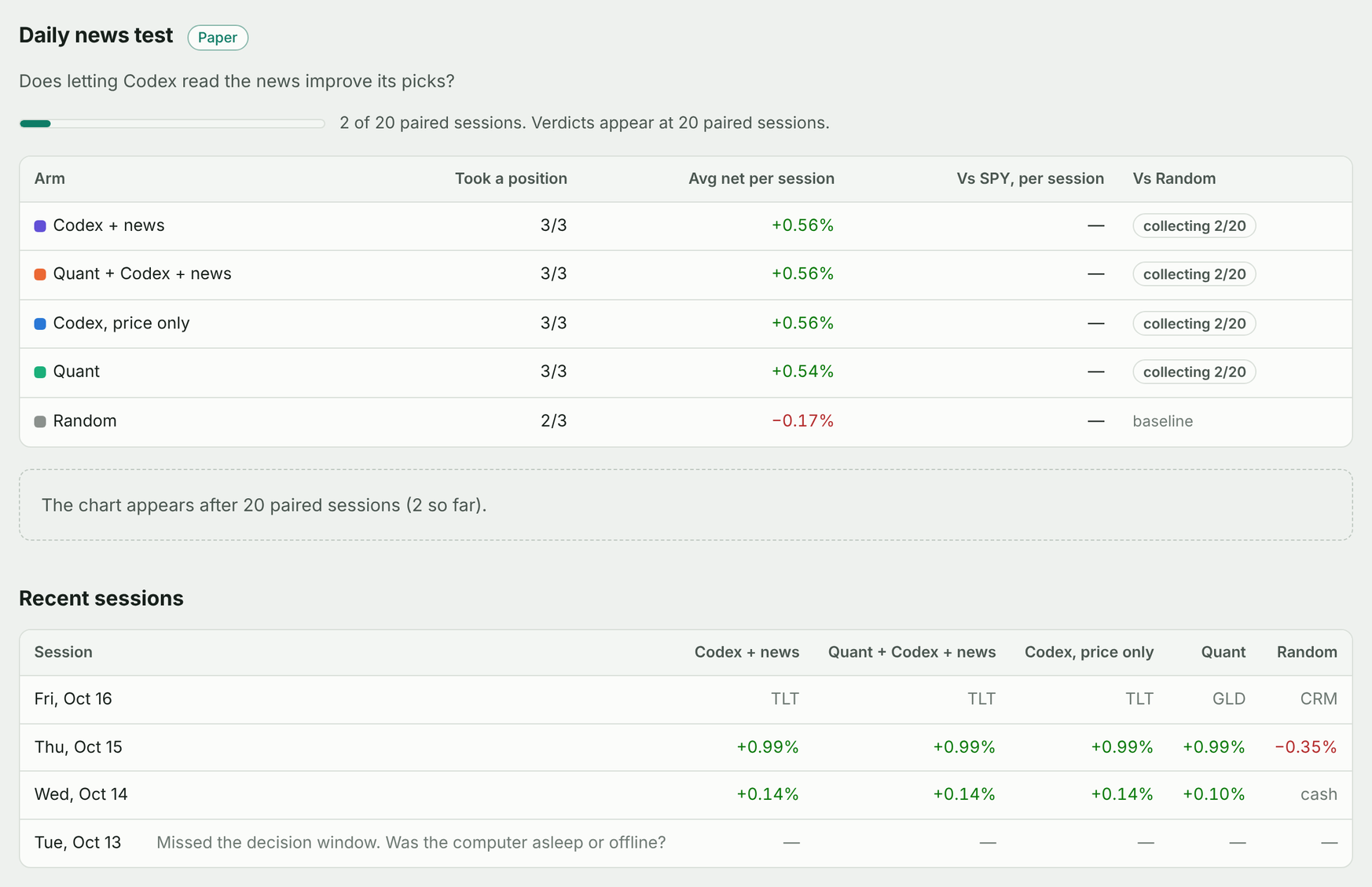
Dashboard. tradeagent dashboard finds the installed timers and the live run on its
own. Today's session as a timeline, every frozen decision with Codex's reasoning, per-arm
results against SPY and Random, and every trade with its fills. Local and read-only.
More
Daily autopilot (Paper only). Install this separately: neither pipx nor the dashboard starts a timer. It needs a running systemd user manager, an awake machine and, on Windows, WSL kept running. From a clone of this repo under your Linux home:
git clone https://github.com/danielye0010/TradeAgent.git && cd TradeAgent
python3 -m venv .venv && source .venv/bin/activate && pip install -e .
python scripts/install_shadow.py --daily --python "$PWD/.venv/bin/python" \
  --state-dir "$HOME/tradeagent-research/daily"
systemctl --user list-timers tradeagent-daily-research.timer
The timer must find codex in ~/.local/bin, /usr/local/bin, /usr/bin or /bin;
a custom shell-only PATH is not inherited. Each research state directory belongs to one protocol.
At 10:00 ET it scans the market, has Codex rank the top three, and freezes four picks
with identical entry, exit and costs: Quant only, Codex only, Quant + Codex and
Random. Add --protocol daily-news-v2 to also measure what reading the news is worth.
More
Ask the analyst. Clone this repo first (or use the checkout above): pipx does not
install its .agents/skills. Run codex from that checkout and use the
trade-opportunity-analyst skill:
| Say | What happens |
|---|---|
$trade-opportunity-analyst Analyze today's market and generate a TradePlan. |
Scans, reads news for the top candidates, explains its reasoning. No orders. |
$trade-opportunity-analyst LIVE: analyze today's market, show the purchase plan, execute if eligible, and report P&L. |
Buys when a strategy clears its evidence bar for the setup; otherwise a reasoned NO_TRADE. |
$trade-opportunity-analyst EXPERIMENTAL LIVE: trade today's strongest quant signal with my $5 setting. |
Up to one $5 position a day on the best quant signal, then the timed exit. |
One trade by hand. tradeagent run-once --live buys per the TOML and exits on its own;
status shows the run, recover finishes an interrupted one (it only sells).
More
Built-in safety
The AI suggests; code decides. Before every order:
- Hard caps: dollar amount, per-entry ceiling, position and exposure limits, cash reserve, daily loss limit. No leverage, shorting or margin.
- Allowlist: configured symbols only, regular hours only.
- Fresh data: account, quote, spread and depth seconds old and consistent.
- Exactly once: each order is journaled with a unique ID before it is sent and never blindly retried.
- Built-in exit: part of the same run.
recoverpicks it back up after a sleep or network drop; aKILLfile in~/.local/state/tradeagent/livestops buying and starts the exit.
Robinhood API updates are checked tool by tool: additive changes keep working, anything that could change what an order means pauses trading with a clear message.
Research lab
Running side by side, each in its own state directory: daily-four-arm-v1 (Codex vs quant
vs random, collecting daily), daily-news-v2 (does reading the news help, collecting daily),
continuous-quant-v5
(does intraday momentum survive decision delays),
event-driven-v6
(Codex reading SEC filings).
Coming soon: options. Calls for bullish picks and puts for bearish ones, with the same
caps, frozen forecasts and automatic exit. The selection and scoring are built (v3, v4)
and switch on as Robinhood rolls out option market data to agentic accounts.
Docs and development
Dashboard · Architecture · Research protocol · Getting started in depth · Changelog
pip install -e ".[dev]" && pytest -q && ruff check src tests scripts
Tests run offline in about two minutes on synthetic markets, a mock broker and a fake OAuth server. See CONTRIBUTING.md.
License
Apache 2.0, with some vendored MIT components (details).
1 maintainer

Metadata
1 maintainer
Release files for tradeagent 1.0.0
For a detailed explanation of source distributions (sdists) and built distributions (wheels), please see the package formats documentation.
Source distribution (sdist)
| File | Size | Uploaded | |
|---|---|---|---|
| tradeagent-1.0.0.tar.gz | 605.0 kB | Details |
Built distribution (wheel)
| File | Interpreter | ABI | Platform | Reset |
|---|---|---|---|---|
| tradeagent-1.0.0-py3-none-any.whl | Python 3 | none | any | Details |
Total release size: 1.0 MB
Release files / tradeagent-1.0.0.tar.gz
| Download URL | tradeagent-1.0.0.tar.gz |
|---|---|
| Size | 605.0 kB |
| Tags | Source |
|
SHA-256 checksum How to use checksums |
ca60b240057de55a6d5ff3c7ada67a12cd2a4e3b4e3669ea7e4cc1654f8f522d
|
|
BLAKE2b-256 checksum How to use checksums |
5ebf8e3f9c485f84289446007a360956afa8290ec57a9a775db28154c6300e5c
|
| Upload date | |
|
Uploaded using Trusted Publishing? What is trusted publishing? |
Yes |
| Uploaded via |
twine/7.0.0 CPython/3.13.14
|
Provenance
Provenance describes where a file came from. On PyPI, provenance is shared via attestations, which provide a verifiable record of the build or publishing details. View details, limitations and caveats.


PyPI Publish Attestation
PyPI verified that this artifact, at this checksum, originated from the publisher listed below.
Signed by GitHub Actions, verified by PyPI on Oct 16, 2026.
Transparency logRelease files / tradeagent-1.0.0-py3-none-any.whl
| Download URL | tradeagent-1.0.0-py3-none-any.whl |
|---|---|
| Size | 396.2 kB |
| Tags | Python 3 |
|
SHA-256 checksum How to use checksums |
c8f8c5b58a294741e9223c9306d3f1bd77592bfca95827771511592b0bffb31a
|
|
BLAKE2b-256 checksum How to use checksums |
88c7b7d2f71e0c182ff9f8494b94e67be597b06207bcb2104b03e0706e748b97
|
| Upload date | |
|
Uploaded using Trusted Publishing? What is trusted publishing? |
Yes |
| Uploaded via |
twine/7.0.0 CPython/3.13.14
|
Provenance
Provenance describes where a file came from. On PyPI, provenance is shared via attestations, which provide a verifiable record of the build or publishing details. View details, limitations and caveats.
PyPI Publish Attestation
PyPI verified that this artifact, at this checksum, originated from the publisher listed below.
Signed by GitHub Actions, verified by PyPI on Oct 16, 2026.
Transparency log













