
tradefloor






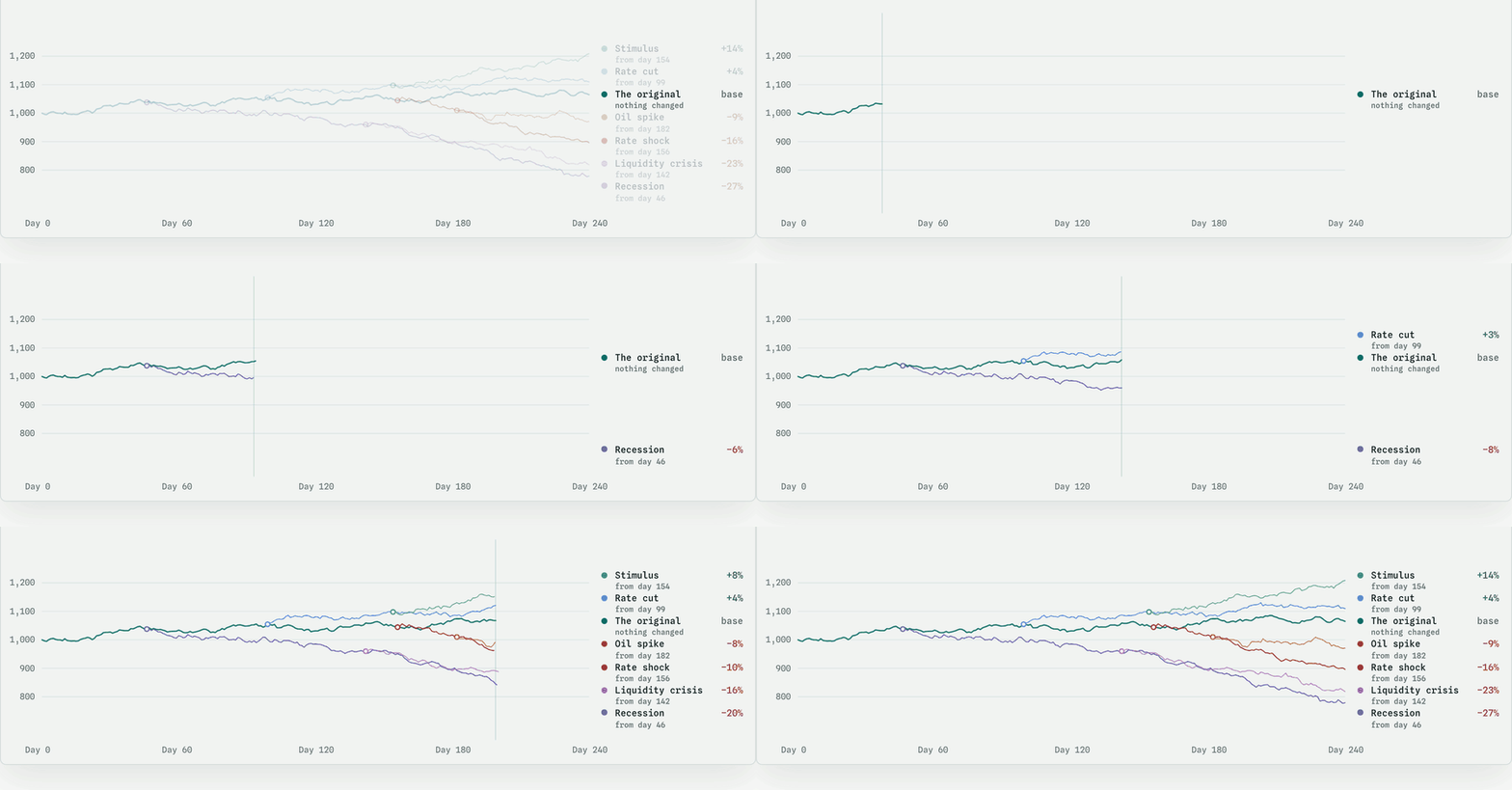
tradefloor is a market simulator you can run a strategy against. It has a Rust core and a Python API.
Give it a seed and a list of companies. It runs a market forward: prices, a limit order book, fills, and an economy that moves each day. Your orders match against the book's depth, so your trades move the price.
Real market data can't tell you what would have happened if you had traded
differently, or what caused a move. tradefloor can, because it computed every
price. You can fork a running market, change one thing in one branch (a rate
rise, a liquidity crisis, a different agent), and measure where the two
branches came apart. engine.truth() splits each move in the gap between a
price and the model's fair value into eleven factors, and
engine.explain(ticker, day) breaks down the move in the traded price, two
records no historical dataset carries.
Documentation is at https://docs.tradefloor.dev.
Install
pip install tradefloor
There are wheels for Linux, macOS and Windows on CPython 3.11+, and no
dependencies. The same engine is a Rust crate (cargo add tradefloor).
Optional extras add the MCP server (tradefloor[mcp]), Arrow output
(tradefloor[arrow]), the Gymnasium environment (tradefloor[rl]) and one
extra per agent framework.
The API may change before 1.0. Model changes ship as new presets, so a market with no agent orders in it replays exactly on its named preset in later releases. tradefloor was called pretium until 0.5.0. Versions up to 0.4.3 still install under that name, and results recorded with them still replay.
A first run
import tradefloor as tf

universe = tf.Universe.random(40, seed=111)

spec = tf.StrategySpec.momentum(lookback_days=1.0, top_k=5)
scores = tf.evaluate({"mine": spec}, seed=7, universe=universe, days=10)

scores["mine"].return_pct            # what it made
scores["mine"].impact_bps            # what its own footprint cost
scores["mine"].strategy_fingerprint  # sha256, cite this
scores["mine"].errors                # each step that raised or was refused
scores["mine"].sharpe                # annualised, from the daily closes
scores["mine"].time_in_market        # share of steps holding a position
That result comes from one random market, so it says as much about the seed
as about the strategy. tf.rank runs many seeds and compares strategies with
a paired sign test. Add tf.baselines.reference_agents() to the entrants and
tf.versus_buy_and_hold(scores) reads each score against buy-and-hold on
the same market.
A Python agent is any object with act(obs) that returns orders: a number
of shares for a market order, tf.Limit(quantity, price) or tf.Cancel().
It sees a read-only view of the market and its own portfolio, and
obs.history holds a daily bar per name. A bar's close is the day's last
print. On pt-v20 the close then re-marks every name, so the next day starts
15 bp away at the median on a 20-name roster.
docs/AGENTS.md
covers what the view holds, how trades are charged, the framework adapters
(OpenAI Agents SDK, PydanticAI, LangGraph, FinRobot) and how scoring works.
The demo
The examples are in this repository and not in the package, so clone it first:
git clone https://github.com/simoncoombes/tradefloor
cd tradefloor
python examples/rate-shock/counterfactual.py
It runs an agent in a controlled market, checkpoints the world and forks it, raises rates by 200 bp in one branch, and compares what the same agent does next. It prints nine checks that the two branches started identical, the step at which the agent's behavior changed, and the two branches side by side. The run takes under five seconds of CPU and needs no keys and no network. The walkthrough is Your first counterfactual experiment.
Contents
engine.truth() |
why each price moved: eleven factors that sum to the mispricing's move, to 1e-16 |
engine.prints() |
how each trade price came about: the shock, and the order book depth that absorbed it |
| counterfactual TCA | your trading cost, from the same seed run with your orders and without them |
tf.rank |
many seeds, paired sign tests |
RunManifest |
what a reader needs to replay a run, checked by reproduce() |
World / compare |
fork a running experiment, change one variable, and measure where the two came apart |
| scenarios | seven packaged shocks, and a file format for your own |
| MCP server | thirteen read-only tools for a coding agent, scenarios included |
| more | a Gymnasium environment, Arrow output, checkpoints, SEC EDGAR data, simulated rate indices, a browser build |
Drive it from an agent
pip install "tradefloor[mcp]"
claude mcp add tradefloor -- tradefloor-mcp
tradefloor-mcp speaks MCP over stdio, and tradefloor mcp starts the same
server. Strategies, universes and scenarios are data, so a tool argument
cannot reach code. Each result carries its own caveats. See
the MCP page.
Scenarios
engine = tf.Engine(seed=42, universe=universe)
engine.run_days(20)                                # a shared history first
scenario = tf.Scenario.load("liquidity_crisis")    # ships with the package

control, stress = tf.branch(engine, 2)
for day in range(80):
    scenario.apply(stress, day)
    ...                                  # run both branches
A scenario is a file of changes to the market and the assumptions behind them. Each change targets a field the engine reads, and the file keeps the shock apart from the knock-on effects you assume follow it:
tradefloor scenario show oil_price_spike

Exogenous shocks
----------------------------------------------------------
  day 50+            commodity.oil            x1.4

Assumed transmission
----------------------------------------------------------
  day 55..74 ramp    macro.inflation          +1.50pp
  day 55+            macro.corporate_yield    +0.50pp
at in a scenario counts days from the first day it is applied, so on a
branch it counts from the branch. Most packaged files first fire on day 50.
To fire one on the first day after a fork, use scenario.starting_at(0), or
world.apply(scenario, at=0) on a World. The gaps between its events stay
the same, and the run's record keeps the packaged file's fingerprint and the
days each event fired.
tradefloor does not predict what a war, an election, an oil shock or a
recession will do to markets. You state the assumptions and it measures how an
agent behaves under them. tradefloor scenario list names the seven packaged
scenarios, and tradefloor scenario targets lists every field a scenario can
change.
Reproducibility
The same seed gives the same market on every platform. tradefloor ships its
own exp, log, pow, sin and cos, so the system's math library cannot
change a result, and each release runs a fixed simulation on five platforms
and stops if any result differs.
A shipped preset never changes, so a market with no agent orders in it replays
exactly on its named preset in every later release. Each release checks that
with a digest per preset. A run with agent orders in it replays exactly on the
same release. Across releases the promise is narrower. 0.8.5 changed how an
agent's fills reach the market, on every preset, so a traded run recorded
before 0.8.5 matches up to its first trade and differs after it. The default
preset is pt-v20, and any earlier one can be named:
eng = tf.Engine(seed=42, universe=u, model="pt-v10")
To let a reader rerun a result, publish its RunManifest. It records the
version, preset, seed, universe, macro state and scenario, and reproduce()
stops on a mismatch. A manifest checks the market and carries no score. Its
result block holds the market's digest, the number of days and
draws_consumed. tf.evaluate and tf.rank write no manifest, so a
published score has to be rerun to be checked.
docs/REPRODUCIBILITY.md
has the full contract, including what a saved engine state promises when it
is restored, and
docs/SUPPORT.md
says which release to pin for a long study.
Realism
tradefloor checks its market against real ones with three named sets of
statistics, listed in
docs/STATISTICS.md.
On the default preset, pt-v20, all 19 statistics of the one-year table
(volatility, fat tails, how much stocks move together, how far the VIX jumps
after a fall) are inside the range real markets show over a year. All 14
graded statistics of the two-year panel are inside their two-year ranges.
The long-run criteria are 40 rows over 21 years for pt-v20, covering crash
depth, how long fear lasts, bear markets per decade, the 2008 and 2020
replays, the rate indices and the cost of size in the book.
pt-v20 meets all 40.
Read those claims narrowly:
- The 19 of 19 is a verdict on figures pooled over 30 seeds. One seed's year
often misses some of its 14 shape statistics. On seeds 101 to 116, all 14
were in range on 5 of the 16, and one seed had 8 of 14. If you run one
market per condition, read
tf.envelope.intervals()for each statistic's spread across seeds. - A shape statistic's range is the median of 35 real one-year windows plus
or minus 2.1 trimmed standard deviations, so passing one is weak evidence.
Volatility clustering is one case.
abs_return_acf1reads 0.028, below every real 2015 to 2025 window (the lowest is 0.039), and it passes because its range reaches lower than those windows do. - The one-year table helped choose most of pt-v20's coefficients, so the held-out checks are the fresh seeds and the fresh set of companies the panel is repeated on.
- One year is the certified horizon. Two years is graded on the two-year panel, and longer runs only by the long-run criteria. Every run on a roster opens at nearly the same VIX (17.66 on the certified roster), so the one-year figures describe years that start calm.
- A driven scenario moves prices at a quarter to a half of the real size, in the right direction. Use a scenario to detect a response, and do not read its size as a forecast.
- Volatility memory is weaker than real at every lag, about a quarter of real at lag 1. Nothing below the 65-minute step is calibrated.
- An order sliced over a day costs far less than published studies find: 0.04 of a daily standard deviation for 10% of a day's volume in 36 slices, against 0.15 to 0.3. A schedule optimiser will overstate the value of trading slowly.
- Your fills pay for the book depth they take, but that temporary impact barely reaches the printed prices. The lasting part is linear and fades, and no other trader adapts to you, so no liquidity spiral or predatory trading can arise.
tf.envelope.check(horizon_days=...) refuses a question that falls outside
a measured limit.
docs/REALISM.md
has every number behind these claims and the full table of limits.
Before you publish a result
- An agent scored on naming the factor behind each day's move gets an
explanation_accuracy. On pt-v20 a constant answer scores 0.95 to 1.0, so quoteexplanation_edge, the accuracy minus that baseline, and never the accuracy alone. - Agents in one
tf.evaluateortf.rankcall run one after another in one Python process, on one seed. An earlier agent can leave the price path in a class variable for a later one. An agent written to cheat can read the seed from the harness's frames throughsys._getframeand run a copy of the market ahead. Nothing flags either. The read-only market view guards only against accidents, so run each agent you did not write in its own process, through the MCP server. - Every
evaluateandrankrun starts at day 0, so a rule that needs 20 days of prices sits out the first 20 while buy-and-hold is invested. Passhistory_days=20to run the market 20 days first with nobody trading. - In a
Worldwith several agents, orders placed at the same step execute in label order, alphabetical, for the whole run. Rotate the labels across runs when you compare different agents in one market. - There are no commissions, no borrow fee on a short and no stop orders. A
stop you check at each step fills a median 26.5 bp past its level at six
steps a day. Uninvested cash earns nothing unless you pass
cash_interest=True, and a negative cash balance pays the policy rate, which is below a broker's margin rate.
docs/AGENTS.md has the measurements behind each of these.
Examples
The twelve numbered examples/ are in reading order, and the test suite runs them:
00-a-year-in-one-market |
Start here: one company, one year, two crises, one chart |
01-first-simulation |
Universe, engine, order book, determinism |
02-evaluating-a-strategy |
Specs, baselines, ranking across seeds |
03-why-did-the-price-move |
The eleven factors that sum to the mispricing's move |
04-how-realistic-is-this |
The realism panel and the limits |
05-training-an-agent |
The Gymnasium environment, and what size costs |
06-execution-and-impact |
TCA and the counterfactual run |
07-research-workflow.py |
A whole study in one file. It takes about forty seconds of CPU and needs tradefloor[arrow] |
08-claude-agent.py |
An LLM agent trading the market through the harness |
09-a-pandemic-shaped-market |
A real 2020-21 macro path, and which fields transmit. Pinned to pt-v12, whose QE channel carries the valuation path, with the same path on the default, pt-v20, at the end |
10-forking-a-market |
Fork a market, raise the rate in one branch, and compare the futures |
11-scenario-fork.py |
A scenario file applied to one branch of a fork, and what it cost |
The rate-shock/
study is the demo above, and
integrations/
runs the same kind of experiment through each agent framework, offline and
without an API key.
Documentation
https://docs.tradefloor.dev covers install, the API, the guides and how the model is measured. These pages in this repository have the detail behind the sections above:
- docs/MODEL.md: the model as equations, with every coefficient's value on the default preset and where it came from
- docs/STATISTICS.md: the named sets of realism statistics
- docs/REALISM.md: the realism results and every measured limit
- docs/REPRODUCIBILITY.md: what replays exactly, across platforms, releases and restored state
- docs/AGENTS.md: writing, scoring and comparing agents
- docs/SUPPORT.md: which release lines get fixes, and for how long
Contributing and support
CONTRIBUTING.md explains how to build and test the project. Its main rule is that any change to the simulated trajectory is a breaking change, however small, so a model change ships as a new preset. RELEASING.md is the release checklist.
Report a vulnerability through GitHub's security advisory form, not a public issue. SECURITY.md says what is in scope. Bugs and questions go to GitHub issues.
0.8.5 and the 0.8 patches after it are the long-term support line, with bug and security fixes for 24 months. docs/SUPPORT.md says what a support line promises and which release to pin for a long study.
Citing tradefloor
Cite the version you ran and name the preset. The same version can run several presets, and results depend on the preset.
@software{tradefloor,
  author  = {Coombes, Simon},
  title   = {tradefloor: a deterministic market simulator with a limit order book},
  version = {0.9.1},
  year    = {2026},
  url     = {https://github.com/simoncoombes/tradefloor},
  note    = {Model preset pt-v20}
}
CITATION.cff carries the same details, and GitHub's "Cite this repository" button reads it.
In the text, say which model you used, for example: "tradefloor 0.9.1, preset pt-v20, specified in its docs/MODEL.md". docs/REPRODUCIBILITY.md says how to publish a result so a reader can rerun it, and how to show a score was not tuned to its seeds.
License
tradefloor is licensed under MIT OR Apache-2.0, at your option. See
LICENSE-MIT
and
LICENSE-APACHE.
GitHub's sidebar reads Apache-2.0 because its license detection picks one
file and stops. The grant that applies is the dual one, stated in
pyproject.toml, rust/Cargo.toml and this section.
1 maintainer

Metadata
1 maintainer
Release files for tradefloor 0.9.1
For a detailed explanation of source distributions (sdists) and built distributions (wheels), please see the package formats documentation.
Source distribution (sdist)
| File | Size | Uploaded | |
|---|---|---|---|
| tradefloor-0.9.1.tar.gz | 1.9 MB | Details |
Built distributions (wheels)
| File | Reset | |||
|---|---|---|---|---|
| tradefloor-0.9.1-cp311-abi3-win_amd64.whl | CPython 3.11 | abi3 | Windows x86-64 | Details |
| tradefloor-0.9.1-cp311-abi3-manylinux_2_34_x86_64.whl | CPython 3.11 | abi3 | Linux glibc 2.34+ x86-64 | Details |
| tradefloor-0.9.1-cp311-abi3-manylinux_2_34_aarch64.whl | CPython 3.11 | abi3 | Linux glibc 2.34+ ARM64 | Details |
| tradefloor-0.9.1-cp311-abi3-macosx_11_0_arm64.whl | CPython 3.11 | abi3 | macOS 11.0+ ARM64 | Details |
| tradefloor-0.9.1-cp311-abi3-macosx_10_12_x86_64.whl | CPython 3.11 | abi3 | macOS 10.12+ x86-64 | Details |
Total release size: 11.9 MB
Release files / tradefloor-0.9.1.tar.gz
| Download URL | tradefloor-0.9.1.tar.gz |
|---|---|
| Size | 1.9 MB |
| Tags | Source |
|
SHA-256 checksum How to use checksums |
550b348984a71ed002c2a5372e71713d5be47b7d38cd0c58a65aac7a2b2a3ae9
|
|
BLAKE2b-256 checksum How to use checksums |
d31851219717bc00f4f7e5366291c12f675ee61ae98b2cc8eecbb32d0f29bb7c
|
| Upload date | |
|
Uploaded using Trusted Publishing? What is trusted publishing? |
Yes |
| Uploaded via |
twine/7.0.0 CPython/3.13.14
|
Provenance
Provenance describes where a file came from. On PyPI, provenance is shared via attestations, which provide a verifiable record of the build or publishing details. View details, limitations and caveats.


PyPI Publish Attestation
PyPI verified that this artifact, at this checksum, originated from the publisher listed below.
Signed by GitHub Actions, verified by PyPI on Oct 4, 2026.
Transparency logRelease files / tradefloor-0.9.1-cp311-abi3-win_amd64.whl
| Download URL | tradefloor-0.9.1-cp311-abi3-win_amd64.whl |
|---|---|
| Size | 2.0 MB |
| Tags | CPython 3.11 Windows x86-64 abi3 |
|
SHA-256 checksum How to use checksums |
6648e756d6ff852d17239f62f71b277e9843b125cac1d0bbc311177fb6c11555
|
|
BLAKE2b-256 checksum How to use checksums |
17e2c7a10ae1122de557fa52d676d28b1beb1957376103f87e78e523c7d8523a
|
| Upload date | |
|
Uploaded using Trusted Publishing? What is trusted publishing? |
Yes |
| Uploaded via |
twine/7.0.0 CPython/3.13.14
|
Provenance
Provenance describes where a file came from. On PyPI, provenance is shared via attestations, which provide a verifiable record of the build or publishing details. View details, limitations and caveats.
PyPI Publish Attestation
PyPI verified that this artifact, at this checksum, originated from the publisher listed below.
Signed by GitHub Actions, verified by PyPI on Oct 4, 2026.
Transparency logRelease files / tradefloor-0.9.1-cp311-abi3-manylinux_2_34_x86_64.whl
| Download URL | tradefloor-0.9.1-cp311-abi3-manylinux_2_34_x86_64.whl |
|---|---|
| Size | 2.0 MB |
| Tags | CPython 3.11 Linux glibc 2.34+ x86-64 abi3 |
|
SHA-256 checksum How to use checksums |
bad14d8803d037d101d3c2087d3d51fc4e0837cdd2786296b892148309003ea9
|
|
BLAKE2b-256 checksum How to use checksums |
15f1d649f69350b4b45364a9dd89b0d65de6941b3d95448a027b10756310db38
|
| Upload date | |
|
Uploaded using Trusted Publishing? What is trusted publishing? |
Yes |
| Uploaded via |
twine/7.0.0 CPython/3.13.14
|
Provenance
Provenance describes where a file came from. On PyPI, provenance is shared via attestations, which provide a verifiable record of the build or publishing details. View details, limitations and caveats.
PyPI Publish Attestation
PyPI verified that this artifact, at this checksum, originated from the publisher listed below.
Signed by GitHub Actions, verified by PyPI on Oct 4, 2026.
Transparency logRelease files / tradefloor-0.9.1-cp311-abi3-manylinux_2_34_aarch64.whl
| Download URL | tradefloor-0.9.1-cp311-abi3-manylinux_2_34_aarch64.whl |
|---|---|
| Size | 2.0 MB |
| Tags | CPython 3.11 Linux glibc 2.34+ ARM64 abi3 |
|
SHA-256 checksum How to use checksums |
73ffff0aa2cafddf73010674c9a6c9cb2f9e4e333467ff5aebf2cac3b7dbbd9e
|
|
BLAKE2b-256 checksum How to use checksums |
ebe1f3481c54d41f48b25e863eeb00088ec5d9e5edff67deab2fe5d419fcd28b
|
| Upload date | |
|
Uploaded using Trusted Publishing? What is trusted publishing? |
Yes |
| Uploaded via |
twine/7.0.0 CPython/3.13.14
|
Provenance
Provenance describes where a file came from. On PyPI, provenance is shared via attestations, which provide a verifiable record of the build or publishing details. View details, limitations and caveats.
PyPI Publish Attestation
PyPI verified that this artifact, at this checksum, originated from the publisher listed below.
Signed by GitHub Actions, verified by PyPI on Oct 4, 2026.
Transparency logRelease files / tradefloor-0.9.1-cp311-abi3-macosx_11_0_arm64.whl
| Download URL | tradefloor-0.9.1-cp311-abi3-macosx_11_0_arm64.whl |
|---|---|
| Size | 2.0 MB |
| Tags | CPython 3.11 abi3 macOS 11.0+ ARM64 |
|
SHA-256 checksum How to use checksums |
395c44f8bacd984124e4cddb24d55caed6799c185f9c87d652f636acdc0f5e20
|
|
BLAKE2b-256 checksum How to use checksums |
2ddcaeeac7d57aaa1896f5619c9d2aff8d6ab05fa6ffa6341acd2f397531a640
|
| Upload date | |
|
Uploaded using Trusted Publishing? What is trusted publishing? |
Yes |
| Uploaded via |
twine/7.0.0 CPython/3.13.14
|
Provenance
Provenance describes where a file came from. On PyPI, provenance is shared via attestations, which provide a verifiable record of the build or publishing details. View details, limitations and caveats.
PyPI Publish Attestation
PyPI verified that this artifact, at this checksum, originated from the publisher listed below.
Signed by GitHub Actions, verified by PyPI on Oct 4, 2026.
Transparency logRelease files / tradefloor-0.9.1-cp311-abi3-macosx_10_12_x86_64.whl
| Download URL | tradefloor-0.9.1-cp311-abi3-macosx_10_12_x86_64.whl |
|---|---|
| Size | 2.0 MB |
| Tags | CPython 3.11 abi3 macOS 10.12+ x86-64 |
|
SHA-256 checksum How to use checksums |
6d922257e608213edf7326bba8a5353b683fa1e088fe317c02caab1e7274277e
|
|
BLAKE2b-256 checksum How to use checksums |
61a5baed9516176e262671aa8232d3719506b21200b19a05d0c2c27e10faa77c
|
| Upload date | |
|
Uploaded using Trusted Publishing? What is trusted publishing? |
Yes |
| Uploaded via |
twine/7.0.0 CPython/3.13.14
|
Provenance
Provenance describes where a file came from. On PyPI, provenance is shared via attestations, which provide a verifiable record of the build or publishing details. View details, limitations and caveats.
PyPI Publish Attestation
PyPI verified that this artifact, at this checksum, originated from the publisher listed below.
Signed by GitHub Actions, verified by PyPI on Oct 4, 2026.
Transparency log













