

TRA
A crypto trading desk with deterministic execution. A rule or a model proposes, the system decides.













TRA (trading research agents) is published as bitra on PyPI and runs as tra. Before
0.10.1 the package was called trading-research-agents, and the same package is still
published under that name.
TRA is a crypto trading desk you run yourself. It reads the market, takes one decision, prices the round trip, holds the decision against limits you declare, and either writes it down or sends one order with its stop attached. The decision can be a rule in your own file, with no model in the loop, or a language model that proposes. Either way the system, with no model involved, computes every figure, applies every limit, sizes the trade and sends the order. Every decision and every refusal is kept on disk with its reason, so you can check afterwards what happened and why.
It is experimental. Settings change between versions, it has not been run with real capital by us, and the package ships no strategy that makes money. What it does give you: one order path to every exchange ccxt reaches, run end to end on six of them; an arena that replays any rule over years of data net of your own costs, beside buy-and-hold and a random null; a typed judge that reads the day's headlines and can hold an entry on an adverse event; and the records to check every claim this page makes on your own data.
Contents
- What it solves
- How it is built
- What we measured, and what it changed
- Get started
- The console
- How one cycle decides
- Venues
- Models and providers
- Toward real orders
- Your money, your orders, your positions
- Watching a desk, and what is kept
- Command line
- What it guarantees, and what is not built yet
- Where it is going
- Documentation
What it solves
| The usual problem with trading software that decides | What happens here |
|---|---|
| A model invents or miscalculates a number | Models never compute. Every figure comes from the system, and a figure a model cites is checked against its brief, value included. |
| Nobody knows what a trade cost until it's done | The round trip (fees, spread, impact, funding, slippage) is priced before an order exists, and a trade whose claimed edge doesn't clear it is refused. |
| The claimed edge is whatever someone hoped | A rule desk claims the mean net per trade you measured in the arena, on your own costs; nothing guesses it. |
| A model "decides" to ignore your settings | Your declared thresholds decide. A model's opinion is recorded beside them, never instead of them. |
| Something went wrong and there is no trace | Each cycle keeps its snapshot, briefs, answers, the intent and what the venue said. Nothing is rewritten. |
| A timeout is read as "the order failed" | An order with no answer is unknown and read back by its client order id; it is never sent twice. |
| A crash leaves a position with no stop | The stop and take profit go to the venue with the entry, or right after the fill where the venue takes them no other way, so they survive this process dying. |
| Text from a feed tells a model what to do | Headlines are read only by the typed judge, as closed questions, after a check for instructions addressed to a machine; no model can send an order or reach a key. |
| A strategy looks good on a lucky sample | The arena replays it over years of recorded market beside buy-and-hold, momentum, its own fade and a seeded random null, net of costs, and says "sample too small" until the sample is not. |
None of these is hypothetical. Why it is built this way lists the documented failures behind each one, with their sources.
How it is built
Three kinds of work, kept apart because they fail differently.
| Does | Never does | |
|---|---|---|
| The system | records the market, computes every figure, prices the round trip, applies your limits, sizes, signs what the risk gate approves, sends one order with its exits, settles every replayed idea | guess, or carry a stale value forward as current |
| The decision | a rule in your file (closed bars in, one idea or none out), or a language model that proposes a direction and its levels, citing the figures it used | compute a number, size a trade, touch an order or a key, loosen a limit |
| Jev, the typed judge | reads each headline as closed questions and returns a probability for each answer: which kind of event, whether it concerns this asset, whether it speaks to a machine | decide a direction from numbers, compare dates, do arithmetic, size, or reach an order |
flowchart LR
    market["market data<br/>candles, book, funding,<br/>open interest, news"]
    decision["the decision<br/>a rule in your file,<br/>or a model that proposes"]
    guard["event guard<br/>Jev reads the headlines,<br/>the system weighs them"]
    cost["cost and exits<br/>round trip priced,<br/>stop and take placed"]
    risk["risk gate<br/>signs or refuses"]
    venue["venue<br/>one order, exits attached"]
    record[("the record<br/>every step, every refusal")]
    arena["tra arena<br/>the same rule replayed<br/>net of costs, beside a null"]
    market --> decision --> guard --> cost --> risk --> venue
    decision -.-> record
    guard -.-> record
    risk -.-> record
    market --> arena
A rule is asked the same way by tra run and by tra arena: the closed bars before the decision,
cut back to the last unbroken run. So the rule you replay is the rule you run, line for line. The
package ships no rule of its own; examples/strategies/momentum_long.py is an example, and a test
fails the build if a decision core appears inside the package.
The typed judge is kept to the job it is built for, and the system carries what its vendor lists as its weak points: recent headlines are chosen by when the system first saw them, so the judge never compares dates; each choice is asked in two orders, so a first-option bias shows as disagreement and the answer is dropped; one headline and its publisher go in each request and nothing else; and the weight of an event and its comparison with your threshold are arithmetic, done by the system.
What we measured, and what it changed
The design changed after we measured our own first version. Each study is in the repository's research notes with its script, so it can be run again.
| Question | What we found | What changed |
|---|---|---|
| How much forecasting skill does a round trip of 15 bps demand? | At a four-hour hold, a forecast's correlation with the next move has to be 0.12 to 0.20 just to break even on BTC, ETH and SOL; at a daily hold, 0.04 to 0.06 | the example desk decides once a day and holds up to six days |
| Is there information in the last move at short horizons? | Indistinguishable from zero at 1 to 12 hours on all three, even with maker fees | shorter horizons stay available as experiments, measured in the arena |
| Are the simulated price paths an edge? | Calibrated on average (within 1.5 points over 16,458 readings), and no better than chance at telling one moment from another | the paths are a risk reading, not a gate ([targets].min_path_ev_bps is off unless declared) |
| Does a fixed rule separate from chance at any horizon? | Only at the daily horizon, for a long-only momentum rule fixed before the run, on five years of hourly data | the rule desk (tra init --profile rule) is the starting point; models are measured against it |
These are replays, partly on the period the horizon was chosen on, three instruments and one cost model. They are reasons for the design, not a promise about the future. Replay them on your data:
for coin in BTCUSDT ETHUSDT SOLUSDT; do tra data klines $coin 2021-01-01 --to 2026-10-31; done
tra arena --tape klines --venue binanceusdm --channel bybit/taker-taker \
  --instruments BTCUSDT,ETHUSDT,SOLUSDT --from 2022-01-01 --to 2026-10-31 --interval 1d --context-interval 7d --hold-bars 6 \
  --rows buy_hold,momentum_long,random --spread-bps 2 --slippage-bps 2
Get started
A few minutes. The rule desk needs no model key.
1. Install. You need Python 3.11 or newer. uv is the quickest way:
uv tool install 'bitra[ccxt,openai,anthropic,google,data]'
That brings every model provider and every exchange in. Without uv, run
pip install 'bitra[ccxt,openai,anthropic,google,data]' inside a virtual
environment. To move to the newest release later:
uv tool upgrade bitra      # or: pip install -U 'bitra[ccxt,openai,anthropic,google,data]'
tra --version
That is the release, and master is the stable branch that holds it. develop, the default
branch on GitHub, is where the next one is built and changes often; the rule desk and the
event guard below are on develop and not yet in a release (more).
2. Make a desk. A desk is a folder holding your settings and everything it decides.
tra init my-desk --profile rule                     # the example daily rule, no model
tra init my-desk --profile autonomous --agent groq  # a language model as the decision, an experiment
cd my-desk
--agent |
Key in .env |
Model, when you name none |
|---|---|---|
groq |
GROQ_API_KEY (free tier) |
openai/gpt-oss-120b |
google |
GEMINI_API_KEY |
gemini-flash-latest |
anthropic |
ANTHROPIC_API_KEY |
claude-opus-5-5 |
openai, deepseek, xai, openrouter, ... |
see Models and providers | name one with --model; tra models <provider> lists them |
Add --venue okx (or any ccxt id) to trade somewhere other than Bybit.
3. Declare what you measured, or add your key. A rule desk refuses to load until
[strategy].edge_bps holds the rule's mean net per trade from your own tra arena run. An agent
desk needs its model key: cp .env.example .env, then set it. Every command reads the .env next to
strategy.toml on its own.
4. Check. tra check reads every setting against the others and names the one thing to fix
next. A desk that is ready ends with ready to run tra run``.
5. Run. tra run decides once on live market data, in the sandbox: nothing leaves your
machine. tra run --every 1d keeps deciding, once a day at the daily close. Or type tra on its
own for the console, which takes the same commands.
6. When you want real orders. Start on the exchange's demo or testnet API. Make the desk for that exchange from the start, and the rest is three commands:
tra init my-desk --profile rule --venue bitget
cd my-desk                       # put the exchange's keys in .env
tra keys --probe --prepare       # reads the account; on a demo or testnet sets one-way mode
tra mandate --sign "Your Name" --venue-mode
tra check
--venue writes what that exchange needs into [execution]: its demo or testnet API, 3x isolated
leverage, at most 200 per order, and how its stop and take profit are placed. Change any of it.
How to make the key on each exchange is in
Exchange accounts and keys, and
Toward real orders has the whole path.
What a rule desk does before you change anything
| Default | Where to change it | |
|---|---|---|
| Orders | none: the sandbox writes each decision down and sends nothing | [execution].mode |
| What it trades | BTCUSDT on Bybit, as a taker | [run].instrument, [universe], --venue |
| Decision | strategies/momentum_long.py, once a day at 00:00 UTC |
[strategy], [run].bar_interval_s |
| Claimed edge | none until you declare it from your arena run | [strategy].edge_bps |
| Stop and target | the rule names them; a stop wider than 12% refuses the trade | [exit].max_stop_frac |
| Time limit | a position closes after six daily bars | [exit].timeout_bars |
| Risk per trade | 0.5% of equity lost at the stop, whatever the stop's distance | [controls].max_risk_per_trade_bps |
| Bad days | no new entry after a 3% loss on the day or a 10% fall from the peak | [controls] |
| Event guard | off; once declared, paper records what it would hold and holds nothing |
[event_guard], [judge] in data.toml |
| Oversight | the risk gate on every new order | [controls] |
An agent desk (--profile autonomous) decides on 15-minute bars by default, reads 1h and 4h as
context, lets the analyst name its stop between 0.2% and 3%, and closes a position after four hours;
its defaults are in The cycle.
Working on the code itself? See Development.
The console
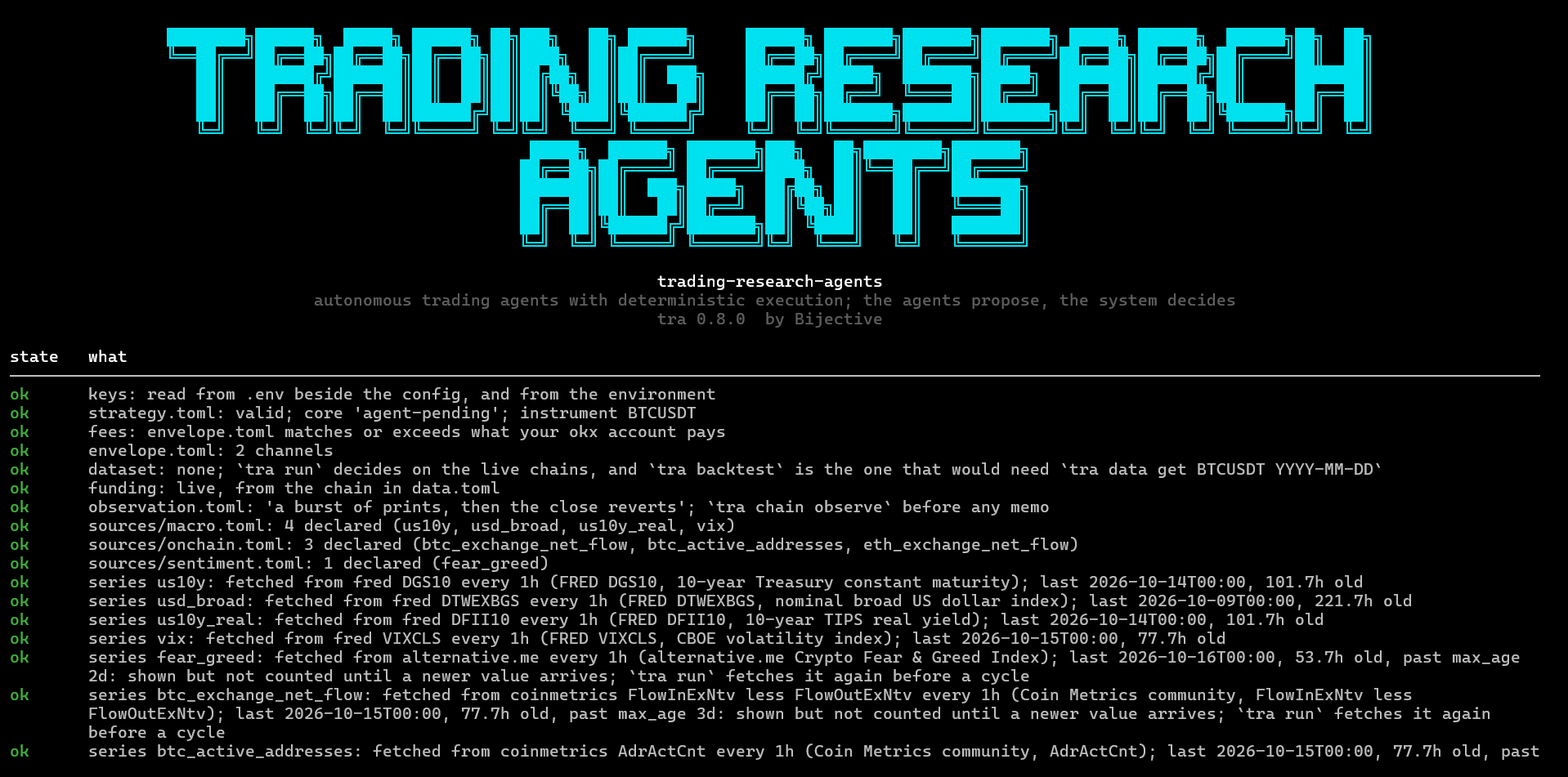
Run tra inside your desk and it opens the console: what is ready, what isn't, and the next
command to run. Under it is a prompt that takes every command and draws it right there. Arrow keys
go back through what you typed, tab completes, help lists the commands and exit leaves. For
scripts and cron, tra -c "run --now" runs one command and exits, and --plain or --json gives
text or machine-readable output instead of panels.
How one cycle decides
flowchart TD
    snap["snapshot<br/>every value with its source and age"] --> wake{"trigger, when declared<br/>has anything moved?"}
    wake -- "no" --> held["held: one data pull, nothing asked"]
    wake -- "yes" --> who{"the decision"}
    who -- "rule desk" --> rule["your rule<br/>closed bars in, one idea or none"]
    who -- "agent desk" --> lead["structure lead, with its team<br/>a direction, a setup, levels, cited figures"]
    rule --> guard{"event guard, when declared<br/>an adverse event about this asset?"}
    guard -- "hold mode, yes" --> refused["a refusal that names its figure"]
    guard -- "no, or paper" --> price
    lead --> price["the round trip priced<br/>fee, spread, impact, funding, slippage"]
    price --> exits["the stop and the target<br/>inside your [exit] bounds"]
    exits --> gates{"the gates you declared<br/>cost, targets, desk exposure"}
    gates -- "no" --> refused
    gates -- "yes" --> riskgate{"risk gate<br/>loss at the stop, caps, switches"}
    riskgate -- "no" --> refused
    riskgate -- "signed" --> intent["the intent, written before anything is sent"]
    intent --> venue["venue mode only<br/>one order, the stop and take profit attached"]
A rule desk asks no model: the rule, the event guard when you declare one, and then the same steps every desk runs. An agent desk adds the structure lead and, when you declare them, its team and its reviewers; each of those is an experiment until the arena or the forward record shows it doing better than the rule alone.
On an agent desk, who does what:
| Role | Reads | Answers | Can never |
|---|---|---|---|
| structure lead | candles, spread, funding, book imbalance, open interest change, and the regime on its timeframe and the higher ones you declare | a direction, a setup from a fixed list, a confidence, a horizon, and where its stop and target sit | size the trade, place a level outside your [exit] bounds, run a trend setup in a range, or fade a market that is not a measured range |
| blind confirmer (optional) | the structure lead's own brief, blind to its answer, ideally on another model family | the same schema, independently | trade alone: the two reads must name the same side, and the lower confidence counts |
| flow specialist (optional) | the book, the spread, funding and open interest, which then leave the analyst's brief | a side and a confidence, with the figures it rests on | name a level or a size; it is one voice in conviction |
| macro, on-chain and sentiment readings (the system, not agents) | dated rates and levels, chain and derivatives figures, scores and notes you curate | a declared state and a graded score: each series against the lines you drew | ask a model, or propose a direction |
| reviewers: pro and contra | the proposal and the figures behind it, each without the other's case | the strongest case for or against, as cited claims | see the other side's case, or cite a figure it wasn't given |
reviewer: neutral, as judge (Jev when [judge] is declared) |
the same, and both cases once the system has checked every claim | support, oppose or abstain, the one verdict that counts; from the typed judge, a probability for each | see the advocates' verdicts, or count claims instead of weighing them |
| technology and quant auditors | the cycles this desk recorded | findings and proposed changes | change anything |
The macro, on-chain and sentiment readings are the system's arithmetic over dated series you declare under
sources/, and ask no model: until 0.11 each was an analyst whose model labelled the same figures,
no decision ever rested on that label, and the calls were retired. Each series
is either a file you keep or a feed the desk refreshes itself (FRED, the Crypto Fear & Greed Index,
or any paid vendor that answers JSON over https). tra sources show lists every series with where it
came from and how old its last value is, and a value older than its max_age is shown as stale and
never counted. Data sources has the details.
Which reviewers run is yours to declare. A vote never decides on its own: it moves conviction by
the weight you give it ([conviction].reviewer_weight), and a stance counts for what it says beyond
its assignment, since a pro that supports is expected to.
Voices are allowed to disagree. Each reading becomes a score between -1 and 1, computed from its own figures against the lines you drew, so a macro reading barely past its line counts as a small voice and one far past it counts as a big one. Conviction adds them up: agreement grows the size, opposition shrinks it in proportion, and only opposition that outweighs the case stops the trade. A short at 0.70 confidence against a barely bullish macro and sentiment scores 0.56 and trades at half size; against a strongly bullish context it scores 0 and doesn't trade.
The structure lead knows what kind of market it is working in before it decides. The system measures
the regime on its timeframe (trending up, trending down, ranging or mixed) and on the higher
timeframes you list in [run].context_intervals, and it hands over what your macro thresholds say
this cycle as well. A setup that doesn't fit the regime, such as a trend trade in a sideways
market, is refused by name; [regime] holds the lines.
Everything after the models answer is arithmetic over numbers you declared. No model can place, cancel or resize an order, read a file outside the project, or edit your configuration. Agents has the full table of what an agent can reach, and The cycle walks through every step.
Venues
A cycle reaches venues through ccxt, so every exchange ccxt supports is already integrated: the same order path, the same gates and the same checks, with nothing in the core naming a venue. What differs from one venue to the next is what ccxt reports it can do, the second column, and how far it has been tested, the last:
| Venue | What a cycle can do there | Practice environment | Run end to end by us |
|---|---|---|---|
| Bybit (the default) | everything: orders with the stop and take profit attached | demo, testnet | yes, on the demo API: real orders, exits attached, a resting order cancelled |
| OKX | everything | demo (ccxt's testnet switch) | yes, on the demo API: real orders, exits attached, closed by the venue's own exits |
| Bitget | everything, on a classic or a unified trading account | demo | yes, on the demo API, unified account |
| BingX | everything | demo (VST, ccxt's testnet switch) | yes, on the demo API |
| Binance, Gate | orders, with the stop and take profit placed right after the fill (exits = "separate") |
demo (Binance), testnet (Gate) | yes, on their practice APIs |
| WEEX, BloFin, WOO X | everything | testnet | ready for its run |
| Hyperliquid, Pacifica, WOOFi Pro, ModeTrade (decentralised) | everything | testnet | ready for its run; report wanted for Hyperliquid |
| KuCoin Futures, Deepcoin | everything | none | integrated; no practice environment |
| dYdX, Paradex, Extended, Lighter (decentralised); Deribit, Crypto.com, Coinbase International | orders, but no exits at the venue through ccxt, and some cannot set leverage | testnet | not for a desk that needs its exits at the venue |
| Kraken, Kraken Futures, Phemex | data for now: ccxt does not report their positions, and no order is sent into a position nobody can see |
"Everything" means ccxt reports the five things a safe order needs: send it, attach the exits, read the position, read the open orders, cancel. "Run end to end" is the stronger claim, a full run with real orders on the venue's demo or testnet API, and Bybit, OKX, Bitget, BingX, Binance and Gate have had it so far. How to make a key on each is in Exchange accounts and keys. Any other venue that takes orders can have that run at any time: start on its practice environment, watch a few cycles and read what it sends. Each report moves a venue into the last column.
Adding the venue you trade on is four steps, and one command writes most of it:
tra venues okx            # what it can do, and which keys it signs with
tra venues okx --setup    # the blocks to paste into envelope.toml, data.toml, strategy.toml and .env
Your fees are filled in from your account when it reports them, and from the venue's standard tier until then, labelled as such; a fee you write yourself is kept and checked against the account. Venues has the full table, the keys each venue needs, and the four steps.
Models and providers
You choose the provider and the model; nothing is hard-coded. Each provider reads its key from the
environment (or the .env beside your config) and nowhere else.
| Provider | Key in .env |
Install with | Structured output | Tested live here |
|---|---|---|---|---|
groq |
GROQ_API_KEY |
openai |
JSON schema, falling back to JSON mode; checked by the system | yes: openai/gpt-oss-120b and openai/gpt-oss-20b, every live cycle in our records |
google |
GEMINI_API_KEY or GOOGLE_API_KEY |
google-genai |
JSON schema | yes: gemini-flash-latest, as the fallback |
anthropic |
ANTHROPIC_API_KEY |
anthropic |
JSON schema | unit-tested; default model claude-opus-5-5 |
openai |
OPENAI_API_KEY |
openai |
strict JSON schema | unit-tested |
deepseek |
DEEPSEEK_API_KEY |
openai |
JSON mode | preset only |
mistral |
MISTRAL_API_KEY |
openai |
JSON schema | preset only |
xai |
XAI_API_KEY |
openai |
JSON mode | preset only |
openrouter |
OPENROUTER_API_KEY |
openai |
JSON mode | preset only |
qwen |
DASHSCOPE_API_KEY |
openai |
JSON mode | preset only; pass --base-url for your region |
ollama |
none | openai |
JSON mode | preset only; a local server |
local |
none | openai |
JSON mode | any OpenAI-compatible server; pass --base-url |
9router |
9ROUTER_API_KEY |
openai |
JSON schema | preset only; a local router |
TypeSafe is not in this table because Jev is not a model for [agents]: it is the typed judge,
declared in data.toml under [judge] with TYPESAFE_API_KEY (a key from
https://console.typesafe.ai/keys) and a pinned version such as jev-1.14.0. tra models typesafe
lists the versions your key may use; tra keys --probe proves the key without asking a question.
Whatever the provider, every answer is parsed against a closed schema by the system before anyone reads it, so a model that only offers JSON mode is held to the same shape as one with strict schemas.
[agents]
provider = "groq"
model = "openai/gpt-oss-120b"
effort = "medium"                    # minimal | low | medium | high | xhigh | max, where the
                                     # vendor takes it; left out, the vendor's default applies
fallback = ["google:gemini-flash-latest", "anthropic:claude-opus-5-5"]

[agents.roles.reviewer]             # a role can run on its own model
model = "a-cheaper-model"
effort = "low"
fallback is tried in order when a provider is rate limited or down, with the same brief. A vendor's
free tier meters each model on its own, so roles can share a provider across two models and each
model keeps its own allowance; tra check judges the load per model and says when one is too much. Every
call is a line in usage.jsonl with its tokens and latency, and nothing caps spend unless you
declare a ceiling. tra keys --probe proves each key works without sending a prompt. A vendor of
your own is about thirty lines (Model providers).
Toward real orders
What it trades today, through one order path and the same gates:
- Linear perpetuals (USDT- or USDC-margined swaps) on any venue ccxt reaches, long and short, with the leverage and margin mode you declare. The default, run end to end on six exchanges.
- Spot pairs, long only and paid in full, for a desk that lists
spotin[execution].markets. - Stock perpetuals and tokenized stocks, which are a perpetual and a spot pair to the venue, with the underlying exchange's hours respected.
- Prediction market outcomes, for a desk that lists
prediction, decided on a probability by their own analyst and priced to resolution.
That is where the project started, not where it stops. For spot, Venues says how to set a desk up. Spot, a stock perpetual and a tokenized stock have been run on the Bybit and OKX demos; prediction outcomes have run in sandbox on live data, and their order path is tested against ccxt's shapes until a practice venue is run. Dated futures, inverse contracts and options are on the way, each with its own cost model, exit rules and tests. Until a market type has those, venue mode checks the type on every order and refuses it, because a market the system cannot yet price and protect is not one it should send to. Boundaries says what each one takes.
A desk goes through three steps, and you can stay at any of them as long as you like:
| Step | How | What happens | Needs |
|---|---|---|---|
| 1. Sandbox | tra run |
the full cycle on live data; every decision written down, no order sent | a declared edge (rule desk) or a model key (agent desk) |
| 2. Demo or testnet API | tra run with [execution].mode = "venue" and environment = "demo" or "testnet" |
real orders on the exchange's demo or testnet API, exits attached, positions looked after | a signed mandate, a leverage, max_notional, practice keys |
| 3. Real capital | the same, with environment = "mainnet" |
real orders with real money | all of the above, plus the ladder at its canary tier (tra ladder promote, with evidence) |
Steps 1 and 2 have been run end to end on the demo or testnet APIs of Bybit, OKX, Bitget, BingX, Binance and Gate. Step 3 has not been run by us; treat it as yours to verify, small, first.
If you bring a scripted strategy of your own instead of the agents, it has a research path of its
own before any of this: tra data get BTCUSDT 2025-01-01 and tra backtest replay a day of the
exchange's archive net of every cost, tra paper --minutes 30 runs it on the live feed with
nothing sent, and tra live is a small canary session behind hard caps. The example core is there
to show the path, not to make money, and the replay prints its net as it comes out, loss or gain.
The live tier has the details.
Venue mode is the only mode that can lose money, so it has a door in front of it. Read the
mandate with tra mandate; when you accept it, tra mandate --sign "Your Name" keeps it in the
project as MANDATE.md and signs [execution] with your name and today's date, in one step.
Signing alone does not switch anything on; --venue-mode signs and turns orders on together.
tra check names whatever else is missing.
Your money, your orders, your positions
Once orders flow, three things look after the money, all of them the system's own rules and none of them a model:
| Before an order | When it is sent | While it is open |
|---|---|---|
| the account's real equity and free margin are read | your leverage is applied at the venue and read back | at the start of every pass, each position is checked against the venue |
| sizing uses the smaller of the real equity and what you allow the desk | an order whose liquidation would sit inside its stop is refused | one that outlives its hold limit is closed with a reduce-only order |
| an order may use only part of the free margin | a taker entry is a limit IOC within your slippage band, never a naked market order | one the venue's stop or take profit closed is written up with its real fees and funding |
| a day's loss past your limit stops new entries | the stop and take profit go with the entry, so they outlive this process | the kill switch flattens everything before the desk stops |
Who decides what, in one line each: the analyst proposes the direction, your risk rule sets the size, you choose the leverage, and no model touches the last two. Leverage never makes a trade bigger. It only decides how much margin the trade ties up and how far away liquidation sits.
[execution]
mode = "venue"
environment = "demo"             # demo | testnet | mainnet
leverage = 3                     # yours to choose; it never makes a trade bigger
max_notional = 400               # the most one order may be worth, in quote currency
margin_mode = "isolated"         # isolated | cross
hold_limit = "timeout"           # close by time after [exit].timeout_bars; or horizon, or none
Underneath, on every venue: the order goes only to the environment you declared (demo, testnet or
mainnet); an open position or a working order refuses a second entry; a size off the venue's step is
refused rather than rounded; a clock more than a second off the venue's refuses before anything is
signed; and Ctrl-C or a service stop cancels a resting order before the process leaves. Every close
goes to positions.jsonl and every finished trade to round_trips.jsonl. Capital, orders and positions has
every setting, every refusal and the arithmetic behind each one.
One thing to know before you rely on it: the position checks run at the start of each pass of
tra run --every. With no desk running, an open position has its venue-side stop and take profit
and nothing else, so a desk meant to run unattended belongs under a supervisor.
Orders cross the book by default (taker-taker): they always fill, which is how most desks trade.
Point [run].venue_key at a maker-taker channel and entries rest on the book as post-only orders
instead - a lower fee, fewer fills, since a resting order can be left behind by the market. Either
way the cost gate prices the fee of the channel you chose.
Watching a desk, and what is kept
The console runs commands in its own process, so closing it ends what it was running. A desk that
should keep running belongs under a supervisor (systemd, a service manager, tmux), and then you
look at it from anywhere with:
tra watch --every 5s # a read-only view built from the records the desk writes
tra watch opens no connection, holds no key and takes no lock, so opening and closing it does
nothing to the desk.
What is kept, and where:
| What | Where | Notes |
|---|---|---|
| everything one cycle did | runs/cycles/<id>/ |
snapshot, briefs, answers, intent, placed.json, cycle.json, and inputs.json.gz with the raw inputs; cycle.json holds a sha256 of each file |
| the pass over the universe | runs/screens/ |
every instrument measured, the order the system took them in and why |
| every model call | runs/cycles/usage.jsonl |
tokens, latency, price |
| when the desk ran and what stopped it | runs/cycles/scheduler.jsonl |
one line per start and stop |
| every position closed, by time, by the venue or by the kill switch | runs/cycles/positions.jsonl |
venue mode |
| every finished trade with entry, exit, fees and funding | runs/cycles/round_trips.jsonl |
venue mode; what the quant auditor reads |
| the first equity reading of each day | runs/cycles/equity.jsonl |
what the daily loss limit is measured from |
| what you typed at the prompt | .tra-history |
a convenience only; tra -c keeps none |
Command line
Every command says what it did. Exit code 0 means cleared, 1 means a gate said no, 2 is a usage
error. --json gives machine-readable output and --plain gives text instead of panels.
Getting started
| Command | What it does |
|---|---|
tra |
opens the console |
tra init my-desk --profile rule |
a desk whose one decision is the example daily rule, with no model |
tra init my-desk --profile autonomous |
a desk wired as the core for the agents; every experiment written off, commented |
tra check |
every setting read against the others, with what to fix |
tra keys --probe |
proves every key works; no key is printed, no prompt or order sent |
tra models groq |
the models your key can use on a provider, read from the vendor; no prompt sent |
tra init my-desk --profile autonomous --venue okx |
a desk wired for one exchange: data, orders, demo or testnet API, keys |
tra venues |
every venue the docs describe, and what each can do |
tra venues okx --setup |
what a venue can do, and the blocks to paste to trade on it |
tra mandate |
the text venue mode requires; --sign "Your Name" keeps it as MANDATE.md and signs [execution] in one step |
Running
| Command | What it does |
|---|---|
tra run |
one autonomous cycle |
tra run --every 15m --cycles 12 |
twelve scheduled passes: the first now, then one on every fifteenth minute of the clock |
tra run --now |
ask the roster even if the trigger would have held a quiet market |
tra watch --every 5s |
a read-only view of a running desk |
tra audit |
both auditors over the records; nothing is applied |
tra arena --instruments BTCUSDT,ETHUSDT --from 2025-07-01 --to 2025-09-30 --spread-bps 1 --slippage-bps 0 |
every policy replayed over the archive, settled net of costs, beside baselines and a random null |
tra arena --tape klines --interval 1d --hold-bars 6 --rows strategies/momentum_long.py:MomentumLong,random ... |
your rule replayed over years of hour candles, the same call tra run makes |
tra backtest, tra paper, tra live |
replay, paper, canary |
Data
| Command | What it does |
|---|---|
tra data get BTCUSDT 2025-01-01 |
download a day, verify its checksum, audit it, write Parquet and funding |
tra data audit export.csv --mapping mapping.toml |
your own CSV or Parquet, through the same audit |
tra data pull BTCUSDT |
one live snapshot through the chains in data.toml |
tra data bars BTCUSDT 2025-07-01 --to 2025-07-31 |
one-minute flow bars from the venue archive and the market's derivatives history, into the verified archive |
tra data klines BTCUSDT 2021-01-01 --to 2026-10-31 |
hour candles with the taker split, and funding, for arena runs of years |
tra record, tra record --once 30m |
order flow, the book, liquidations, derivatives and news kept while they happen, per [record] in data.toml |
tra record status |
coverage, gaps and latency of the recording over the last day |
tra runs verify --market data |
every market day file and hour part against its manifest |
tra sources show, tra sources pull |
where the readings' series come from and how old they are; refresh them now |
tra sources add macro us10y --from fred --id DGS10 --high bearish |
a series onto the shelf in one step: pulled now, its lines drawn from its own history |
tra universe |
which perpetuals discovery finds on the venue now, and what each filter took out |
tra runs verify |
every cycle's files against their hashes, and its briefs against its raw inputs |
tra runs prune --keep 90d |
what old cycle directories would be removed; add --yes (and --archive) to do it |
The ladder, research and hosts
| Command | What it does |
|---|---|
tra ladder show, promote, demote |
which tier the desk stands at; one step up with evidence, or down |
tra chain floor, observe, check, validate |
the research chain, layer by layer (The falsification chain) |
tra ledger show |
every idea that died, and what killed it |
tra agent session, eval, trace |
the research session, model comparison, a run read back |
tra mcp serve |
the read-only gates as tools for any MCP host |
What it guarantees, and what is not built yet
Some rules are guarantees, enforced by the system and tests, and every change has to keep them:
- No model touches an order or a key. Models read figures and answer; the system sizes, prices, limits and sends.
- No model can loosen a control. A model can tighten a limit, step the ladder down or arm the kill switch; never widen, promote or disarm.
- One decision, at most one order. A venue error is recorded and the next cycle decides again; nothing is retried around real capital.
- Stale or missing data is refused, never read as zero or as current.
Other things are simply not built yet, and contributions are welcome: inverse, dated futures and options; on-chain venues outside ccxt; more than one account; transfers and treasury; routing and execution algorithms; portfolio accounting. Boundaries lists each one with what it does today and what a contribution would need. The example strategy cores are examples: your edge is yours to declare.
Liability says plainly where responsibility sits when real capital is involved.
Where it is going
The project is in active development, and what this page describes is where it stands today, not where it stops.
- More market types. Spot, stock perpetuals, tokenized stocks and prediction markets are built; inverse and dated futures and options follow, each added with its own cost model, exit rules, sizing and tests before venue mode accepts it.
- More venues run end to end. Every venue ccxt supports already goes through the same order path and gates. Each one joins the six already in the last column of the venues table after a full run on its demo or testnet API, ours or yours.
- The rest of the not-built-yet list, one piece at a time, without weakening a guarantee.
Use the release. What PyPI installs is the latest release, and it is the version to run.
master holds that release and is the stable branch. develop is the default branch on GitHub,
the one this page is read from, and it is where the next release is built: it changes often, a
commit there is not a release, and it can carry work that is unfinished or changed again before it
ships. A set of changes becomes a release when it is merged into master, tagged and
published, and CHANGELOG.md says what each one brought.
Documentation
The full documentation is at docs.bijectivelabs.dev. Its source is in
docs/, so a change in behaviour and the page that describes it go in the same pull request.
| Read this | For |
|---|---|
| Why it is built this way | the documented failures it is built against, each with its source, and what we found building it |
| The cycle | the cycle step by step, and every setting that shapes it |
| Agents | each role, what it reads, and what an agent can and cannot reach |
| Data sources | where the macro, on-chain and sentiment figures come from, fetching them, and freshness |
| Market data, The arena | the recorded archive and the recorder; replaying policies over it, net of costs |
| Capital, orders and positions | equity, margin, leverage, liquidation, daily loss, time exits, the kill switch, and the records they leave |
| Venues | which venues work, and adding yours |
| Working with language models, Model providers | how models are used: fallback, spend, adding a provider |
| The live tier, The trading agent | the ladder from replay to a live session |
| Your own data, The data gate | trade history, series and vendor feeds you bring, in CSV, JSON or Parquet, and the checks every file passes |
| Boundaries, Liability | what is guaranteed, what is not built yet, and who is responsible |
| The agent, The MCP server | the research agent, and the MCP server |
| Architecture | packages, import rules, file formats |
| The falsification chain, Execution realism, The kill ledger | the research chain, execution realism, verdicts |
| Command line | every tra command |
CHANGELOG.md |
what changed |
Development
git clone https://github.com/BijectiveLabs/bitra && cd bitra
uv sync --all-extras
uv run ruff check . && uv run ruff format --check .
uv run mypy
uv run pytest
CONTRIBUTING.md has the branch flow and the standards the code is held to.
Where it comes from
This repository opened to the public in October 2026. Its history starts on 12 September 2026, when the code was separated from Bijective's internal work, and every commit, tag and contributor since then is here. The ideas it is built on are older: the falsification chain, the cost model and the controls in front of every order come from Bijective's research and from the trading platform it was building before this repository existed. The language-model agents came later and sit on top of those gates, which is why they can propose but never size, price or send.
License
MIT. See LICENSE; NOTICE lists the third-party software this package builds on.
Built by Bijective Labs.
1 maintainer

Metadata
1 maintainer
Release files for trading-research-agents 0.14.0
For a detailed explanation of source distributions (sdists) and built distributions (wheels), please see the package formats documentation.
Source distribution (sdist)
| File | Size | Uploaded | Provenance | Actions |
|---|---|---|---|---|
| trading_research_agents-0.14.0.tar.gz | 1.6 MB | Without provenance | Details for trading_research_agents-0.14.0.tar.gz |
Built distribution (wheel)
| File | Interpreter | ABI | Platform | Actions Reset |
|---|---|---|---|---|
| trading_research_agents-0.14.0-py3-none-any.whl | Python 3 | none | any | Details for trading_research_agents-0.14.0-py3-none-any.whl |
Total release size: 2.4 MB
Release files / trading_research_agents-0.14.0.tar.gz
| Download URL | trading_research_agents-0.14.0.tar.gz |
|---|---|
| Size | 1.6 MB |
| Tags | Source |
|
SHA-256 checksum How to use checksums |
261c7386433b75319bc71da5cb1c5634e666f7946aaa772a3a27bb0d5c9bf615
|
|
BLAKE2b-256 checksum How to use checksums |
59c26e56d76ba601b1f6c9cc52b6331efeb7d57220d6d52199e33a557cf78412
|
| Upload date | |
|
Uploaded using Trusted Publishing? What is trusted publishing? |
Yes |
| Uploaded via |
uv/0.13.7 {"installer":{"name":"uv","version":"0.13.7","subcommand":["publish"]},"python":null,"implementation":{"name":null,"version":null},"distro":{"name":"Ubuntu","version":"26.04","id":"resolute","libc":null},"system":{"name":null,"release":null},"cpu":null,"openssl_version":null,"setuptools_version":null,"rustc_version":null,"ci":true}
|
Release files / trading_research_agents-0.14.0-py3-none-any.whl
| Download URL | trading_research_agents-0.14.0-py3-none-any.whl |
|---|---|
| Size | 861.6 kB |
| Tags | Python 3 |
|
SHA-256 checksum How to use checksums |
9ba23dbe305753ab05221b26152eedb7336d12b864cbbbbb0db3b5aa73ec8639
|
|
BLAKE2b-256 checksum How to use checksums |
7cd08d5ed945a3155abdc86aef2fbb1e7acccc0a9086d4e4109249b5779b51b6
|
| Upload date | |
|
Uploaded using Trusted Publishing? What is trusted publishing? |
Yes |
| Uploaded via |
uv/0.13.7 {"installer":{"name":"uv","version":"0.13.7","subcommand":["publish"]},"python":null,"implementation":{"name":null,"version":null},"distro":{"name":"Ubuntu","version":"26.04","id":"resolute","libc":null},"system":{"name":null,"release":null},"cpu":null,"openssl_version":null,"setuptools_version":null,"rustc_version":null,"ci":true}
|
Security for trading-research-agents 0.14.0
Provenance
Provenance describes where a file came from. On PyPI, provenance is shared via attestations, which provide a verifiable record of the build or publishing details. View details, limitations and caveats.
No provenance found
None of the files in this release were uploaded with provenance metadata.
A note on package security
PyPI is a repository for distributing packages, not a service for auditing them. While third-party security researchers and our staff do their best to detect and remove malicious packages, PyPI cannot guarantee the quality, security or suitability of any given package.
To learn more about protecting yourself from malicious actors, visit our package security documentation.














