




Overview
pip install tradingview-screener
tradingview-screener is a Python package that allows you to create custom stock screeners using TradingView's official
API. This package retrieves data directly from TradingView without the need for web scraping or HTML parsing.
Key Features
- Stocks (~70 countries), options, crypto, forex, CFDs, futures, bonds, and more.
- 3000+ Data Fields: OHLC data, technical indicators, fundamental metrics (e.g. P/E, EPS), and even internal TradingView-only fields.
- Timeframes: Use 1m, 5m, 15m, 30m, 1h, 2h, 4h, 1d, 1w, and 1mo — freely mix timeframes per field, no subscription required.
- Filtering: SQL-like syntax with full support for
AND/ORlogic.
Links
Note that throughout the documentation, "field" and "column" are used interchangeably. Same with "Scanner" and "Screener".
Quickstart
Here’s a simple example to get you started:
from tradingview_screener import Query

x = (Query()
 .select('name', 'close', 'volume', 'market_cap_basic')
 .get_scanner_data())
print(x)
Output:
(17580,
          ticker  name   close     volume  market_cap_basic
 0   NASDAQ:NVDA  NVDA  127.25  298220762      3.130350e+12
 1      AMEX:SPY   SPY  558.70   33701795               NaN
 2   NASDAQ:TSLA  TSLA  221.10   73869589      7.063350e+11
 3    NASDAQ:QQQ   QQQ  480.26   29102854               NaN
 4    NASDAQ:AMD   AMD  156.40   76693809      2.531306e+11
 ..          ...   ...     ...        ...               ...
 45   NASDAQ:PDD   PDD  144.22    8653323      2.007628e+11
 46     NYSE:JPM   JPM  214.52    5639973      6.103447e+11
 47     NYSE:JNJ   JNJ  160.16    7274621      3.855442e+11
 48  NASDAQ:SQQQ  SQQQ    7.99  139721164               NaN
 49  NASDAQ:ASTS  ASTS   34.32   32361315      9.245616e+09

 [50 rows x 5 columns])
By default, the result is limited to 50 rows. You can adjust this limit, but be mindful of server load and potential bans.
A more advanced query:
from tradingview_screener import Query, col

(Query()
 .select('name', 'close', 'close|1', 'close|5', 'volume', 'relative_volume_10d_calc')
 .where(
     col('market_cap_basic').between(1_000_000, 50_000_000),
     col('relative_volume_10d_calc') > 1.2,
     col('MACD.macd|1') >= col('MACD.signal|1')  # 1 minute MACD
 )
 .order_by('volume', ascending=False)
 .offset(5)
 .limit(25)
 .get_scanner_data())
Other Screeners
from tradingview_screener import stocks, crypto, options

# top stocks by market cap in Italy
stocks('italy').limit(5).get_scanner_data()

# top CEX crypto pairs by 24 h volume
crypto().limit(5).get_scanner_data()

# AAPL options chain
options('NASDAQ:AAPL').limit(5).get_scanner_data()
All screener functions return a Query object, so you can chain any of the usual methods
(.select(), .where(), .order_by(), etc.) on top of them:
from tradingview_screener import options, col

(options('NASDAQ:AAPL')
 .select('name', 'close', 'ask', 'bid', 'expiration', 'volume')
 .where(col('expiration') == 20260427)  # 2026/4/27
 .order_by('strike')
 .limit(10)
 .get_scanner_data())
The full list of available screeners: stocks, crypto, crypto_dex, coin, forex,
futures, bond, cfd, options.
Note that some fields (usually prices and indicators) have multiple timeframes that you can choose from, for example:
| Timeframe | Column |
|---|---|
| 1 Minute | close|1 |
| 5 Minutes | close|5 |
| 15 Minutes | close|15 |
| 30 Minutes | close|30 |
| 1 Hour | close|60 |
| 2 Hours | close|120 |
| 4 Hours | close|240 |
| 1 Day | close |
| 1 Week | close|1W |
| 1 Month | close|1M |
Real-Time Data Access
To access real-time data, you need to pass your session cookies, as even free real-time data requires authentication.
Verify Update Mode
You can run this query to get an overview on the update_mode you get for each exchange:
from tradingview_screener import Query

_, df = Query().select('exchange', 'update_mode').limit(1_000_000).get_scanner_data()
df = df.groupby('exchange')['update_mode'].value_counts()
print(df)
exchange  update_mode
AMEX      delayed_streaming_900    3255
NASDAQ    delayed_streaming_900    4294
NYSE      delayed_streaming_900    2863
OTC       delayed_streaming_900    7129
Using rookiepy
rookiepy is a library that loads the cookies from your local browser.
So if you are logged in on Chrome (or whatever browser you use), it will use the same session.
-
Install
rookiepy:pip install rookiepy
-
Load the cookies:
import rookiepy
cookies = rookiepy.to_cookiejar(rookiepy.chrome(['.tradingview.com']))  # replace chrome() with your browser
-
Pass the cookies when querying:
Query().get_scanner_data(cookies=cookies)
Now, if you re-run the update mode check:
_, df = Query().select('exchange', 'update_mode').limit(1_000_000).get_scanner_data(cookies=cookies)
df = df.groupby('exchange')['update_mode'].value_counts()
print(df)
exchange  update_mode
AMEX      streaming                3256
NASDAQ    streaming                4286
NYSE      streaming                2860
OTC       delayed_streaming_900    7175
We now get live-data for all exchanges except OTC (because my subscription dosent include live-data for OTC tickers).
Other Ways For Loading Cookies
Extract Cookies Manually
-
Go to TradingView
-
Open the developer tools (
Ctrl + Shift + I) -
Navigate to the
Applicationtab. -
Go to
Storage > Cookies > https://www.tradingview.com/ -
Copy the value of
sessionid -
Pass it in your query:
cookies = {'sessionid': '<your-session-id>'}
Query().get_scanner_data(cookies=cookies)
Authenticate via API
While it's possible to authenticate directly via API, TradingView has restrictions on login frequency, which may result
in CAPTCHA requests and account flagging (meaning this method won't work again until the cooldown expires and the CAPTCHA
is gone).
If you wish to proceed, here’s how:
from http.cookiejar import CookieJar

import requests
from tradingview_screener import Query


def authenticate(username: str, password: str) -> CookieJar:
    session = requests.Session()
    r = session.post(
       'https://www.tradingview.com/accounts/signin/',
       headers={'User-Agent': 'Mozilla/5.0', 'Referer': 'https://www.tradingview.com'},
       data={'username': username, 'password': password, 'remember': 'on'},
       timeout=60,
    )
    r.raise_for_status()
    if r.json().get('error'):
        raise Exception(f'Failed to authenticate: \n{r.json()}')
    return session.cookies


cookies = authenticate('<your-username-or-email>', '<your-password>')
Query().get_scanner_data(cookies=cookies)
Comparison to Similar Packages
Unlike other Python libraries that have specific features like extracting the sentiment, or what not.
This package is but a (low-level) wrapper around TradingView's /screener API endpoint.
It merely documents the endpoint, by listing all the functions and operations available, the different fields you can use, the markets, instruments (even some that you wont find on TradingView's website), and so on.
This library is also a wrapper that makes it easier to generate those verbose JSON payloads.
Robustness & Longevity
This package is designed to be future-proof. There are no hard-coded values in the package, all fields/columns and markets are documented on the website, which is updated daily via a GitHub Actions script.
How It Works
When using methods like select() or where(), the Query object constructs a dictionary representing the API
request. Here’s an example of the dictionary generated:
{
    'markets': ['america'],
    'symbols': {'query': {'types': []}, 'tickers': []},
    'options': {'lang': 'en'},
    'columns': ['name', 'close', 'volume', 'relative_volume_10d_calc'],
    'sort': {'sortBy': 'volume', 'sortOrder': 'desc'},
    'range': [5, 25],
    'filter': [
        {'left': 'market_cap_basic', 'operation': 'in_range', 'right': [1000000, 50000000]},
        {'left': 'relative_volume_10d_calc', 'operation': 'greater', 'right': 1.2},
        {'left': 'MACD.macd', 'operation': 'egreater', 'right': 'MACD.signal'},
    ],
}
The get_scanner_data() method sends this dictionary as a JSON payload to the TradingView API,
allowing you to query data using SQL-like syntax without knowing the specifics of the API.
Feedback and Improvement
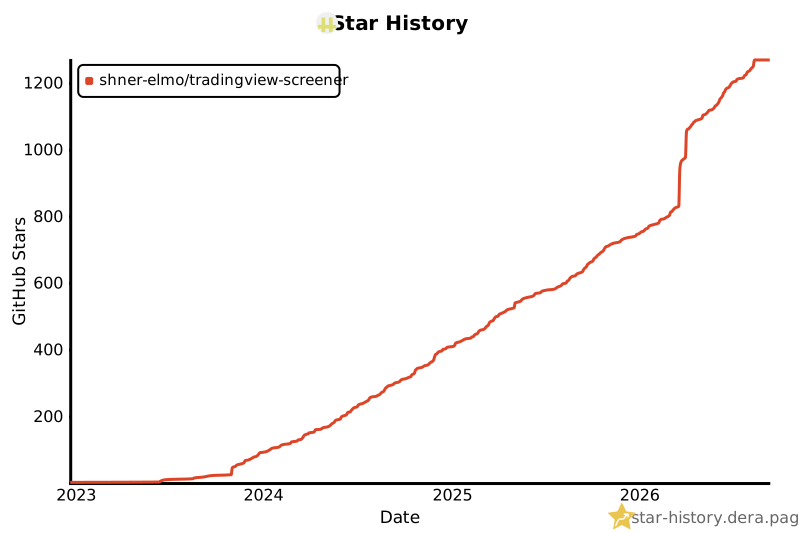
If this package has bought value to your projects, please consider starring it.
Stargazers
1 maintainer

Release files for tradingview-screener 3.2.2
For a detailed explanation of source distributions (sdists) and built distributions (wheels), please see the package formats documentation.
Source distribution (sdist)
| File | Size | Uploaded | |
|---|---|---|---|
| tradingview_screener-3.2.2.tar.gz | 101.5 kB | Details |
Built distribution (wheel)
| File | Interpreter | ABI | Platform | Reset |
|---|---|---|---|---|
| tradingview_screener-3.2.2-py3-none-any.whl | Python 3 | none | any | Details |
Total release size: 123.9 kB
Release files / tradingview_screener-3.2.2.tar.gz
| Download URL | tradingview_screener-3.2.2.tar.gz |
|---|---|
| Size | 101.5 kB |
| Tags | Source |
|
SHA-256 checksum How to use checksums |
cf0407c64cf10fec5b5e7454b8d1dc5a19f8c9adb111b68a5671a35afe50e4ca
|
|
BLAKE2b-256 checksum How to use checksums |
701165006f34f66abc6f2c6dc7b04d70abbd6f609a677a7ca408c6fde5b09398
|
| Upload date | |
|
Uploaded using Trusted Publishing? What is trusted publishing? |
No |
| Uploaded via |
uv/0.11.25 {"installer":{"name":"uv","version":"0.11.25","subcommand":["publish"]},"python":null,"implementation":{"name":null,"version":null},"distro":{"name":"NixOS","version":"26.11","id":"zokor","libc":null},"system":{"name":null,"release":null},"cpu":null,"openssl_version":null,"setuptools_version":null,"rustc_version":null,"ci":null}
|
Release files / tradingview_screener-3.2.2-py3-none-any.whl
| Download URL | tradingview_screener-3.2.2-py3-none-any.whl |
|---|---|
| Size | 22.3 kB |
| Tags | Python 3 |
|
SHA-256 checksum How to use checksums |
e2e46332c1c4102ea2eb986538b0e3a901731804b5084be091c9af317fb2d9f6
|
|
BLAKE2b-256 checksum How to use checksums |
78f94a19f4eb7fc69dd4e41f8855761854bde511c1342124815af8815fc08e11
|
| Upload date | |
|
Uploaded using Trusted Publishing? What is trusted publishing? |
No |
| Uploaded via |
uv/0.11.25 {"installer":{"name":"uv","version":"0.11.25","subcommand":["publish"]},"python":null,"implementation":{"name":null,"version":null},"distro":{"name":"NixOS","version":"26.11","id":"zokor","libc":null},"system":{"name":null,"release":null},"cpu":null,"openssl_version":null,"setuptools_version":null,"rustc_version":null,"ci":null}
|














