
Signed OpenTelemetry GenAI spans for AI agents.

Project description
Trail

Signed OpenTelemetry GenAI spans for AI agents. Capture, normalize, verify — bring your own backend.
Trail is a Python SDK that captures what AI agents actually do — every LLM call, tool invocation, MCP call, and skill execution — as OpenTelemetry spans with a small Trail extension namespace. It signs each session with Ed25519 and exports via OTLP to any OTel backend (Grafana, Honeycomb, Datadog, Chronosphere, ...). Trail does not store, query, or dashboard. Storage and query are your existing backend's job.
Why Trail
When an agent misbehaves in production, three questions are surprisingly hard to answer:
- Which tool ran, in what order, with what inputs? Existing tracers are LLM-call-shaped, not agent-shaped.
- Was that MCP server response trying to inject instructions? No mainstream tracer flags this.
- Is this skill the same code it was yesterday? Skill substitution leaves no trace by default.
Trail adds the three things that are missing: an agent-aware tool taxonomy (internal / mcp / skill / builtin), MCP injection flagging on tool responses, and a skill hash that detects silent substitution — all as standard OpenTelemetry spans, so any OTel backend ingests them with no translation layer.
How Trail answers them
Trail models an agent run as an OpenTelemetry span tree — one invoke_agent root span per session, with every LLM call, tool, MCP call, and skill nested underneath — and layers a trail.* attribute namespace on top. That structure, plus three purpose-built attributes, is what turns each question above into a query.
Which tool ran, in what order, with what inputs?
Every tool invocation becomes an execute_tool span tagged with gen_ai.tool.name and trail.tool_type (internal / mcp / skill / builtin) — the agent-shaped distinction a plain LLM tracer never draws. Order and nesting come from the OpenTelemetry SDK's contextvars propagation, which stays correct across async/await and concurrent asyncio tasks, so each span attaches to the right parent. Inputs and outputs are recorded as trail.input_hash / trail.output_hash (SHA-256, computed off the hot path) plus a sensitivity flag — tamper-evident identity of the payloads without storing the payloads themselves.
gen_ai.operation.name = "execute_tool"
gen_ai.tool.name      = "get_customer_record"
trail.tool_type       = "mcp"
trail.input_hash      = "sha256:..."
Was that MCP server response trying to inject instructions?
When Trail wraps an MCP call_tool, it runs the response through a YAML injection ruleset — instruction-override, system-prompt injection, role override, credential-exfil phrasing (override via TRAIL_MCP_RULES) — and stamps the span with trail.mcp.injection_flag. A response that says "ignore your previous instructions and…" lands as an ordinary span with trail.mcp.injection_flag = true, next to trail.mcp.server_id for provenance.
Is this skill the same code it was yesterday?
wrap_skill() records trail.skill.hash — a SHA-256 over the skill's source (trail.skill.hash_method = "source", with a qualname-fallback for C-extensions and lambdas). Same skill → same hash; a silent swap → a different hash on today's span versus yesterday's. Diff the attribute across two sessions and substitution is visible.
Then you ask where you already look. Trail only captures — the questions get answered in your backend. In dev mode that's the session JSONL (~/.trail/sessions/{trace_id}.jsonl), and trail verify-export proves none of it was altered after the fact (and pinpoints the span if it was). In prod, it's an ordinary attribute filter — trail.tool_type = "mcp" AND trail.mcp.injection_flag = true — in Grafana, Honeycomb, or Datadog.
Quickstart — OpenAI agent (60 seconds)
pip install 'trail-otel[openai]'
import openai
import trail

trail.auto_instrument()           # detects openai, instruments it

with trail.session(agent_id="content-pipeline"):
    client = openai.OpenAI()
    client.chat.completions.create(model="gpt-4o", messages=[...])
That's it. By default Trail writes spans to ~/.trail/sessions/{trace_id}.jsonl and a short summary to stderr. Zero infrastructure.
To ship to your OTel backend instead:
export TRAIL_EXPORT=otlp
export OTEL_EXPORTER_OTLP_ENDPOINT=https://your-collector:4317
Async OpenAI (AsyncOpenAI) is instrumented automatically by the same trail.auto_instrument() call.
Quickstart — Claude Code
Trail ships a trail-hook console script. Wire it into ~/.claude/settings.json. A single binary handles all three events — it reads the event name from Claude Code's stdin payload and dispatches internally.
{
  "hooks": {
    "PreToolUse": [
      { "matcher": "*", "hooks": [{ "type": "command", "command": "trail-hook" }] }
    ],
    "PostToolUse": [
      { "matcher": "*", "hooks": [{ "type": "command", "command": "trail-hook" }] }
    ],
    "SessionEnd": [
      { "hooks": [{ "type": "command", "command": "trail-hook" }] }
    ]
  }
}
Already have hooks? Claude Code's hooks.<EventName> is an array — Trail composes alongside whatever is already there. Append a new {matcher, hooks} block per event rather than replacing the array. Trail runs sequentially with your existing hooks and never blocks them (it exits 0 even on internal errors).
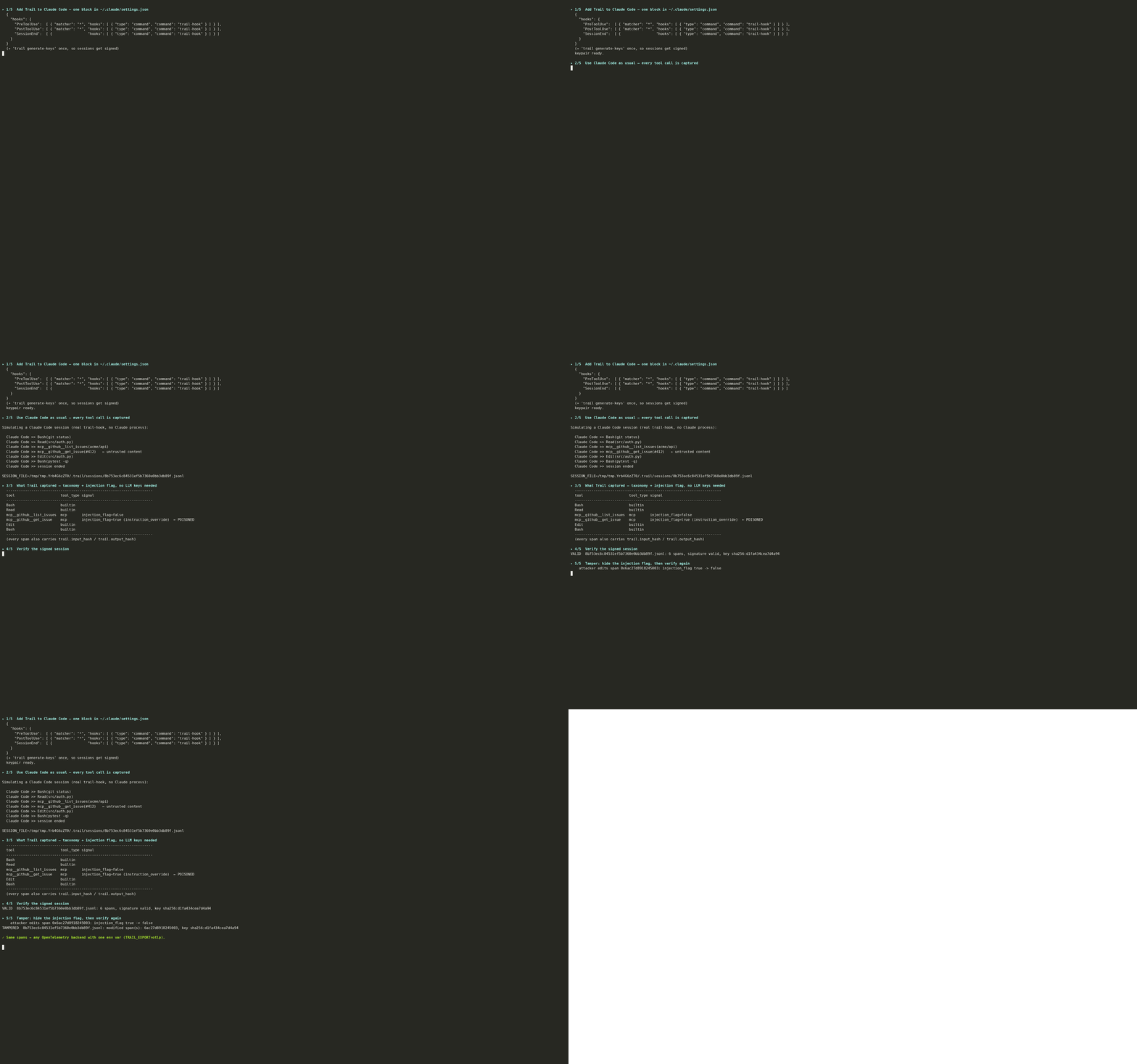
See it end to end: examples/demo_claude_code/run_demo.sh replays a real Claude Code session against trail-hook (no infrastructure, no API key) — captures the tool taxonomy, flags a prompt-injection riding in on an MCP-fetched GitHub issue, then verify-export proves the session and catches a tamper.
Every Claude Code tool call — including MCP calls and skills — is now captured. The SessionEnd hook is the moment the session gets its Merkle root + Ed25519 signature. (Signing is wired to SessionEnd, which fires once when the session terminates — not Stop, which fires at the end of every turn and would leave later turns' spans unsigned.)
Quickstart — Google ADK
Google's Agent Development Kit is OpenTelemetry-native, so Trail rides ADK's own
execute_tool spans rather than re-instrumenting — one auto_instrument() call
adds the tool taxonomy and MCP injection flag ADK doesn't produce, and wrapping
the run in trail.session() signs it.
import trail
from google.adk.runners import Runner

trail.auto_instrument()           # detects google.adk, enriches its tool spans

with trail.session(agent_id="support-triage", provider="gcp.vertex"):
    runner.run(user_id="u1", session_id="s1", new_message=msg)
Every ADK tool call now carries trail.tool_type (McpTool → mcp,
ADK-provided search/memory tools → builtin, your FunctionTools → internal)
and MCP responses are scanned for injection (trail.mcp.injection_flag).
Try it in dev mode first — zero infrastructure. Dev mode is the default, so
the two lines above already write every ADK span to
~/.trail/sessions/{trace_id}.jsonl locally (no network). Run your agent, then
inspect what was captured:
cat ~/.trail/sessions/<trace_id>.jsonl | jq . # spans + trail.tool_type
Signing is opt-in. With no keys present, sessions are simply unsigned —
the minimal setup: spans + trail.tool_type + MCP injection flag, no
tamper-evidence, no signing overhead. Turn it on when you want it:
trail generate-keys                                # once; enables signing
trail verify-export ~/.trail/sessions/<trace_id>.jsonl
# → VALID  (N spans, signature valid, key fpr ...)
Dev-mode note: don't also enable ADK's own Cloud Trace / OTel exporter while running dev mode. Trail configures the tracer provider; if ADK sets one first, Trail's local JSONL won't attach. Just add the two Trail lines and leave ADK's own tracing off.
When it looks right locally, ship the same code to your backend — ADK exports
OTLP, so set TRAIL_EXPORT=otlp and OTEL_EXPORTER_OTLP_ENDPOINT (e.g.
Chronosphere) and the spans flow there instead. See
docs/backends/chronosphere.md, and
examples/adk_manual_instrumentation.py
for the framework-agnostic manual path (no adapter required).
ADK has no first-class "skill", so skill-hashing stays with
trail.wrap_skill, which composes with ADK. Parallel/merged tool calls are a documented v1 gap.
What you get on each span
Standard OpenTelemetry GenAI attributes:
gen_ai.operation.name      = "chat" | "execute_tool" | "invoke_agent"
gen_ai.provider.name       = "openai" | "anthropic"
gen_ai.request.model       = "gpt-4o"
gen_ai.tool.name           = "get_customer_record"
gen_ai.usage.input_tokens  = 1240
Plus the Trail extension — the novel part:
trail.tool_type            = "internal" | "mcp" | "skill" | "builtin"
trail.mcp.server_id        = "acme-crm-mcp"
trail.mcp.injection_flag   = false
trail.skill.hash           = "sha256:..."
trail.input_hash           = "sha256:..."
trail.output_hash          = "sha256:..."
In Grafana or Honeycomb, these render as ordinary GenAI spans. The trail.* attributes are queryable like any other attribute (trail.tool_type = "mcp" AND trail.mcp.injection_flag = true).
Metrics? Use the Collector's spanmetrics connector
Trail emits spans only — no Prometheus scrape endpoint and no OTel metrics. To get rate / error / duration counters or a "MCP injections per minute" panel, drop the OpenTelemetry Collector's spanmetrics connector into your pipeline and label by trail.tool_type, trail.mcp.injection_flag, etc. Span backends (Tempo's metrics-generator, Datadog APM metrics, Honeycomb derived columns) offer equivalent backend-side derivations. Two signal types at the source would duplicate the signal — the Collector composes them cleanly.
Verifying a session offline
Each session is signed once at session end with Ed25519 over a Merkle root of its span content. Anyone with the public key can verify it later — no Trail infrastructure required:
trail verify-export session.jsonl
# → VALID  (132 spans, signed 2026-06-06T10:02:14Z, key fpr sha256:abcd...)
Modified spans, removed spans, and added spans are all detected by the Merkle root mismatch.
Generate a keypair:
trail generate-keys
# → ~/.trail/keys/trail.key  (private, chmod 600)
# → ~/.trail/keys/trail.pub  (public)
Dev mode vs prod mode
| Mode | Storage | Signing | Network | Use it for |
|---|---|---|---|---|
| Dev (default) | ~/.trail/sessions/*.jsonl + stderr summary |
Off | None | Local debugging |
| Prod | OTLP to your backend | On (Ed25519 + Merkle, at session end) | OTLP | Shipping to Grafana / Honeycomb / Datadog / Chronosphere |
Per-backend setup (endpoint, auth, query examples) lives in
docs/backends/ — Grafana Tempo, Honeycomb, Datadog,
Chronosphere. For clusters, see docs/deployment/kubernetes.md.
v1 scope, honestly
In: OpenAI SDK adapter, Google ADK adapter, Claude Code hooks, OTel GenAI emission, tool taxonomy, MCP injection flagging, skill hash, session-checkpoint signing, OTLP transport, dev-mode JSONL, verify-export, generate-keys.
Not yet: LangChain / LlamaIndex / AutoGen adapters, HTTP proxy, sidecar deployment, CloudTrail / CloudWatch transports, encrypted sensitive-content side-store, GDPR erasure workflow, multi-org config, KMS-backed signing.
Known v1 limitations:
- In-process capture is suppressible by the agent code. Trail v1 is positioned as a developer debugging tool. Suppression-resistant capture (proxy / sidecar) is a v2 theme.
- A process crash before session end leaves spans unsigned (still exported, just unverifiable). Per-event signing is v2.
- Claude Code hooks expose tool events, not LLM calls — so the LLM-token detail you'd get from the OpenAI adapter is absent from the Claude Code path. Tool taxonomy, MCP flagging, and skill hash come through on both paths.
Roadmap (v2 themes)
Suppression-resistant capture (HTTP proxy + sidecar), per-event / checkpoint signing for crash safety, additional framework adapters (LangChain, LlamaIndex, AutoGen), encrypted sensitive-content side-store, GDPR erasure workflow, KMS-backed signing, additional transports (CloudTrail, CloudWatch).
Project structure
See trail_hld.md for the high-level design and CLAUDE.md for implementation conventions.
Security
Trail produces signed, tamper-evident telemetry — reports against the signing /
verification path are taken seriously. See SECURITY.md for the
disclosure process and what is in scope.
License
Apache-2.0. See LICENSE and NOTICE.
Release history Release notifications | RSS feed


Download files
Download the file for your platform. If you're not sure which to choose, learn more about installing packages.
Source Distribution
Built Distribution
Filter files by name, interpreter, ABI, and platform.
If you're not sure about the file name format, learn more about wheel file names.
Copy a direct link to the current filters
File details
Details for the file trail_otel-1.0.1.tar.gz.
File metadata
- Download URL: trail_otel-1.0.1.tar.gz
- Upload date:
- Size: 282.5 kB
- Tags: Source
- Uploaded using Trusted Publishing? Yes
- Uploaded via: twine/7.0.0 CPython/3.13.14
File hashes
| Algorithm | Hash digest | |
|---|---|---|
| SHA256 |
6592c09fbcf11fe55bcb3d1f57b84cc30901d43586b7e37c80880f17cda1539a
|
|
| MD5 |
43ecfd2b1e35bd617fd3aa064e184608
|
|
| BLAKE2b-256 |
e588ba84b6077c41b2f7d49e1bb29fafc72a126b73db05260f0a862c3782f9bf
|
Provenance
The following attestation bundles were made for trail_otel-1.0.1.tar.gz:
Publisher:
release.yml on varmax2511/trail
-
Statement:
-
Statement type:
https://in-toto.io/Statement/v1 -
Predicate type:
https://docs.pypi.org/attestations/publish/v1 -
Subject name:
trail_otel-1.0.1.tar.gz -
Subject digest:
6592c09fbcf11fe55bcb3d1f57b84cc30901d43586b7e37c80880f17cda1539a - Sigstore transparency entry: 2331882891
- Sigstore integration time:
-
Permalink:
varmax2511/trail@6b3abec81b9ee704ac338577949e5f3bf5f282f9 -
Branch / Tag:
refs/tags/v1.0.1 - Owner: https://github.com/varmax2511
-
Access:
private
-
Token Issuer:
https://token.actions.githubusercontent.com -
Runner Environment:
github-hosted -
Publication workflow:
release.yml@6b3abec81b9ee704ac338577949e5f3bf5f282f9 -
Trigger Event:
push
-
Statement type:
File details
Details for the file trail_otel-1.0.1-py3-none-any.whl.
File metadata
- Download URL: trail_otel-1.0.1-py3-none-any.whl
- Upload date:
- Size: 73.1 kB
- Tags: Python 3
- Uploaded using Trusted Publishing? Yes
- Uploaded via: twine/7.0.0 CPython/3.13.14
File hashes
| Algorithm | Hash digest | |
|---|---|---|
| SHA256 |
9784bc04cd0b91665cfec0a37319b3e4edd13c997cda699d5d41031848123361
|
|
| MD5 |
e98af01a6f297cc1c934496334ad8ef3
|
|
| BLAKE2b-256 |
bdf2a7fa01338b1cd40b05553df6cffa1ec1b7e49a57f39813d7584e91f61e55
|
Provenance
The following attestation bundles were made for trail_otel-1.0.1-py3-none-any.whl:
Publisher:
release.yml on varmax2511/trail
-
Statement:
-
Statement type:
https://in-toto.io/Statement/v1 -
Predicate type:
https://docs.pypi.org/attestations/publish/v1 -
Subject name:
trail_otel-1.0.1-py3-none-any.whl -
Subject digest:
9784bc04cd0b91665cfec0a37319b3e4edd13c997cda699d5d41031848123361 - Sigstore transparency entry: 2331882921
- Sigstore integration time:
-
Permalink:
varmax2511/trail@6b3abec81b9ee704ac338577949e5f3bf5f282f9 -
Branch / Tag:
refs/tags/v1.0.1 - Owner: https://github.com/varmax2511
-
Access:
private
-
Token Issuer:
https://token.actions.githubusercontent.com -
Runner Environment:
github-hosted -
Publication workflow:
release.yml@6b3abec81b9ee704ac338577949e5f3bf5f282f9 -
Trigger Event:
push
-
Statement type:






