
🐜 trailant

Ants don't remember paths. They lay a trail as they move, and follow the strongest trail back.
trailant does the same for your work. It doesn't hold state of its own — it reads the trails
your tools already leave behind (Claude Code, Codex CLI, and other AI coding sessions) and
reconstructs where you were, so you can answer:
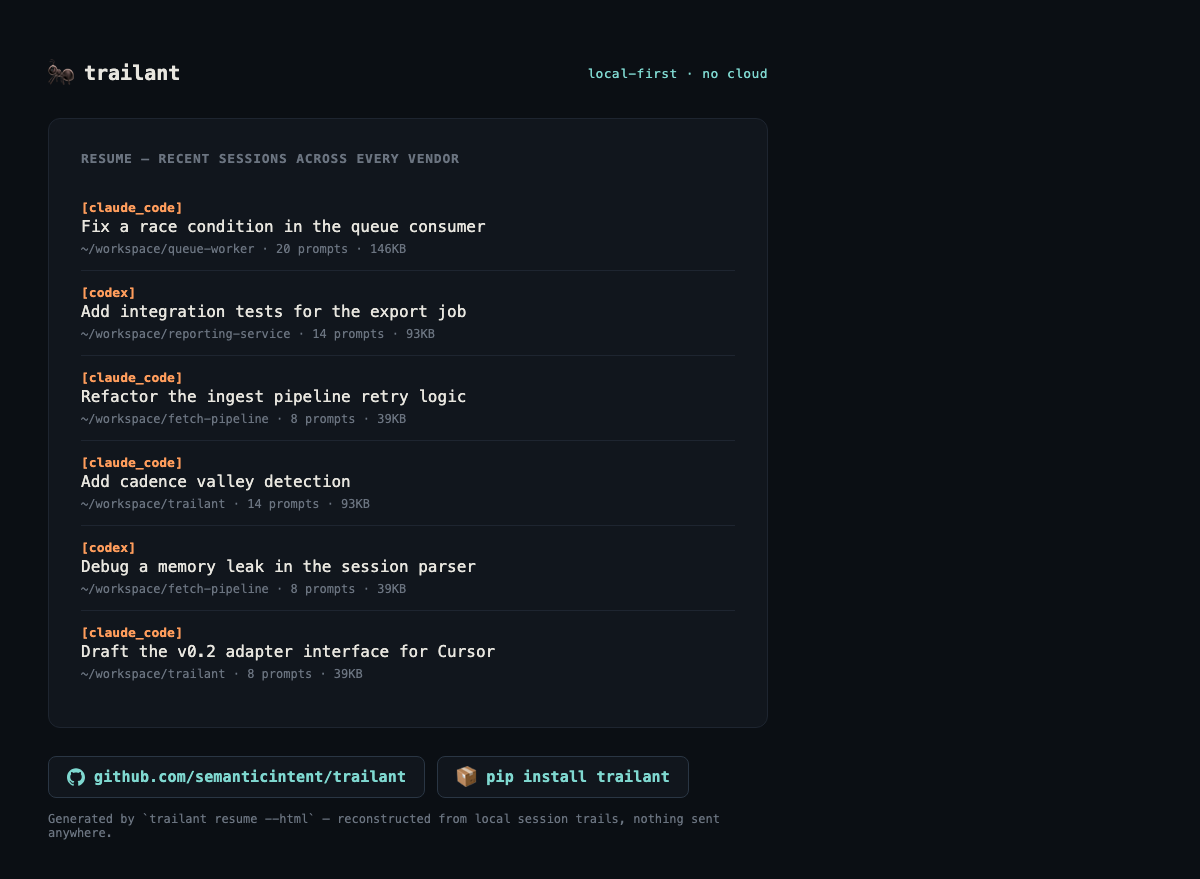
- "Where was I?" — resume the right session, in the right project, without hunting through directories or scrollback.
- "What did I actually do today / this week?" — a reconstructed activity view, useful for timesheets, standups, or just your own sanity.
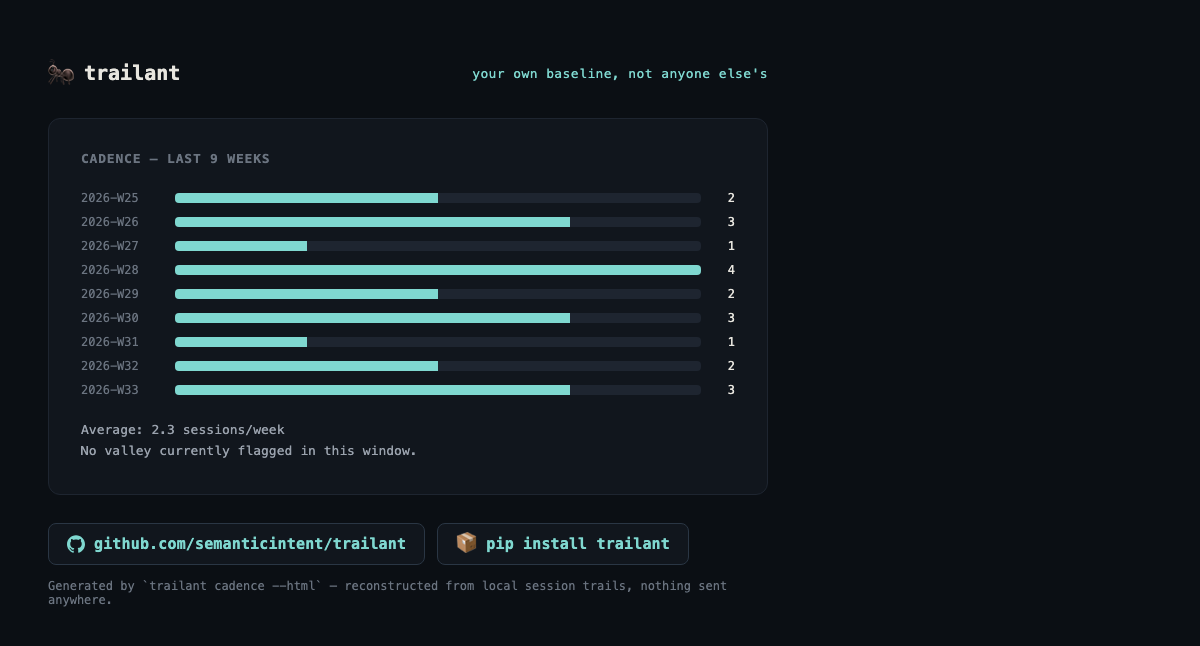
- "Am I pacing myself sustainably?" — a cadence view of your own velocity over time, so a burnout trajectory shows up as data instead of only as hindsight.
No cloud, no telemetry, no account. Everything lives in plain, append-only JSONL files on your own
machine, so you can cat them, grep them, or check them into your own private git repo if you
want history on your history.
Why not just use claude --resume / codex resume?
Those work fine within one vendor. trailant exists for the parts they don't cover: a single view
across multiple AI coding tools, a way to reconstruct what a session or day was actually about
after the fact, and a lightweight trend view over weeks — none of which any single vendor's CLI is
trying to solve.
Design principles
- Transparent over opaque. The source of truth is plain JSONL — the same format Claude Code and Codex already use for their own session logs. No database holds unique data.
- Cache, never store, derived state. Any local index (e.g. SQLite) is a disposable accelerator, rebuildable at any time from the JSONL. Delete it whenever — nothing is lost.
- Supervised, not autonomous.
trailantnever sends anything (a log, an email) without showing you the draft first. It's meant to make a human-in-the-loop workflow faster, not to replace the human in the loop. - Vendor-agnostic via adapters. Each AI coding tool gets a small adapter that normalizes its session format into one internal shape. Adding a new vendor is a self-contained addition.
See docs/technical-overview.md for the full design spec.
Mascot: the Trail Ant 🐜 — doesn't remember, just reads the trail.
Install
git clone https://github.com/semanticintent/trailant.git
cd trailant
pip install -e .
Quickstart
trailant reindex     # walk configured source directories, build the trail index
trailant resume       # list recent sessions across all vendors, ranked by recency
trailant today          # reconstructed view of today's activity
trailant log "debugging the retry logic in the ingest job"   # manual entry, no editor needed
trailant cadence          # velocity trend vs. your own baseline
trailant cadence --html   # same data as a static HTML report (also on `resume`)
Configuration lives at ~/.trailant/config.yaml and is created with sane defaults on first run.
See config.example.yaml in this repo for the full set of options.
Example output
--html on resume/cadence writes a static, screenshot-ready report instead of printing to
the terminal (--output PATH implies --html). These are real renders — synthetic demo data, but
the actual command output, not a mockup:
Status
Early / pre-alpha. The Claude Code and Codex adapters are functional against the documented
session formats; other vendors are not yet implemented. Interfaces may change. Contributions and
adapters for other tools (Cursor, Gemini CLI, etc.) are very welcome — see
CONTRIBUTING.md.
License
MIT — see LICENSE.
1 maintainer

Download files
Download the file for your platform. If you're not sure which to choose, learn more about installing packages.
Source Distribution
Built Distribution
Filter files by name, interpreter, ABI, and platform.
If you're not sure about the file name format, learn more about wheel file names.
Copy a direct link to the current filters
File details
Details for the file trailant-0.1.6.tar.gz.
File metadata
- Download URL: trailant-0.1.6.tar.gz
- Upload date:
- Size: 22.4 kB
- Tags: Source
- Uploaded using Trusted Publishing? Yes
- Uploaded via:
twine/7.0.0 CPython/3.13.14
File hashes
| Algorithm | Hash digest | |
|---|---|---|
| SHA256 |
dd016388f38a06e65092c3c9a2435e4994395148da40a064bf82a6ed20fe273a
|
|
| MD5 |
51f103e984beccec37987471682c299f
|
|
| BLAKE2b-256 |
e6fdff610f31e5a542eda5a841f64ee2727c4a24ae6a7e2078c48ef6865d7fb3
|
Provenance
The following attestation bundles were made for trailant-0.1.6.tar.gz:
Publisher:
publish.yml on semanticintent/trailant
-
Statement:
-
Statement type:
https://in-toto.io/Statement/v1 -
Predicate type:
https://docs.pypi.org/attestations/publish/v1 -
Subject name:
trailant-0.1.6.tar.gz -
Subject digest:
dd016388f38a06e65092c3c9a2435e4994395148da40a064bf82a6ed20fe273a - Sigstore transparency entry: 2571917725
- Sigstore integration time:
-
Permalink:
semanticintent/trailant@458ad6f3a24350a6825fd6d14e731a40479f4186 -
Branch / Tag:
refs/tags/v0.1.6 - Owner: https://github.com/semanticintent
-
Access:
public
-
Token Issuer:
https://token.actions.githubusercontent.com -
Runner Environment:
github-hosted -
Publication workflow:
publish.yml@458ad6f3a24350a6825fd6d14e731a40479f4186 -
Trigger Event:
release
-
Statement type:
File details
Details for the file trailant-0.1.6-py3-none-any.whl.
File metadata
- Download URL: trailant-0.1.6-py3-none-any.whl
- Upload date:
- Size: 21.4 kB
- Tags: Python 3
- Uploaded using Trusted Publishing? Yes
- Uploaded via:
twine/7.0.0 CPython/3.13.14
File hashes
| Algorithm | Hash digest | |
|---|---|---|
| SHA256 |
d7b89a04e89500c68febf1bf30c9a19e65ebef3fd6f3e9c42c928778503dd2a4
|
|
| MD5 |
78e9b1b923722f296aa1bdd8ff923b7d
|
|
| BLAKE2b-256 |
7fdca46815a349e6a29056ad78f76dc172bae874adc3d1ec4a326757bc511925
|
Provenance
The following attestation bundles were made for trailant-0.1.6-py3-none-any.whl:
Publisher:
publish.yml on semanticintent/trailant
-
Statement:
-
Statement type:
https://in-toto.io/Statement/v1 -
Predicate type:
https://docs.pypi.org/attestations/publish/v1 -
Subject name:
trailant-0.1.6-py3-none-any.whl -
Subject digest:
d7b89a04e89500c68febf1bf30c9a19e65ebef3fd6f3e9c42c928778503dd2a4 - Sigstore transparency entry: 2571917867
- Sigstore integration time:
-
Permalink:
semanticintent/trailant@458ad6f3a24350a6825fd6d14e731a40479f4186 -
Branch / Tag:
refs/tags/v0.1.6 - Owner: https://github.com/semanticintent
-
Access:
public
-
Token Issuer:
https://token.actions.githubusercontent.com -
Runner Environment:
github-hosted -
Publication workflow:
publish.yml@458ad6f3a24350a6825fd6d14e731a40479f4186 -
Trigger Event:
release
-
Statement type:







