
Train multiple programs on multiple servers without pain

Project description
Training Noodles


A simple and powerful tool to help training multiple programs on multiple servers with only one human.
Features
- Automatically deploys experiments to available servers
- No need to change any existing code
- Considers CPU usage, GPU usage, memory usage, disk usage, and more
- Uses only SSH protocol
- Relies on minimal dependencies
- Allows fast prototyping
Use Case
If we want to run 4 experiments on 3 servers, more specifically, we need to
- Upload the code to one of the servers which has low CPU usage
- Run the code on the server
- Download experimental results when they're ready
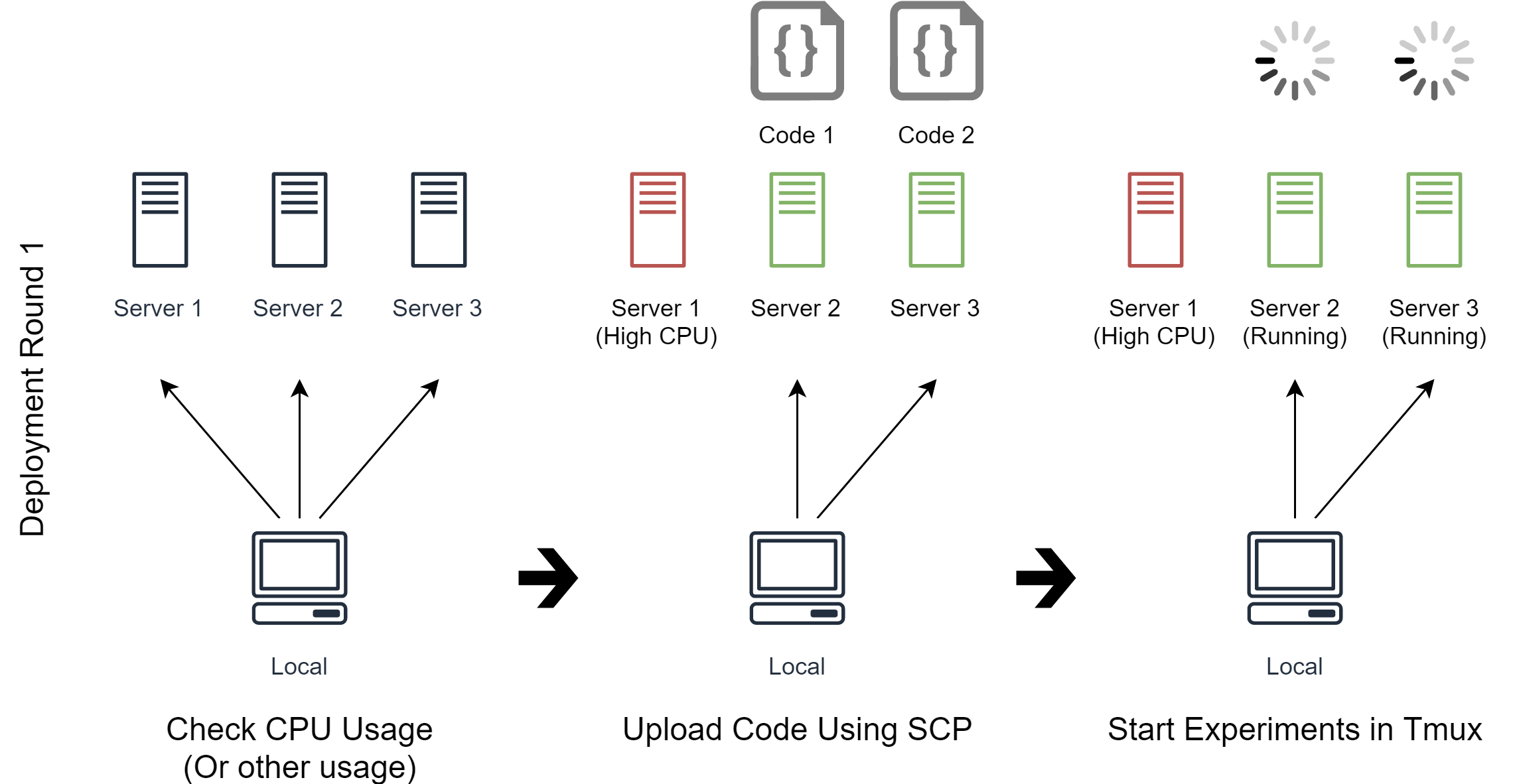
In the first deployment round (See image above), Noodles will use the user-defined commands to check CPU usage on the servers.
The CPU usage is high on Server 1 because there are some other programs running, so Noodles uses scp to upload the code Code 1 and Code 2, and run them on Server 2 and Server 3 respectively.
As for how to upload the code, it's just a list of commands written by us, Noodles just follows the commands.
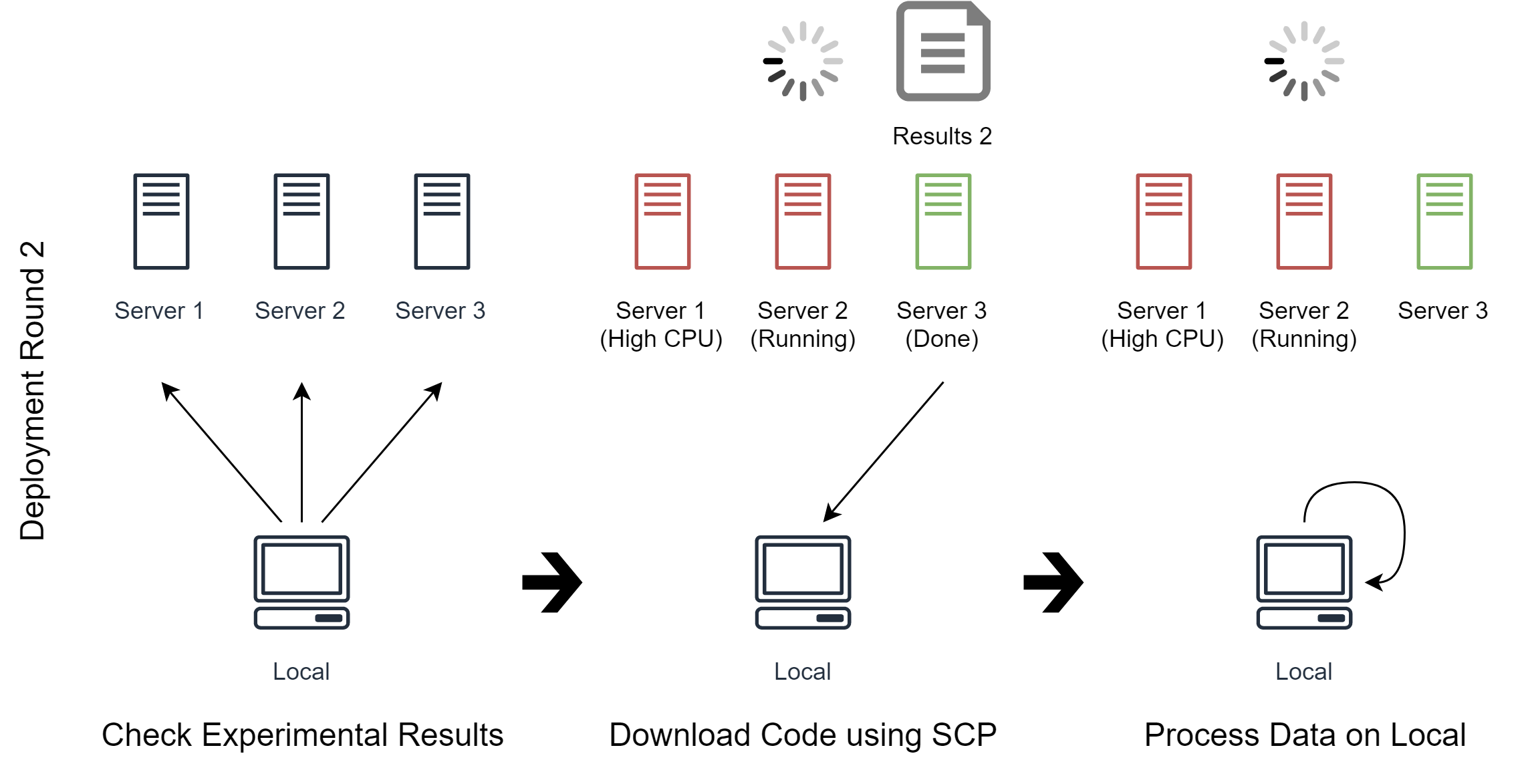
In the second deployment round (See image above), we tell Noodles to check experimental results on all servers.
Noodles finds that Server 3 has just finished running Code 2, so it downloads the experimental results and process the data on local machine as we tell it to do so.
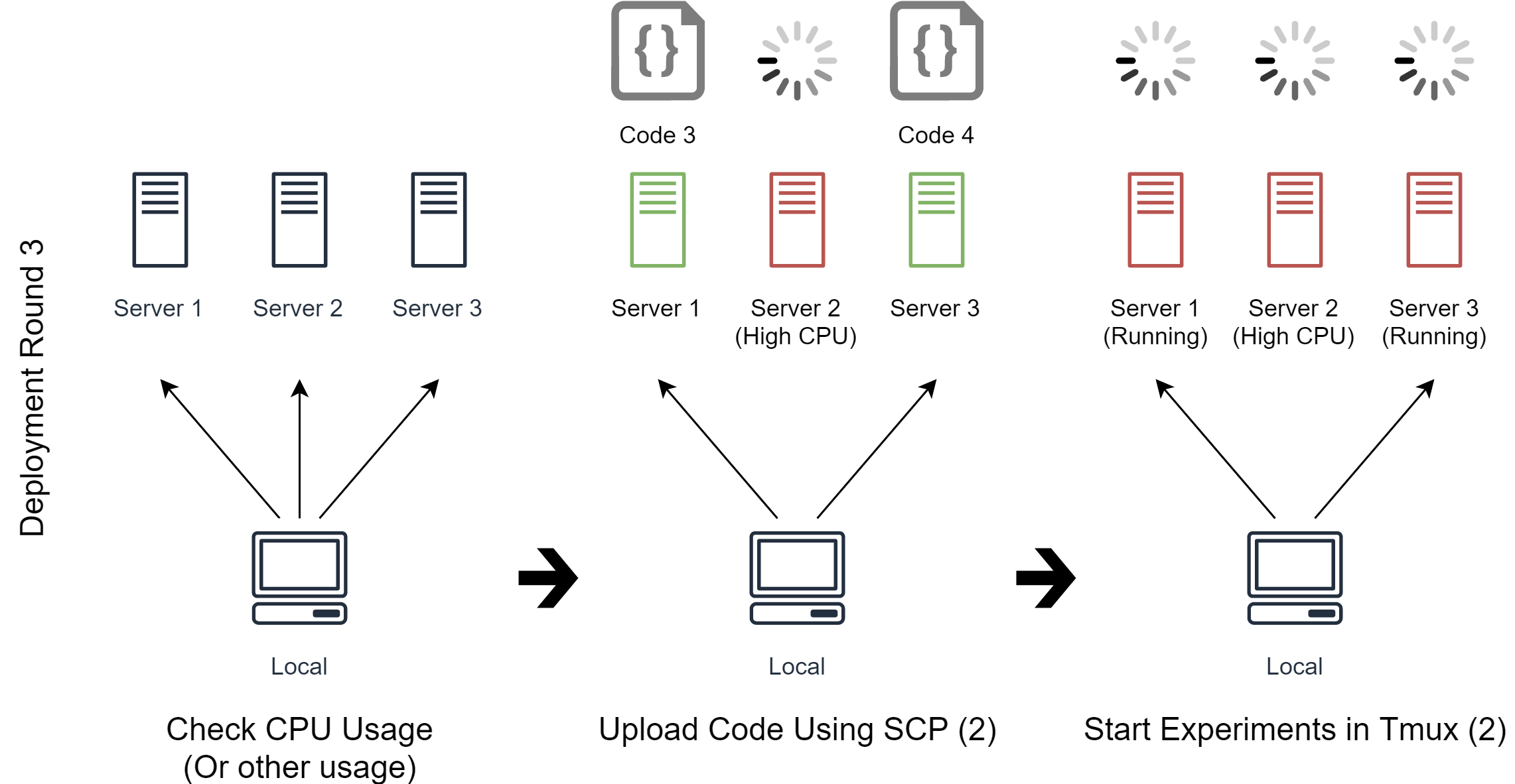
In the third deployment round (See image above), Code 3 and Code 4 still need to be deployed. Noodles checks the CPU usage on all servers again. As Server 1 has just become free now, Noodles can deploy Code 3 and Code 4 to Server 1 and Server 3 respectively.
The deployment round would continue until all experiments are successfully deployed. As in this case, Noodles will try to download and process the experimental results of Code 1, Code 3 and Code 4 in later rounds.
How Noodles Works
The general procedure is as follows:
- Initialize the list of experiments in E
- For each deployment round:
- Initialize the list of servers in S
- For each experiment in E:
- Noodles runs user-defined requirements on each server in S
- Noodles compares the metrics (results from the above step) to the user-defined expression
- If the expression is satisfied:
- Noodles runs the user-defined commands on the satisfied server
- Remove the current experiment from E
- Remove the satisfied server from S
- If S is empty, break
- If E is empty, break
The implementation of Noodles complies with the following rules:
- Simple (User can understand code and spec without looking documentation)
- Easy to debug (Noodles can take different actions when different error occurs)
- Stateless (The only state Noodles cares about is whether the deployment is successful or not, the states of the experiments must be handled by the user)
Documentation
See full documentation here.
Prerequisites
- Linux-based terminals (For Windows, I recommend using git-sdk)
- Python 3.5 or higher
Installation
Run the following command:
pip install training-noodles
Usage
noodles <command_type> <path_to_spec>
It's just that simple.
Examples
Here are some examples showing how Noodles is used:
noodles run my_training.yml
noodles status my_training.yml
noodles monitor my_training.yml
noodles stop my_training.yml
noodles download my_training.yml
noodles upload my_training.yml
...
You can also choose only some experiments:
noodles run "my_training.yml:Experiment 1,Experiment 2"
See the example Two Locals to get started. See Train TensorFlow Examples for a more complex example.
Default Spec
Noodles will use properties from default spec if the user spec doesn't specify them. See training_noodles/specs/defaults.yml for the default spec.
Release history Release notifications | RSS feed


Download files
Download the file for your platform. If you're not sure which to choose, learn more about installing packages.
Source Distribution
Built Distribution
Filter files by name, interpreter, ABI, and platform.
If you're not sure about the file name format, learn more about wheel file names.
Copy a direct link to the current filters
File details
Details for the file training-noodles-1.2.1.tar.gz.
File metadata
- Download URL: training-noodles-1.2.1.tar.gz
- Upload date:
- Size: 33.6 kB
- Tags: Source
- Uploaded using Trusted Publishing? No
- Uploaded via: twine/3.2.0 pkginfo/1.5.0.1 requests/2.22.0 setuptools/49.2.0 requests-toolbelt/0.9.1 tqdm/4.42.0 CPython/3.6.8
File hashes
| Algorithm | Hash digest | |
|---|---|---|
| SHA256 |
97bf8f58c149530de9415875a92788a23d0cd552d540905a8bca9d455e5d300f
|
|
| MD5 |
53bcd66fdeba918ad5597cbe8ca88984
|
|
| BLAKE2b-256 |
3360e850db265cb6b2221f2247342ae9a4537598068dc74559dccb094d3c8eff
|
File details
Details for the file training_noodles-1.2.1-py3-none-any.whl.
File metadata
- Download URL: training_noodles-1.2.1-py3-none-any.whl
- Upload date:
- Size: 35.8 kB
- Tags: Python 3
- Uploaded using Trusted Publishing? No
- Uploaded via: twine/3.2.0 pkginfo/1.5.0.1 requests/2.22.0 setuptools/49.2.0 requests-toolbelt/0.9.1 tqdm/4.42.0 CPython/3.6.8
File hashes
| Algorithm | Hash digest | |
|---|---|---|
| SHA256 |
a90be8650322a8b04e160e9c826948c50f48774f13c58f1a6c89d7579e8562fa
|
|
| MD5 |
59f9b6e7ec83512571f9e8efa9a3a306
|
|
| BLAKE2b-256 |
46c4604dc19d84fd84782a3bbf821ddb40bb00e24ceefa58a98daaf6d78298f6
|






