
Create live subplots in your notebook that update while training a PyTorch model

Project description
trainplotkit
Create live subplots in your notebook that update while training a PyTorch model
Features
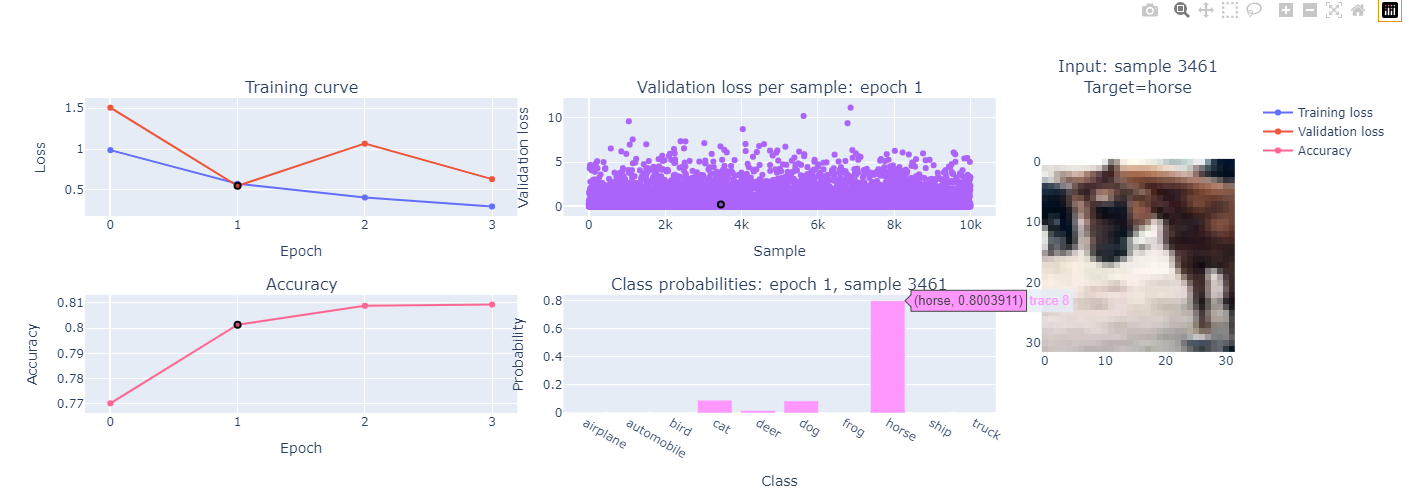
- Extensible framework for adding subplots updated in real time in your notebook during training
- Interaction between subplots after training has completed
- Click on one subplot to select an epoch / sample and update other subplots dynamically
- Supports custom training loops and high-level training libraries like pytorch_lightning and fastai
- Coming soon: adapters for even more seamless integration with high-level training libraries
- All graph interactions provided by plotly
- Built-in subplots:
- Training curves
- Custom metric vs epoch
- Validation loss for individual samples (scatter plot)
- Input image corresponding to selected sample
- Class probililities corresponding to selected sample
- Coming soon: colourful dimension plot from fastai course Lesson 16 1:14:30 for visualizing activation stats
Use cases
- Quickly identifying and explaining outlier samples in a dataset
- Quickly developing visualizations to improve your understanding of a model and/or training process
Installation
pip install torch torchvision torchaudio --index-url https://download.pytorch.org/whl/cu118
pip install "plotly>=5,<6"
pip install trainplotkit
Usage example
import torch
import torchvision.transforms as T
from torch.utils.data import DataLoader
from torch import nn, optim
from torchvision import datasets, models
from torcheval.metrics import MulticlassAccuracy
from trainplotkit.plotgrid import PlotGrid
from trainplotkit.subplots.basic import TrainingCurveSP, MetricSP, ValidLossSP, ImageSP, ClassProbsSP

# Set device
device = torch.device("cuda" if torch.cuda.is_available() else "cpu")
print(f"Using device: {device}")

# Data preparation
transform    = T.Compose([T.ToTensor(), T.Normalize((0.5,), (0.5,))])
train_data   = datasets.CIFAR10(root="./data", train=True, download=True, transform=transform)
valid_data   = datasets.CIFAR10(root="./data", train=False, download=True, transform=transform)
train_loader = DataLoader(train_data, batch_size=64, num_workers=15, shuffle=True)
valid_loader = DataLoader(valid_data, batch_size=64, num_workers=15, shuffle=False)
num_classes  = len(valid_data.classes)

# Model setup
model = models.resnet18(weights=models.ResNet18_Weights.DEFAULT)
model.fc = nn.Linear(model.fc.in_features, num_classes)
model = model.to(device)
criterion = nn.CrossEntropyLoss()
optimizer = optim.Adam(model.parameters(), lr=0.0001)

# Plots
batch_loss_fn = nn.CrossEntropyLoss(reduction='none')
probs_fn = lambda preds: torch.softmax(preds, dim=1)
sps = [
    TrainingCurveSP(colspan=2),
    ValidLossSP(batch_loss_fn, remember_past_epochs=True, colspan=2),
    ImageSP(valid_data, class_names=valid_data.classes, rowspan=2),
    MetricSP("Accuracy", MulticlassAccuracy(), colspan=2),
    ClassProbsSP(probs_fn, remember_past_epochs=True, class_names=valid_data.classes, colspan=2),
]
pg = PlotGrid(num_grid_cols=5, subplots=sps)
pg.show()

# Training and validation loop
for epoch in range(4):
    # Training
    model.train()
    for images, labels in train_loader:
        images, labels = images.to(device), labels.to(device)
        optimizer.zero_grad()
        outputs = model(images)
        loss = criterion(outputs, labels)
        loss.backward()
        optimizer.step()
        pg.after_batch(training=True, inputs=images, targets=labels, predictions=outputs, loss=loss)
    pg.after_epoch(training=True)

    # Validation
    model.eval()
    val_loss, correct = 0, 0
    with torch.no_grad():
        for images, labels in valid_loader:
            images, labels = images.to(device), labels.to(device)
            outputs = model(images)
            val_loss += criterion(outputs, labels).item()
            correct += (outputs.argmax(1) == labels).sum().item()
            pg.after_batch(training=False, inputs=images, targets=labels, predictions=outputs, loss=loss)
    pg.after_epoch(training=False)
pg.after_fit()
License
This repository is released under the MIT license. See LICENSE for additional details.
Release history Release notifications | RSS feed


Download files
Download the file for your platform. If you're not sure which to choose, learn more about installing packages.
Source Distribution
trainplotkit-0.2.0.tar.gz
(17.8 kB
view details)
Built Distribution
Filter files by name, interpreter, ABI, and platform.
If you're not sure about the file name format, learn more about wheel file names.
Copy a direct link to the current filters
File details
Details for the file trainplotkit-0.2.0.tar.gz.
File metadata
- Download URL: trainplotkit-0.2.0.tar.gz
- Upload date:
- Size: 17.8 kB
- Tags: Source
- Uploaded using Trusted Publishing? No
- Uploaded via: twine/6.1.0 CPython/3.10.12
File hashes
| Algorithm | Hash digest | |
|---|---|---|
| SHA256 |
fbe75663cc954187f17c3fb975dd2bad31eef57fcf382bc82839432e8eb6bfa3
|
|
| MD5 |
7f347a829993d7cca5ec7df9b627868e
|
|
| BLAKE2b-256 |
85f8be84956a69aee2fed6d3a0b9291a59c042f805e0fca5f11d1e41b08d1267
|
File details
Details for the file trainplotkit-0.2.0-py3-none-any.whl.
File metadata
- Download URL: trainplotkit-0.2.0-py3-none-any.whl
- Upload date:
- Size: 19.3 kB
- Tags: Python 3
- Uploaded using Trusted Publishing? No
- Uploaded via: twine/6.1.0 CPython/3.10.12
File hashes
| Algorithm | Hash digest | |
|---|---|---|
| SHA256 |
58ce1aec44c234f2dad88c7a79dc6d287cece54a7b2075b40101052f4e8ec1ed
|
|
| MD5 |
df2051b4acbb5ac894f670cae6f41967
|
|
| BLAKE2b-256 |
32c845511d7a9e23b7e23cde1e2f73d2fb943c6141ba5cd578905c4730670705
|






