
TRAINS Jupyter Plugin




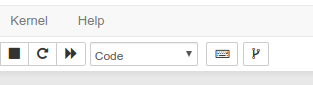
trains-jupyter-plugin is a jupyter notebook extension enabling users to push ipython notebooks to a git repository, using the git button added to the notebook toolbar.
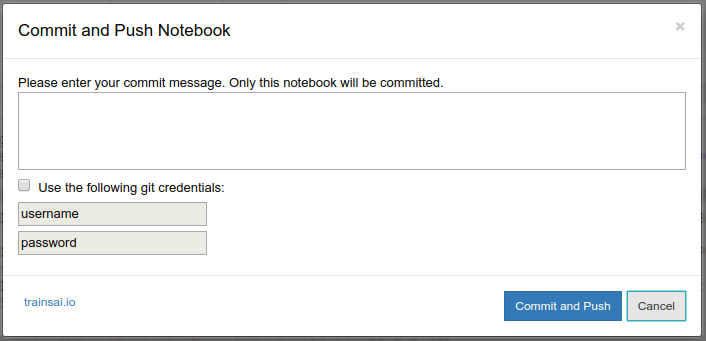
After saving a notebook, a user can push the notebook to a predefined git repository. The extension currently supports pushing to a predefined branch in the repository.
When clicking the version-control button:
- The notebook
.ipynbfile will be pushed to the git repository based on the folder structure in which it is located - The notebook will also be converted to a
.pyscript, pushed alongside the.ipynbfile - A
requirements.txtwill be created and updated according to the notebook imports, and pushed alongside the.ipynbfile
For example, if you have two repositories:
repo1/
├── .git
└── experiment1/
   └── notebook.ipynb

repo2/
├── .git
└── experiment2/
   └── notebook2.ipynb
notebook1.ipynb will be pushed to the repo1 repository, and notebook2.ipynb will be pushed to the repo2 repository.
In order to select the predefined branch into which the files will be pushed, use git checkout on the jupyter host machine.
For example, switch to branch2 in repo2:
$ cd ~/repo2
$ git checkout branch2
From this point onwards the jupyter notebook push will be done to the branch2 branch in the repo2 repository.
Installation
Install directly from pypi:
pip install trains-jupyter-plugin

if [ ! -f ~/.jupyter/jupyter_notebook_config.py ]; then
   jupyter notebook --generate-config
fi

jupyter serverextension enable --py trains-jupyter-plugin
sudo jupyter nbextension install --py trains-jupyter-plugin
To enable the extension for all notebooks:
jupyter nbextension enable --py trains-jupyter-plugin
How to use
- Install package using the commands above
- Clone your git repository to a folder that will be assigned to a specific user
- Checkout a specific branch for the current user
- Make sure git is configured with the correct credentials (we recommend verifying a password/passphrase is required when pushing)
- Run jupyter notebook
- Any commit/push of notebooks from this specific folder will be done to the selected branch
Screenshots

Credits
Thanks to Lab41/sunny-side-up & sat28/githubcommit for laying the foundations for this extension.
1 maintainer

Release files for trains-jupyter-plugin 0.2.1
For a detailed explanation of source distributions (sdists) and built distributions (wheels), please see the package formats documentation.
Built distribution (wheel)
| File | Interpreter | ABI | Platform | Reset |
|---|---|---|---|---|
| trains_jupyter_plugin-0.2.1-py2.py3-none-any.whl | Python 2, Python 3 | none | any | Details |
Release files / trains_jupyter_plugin-0.2.1-py2.py3-none-any.whl
| Download URL | trains_jupyter_plugin-0.2.1-py2.py3-none-any.whl |
|---|---|
| Size | 35.5 kB |
| Tags | Python 2 Python 3 |
|
SHA-256 checksum How to use checksums |
9ce820f8273e829a07f9b1045d22972af528f9ab157381f13737d34af0ffba87
|
|
BLAKE2b-256 checksum How to use checksums |
fabace213ec537104285ebb2b6fd7f06f736f49523beb1fff7fc33e9060e9198
|
| Upload date | |
|
Uploaded using Trusted Publishing? What is trusted publishing? |
No |
| Uploaded via |
twine/1.13.0 pkginfo/1.5.0.1 requests/2.20.1 setuptools/41.0.1 requests-toolbelt/0.9.1 tqdm/4.23.4 CPython/3.5.2
|














