
trame-dockview: Docking layout system for trame 

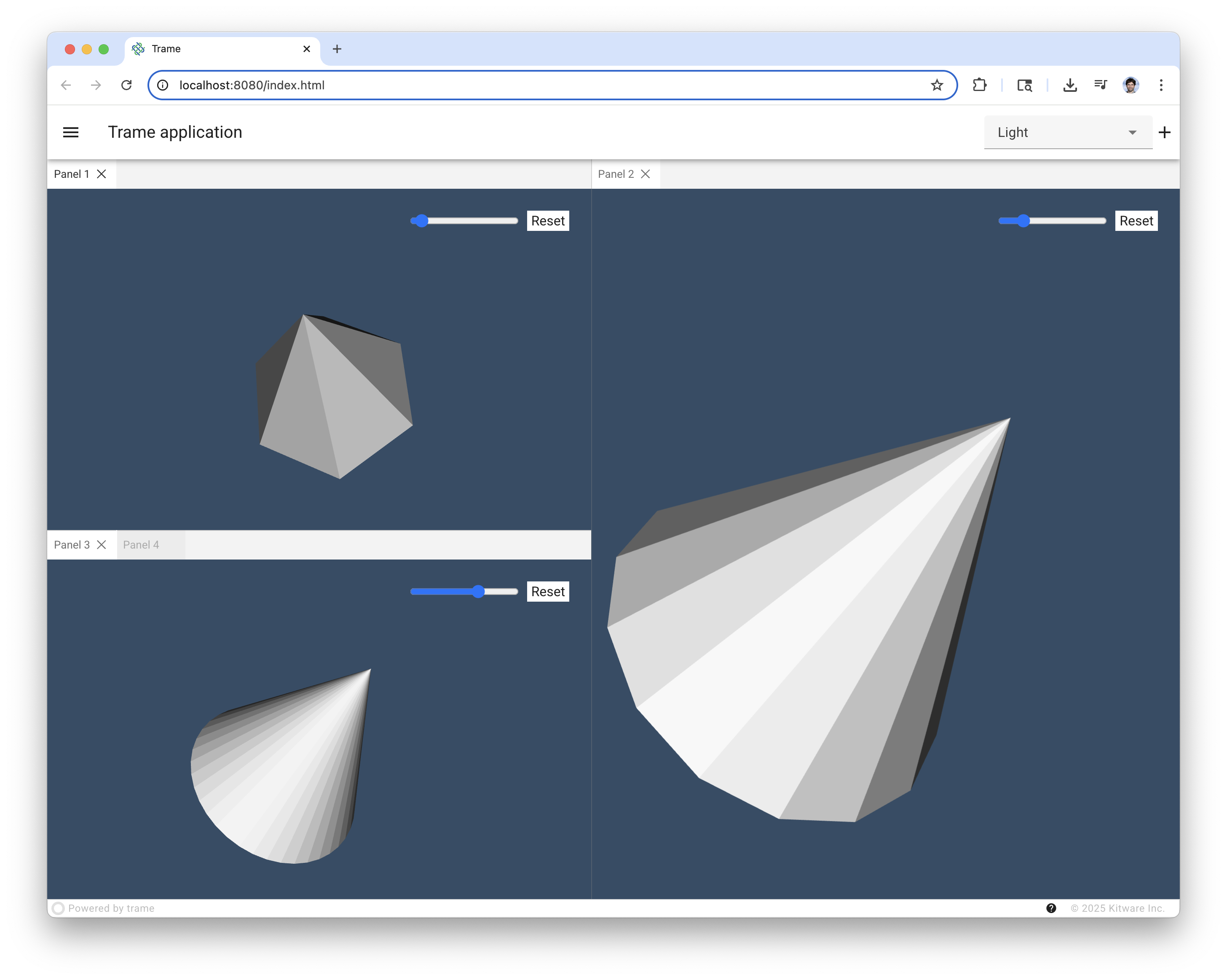
Trame-dockview extend trame widgets with dockview capabilities tuned so it can easily be used within trame. Dockview is a fully featured Docking Layout Manager with customizable themes and controls.
This package is not supposed to be used by itself but rather should come as a dependency of trame. For any specificity, please refer to the trame documentation.
Installing
trame-dockview can be installed with pip:
pip install --upgrade trame-dockviewUsage
The Trame Tutorial is the place to go to learn how to use the library and start building your own application.
The API Reference documentation provides API-level documentation.
The Dockview website is very well made for exploring capabilities that the library is providing.
DockView Widget
First you need to import the dockview module so you can instantiate the layout manager like illustrated below.
from trame.app import TrameApp
from trame.ui.html import DivLayout
from trame.ui.vuetify3 import SinglePageLayout
from trame.widgets import dockview, html
from trame.widgets import vtk as vtk_widgets
from trame.widgets import vuetify3 as v3

THEMES = [
    "Abyss",
    "AbyssSpaced",
    "Dark",
    "Dracula",
    "Light",
    "LightSpaced",
    "VisualStudio",
]


class Demo(TrameApp):
    def __init__(self, server=None):
        super().__init__(server)
        self._panel_count = 0
        self._build_ui()

        # init vtk.js
        vtk_widgets.VtkView(trame_server=server)

    def _build_ui(self):
        with SinglePageLayout(self.server, full_height=True) as self.ui:
            with self.ui.toolbar:
                v3.VSpacer()
                v3.VSelect(
                    v_model=("theme", "Abyss"),
                    items=("themes", THEMES),
                    hide_details=True,
                    density="compact",
                    style="max-width:200px;",
                )
                v3.VBtn(icon="mdi-plus", click=self.add_panel, density="compact")

            with self.ui.content:
                with v3.VContainer(classes="pa-0 ma-0 fill-height", fluid=True):
                    dockview.DockView(
                        ctx_name="dock_view",
                        theme=("theme",),
                    )

    def add_panel(self):
        self._panel_count += 1
        panel_id = f"panel_{self._panel_count}"
        title = f"Panel {self._panel_count}"
        template_name = f"dock_{panel_id}"
        resolution_key = f"{template_name}_resolution"

        with DivLayout(self.server, template_name) as layout:
            layout.root.style = "height:100%;position:relative;"
            with vtk_widgets.VtkView() as view:
                with html.Div(
                    style="position:absolute;top:1rem;right:1rem;z-index:1;display:flex;flex-align:center;"
                ):
                    html.Input(
                        type="range",
                        v_model_number=(resolution_key, 6),
                        min=3,
                        max=60,
                        step=1,
                    )
                    html.Button(
                        "Reset",
                        style="padding:0 5px;margin:10px;background:white;",
                        click=view.reset_camera,
                    )

                with vtk_widgets.VtkGeometryRepresentation():
                    vtk_widgets.VtkAlgorithm(
                        vtk_class="vtkConeSource",
                        state=(f"{{ resolution: {resolution_key} }}",),
                    )

        self.ctx.dock_view.add_panel(panel_id, title, template_name)


def main():
    app = Demo()
    app.server.start()


if __name__ == "__main__":
    main()
License
trame-dockview is made available under the MIT License. For more details, see LICENSE This license has been chosen to match the one use by DockView License which is instrumental for making that library possible.
Community
Trame | Discussions | Issues | Contact Us

Enjoying trame?
Share your experience with a testimonial or with a brand approval.
JavaScript dependency
This Python package bundles the following dockview-vue@7.0.4 library. If you would like us to upgrade its dependency or expose more capabilities provided by the underlying library, please reach out.
3 maintainers


Metadata
3 maintainers
Release files for trame-dockview 2.0.1
For a detailed explanation of source distributions (sdists) and built distributions (wheels), please see the package formats documentation.
Source distribution (sdist)
| File | Size | Uploaded | |
|---|---|---|---|
| trame_dockview-2.0.1.tar.gz | 87.0 kB | Details |
Built distribution (wheel)
| File | Interpreter | ABI | Platform | Reset |
|---|---|---|---|---|
| trame_dockview-2.0.1-py3-none-any.whl | Python 3 | none | any | Details |
Total release size: 176.0 kB
Release files / trame_dockview-2.0.1.tar.gz
| Download URL | trame_dockview-2.0.1.tar.gz |
|---|---|
| Size | 87.0 kB |
| Tags | Source |
|
SHA-256 checksum How to use checksums |
8b1db7a4ffd5a3eab4d877a2eb4bb5b73006d05634e6f9f3a873dc97da458cba
|
|
BLAKE2b-256 checksum How to use checksums |
a8e401abe3c7d6968a016c5bcd31c5c9dd38590ea5da6d992d6b35d4a6b59d6b
|
| Upload date | |
|
Uploaded using Trusted Publishing? What is trusted publishing? |
Yes |
| Uploaded via |
twine/7.0.0 CPython/3.13.14
|
Provenance
Provenance describes where a file came from. On PyPI, provenance is shared via attestations, which provide a verifiable record of the build or publishing details. View details, limitations and caveats.


PyPI Publish Attestation
PyPI verified that this artifact, at this checksum, originated from the publisher listed below.
Signed by GitHub Actions, verified by PyPI on Sep 17, 2026.
Transparency logRelease files / trame_dockview-2.0.1-py3-none-any.whl
| Download URL | trame_dockview-2.0.1-py3-none-any.whl |
|---|---|
| Size | 89.0 kB |
| Tags | Python 3 |
|
SHA-256 checksum How to use checksums |
752291748edf773530b6ff176739666ba6560a68e827fda789917a68bf5f44f1
|
|
BLAKE2b-256 checksum How to use checksums |
2bcecd492d0bb11d61d642b7a5cd753812e4e3aad50726bc3bcff21f6ed99da9
|
| Upload date | |
|
Uploaded using Trusted Publishing? What is trusted publishing? |
Yes |
| Uploaded via |
twine/7.0.0 CPython/3.13.14
|
Provenance
Provenance describes where a file came from. On PyPI, provenance is shared via attestations, which provide a verifiable record of the build or publishing details. View details, limitations and caveats.
PyPI Publish Attestation
PyPI verified that this artifact, at this checksum, originated from the publisher listed below.
Signed by GitHub Actions, verified by PyPI on Sep 17, 2026.
Transparency log













