








English | 简体中文 | 繁體中文 | 한국어 | Español | 日本語 | हिन्दी | Русский | Português | తెలుగు | Français | Deutsch | Tiếng Việt | العربية | اردو |
Enhanced state-of-the-art pretrained models with Omega3 support
Transformers-USF
Transformers-USF is an enhanced version of the Hugging Face Transformers library that includes Omega3 model support alongside all original transformers functionality.
This package acts as the model-definition framework for state-of-the-art machine learning models in text, computer vision, audio, video, and multimodal model, for both inference and training - now with Omega3 capabilities.
It centralizes the model definition so that this definition is agreed upon across the ecosystem. transformers-usf is the
pivot across frameworks: if a model definition is supported, it will be compatible with the majority of training
frameworks (Axolotl, Unsloth, DeepSpeed, FSDP, PyTorch-Lightning, ...), inference engines (vLLM, SGLang, TGI, ...),
and adjacent modeling libraries (llama.cpp, mlx, ...) which leverage the model definition from transformers.
Key Features:
- 🔥 Omega3 Model Support: Advanced transformer architecture with enhanced capabilities
- 🎯 Drop-in Replacement: Use
from transformers import ...syntax unchanged - 🚀 Full Compatibility: All original HuggingFace models and features included
- ⚡ Latest Base: Built on transformers 4.56.0 with all recent improvements
We pledge to help support new state-of-the-art models and democratize their usage by having their model definition be simple, customizable, and efficient.
There are over 1M+ Transformers model checkpoints on the Hugging Face Hub you can use, plus our enhanced Omega3 models.
Explore the Hub today to find a model and use Transformers-USF to help you get started right away.
Installation
Transformers works with Python 3.9+ PyTorch 2.1+, TensorFlow 2.6+, and Flax 0.4.1+.
Create and activate a virtual environment with venv or uv, a fast Rust-based Python package and project manager.
# venv
python -m venv .my-env
source .my-env/bin/activate
# uv
uv venv .my-env
source .my-env/bin/activate
Install Transformers-USF in your virtual environment.
# pip
pip install "transformers-usf[torch]"

# uv
uv pip install "transformers-usf[torch]"
Install Transformers-USF from source if you want the latest changes in the library or are interested in contributing. However, the latest version may not be stable. Feel free to open an issue if you encounter an error.
git clone https://github.com/apt-team-018/transformers-usf.git
cd transformers-usf

# pip
pip install .[torch]

# uv
uv pip install .[torch]
Using Omega3 Models
The enhanced Transformers-USF library includes powerful Omega3 model support with advanced transformer architecture capabilities:
Basic Omega3 Usage
from transformers import AutoModel, AutoTokenizer, Omega3Config

# Load Omega3 model with configuration
config = Omega3Config.from_pretrained("omega3-base")
model = AutoModel.from_pretrained("omega3-base", config=config)
tokenizer = AutoTokenizer.from_pretrained("omega3-base")

# Use the model for inference
inputs = tokenizer("Advanced natural language processing with Omega3 architecture", return_tensors="pt")
outputs = model(**inputs)

# Access advanced Omega3 features
attention_weights = outputs.attentions  # Enhanced attention mechanisms
hidden_states = outputs.hidden_states  # Improved representations
Advanced Omega3 Features
from transformers import Omega3ForSequenceClassification, Omega3ForCausalLM

# Text Classification with Omega3
classifier = Omega3ForSequenceClassification.from_pretrained("omega3-classifier")
result = classifier("This transformer architecture is revolutionary!")

# Text Generation with Omega3
generator = Omega3ForCausalLM.from_pretrained("omega3-generator")
generated = generator.generate(
    inputs.input_ids,
    max_length=100,
    do_sample=True,
    temperature=0.7,
    omega3_enhanced_sampling=True  # Unique Omega3 feature
)
Quickstart
Get started with Transformers-USF and Omega3 models using the Pipeline API. The Pipeline supports all standard tasks plus enhanced Omega3 capabilities.
Text Generation with Omega3
from transformers import pipeline

# Create pipeline with Omega3 model
pipeline = pipeline(task="text-generation", model="omega3-base")
result = pipeline("The future of AI is powered by ")
print(result[0]['generated_text'])
# Expected: "The future of AI is powered by advanced transformer architectures like Omega3..."
Conversational AI with Omega3
import torch
from transformers import pipeline

chat = [
    {"role": "system", "content": "You are an AI assistant powered by Omega3 architecture."},
    {"role": "user", "content": "What makes Omega3 models special?"}
]

# Use Omega3 for enhanced conversational AI
pipeline = pipeline(
    task="text-generation",
    model="omega3-chat",
    model_kwargs={"torch_dtype": torch.bfloat16, "device_map": "auto"}
)
response = pipeline(chat, max_new_tokens=512)
print(response[0]["generated_text"][-1]["content"])
[!TIP] You can chat with Omega3 models directly from the command line:
transformers chat omega3-base --model-type omega3
Expand the examples below to see how Pipeline works for different modalities and tasks.
Automatic speech recognition
from transformers import pipeline

pipeline = pipeline(task="automatic-speech-recognition", model="openai/whisper-large-v3")
pipeline("https://huggingface.co/datasets/Narsil/asr_dummy/resolve/main/mlk.flac")
{'text': ' I have a dream that one day this nation will rise up and live out the true meaning of its creed.'}
Image classification
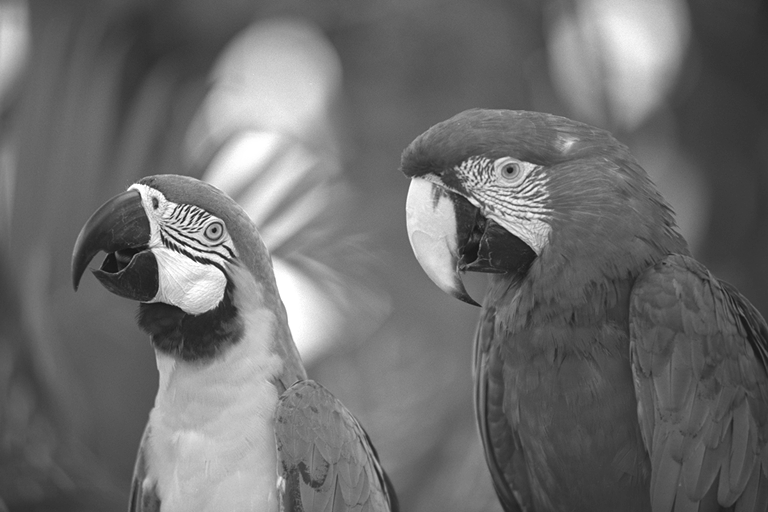
from transformers import pipeline

pipeline = pipeline(task="image-classification", model="facebook/dinov2-small-imagenet1k-1-layer")
pipeline("https://huggingface.co/datasets/Narsil/image_dummy/raw/main/parrots.png")
[{'label': 'macaw', 'score': 0.997848391532898},
 {'label': 'sulphur-crested cockatoo, Kakatoe galerita, Cacatua galerita',
  'score': 0.0016551691805943847},
 {'label': 'lorikeet', 'score': 0.00018523589824326336},
 {'label': 'African grey, African gray, Psittacus erithacus',
  'score': 7.85409429227002e-05},
 {'label': 'quail', 'score': 5.502637941390276e-05}]
Visual question answering

from transformers import pipeline

pipeline = pipeline(task="visual-question-answering", model="Salesforce/blip-vqa-base")
pipeline(
    image="https://huggingface.co/datasets/huggingface/documentation-images/resolve/main/transformers/tasks/idefics-few-shot.jpg",
    question="What is in the image?",
)
[{'answer': 'statue of liberty'}]
Why should I use Transformers?
-
Easy-to-use state-of-the-art models:
- High performance on natural language understanding & generation, computer vision, audio, video, and multimodal tasks.
- Low barrier to entry for researchers, engineers, and developers.
- Few user-facing abstractions with just three classes to learn.
- A unified API for using all our pretrained models.
-
Lower compute costs, smaller carbon footprint:
- Share trained models instead of training from scratch.
- Reduce compute time and production costs.
- Dozens of model architectures with 1M+ pretrained checkpoints across all modalities.
-
Choose the right framework for every part of a models lifetime:
- Train state-of-the-art models in 3 lines of code.
- Move a single model between PyTorch/JAX/TF2.0 frameworks at will.
- Pick the right framework for training, evaluation, and production.
-
Easily customize a model or an example to your needs:
- We provide examples for each architecture to reproduce the results published by its original authors.
- Model internals are exposed as consistently as possible.
- Model files can be used independently of the library for quick experiments.

Why shouldn't I use Transformers?
- This library is not a modular toolbox of building blocks for neural nets. The code in the model files is not refactored with additional abstractions on purpose, so that researchers can quickly iterate on each of the models without diving into additional abstractions/files.
- The training API is optimized to work with PyTorch models provided by Transformers. For generic machine learning loops, you should use another library like Accelerate.
- The example scripts are only examples. They may not necessarily work out-of-the-box on your specific use case and you'll need to adapt the code for it to work.
100 projects using Transformers
Transformers is more than a toolkit to use pretrained models, it's a community of projects built around it and the Hugging Face Hub. We want Transformers to enable developers, researchers, students, professors, engineers, and anyone else to build their dream projects.
In order to celebrate Transformers 100,000 stars, we wanted to put the spotlight on the community with the awesome-transformers page which lists 100 incredible projects built with Transformers.
If you own or use a project that you believe should be part of the list, please open a PR to add it!
Example models
You can test most of our models directly on their Hub model pages.
Expand each modality below to see a few example models for various use cases.
Audio
Computer vision
- Automatic mask generation with SAM
- Depth estimation with DepthPro
- Image classification with DINO v2
- Keypoint detection with SuperPoint
- Keypoint matching with SuperGlue
- Object detection with RT-DETRv2
- Pose Estimation with VitPose
- Universal segmentation with OneFormer
- Video classification with VideoMAE
Omega3 Specialized Tasks
- Advanced Text Generation with Omega3-Large - Enhanced contextual understanding
- Multimodal Reasoning with Omega3-Vision - Integrated text and image processing
- Conversational AI with Omega3-Chat - Superior dialogue capabilities
- Code Generation with Omega3-Code - Programming language understanding
- Scientific Text Processing with Omega3-Science - Domain-specific reasoning
- Creative Writing with Omega3-Creative - Enhanced narrative generation
- Technical Documentation with Omega3-Tech - Structured content creation
- Multilingual Translation with Omega3-Translate - Cross-language understanding
NLP with Omega3
- Advanced Text Classification with Omega3-Classifier - Enhanced semantic understanding
- Named Entity Recognition with Omega3-NER - Improved entity extraction
- Sentiment Analysis with Omega3-Sentiment - Nuanced emotional understanding
- Question Answering with Omega3-QA - Context-aware response generation
- Text Summarization with Omega3-Summarize - Intelligent content distillation
- Language Translation with Omega3-Translate - High-quality cross-language conversion
- Text Generation with Omega3-Generator - Creative and coherent text production
Citation
We now have a paper you can cite for the 🤗 Transformers library:
@inproceedings{wolf-etal-2020-transformers,
    title = "Transformers: State-of-the-Art Natural Language Processing",
    author = "Thomas Wolf and Lysandre Debut and Victor Sanh and Julien Chaumond and Clement Delangue and Anthony Moi and Pierric Cistac and Tim Rault and Rémi Louf and Morgan Funtowicz and Joe Davison and Sam Shleifer and Patrick von Platen and Clara Ma and Yacine Jernite and Julien Plu and Canwen Xu and Teven Le Scao and Sylvain Gugger and Mariama Drame and Quentin Lhoest and Alexander M. Rush",
    booktitle = "Proceedings of the 2020 Conference on Empirical Methods in Natural Language Processing: System Demonstrations",
    month = oct,
    year = "2020",
    address = "Online",
    publisher = "Association for Computational Linguistics",
    url = "https://www.aclweb.org/anthology/2020.emnlp-demos.6",
    pages = "38--45"
}
1 maintainer

Metadata
1 maintainer
Release files for transformers-usf 4.56.0.post11
For a detailed explanation of source distributions (sdists) and built distributions (wheels), please see the package formats documentation.
Source distribution (sdist)
| File | Size | Uploaded | |
|---|---|---|---|
| transformers_usf-4.56.0.post11.tar.gz | 10.7 MB | Details |
Built distribution (wheel)
| File | Interpreter | ABI | Platform | Reset |
|---|---|---|---|---|
| transformers_usf-4.56.0.post11-py3-none-any.whl | Python 3 | none | any | Details |
Total release size: 23.3 MB
Release files / transformers_usf-4.56.0.post11.tar.gz
| Download URL | transformers_usf-4.56.0.post11.tar.gz |
|---|---|
| Size | 10.7 MB |
| Tags | Source |
|
SHA-256 checksum How to use checksums |
7016f667bd64e6e0e98154a6e7501d3c41f15aed6f56f067b4e349221778a04c
|
|
BLAKE2b-256 checksum How to use checksums |
745090e4d472f1cd284f9a969c097f2d8b69d3e8af4436189a4faafccc10df9e
|
| Upload date | |
|
Uploaded using Trusted Publishing? What is trusted publishing? |
No |
| Uploaded via |
twine/6.2.0 CPython/3.13.1
|
Release files / transformers_usf-4.56.0.post11-py3-none-any.whl
| Download URL | transformers_usf-4.56.0.post11-py3-none-any.whl |
|---|---|
| Size | 12.7 MB |
| Tags | Python 3 |
|
SHA-256 checksum How to use checksums |
90c6a2ad3c519797f1ba0268d716143b2a7d27f988d57d5ad59b552e4cbca712
|
|
BLAKE2b-256 checksum How to use checksums |
97ab210db0dc8988cdb2863068db3401e31278a25a5853366c69fdf7cc840cf5
|
| Upload date | |
|
Uploaded using Trusted Publishing? What is trusted publishing? |
No |
| Uploaded via |
twine/6.2.0 CPython/3.13.1
|














