
A Python library for generating realistic synthetic images to train segmentation models in a smart, simple way.

Project description
transforms_fake
A Python library for generating realistic synthetic images to train segmentation models in a smart, simple way.



Overview
transforms_fake automatically generates new labeled images and masks from existing annotated datasets. Unlike traditional augmentation libraries, which only transform existing data, this library creates entirely new training examples by intelligently extracting and repositioning objects with their corresponding masks.
Key innovation: context-aware object insertion that maintains a realistic appearance while expanding the diversity of the dataset.
Features
- Instance-aware copy and paste: extract objects using segmentation masks
- Contextual transformations: rotation, scaling, and inversion with mask preservation
- Insertion between images: place objects from one image into different backgrounds
- Automatic mask updates: maintains segmentation labels with pixel-perfect accuracy
- Framework integration: compatible with PyTorch and FastAI workflows
- Dataset export: generate ready-to-use training datasets
Installation
pip install transforms_fake
For the latest development version:
pip install git+https://github.com/THOTIACORP/transforms_fake.git
Quick start
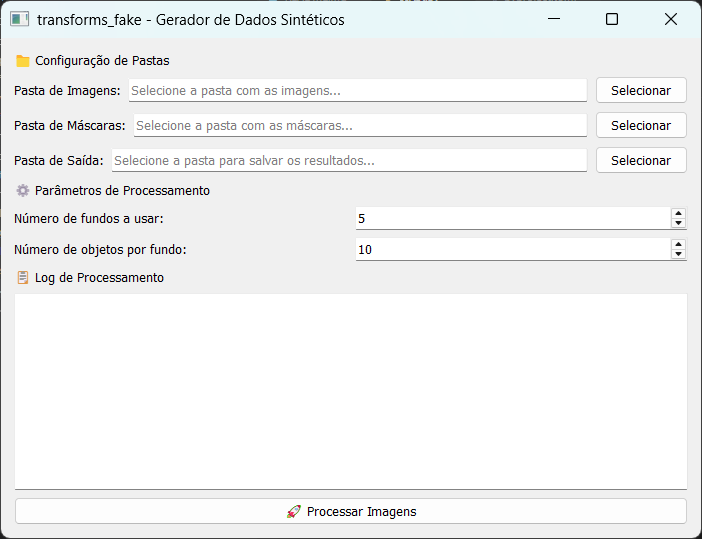
GUI
from transforms_fake.main import main

# Basic usage
main()
Code
from transforms_fake.main import process_images


class FakeLogWidget:
    def __init__(self):
        self.logs = []

    def append(self, text):
        self.logs.append(text)

    def repaint(self):
        pass  # Não faz nada, só para evitar erro

    def __str__(self):
        return "\n".join(self.logs)

# Uso:
log_widget = FakeLogWidget()
# Basic usage
img_dir = './img'
mask_dir = './mask'
output_dir = './output'
num_fundos = 50
num_ratos_por_fundo = 100

process_images(img_dir, mask_dir, output_dir, num_fundos, num_ratos_por_fundo, log_widget)

print("Logs:")
print(log_widget)
Dataset structure
Organize your data as follows:
dataset/
├── images/
│   ├── image1.png
│   └── image2.png
└── masks/
    ├── image1_mask.png
    └── image2_mask.png
How it works
- Input processing: Loads images with corresponding segmentation masks
- Instance detection: Identifies individual objects within the masks
- Object extraction: Isolates objects using the mask boundaries
- Contextual placement: Inserts objects into new locations with transformations
- Mask synchronization: Updates the segmentation masks to match the new object positions
Comparison with existing tools
vs. Albumentations
| Feature | Albumentations | transforms_fake |
|---|---|---|
| Traditional augmentation | ✅ | ✅ |
| Synthetic instance generation | ❌ | ✅ |
| Individual object manipulation | ❌ | ✅ |
| Copy and paste with mask recognition | ❌ | ✅ |
vs. Other augmentation tools
- Traditional libraries modify existing pixels
- transforms_fake creates new object arrangements while preserving realism
- Designed specifically for segmentation tasks that require diversity at the instance level
Use cases
- Medical images: augment rare cases of pathologies
- Object detection: augment variations in object occurrence
- Segmentation: generate diverse object arrangements
- Small datasets: multiply training examples contextually
Requirements
- Python 3.7+
- PIL/Pillow for image processing
- NumPy for matrix operations
- Compatible with PyTorch and FastAI
Contributions
Contributions are welcome! Please:
- Fork the repository
- Create feature branches
- Submit pull requests with clear descriptions
- Report bugs via issues on GitHub
License
GNU General Public License v3.0 - See LICENSE for details.
Contact
THOTIACORP
- GitHub: @THOTIACORP
- Email: founder@thotiacorp.com.br
Authors


Download files
Download the file for your platform. If you're not sure which to choose, learn more about installing packages.
Source Distribution
Built Distribution
Filter files by name, interpreter, ABI, and platform.
If you're not sure about the file name format, learn more about wheel file names.
Copy a direct link to the current filters
File details
Details for the file transforms_fake-0.1.4.tar.gz.
File metadata
- Download URL: transforms_fake-0.1.4.tar.gz
- Upload date:
- Size: 47.3 kB
- Tags: Source
- Uploaded using Trusted Publishing? No
- Uploaded via: twine/6.1.0 CPython/3.13.0
File hashes
| Algorithm | Hash digest | |
|---|---|---|
| SHA256 |
16b2814c461c09dc3d10e0cf77e441c002fa5ae2925f0db59da8cc9cc6c6e894
|
|
| MD5 |
c596ec79821bb49907fa1e19468fdbea
|
|
| BLAKE2b-256 |
8711971902633c0ef5d2bf55a9edd0a0035098d25880e46e14b07076b5ddd0e4
|
File details
Details for the file transforms_fake-0.1.4-py3-none-any.whl.
File metadata
- Download URL: transforms_fake-0.1.4-py3-none-any.whl
- Upload date:
- Size: 35.8 kB
- Tags: Python 3
- Uploaded using Trusted Publishing? No
- Uploaded via: twine/6.1.0 CPython/3.13.0
File hashes
| Algorithm | Hash digest | |
|---|---|---|
| SHA256 |
4d0641923d020061a9b731098a41d24fe15d137a3c59b9aea196fc0e220b52a8
|
|
| MD5 |
718faa0c91c06d12436fdf65fd16d71d
|
|
| BLAKE2b-256 |
17999b0b677755b189b5c862cf48a08476039146474efc1dfa2ec7705527736f
|






