
Translation Canvas


Overview
Translation Canvas is a Python package designed for in-depth analysis and visualization of machine translation (MT) model outputs. It facilitates both system-level and instance-level evaluations, helping researchers identify, analyze, and comprehend the strengths and weaknesses of translation models.
The tool integrates multiple evaluation metrics, including BLEU, COMET, and InstructScore, to provide a comprehensive view of translation quality. Moreover, it offers detailed natural language explanations for identified errors, powered by InstructScore, and presents the results in an intuitive and interactive dashboard.
Why Translation Canvas?
With the rapid development of machine translation systems, traditional evaluation tools like COMET and SacreBLEU often fall short in providing fine-grained insights. Translation Canvas bridges this gap by offering:
Instance-level Error Analysis: Highlight specific errors in translation instances and explain their nature using natural language descriptions.
System-level Insights: Aggregate error analysis to identify common pitfalls and strengths across entire datasets.
Visual Comparisons: Interactive dashboard for comparing the performance of different models on a granular level.
Installation
You can easily install Translation Canvas via pip:
pip install translation-canvas
After installation, run a one-time setup script to configure necessary dependencies:
translation-canvas-setup
For the latest development version, you can install directly from the GitHub repository:
pip install git+https://github.com/ChinDandekar/translation_canvas
Features
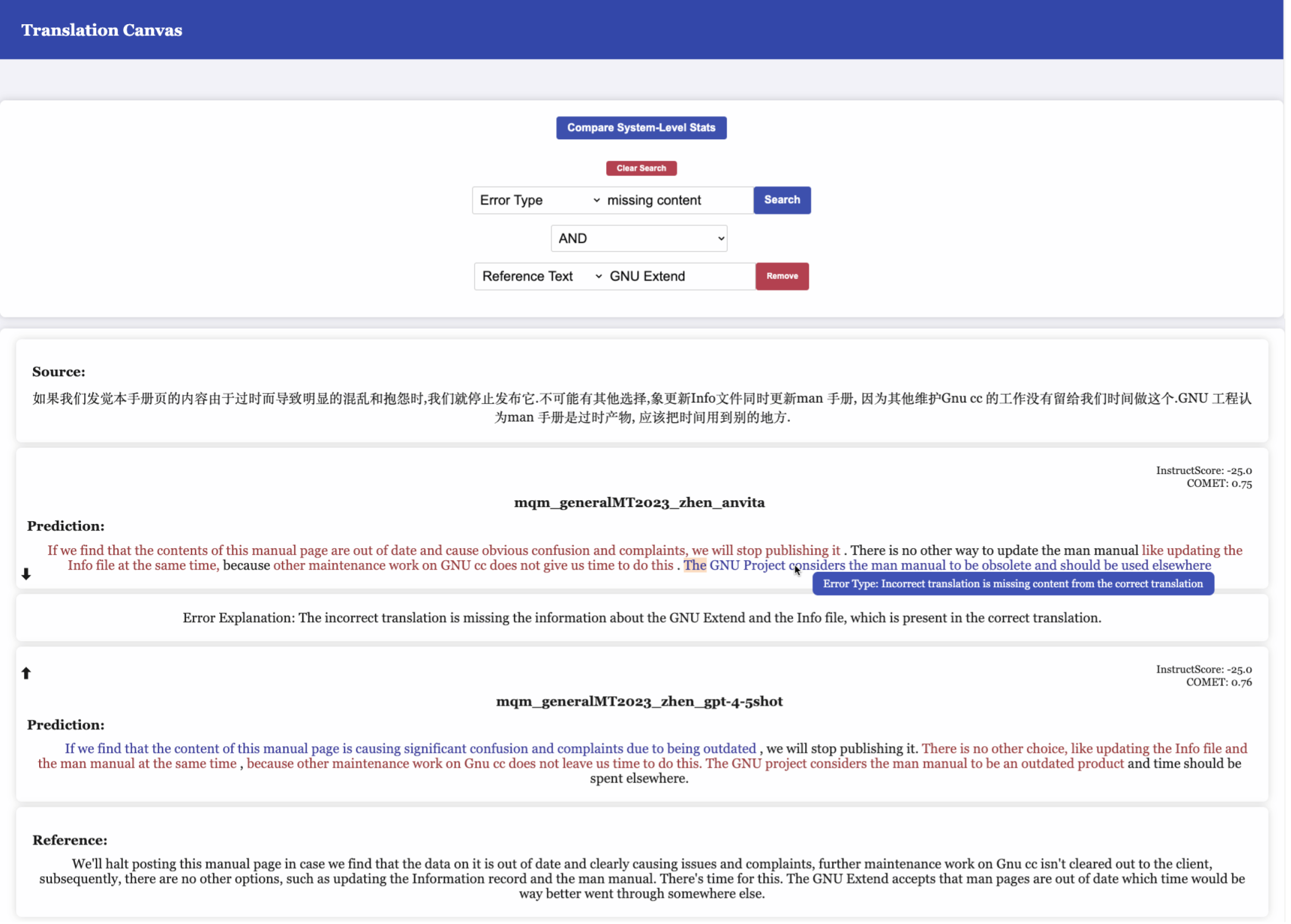
Error Analysis
Translation Canvas highlights errors at the instance level using color-coded spans. Hovering over these spans reveals natural language explanations, making it easier to understand the type of errors encountered.
Comparison and Search
Translation Canvas allows users to compare multiple models simulatneously. It also provides a powerful search feature to users, allowing them to filter instancs by text, error type, error scale and error explanation
System-level Dashboard
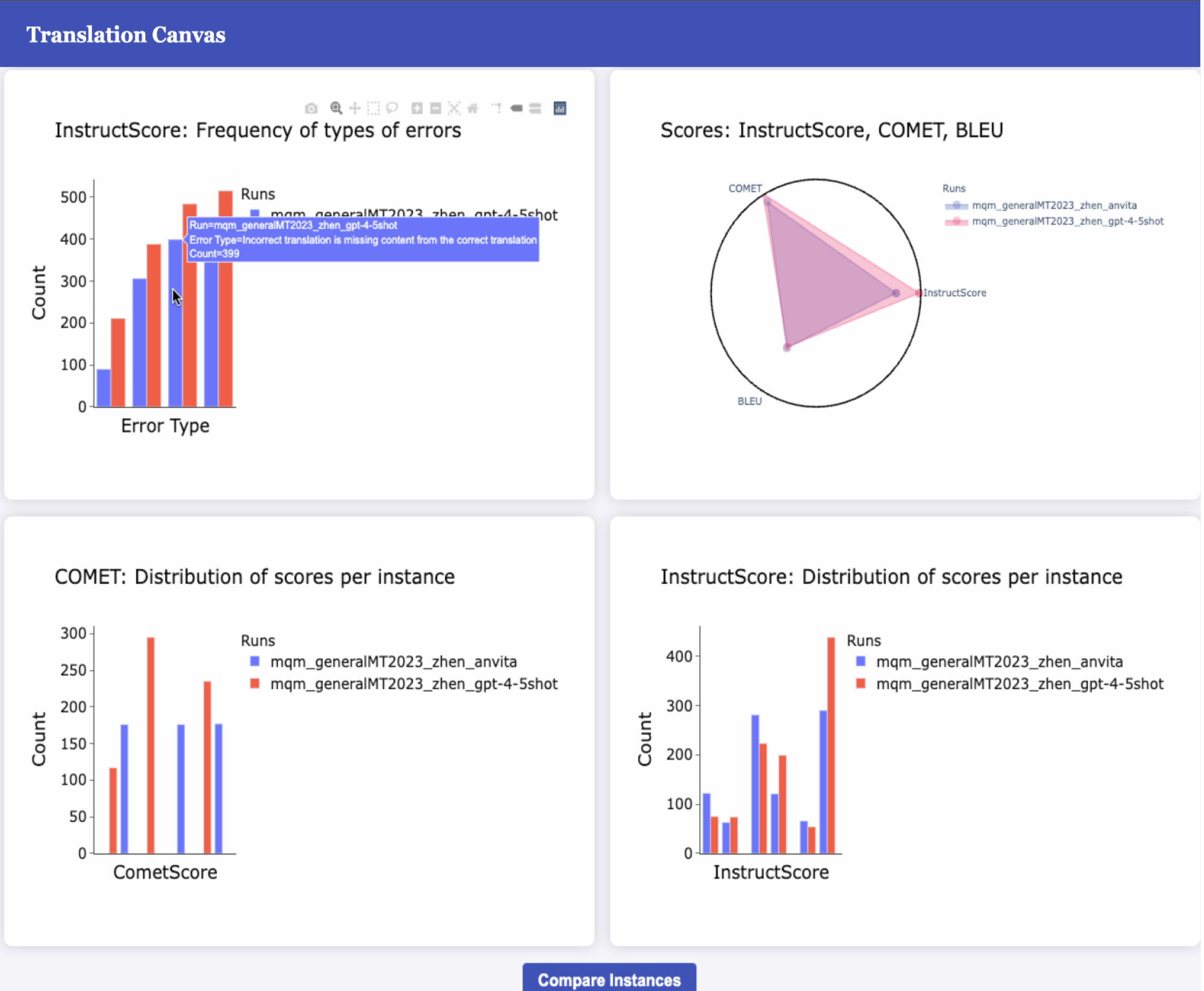
Translation Canvas provides a system-level dashboard to understand model performance at a system level.
Instance Submission
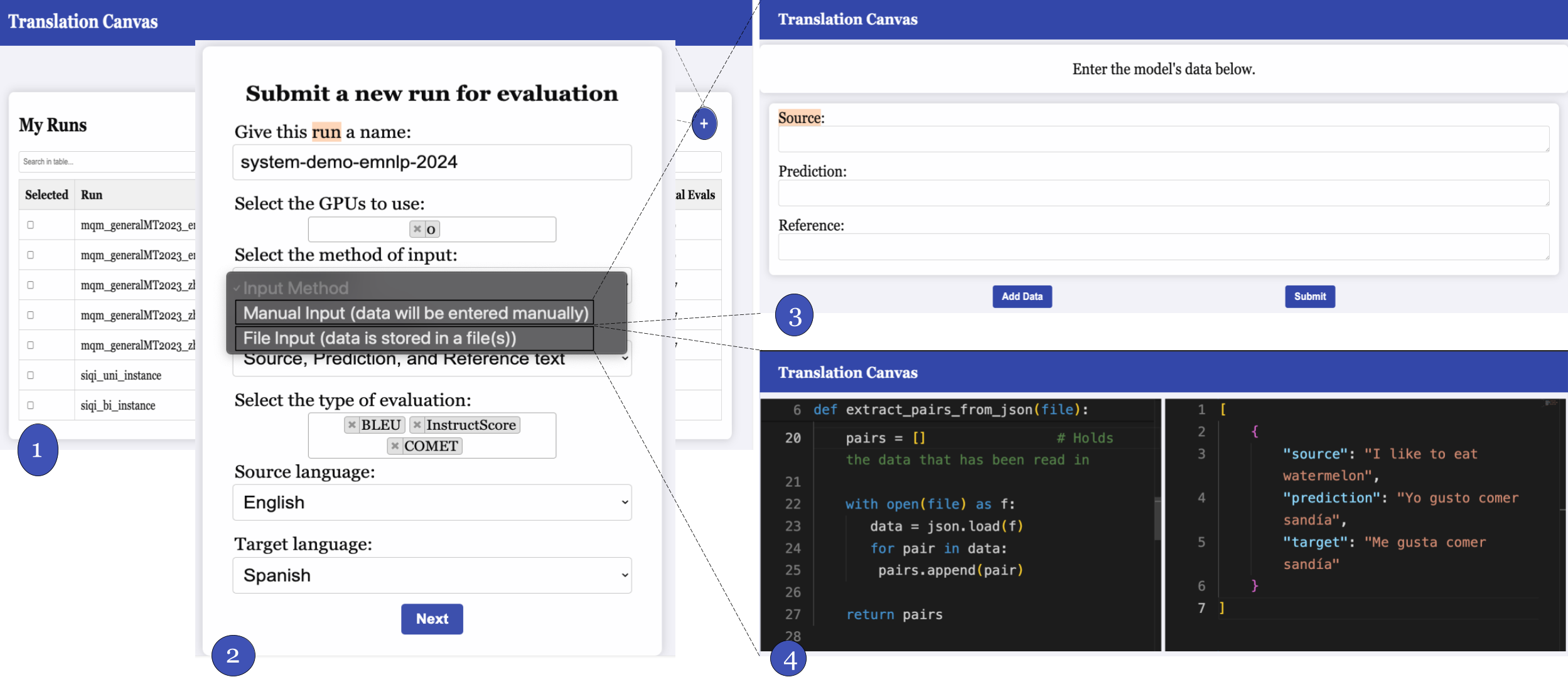
Submit source-prediction-reference triplets through the user interface or by directly uploading files. The tool will process these instances, evaluate them using the integrated metrics, and provide detailed feedback.
Usage
Translation Canvas operates as a web application, running in your browser. To start the application:
translation-canvas-start
By default, the app will be available at http://127.0.0.1:5000.
To run the app on a different port:
translation-canvas-start --port your-port
Port Forwarding
If you are running Translation Canvas on a remote server via SSH, use port forwarding to access the app:
ssh -L your-port:127.0.0.1:5000 username@yourserver.com
Evaluation and Feedback
Translation Canvas has been tested with machine translation experts, who found it to be both effective and user-friendly. The tool has shown to be particularly useful in pinpointing subtle errors that might be overlooked by traditional evaluation methods.
1 maintainer

Metadata
1 maintainer
Release files for translation-canvas 1.0.2
For a detailed explanation of source distributions (sdists) and built distributions (wheels), please see the package formats documentation.
Source distribution (sdist)
| File | Size | Uploaded | |
|---|---|---|---|
| translation_canvas-1.0.2.tar.gz | 1.8 MB | Details |
Built distribution (wheel)
| File | Interpreter | ABI | Platform | Reset |
|---|---|---|---|---|
| translation_canvas-1.0.2-py3-none-any.whl | Python 3 | none | any | Details |
Total release size: 3.6 MB
Release files / translation_canvas-1.0.2.tar.gz
| Download URL | translation_canvas-1.0.2.tar.gz |
|---|---|
| Size | 1.8 MB |
| Tags | Source |
|
SHA-256 checksum How to use checksums |
0e8ddb232ea1e96b9564486e5db9f7ded5138ab0887495c0caa453f5a1fd0c50
|
|
BLAKE2b-256 checksum How to use checksums |
84153aec4da5dd5eb73875935c0322852222be5f2f24ace66d2cbb1b2e493021
|
| Upload date | |
|
Uploaded using Trusted Publishing? What is trusted publishing? |
No |
| Uploaded via |
twine/5.1.1 CPython/3.12.2
|
Release files / translation_canvas-1.0.2-py3-none-any.whl
| Download URL | translation_canvas-1.0.2-py3-none-any.whl |
|---|---|
| Size | 1.8 MB |
| Tags | Python 3 |
|
SHA-256 checksum How to use checksums |
a4c4c6ed4b12b40dea8d1a3fde2d15efda119b97242a23f9efe61da2cd78c3ee
|
|
BLAKE2b-256 checksum How to use checksums |
2a3a52605406a01a9c43ccd15b48ddcd3fc088c082f178bfb19148614b057fac
|
| Upload date | |
|
Uploaded using Trusted Publishing? What is trusted publishing? |
No |
| Uploaded via |
twine/5.1.1 CPython/3.12.2
|














