
tree-copy
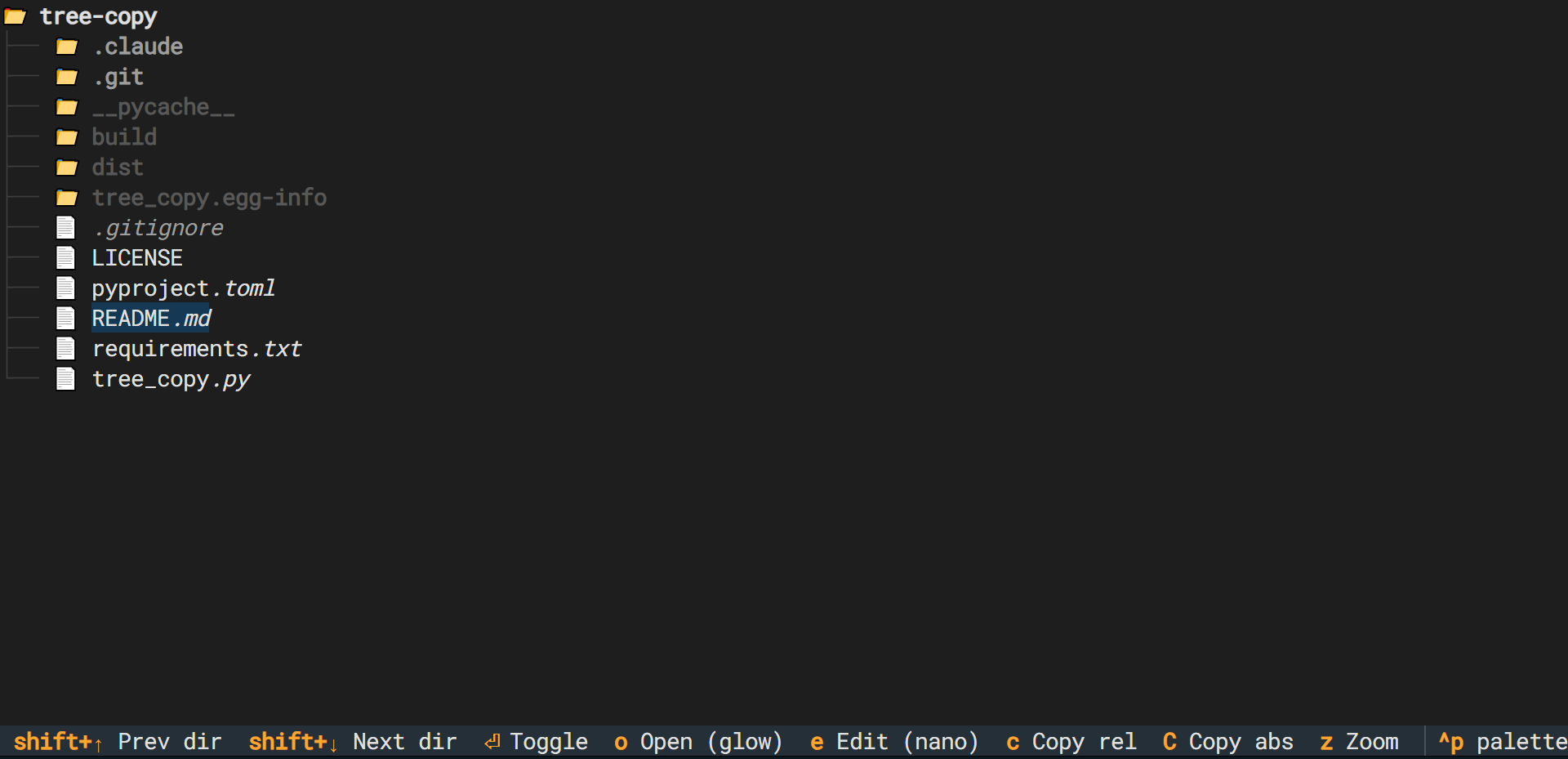




A keyboard-driven file tree sidebar for tmux, built with Textual.
Browse your project, jump between directories, copy paths, and preview files — without leaving the terminal.
Features
- Navigate the file tree with arrow keys
- Jump between sibling directories with
Shift+↑/↓ - Copy relative or absolute paths to clipboard
- Preview files with glow (falls back to
less) - Edit files with
$TREE_COPY_EDITOR(falls back to nano → vi) - Root folder stays open (non-collapsible)
Requirements
- Python 3.10+
- glow (optional, recommended for file preview — falls back to
less)
Install
pip install tree-copy
Or from source:
pip install .
Usage
tree-copy [directory] # defaults to current directory
As a togglable tmux sidebar, add to ~/.tmux.conf:
bind-key e run-shell " \
  PANE=$(tmux show-option -wqv @tree-copy-pane); \
  if [ -n \"$PANE\" ] && tmux list-panes -F '#{pane_id}' | grep -q \"^$PANE\$\"; then \
    tmux kill-pane -t \"$PANE\"; \
    tmux set-option -w @tree-copy-pane ''; \
  else \
    NEW_PANE=$(tmux split-window -hbP -l 35 -F '#{pane_id}' \"tree-copy '#{pane_current_path}'\"); \
    tmux set-option -w @tree-copy-pane \"$NEW_PANE\"; \
  fi"
prefix + e opens the sidebar; pressing it again closes it. State (expanded folders, cursor position) is saved automatically and restored on next open.
Keybindings
| Key | Action |
|---|---|
↑ / ↓ |
Navigate |
Shift+↑ / Shift+↓ |
Jump between sibling directories; moves to parent at bounds |
Enter / Space |
Toggle directory open/close |
o |
Preview file (glow if available, else less) |
e |
Edit file ($TREE_COPY_EDITOR, else nano, else vi) |
c |
Copy relative path to clipboard |
C |
Copy absolute path to clipboard |
q / Esc |
Quit |
License
1 maintainer

Metadata
1 maintainer
Release files for tree-copy 0.1.5
For a detailed explanation of source distributions (sdists) and built distributions (wheels), please see the package formats documentation.
Source distribution (sdist)
| File | Size | Uploaded | |
|---|---|---|---|
| tree_copy-0.1.5.tar.gz | 8.0 kB | Details |
Built distribution (wheel)
| File | Interpreter | ABI | Platform | Reset |
|---|---|---|---|---|
| tree_copy-0.1.5-py3-none-any.whl | Python 3 | none | any | Details |
Total release size: 16.4 kB
Release files / tree_copy-0.1.5.tar.gz
| Download URL | tree_copy-0.1.5.tar.gz |
|---|---|
| Size | 8.0 kB |
| Tags | Source |
|
SHA-256 checksum How to use checksums |
5c83cc875bba158acde92c5f619108addde945b6d4e4eaaa3b67eac3642c43e0
|
|
BLAKE2b-256 checksum How to use checksums |
0831be7cbbb1e9ce014a6eaa6000584013b7c460b301937e1fb1dcdb420ecccf
|
| Upload date | |
|
Uploaded using Trusted Publishing? What is trusted publishing? |
No |
| Uploaded via |
twine/6.2.0 CPython/3.10.12
|
Release files / tree_copy-0.1.5-py3-none-any.whl
| Download URL | tree_copy-0.1.5-py3-none-any.whl |
|---|---|
| Size | 8.5 kB |
| Tags | Python 3 |
|
SHA-256 checksum How to use checksums |
bbe752143893b882186f4c76a1b2dae642a82e4ec539914c99a5bfe9f94d30ef
|
|
BLAKE2b-256 checksum How to use checksums |
21aad9f5097e12391490c438981abe328447093a0a66bbf1297cd08e42a0a768
|
| Upload date | |
|
Uploaded using Trusted Publishing? What is trusted publishing? |
No |
| Uploaded via |
twine/6.2.0 CPython/3.10.12
|














