
tree-sitter-usd
This library parses USD ASCII files using tree-sitter to produce a light-weight grammar of the file.
For those who don't know what tree-sitter is and why you'd care to use it, see Why Tree-sitter?. For install / usage instructions, see below.
Disclaimer
This repository's parsing rules are subject to change.
Building + Using
Neovim
Make sure you include the following somewhere in your init.lua file.
require("nvim-treesitter.configs").setup {
    ensure_installed = {"usd"},
    parser_install_dir = installation_directory,
    highlight = { enable = true },

    -- More stuff
}
Python
pip install tree-sitter-usda
import tree_sitter_usda
from tree_sitter import Language, Parser

parser = Parser(Language(tree_sitter_usda.language()))
tree = parser.parse(b'def Xform "root"\n{\n    custom int value = 10\n}\n')

print(tree.root_node)
The bundled highlights query is available as
tree_sitter_usda.HIGHLIGHTS_QUERY.
Why Tree-sitter?
In the beginning, Tree-sitter was made to give text editors better syntax highlighting.
Most text editors today create syntax highlighting with regex patterns. On large files with long line counts, this approach is slow and error-prone.
In contrast to regex, Tree-sitter actually knows about your file. It can convert a USD file like:
#usda 1.0

def "root"
{
    custom uniform int value = 10
}
Into a tokenized tree like this:
(prim_definition) ; [3:1 - 2:5]
 (prim_type) ; [3:1 - 4:2]
 (string) ; [3:5 - 11:2]
 (block) ; [4:1 - 2:5]
  (attribute_assignment) ; [5:5 - 34:4]
   (custom) ; [5:5 - 11:4]
   (uniform) ; [5:12 - 19:4]
   (attribute_type) ; [5:20 - 23:4]
   (identifier) ; [5:24 - 29:4]
   (integer) ; [5:32 - 34:4]
That tree is built sparsely, interactively, and even works with WIP files where
you may be missing a } or two. Tree-sitter is accurate, fast, and getting
better all the time.
Having this tree is really powerful. It became clear very quickly to others that Tree-sitter can be used for a lot more than just syntax highlighting. Here's some of the fun plug-ins showing off what you can do using this USD parser.
Neovim
aerial.nvim - Navigate USD Files Effortlessly
Display And Move Through A Prim Tree
Effortlessly move in, out, or around any USD Prim, no matter how large it is.
Prim Tree Based On Your Current Position
Many times I find myself thinking "I'm in a nested Prim but I actually need to go one down, and over". This aerial.nvim view is super good at moving around.
Syntax Highlighting
Tree-sitter is an incremental parser. That means
- Parsing is lightning quick
- Making edits to the file doesn't require a full re-parse of the file
- WIP files with syntax errors still parse
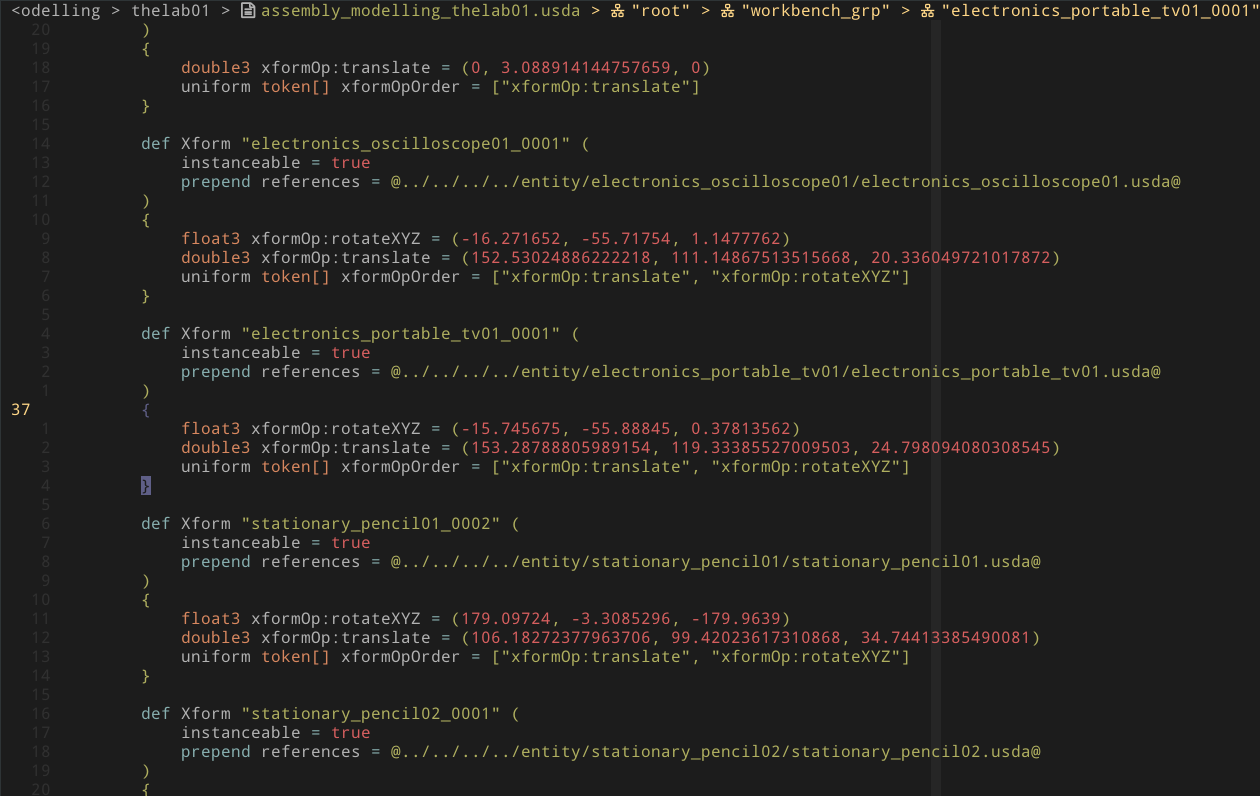
And the results are pretty good. My Neovim theme is
hybrid2.nvim. If you desire
even more colors (e.g. coloring uniform as blue, instead of white), there's
already an out-of-box highlight group for that over at
nvim-treesitter-highlights-usd.
In the future, this might get upstreamed to
nvim-treesitter, maybe.
Maintain The Current Prim Context
Have you ever been viewing a huge USD file and, in the middle of viewing some Prim, forget the name / tree of the Prim that you're viewing? This fun plug-in keeps the Prim name pinned as you scroll so you never lose your place.
Prim Statusline
The top bar tracks your location in the file.
Auto-Folding
Text Objects
Select, move, delete, comment, edit anything easily, using whatever mappings you desire.
In truth, most people don't have much need to edit USD files directly. But it's a testiment to tree-sitter that the same mappings do as you expect across all languages.
Qt
examples/qt is a runnable USD layer viewer - a QLineEdit which
takes a path on-disk plus a read-only, syntax highlighted QPlainTextEdit.
uv run --no-editable --extra example examples/qt/usda_viewer.py /path/to/some_layer.usda

The example uses Qt.py, so the same code
runs on PySide6, PySide2, PyQt5, or PyQt6. Only its Usda-prefixed classes and
its layer reader know about USD - everything else works for any tree-sitter
grammar.
Integrating Tree-sitter With Qt
Qt colors text with QSyntaxHighlighter. It calls highlightBlock once per
block (one line, in a QPlainTextEdit) and you answer with setFormat calls.
tree-sitter parses whole files and answers with captured nodes. Bridging the
two is mostly a matter of translating coordinates:
from Qt import QtGui
from tree_sitter import Language, Parser, Query, QueryCursor

import tree_sitter_usda


class Highlighter(QtGui.QSyntaxHighlighter):
    def __init__(self, parent=None):
        super().__init__(parent)

        language = Language(tree_sitter_usda.language())
        self._parser = Parser(language)
        self._cursor = QueryCursor(Query(language, tree_sitter_usda.HIGHLIGHTS_QUERY))
        self._formats = {"string": _make_format("#98c379")}  # And so on, per capture

    def highlightBlock(self, text):
        # NOTE: Real code caches this parse. See examples/qt for how + why.
        source = self.document().toPlainText().encode("utf-8")
        tree = self._parser.parse(source)

        start_byte = _get_block_start_byte(source, self.currentBlock().blockNumber())
        end_byte = start_byte + len(text.encode("utf-8"))
        self._cursor.set_byte_range(start_byte, end_byte)

        for _, captures in self._cursor.matches(tree.root_node):
            for capture, nodes in captures.items():
                format_ = self._formats.get(capture)  # e.g. @spell is not a color

                if format_ is None:
                    continue

                for node in nodes:
                    # NOTE: Byte offsets are Qt offsets only while the line is ASCII
                    start = max(node.start_byte, start_byte) - start_byte
                    end = min(node.end_byte, end_byte) - start_byte
                    self.setFormat(start, end - start, format_)
The parts which that sketch glosses over, and which examples/qt handles:
- Offsets - tree-sitter counts UTF-8 bytes, Qt counts UTF-16 code units.
They agree until a line contains a
é(2 bytes, 1 unit) or a🙂(4 bytes, 2 units), and then every color on that line slides sideways. - Priority - a highlights query captures the same text more than once on
purpose.
(comment) @spell @commentand(attribute_type) @type+@type.builtinboth do. tree-sitter 0.25+ gives the last-written pattern priority, so sort the captures by pattern order and paint the low priority ones first. Qt'ssetFormatis last-write-wins, which does the rest. - Speed - do not re-parse per block. Re-parse once per edit, hand the old
tree to
Parser.parseso tree-sitter re-uses the subtrees which did not change, and give each block aQueryCursor.set_byte_rangeso it is not querying the whole document. - Repaints - Qt only re-highlights the blocks which the user typed in,
which is not enough for multi-line constructs. Deleting the
"""which opened a docstring re-interprets every line below it.Tree.changed_rangessays exactly which bytes changed meaning, so those blocks can be repainted.
See examples/qt/README.md for the details.
Need A Parser? Look No Further
USD of course has parsing capabilities but, at the time of writing, most of the parsing classes and functions are private. On top of that, it's a multi-million like repository written in C++.
In contrast, tree-sitter
- Has no dependencies
- Has over 10 language bindings (C, C++, Rust, Python, Swift, JavaScript, etc)
- Is a fraction of the code
Tree-sitter is easy to embed and extend, making it very attractive for plug-in authors.
Future Improvements
Plug-Ins
There's a bunch of open-source momentum behind tree-sitter. New tools and plug-ins may come out that further expands upon the list of reasons above.
Some other plug-ins that could be useful in the future
- https://github.com/nvim-treesitter/nvim-treesitter-refactor
- https://github.com/t-troebst/perfanno.nvim
- https://github.com/ThePrimeagen/refactoring.nvim
- https://github.com/bennypowers/nvim-regexplainer/
- https://github.com/ray-x/navigator.lua
- https://github.com/Olical/conjure
And others
Neovim 0.10+
I spotted a couple Neovim roadmap items that seem to want to make tree-sitter faster and more async. It's already fast but more speed is definitely welcome on larger USD files. Needless to say I'll be keeping an eye on those!
Testing
Unittests
- Install the tree-sitter-cli
cd {root}
tree-sitter test
All tests should pass.
Highlighting
- Clone this repository
- Add this clone's parent directory
"parser-directories"(see Per-user configuration)
If everything worked correctly, you should be able to highlight any USD file from the tree-sitter CLI like so:
tree-sitter highlight /path/to/file.usda
You should see something like this
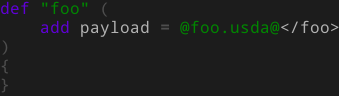
And the next time you run tree-sitter test, highlighting information will
be in the output.
syntax highlighting:
  ✓ payload.usda (N assertions)
  ✓ references.usda (N assertions)
  ✓ relationship.usda (N assertions)
  ✓ specializes.usda (N assertions)
  ✓ string.usda (N assertions)

  ...
Actual USD Files
The best way to test tree-sitter-usd is to parse USD files in-action.
- The USD repository has over 800 production USD files
- The Pixar Kitchen set
- Animal Logic's ALab scene
The basic steps are
- Download from any of the links above
- Install the tree-sitter-cli
- Find + parse the files. e.g.
find /path/to/your/root/usd_files/folder -name "*.usda" -type f | xargs tree-sitter parse
tree-sitter-usd parses all of the files, everywhere, without errors.
Contributing
If you find a bug in a USD file, please submit an issue or pull request specifying the expected parse and the actual results.
1 maintainer

Metadata
1 maintainer
Release files for tree-sitter-usda 0.8.0
For a detailed explanation of source distributions (sdists) and built distributions (wheels), please see the package formats documentation.
Source distribution (sdist)
| File | Size | Uploaded | |
|---|---|---|---|
| tree_sitter_usda-0.8.0.tar.gz | 94.1 kB | Details |
Built distributions (wheels)
| File | Reset | |||
|---|---|---|---|---|
| tree_sitter_usda-0.8.0-cp310-abi3-win_amd64.whl | CPython 3.10 | abi3 | Windows x86-64 | Details |
| tree_sitter_usda-0.8.0-cp310-abi3-musllinux_1_2_x86_64.whl | CPython 3.10 | abi3 | Linux musl 1.2+ x86-64 | Details |
| tree_sitter_usda-0.8.0-cp310-abi3-musllinux_1_2_aarch64.whl | CPython 3.10 | abi3 | Linux musl 1.2+ ARM64 | Details |
| tree_sitter_usda-0.8.0-cp310-abi3-manylinux2014_aarch64.manylinux_2_17_aarch64.manylinux_2_28_aarch64.whl | CPython 3.10 | abi3 | Linux glibc 2.28+ ARM64, Linux glibc 2.17+ ARM64 | Details |
| tree_sitter_usda-0.8.0-cp310-abi3-manylinux1_x86_64.manylinux_2_28_x86_64.manylinux_2_5_x86_64.whl | CPython 3.10 | abi3 | Linux glibc 2.5+ x86-64, Linux glibc 2.28+ x86-64 | Details |
| tree_sitter_usda-0.8.0-cp310-abi3-macosx_11_0_arm64.whl | CPython 3.10 | abi3 | macOS 11.0+ ARM64 | Details |
| tree_sitter_usda-0.8.0-cp310-abi3-macosx_10_9_x86_64.whl | CPython 3.10 | abi3 | macOS 10.9+ x86-64 | Details |
Total release size: 473.9 kB
Release files / tree_sitter_usda-0.8.0.tar.gz
| Download URL | tree_sitter_usda-0.8.0.tar.gz |
|---|---|
| Size | 94.1 kB |
| Tags | Source |
|
SHA-256 checksum How to use checksums |
b5cc80f745a9731894aea45f7755c45e9b8408a311a1de11bd1cf3fdd25ef816
|
|
BLAKE2b-256 checksum How to use checksums |
beffc53529db84d66e40dc75dc40fcf652f703637a235f6d1b55a29e43beb190
|
| Upload date | |
|
Uploaded using Trusted Publishing? What is trusted publishing? |
No |
| Uploaded via |
uv/0.7.20
|
Release files / tree_sitter_usda-0.8.0-cp310-abi3-win_amd64.whl
| Download URL | tree_sitter_usda-0.8.0-cp310-abi3-win_amd64.whl |
|---|---|
| Size | 50.9 kB |
| Tags | CPython 3.10 Windows x86-64 abi3 |
|
SHA-256 checksum How to use checksums |
973925fa982ade805a977dad3caf172a54077eb8d8caf761dde5bfdf0a07ee53
|
|
BLAKE2b-256 checksum How to use checksums |
805e5251721c610a992d4d04a5fdaa3ab97a0a575d58b98f038581acae7d676e
|
| Upload date | |
|
Uploaded using Trusted Publishing? What is trusted publishing? |
Yes |
| Uploaded via |
twine/7.0.0 CPython/3.13.14
|
Provenance
Provenance describes where a file came from. On PyPI, provenance is shared via attestations, which provide a verifiable record of the build or publishing details. View details, limitations and caveats.


PyPI Publish Attestation
PyPI verified that this artifact, at this checksum, originated from the publisher listed below.
Signed by GitHub Actions, verified by PyPI on Aug 2, 2026.
Transparency logRelease files / tree_sitter_usda-0.8.0-cp310-abi3-musllinux_1_2_x86_64.whl
| Download URL | tree_sitter_usda-0.8.0-cp310-abi3-musllinux_1_2_x86_64.whl |
|---|---|
| Size | 57.5 kB |
| Tags | CPython 3.10 Linux musl 1.2+ x86-64 abi3 |
|
SHA-256 checksum How to use checksums |
9b726ecbfc6be41efaddbd9ab6cf438844c83084a3c56dee27583cff35864170
|
|
BLAKE2b-256 checksum How to use checksums |
36f1f0a72ca59fb8dffc679c81a9eb5b72cf5f6d131e98cae2fe46b7d4ac37eb
|
| Upload date | |
|
Uploaded using Trusted Publishing? What is trusted publishing? |
Yes |
| Uploaded via |
twine/7.0.0 CPython/3.13.14
|
Provenance
Provenance describes where a file came from. On PyPI, provenance is shared via attestations, which provide a verifiable record of the build or publishing details. View details, limitations and caveats.
PyPI Publish Attestation
PyPI verified that this artifact, at this checksum, originated from the publisher listed below.
Signed by GitHub Actions, verified by PyPI on Aug 2, 2026.
Transparency logRelease files / tree_sitter_usda-0.8.0-cp310-abi3-musllinux_1_2_aarch64.whl
| Download URL | tree_sitter_usda-0.8.0-cp310-abi3-musllinux_1_2_aarch64.whl |
|---|---|
| Size | 57.9 kB |
| Tags | CPython 3.10 Linux musl 1.2+ ARM64 abi3 |
|
SHA-256 checksum How to use checksums |
77aab3ac76e30107d11818ea49cddc1a07e9a3bc3103d3ab3ab32c1182a4ca40
|
|
BLAKE2b-256 checksum How to use checksums |
89c5e13e67065349caef81b1eb9f83f0b9b4ab8f1a0971a493aa4a2454dd0f4e
|
| Upload date | |
|
Uploaded using Trusted Publishing? What is trusted publishing? |
Yes |
| Uploaded via |
twine/7.0.0 CPython/3.13.14
|
Provenance
Provenance describes where a file came from. On PyPI, provenance is shared via attestations, which provide a verifiable record of the build or publishing details. View details, limitations and caveats.
PyPI Publish Attestation
PyPI verified that this artifact, at this checksum, originated from the publisher listed below.
Signed by GitHub Actions, verified by PyPI on Aug 2, 2026.
Transparency logRelease files / tree_sitter_usda-0.8.0-cp310-abi3-manylinux2014_aarch64.manylinux_2_17_aarch64.manylinux_2_28_aarch64.whl
| Download URL | tree_sitter_usda-0.8.0-cp310-abi3-manylinux2014_aarch64.manylinux_2_17_aarch64.manylinux_2_28_aarch64.whl |
|---|---|
| Size | 58.3 kB |
| Tags | CPython 3.10 Linux glibc 2.17+ ARM64 Linux glibc 2.28+ ARM64 abi3 |
|
SHA-256 checksum How to use checksums |
703110a4bafa4fca7b20188339abad2b3550d854f380812bc50fd7ac4e7b7c20
|
|
BLAKE2b-256 checksum How to use checksums |
8046230aac5a97c77aa4bf5ca12aaee89ab8ab9c4faf5d003aff0650f55a3252
|
| Upload date | |
|
Uploaded using Trusted Publishing? What is trusted publishing? |
Yes |
| Uploaded via |
twine/7.0.0 CPython/3.13.14
|
Provenance
Provenance describes where a file came from. On PyPI, provenance is shared via attestations, which provide a verifiable record of the build or publishing details. View details, limitations and caveats.
PyPI Publish Attestation
PyPI verified that this artifact, at this checksum, originated from the publisher listed below.
Signed by GitHub Actions, verified by PyPI on Aug 2, 2026.
Transparency logRelease files / tree_sitter_usda-0.8.0-cp310-abi3-manylinux1_x86_64.manylinux_2_28_x86_64.manylinux_2_5_x86_64.whl
| Download URL | tree_sitter_usda-0.8.0-cp310-abi3-manylinux1_x86_64.manylinux_2_28_x86_64.manylinux_2_5_x86_64.whl |
|---|---|
| Size | 57.5 kB |
| Tags | CPython 3.10 Linux glibc 2.28+ x86-64 Linux glibc 2.5+ x86-64 abi3 |
|
SHA-256 checksum How to use checksums |
71b036f3094caf362f32b2a5f1a02d96866c79f3e24cca4cb776a2391b48c23a
|
|
BLAKE2b-256 checksum How to use checksums |
ccf6eff3a1e71a37d76aa23363db7fcea7b0845ec242d57f87415dd1b4c580f7
|
| Upload date | |
|
Uploaded using Trusted Publishing? What is trusted publishing? |
Yes |
| Uploaded via |
twine/7.0.0 CPython/3.13.14
|
Provenance
Provenance describes where a file came from. On PyPI, provenance is shared via attestations, which provide a verifiable record of the build or publishing details. View details, limitations and caveats.
PyPI Publish Attestation
PyPI verified that this artifact, at this checksum, originated from the publisher listed below.
Signed by GitHub Actions, verified by PyPI on Aug 2, 2026.
Transparency logRelease files / tree_sitter_usda-0.8.0-cp310-abi3-macosx_11_0_arm64.whl
| Download URL | tree_sitter_usda-0.8.0-cp310-abi3-macosx_11_0_arm64.whl |
|---|---|
| Size | 49.7 kB |
| Tags | CPython 3.10 abi3 macOS 11.0+ ARM64 |
|
SHA-256 checksum How to use checksums |
a439a0a2f12ef1736c7212e9268931d806e16996fe26419180642e217192b9f3
|
|
BLAKE2b-256 checksum How to use checksums |
47d3ca18ec8ec02f089659e63253745d80b188e7b36ec7710e494bff78de50b3
|
| Upload date | |
|
Uploaded using Trusted Publishing? What is trusted publishing? |
Yes |
| Uploaded via |
twine/7.0.0 CPython/3.13.14
|
Provenance
Provenance describes where a file came from. On PyPI, provenance is shared via attestations, which provide a verifiable record of the build or publishing details. View details, limitations and caveats.
PyPI Publish Attestation
PyPI verified that this artifact, at this checksum, originated from the publisher listed below.
Signed by GitHub Actions, verified by PyPI on Aug 2, 2026.
Transparency logRelease files / tree_sitter_usda-0.8.0-cp310-abi3-macosx_10_9_x86_64.whl
| Download URL | tree_sitter_usda-0.8.0-cp310-abi3-macosx_10_9_x86_64.whl |
|---|---|
| Size | 47.9 kB |
| Tags | CPython 3.10 abi3 macOS 10.9+ x86-64 |
|
SHA-256 checksum How to use checksums |
4b1f7ef537f203a31ec8450b6532a9c59c260ee996592b25b5b650668aa30a33
|
|
BLAKE2b-256 checksum How to use checksums |
123f0382e96a7ed37b9cedb5080a0eee0abf094f4fd2514aec73ca779e6182f0
|
| Upload date | |
|
Uploaded using Trusted Publishing? What is trusted publishing? |
Yes |
| Uploaded via |
twine/7.0.0 CPython/3.13.14
|
Provenance
Provenance describes where a file came from. On PyPI, provenance is shared via attestations, which provide a verifiable record of the build or publishing details. View details, limitations and caveats.
PyPI Publish Attestation
PyPI verified that this artifact, at this checksum, originated from the publisher listed below.
Signed by GitHub Actions, verified by PyPI on Aug 2, 2026.
Transparency log












