
Spin up worktrees, put them in a box,
tear them down - treebox
Isolated, ready-to-run git worktrees for coding agents.






Documentation · Install · Usage · How it works · Seth Peters
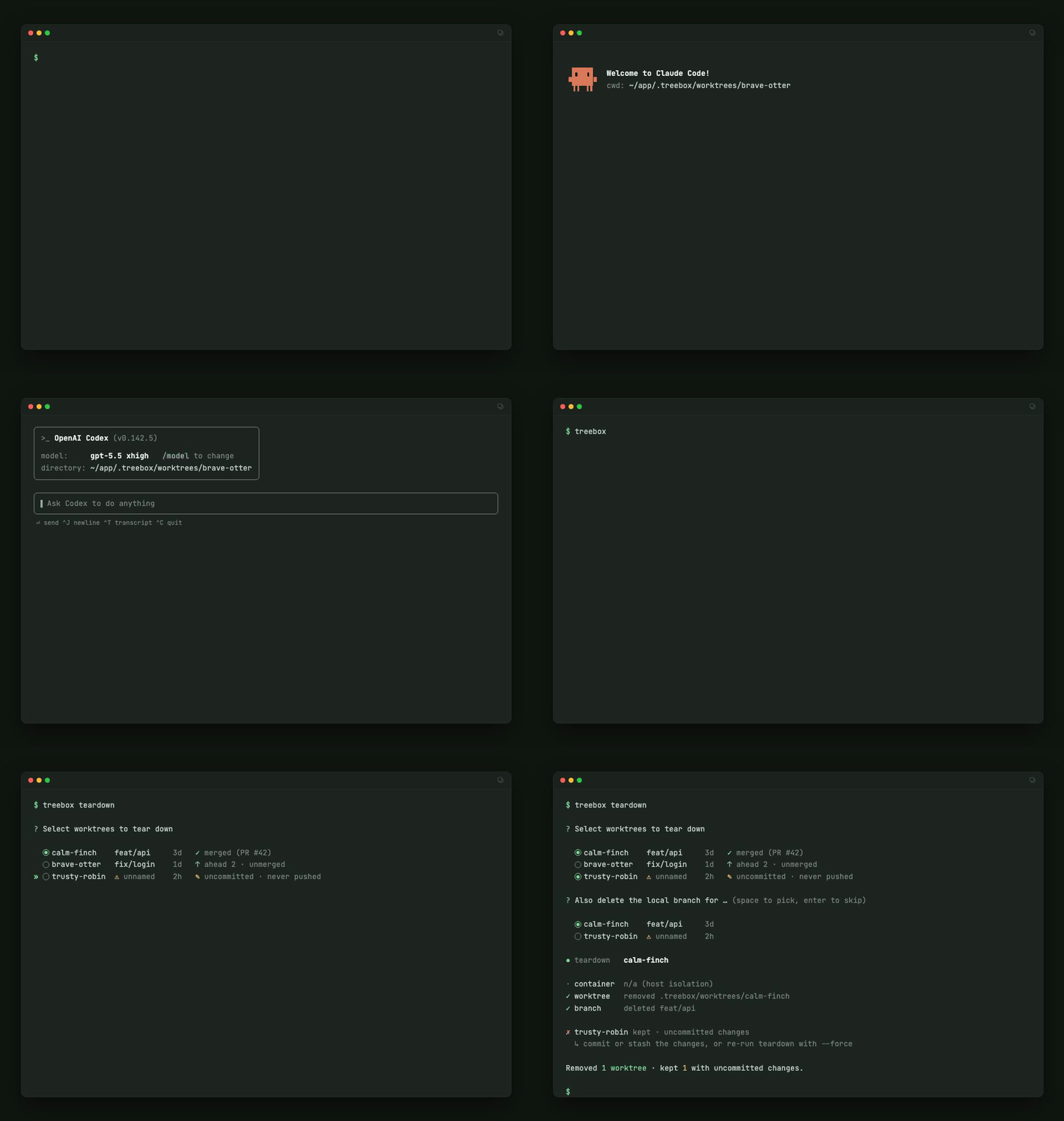
treebox hands coding agents isolated, ready-to-run git worktrees — one
directory per worktree name. treebox create fetches, cuts a worktree from a
fresh origin/<base>, copies your .env, installs dependencies from a shared
cache, and launches claude or codex inside. Name the work up front
(treebox create fix-auth works on branch fix-auth) or don't: with no name
the worktree gets a stable petname and an un-pushable treebox/<petname>
placeholder branch the agent renames when the work takes shape. Agents work the same repo
in parallel without collisions — on a laptop or over plain SSH.
Provisioning is identical everywhere; a pluggable isolation mode decides where the agent runs:
--isolation |
Sandbox | Agent runs in |
|---|---|---|
host (default) |
none | the worktree shell |
docker |
sandboxed | a docker container, with your .env + caches mounted |
Install
curl -fsSL https://raw.githubusercontent.com/Seth-Peters/treebox/main/install.sh | sh
The script installs with uv and stops with instructions if uv is missing — it never installs a package manager behind your back. Or install directly:
uv tool install treebox
Host isolation needs git plus the selected agent CLI on PATH and logged in.
Docker isolation additionally needs docker; the default template supplies the
agent CLI, and treebox copies scoped login files from your ~/.claude /
~/.codex subscription login. See the
install guide for
requirements and installer overrides.
Usage
The core worktree lifecycle is five commands (template scaffolds docker
sandbox templates and version prints the version alongside them).
Check the host. doctor verifies exactly what create will need — git,
agent logins, the (optional) .env, credentials for the required fetch — and
prints the fix for anything missing:
treebox doctor
Create. Fetches origin, cuts a worktree from the fresh origin/main,
copies .env and submodules, syncs dependencies from the shared cache, and
launches the agent:
treebox create                          # generated name (brave-otter), host-native
treebox create fix-auth                 # named up front: works on branch fix-auth
treebox create feature/auth             # slash names: branch feature/auth, dir feature--auth
treebox create fix-auth --isolation docker   # sandboxed
treebox create --checkout feature/auth       # exact existing branch (resume, PR review)
treebox create auth-fixes --base feature/auth   # stack on any base branch
The optional name is the worktree's permanent identity and its branch,
created fresh from origin/<base> — slug tokens joined by slashes, with the
slashes flattened to -- in the directory. Omit the name and the branch
starts as a treebox/<petname> placeholder — rename it conventionally
(git branch -m feature/user-auth, fix/login-race, chore/bump-deps, …)
when the work has a shape, then push. Every worktree carries a pre-push guard
that keeps treebox/* refs un-pushable, so a machine-generated name can
never become a PR title. --checkout checks out an existing branch exactly;
naming a branch that already exists is a loud conflict pointing there.
--base takes any branch, not just main — branch off dev, or stack a new
worktree on top of an existing PR's branch, even while that branch is checked
out in another worktree. It resolves as the freshly fetched origin/<base>,
so push the base first if its latest commits only exist locally.
Enter. Come back to an existing worktree. By default it reuses the harness
the worktree was created with; an explicit --harness overrides it for that
session only, without changing what's recorded on disk. The ref is the name,
the current branch (renames are followed live), or a unique substring of
either. Dependencies re-sync only if the lockfile changed since last time; a
setup that never completed (a prior run died mid-provision) is finished rather
than skipped:
treebox enter fix-auth --harness claude
treebox enter fix-auth --harness codex -- --resume   # args after -- go to the agent
List. See what exists, each worktree's recorded isolation, what it was
last doing, and what has gone stale. Results are sorted by recency, with
treebox/* placeholders flagged ⚠ unnamed; the root footer plus each stable
name identifies the directory without a wide path column:
treebox list
Tear down. Remove one or more worktrees — and, when you're done, their
branches. Refuses to delete uncommitted work unless forced. Run it with no
refs and treebox walks you through an arrow-key picker, each worktree
annotated with a "will I lose work?" badge (dirty/ahead/merged, plus PR state
when gh/glab is present):
treebox teardown fix-auth brave-otter --delete-branch
treebox teardown                        # pick interactively
treebox is built to be scripted, including by agents: the worktree commands and
doctor take --json (data to stdout, diagnostics to stderr, a schema that
only gains fields within a version), --dry-run prints the exact commands
without running them (and fails with the same errors a real run would, so it
doubles as a preflight), and exit codes are stable (0 ok · 1 runtime/doctor
blocked · 2 usage · 3 not found · 4 auth · 5 conflict). Full
reference in the usage guide.
Every agent ships its own cage
Every coding agent invents its own answer to "run me in parallel" and "don't let me touch the wrong thing" — a different config file, a different schema, a different word for the same idea:
| Agent | Sandbox / permission config | Built-in worktrees | Config lives in |
|---|---|---|---|
| Claude Code | permissions allow/ask/deny + native OS sandbox (Seatbelt/bubblewrap) + dev container |
Yes (--worktree) |
.claude/settings.json, .devcontainer/ |
| OpenAI Codex | sandbox_mode × approval_policy (Seatbelt / Landlock+seccomp) |
No in CLI (app only) | ~/.codex/config.toml, [profiles.*] |
| opencode | permission per-tool allow/ask/deny (no OS sandbox) |
No (community plugins) | opencode.json |
| pi | none built-in ("all permissions by default"); BYO Docker/VM + trust prompt | No in core (pi-subagents) |
~/.pi/agent/settings.json |
Learn one and it teaches you nothing about the next, and none of it ports across tools. treebox owns the isolation layer instead — one named-worktree layout, one operator-owned sandbox, one config file — and launches your agent of choice inside it. Learn treebox once; swap the agent, keep the box. Full comparison with citations: Agents & sandboxing.
Design
- Never silently stale.
createrequires a successfulgit fetch originand branches from the freshorigin/<base>; a failed fetch exits4loudly.--no-fetchis the only (explicit) escape. - Warmth lives in the cache, not the tree. Installs hardlink from shared
caches (
~/.cache/uv, the pnpm store, …) reused across worktrees and containers. - The sandbox config lives outside the box. The container is rendered from your operator-owned template beside the worktree, never mounted — a boxed agent can't edit its own cage, and the target repo's container config and hooks are ignored.
- Credentials go in as scoped copies. Only the agents' login files are
copied into a throwaway per-worktree dir — never the live
~/.claude/~/.codex— refreshed on every entry so a host logout or a fresh login reaches the sandbox next time; treebox uses your subscription login.
More in how it works.
Configuration
Optional, and user-level only ($TREEBOX_CONFIG, else
$TREEBOX_HOME/config.toml, default ~/.treebox/config.toml) — treebox
never reads config from the target repo:
isolation = "docker"  # host | docker
harness = "claude"  # claude | codex
base   = "main"
All keys, shared-cache overrides, setup hooks, and sandbox templates are covered in the configuration guide.
Customizing isolation
docker isolation builds from a template you own — a directory of files
treebox ships and you edit. treebox renders it beside the worktree so a boxed
agent can't touch its own cage. Three steps:
1. Scaffold a template — you edit a copy, never the shipped one.
treebox template init copies the default into ~/.treebox/templates/<name>
with the full required file set; a node box and a python box can coexist,
one per stack:
treebox template init node          # copies from the built-in default
treebox template list               # names, source, firewall, status, default + what the default bundles (`ls` works too)
treebox template path node          # where it lives: cd "$(treebox template path node)"
2. Edit two files. The shipped image already bundles Node 22, uv, gh,
ripgrep, and the agent CLIs, so most projects touch only these:
# ~/.treebox/templates/node/Dockerfile — global tooling
USER root
RUN npm install -g pnpm@9 typescript tsx
USER ${USERNAME}
// ~/.treebox/templates/node/container.json — your install command
"postCreate": "if [ -f pnpm-lock.yaml ]; then pnpm install --frozen-lockfile; elif [ -f package-lock.json ]; then npm ci; else npm install; fi"
(In docker, setup runs postCreate, not the host-mode ecosystem auto-detect,
so a non-Python project wires its install here.)
3. Point treebox at it — per run with --isolation docker --template node,
or set template = "node" in ~/.treebox/config.toml.
Full walkthrough — every file in a template and the container.json schema — in
the configuration guide.
Development
git clone https://github.com/Seth-Peters/treebox && cd treebox
uv run treebox ...                    # run the CLI from the working tree
uv run --extra dev pre-commit install # lint/format/strict type-check hooks (see CONTRIBUTING.md)
uv run --extra dev python -m pytest   # unit + integration suite
uv run --extra dev mypy               # strict type check
./scripts/validate.sh                 # full gate: lint + typecheck + shell assets + tests + snapshots + smoke
Contributing
Small fixes and docs improvements are welcome. See CONTRIBUTING.md. The roadmap is intentionally light for now: ROADMAP.md.
License
1 maintainer

Download files
Download the file for your platform. If you're not sure which to choose, learn more about installing packages.
Source Distribution
Built Distribution
Filter files by name, interpreter, ABI, and platform.
If you're not sure about the file name format, learn more about wheel file names.
Copy a direct link to the current filters
File details
Details for the file treebox-1.0.2.tar.gz.
File metadata
- Download URL: treebox-1.0.2.tar.gz
- Upload date:
- Size: 3.3 MB
- Tags: Source
- Uploaded using Trusted Publishing? Yes
- Uploaded via:
twine/6.1.0 CPython/3.13.14
File hashes
| Algorithm | Hash digest | |
|---|---|---|
| SHA256 |
e011b9beb89abc8afe2d6be0cd9df5473a6424c52671d41609bf6620bedd4381
|
|
| MD5 |
89269fa6f234b74e44605076d9cc4d52
|
|
| BLAKE2b-256 |
8e6f73a2a3b970b35255fc6c47f5fe670ae3a092c8e999ff544119f64f57764e
|
Provenance
The following attestation bundles were made for treebox-1.0.2.tar.gz:
Publisher:
release.yml on Seth-Peters/treebox
-
Statement:
-
Statement type:
https://in-toto.io/Statement/v1 -
Predicate type:
https://docs.pypi.org/attestations/publish/v1 -
Subject name:
treebox-1.0.2.tar.gz -
Subject digest:
e011b9beb89abc8afe2d6be0cd9df5473a6424c52671d41609bf6620bedd4381 - Sigstore transparency entry: 2260969857
- Sigstore integration time:
-
Permalink:
Seth-Peters/treebox@e8a7fa1566133a7b81a5ccf164cf76a0f91a1e8a -
Branch / Tag:
refs/tags/v1.0.2 - Owner: https://github.com/Seth-Peters
-
Access:
public
-
Token Issuer:
https://token.actions.githubusercontent.com -
Runner Environment:
github-hosted -
Publication workflow:
release.yml@e8a7fa1566133a7b81a5ccf164cf76a0f91a1e8a -
Trigger Event:
push
-
Statement type:
File details
Details for the file treebox-1.0.2-py3-none-any.whl.
File metadata
- Download URL: treebox-1.0.2-py3-none-any.whl
- Upload date:
- Size: 112.0 kB
- Tags: Python 3
- Uploaded using Trusted Publishing? Yes
- Uploaded via:
twine/6.1.0 CPython/3.13.14
File hashes
| Algorithm | Hash digest | |
|---|---|---|
| SHA256 |
625d60e6071808083dd077cfd91a24789095ce6633289f958da8a1a2cb6a4cd2
|
|
| MD5 |
e555654067722ab822e151d7a77a8cfe
|
|
| BLAKE2b-256 |
c6568d543bf4ab1146e1db36948f88810d4c747057c299eca6e36aa66997f138
|
Provenance
The following attestation bundles were made for treebox-1.0.2-py3-none-any.whl:
Publisher:
release.yml on Seth-Peters/treebox
-
Statement:
-
Statement type:
https://in-toto.io/Statement/v1 -
Predicate type:
https://docs.pypi.org/attestations/publish/v1 -
Subject name:
treebox-1.0.2-py3-none-any.whl -
Subject digest:
625d60e6071808083dd077cfd91a24789095ce6633289f958da8a1a2cb6a4cd2 - Sigstore transparency entry: 2260970055
- Sigstore integration time:
-
Permalink:
Seth-Peters/treebox@e8a7fa1566133a7b81a5ccf164cf76a0f91a1e8a -
Branch / Tag:
refs/tags/v1.0.2 - Owner: https://github.com/Seth-Peters
-
Access:
public
-
Token Issuer:
https://token.actions.githubusercontent.com -
Runner Environment:
github-hosted -
Publication workflow:
release.yml@e8a7fa1566133a7b81a5ccf164cf76a0f91a1e8a -
Trigger Event:
push
-
Statement type:














