
Enhanced directory tree printer with Git integration

Project description
TreeLS
Enhanced directory tree printer with Git integration and ls-like features.
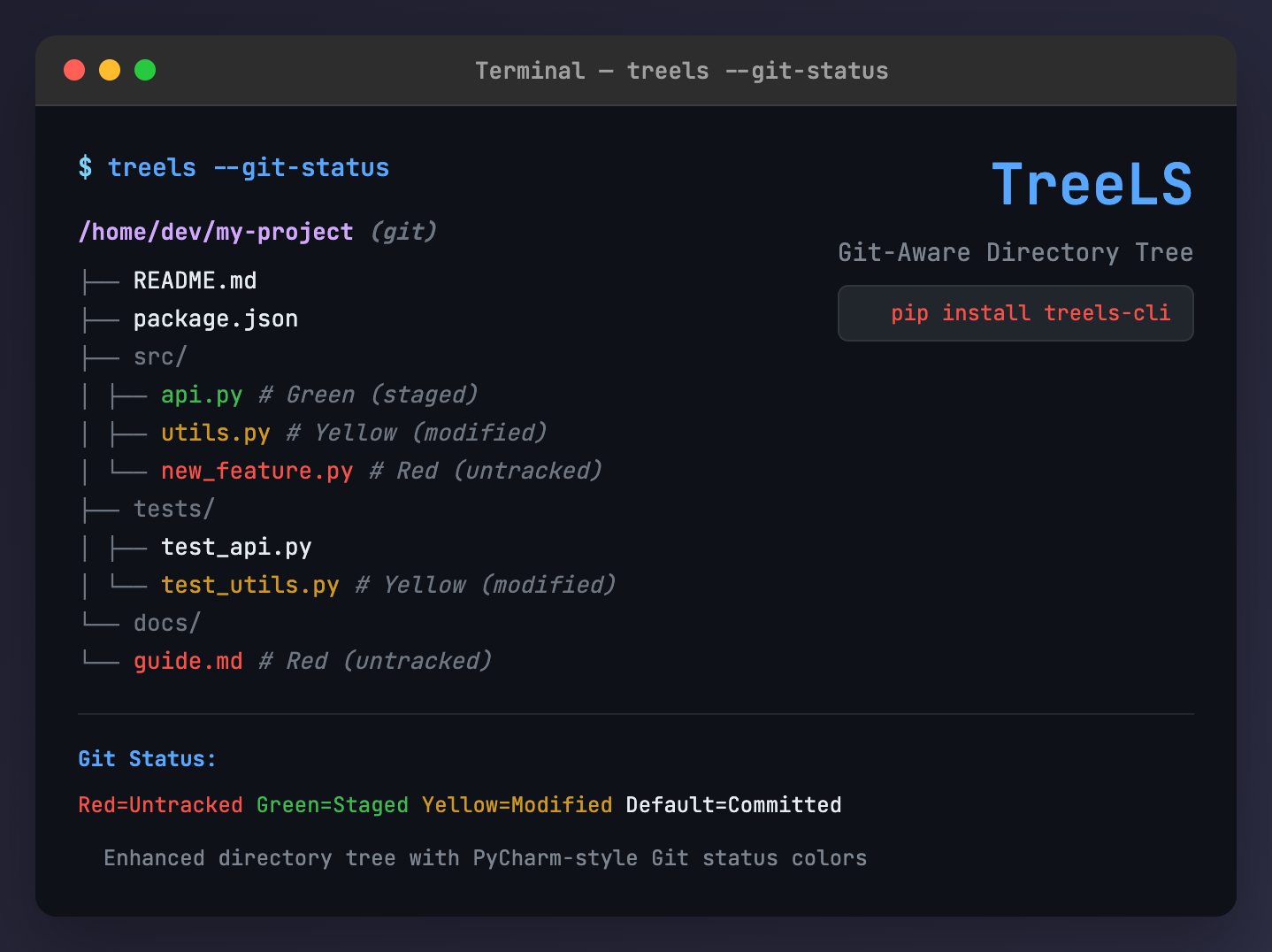
TreeLS combines the functionality of the classic tree command with Git status awareness, providing color-coded file status indicators and powerful filtering options. Perfect for developers who want to quickly visualize project structure and Git state.
✨ Features
- 🌳 Beautiful Tree Display: Rich, colorized directory tree output
- 🔥 Git Integration: Color-coded files based on Git status (PyCharm-style)
- 🎯 Smart Filtering: Show only specific types of files (staged, modified, untracked, etc.)
- 🙈 .gitignore Aware: Automatically respects .gitignore patterns
- ⚡ Fast & Lightweight: Minimal dependencies, maximum performance
- 🛡️ Safe by Default: Hides .git folder and respects ignore patterns
🎨 Git Status Colors
| Color | Status | Description |
|---|---|---|
| 🔴 Red | Untracked | Files not in version control |
| 🟢 Green | Staged | Files staged for commit |
| 🟡 Yellow | Modified | Files modified but not staged |
| ⚫ Dark Grey | Deleted | Files marked for deletion |
| Default | Committed | Clean, committed files |
| 🔘 Grey | Non-Git | Files in non-Git directories |
📦 Installation
pip install treels-cli
Or install from source:
git clone <repository-url>
cd treels
pip install -e .
🚀 Quick Start
# Basic tree view
treels

# Show all files including hidden ones
treels -a

# Show Git status legend
treels --git-status

# Show only modified files
treels --only-modified
Sample Output
Basic tree view:
/home/user/my-project (git)
├── README.md
├── src/
│   ├── main.py
│   ├── utils.py
│   └── config.json
├── tests/
│   ├── test_main.py
│   └── test_utils.py
└── requirements.txt
With Git status colors (when in a Git repository):
/home/user/my-project (git)
├── README.md                    # Default (committed)
├── src/
│   ├── main.py                  # Yellow (modified)
│   ├── utils.py                 # Green (staged)
│   └── config.json              # Default (committed)
├── tests/
│   ├── test_main.py             # Red (untracked)
│   └── test_utils.py            # Default (committed)
├── requirements.txt             # Default (committed)
└── new_feature.py               # Red (untracked)
Filtered view (--only-modified --only-untracked):
/home/user/my-project (git)
├── src/
│   └── main.py                  # Yellow (modified)
├── tests/
│   └── test_main.py             # Red (untracked)
└── new_feature.py               # Red (untracked)
Note: In actual terminal output, the files appear in the colors described in the comments. The examples above show the structure with status indicators for clarity.
📚 Usage Examples
Basic Usage
# Current directory tree
treels

# Specific directory
treels /path/to/project

# Show hidden files (but not .git folder)
treels -a

# Show everything including .git folder
treels -a --show-git
Example: Basic tree in a Python project
/home/user/my-app
├── app.py
├── requirements.txt
├── src/
│   ├── __init__.py
│   ├── models.py
│   └── views.py
├── tests/
│   └── test_app.py
└── docs/
    └── README.md
Example: With hidden files (-a)
/home/user/my-app
├── .env
├── .gitignore
├── app.py
├── requirements.txt
├── src/
│   ├── .cache/
│   ├── __init__.py
│   ├── models.py
│   └── views.py
├── tests/
│   └── test_app.py
└── docs/
    └── README.md
Git-Aware Filtering
# Show only files with changes (any status)
treels --git-uncommitted-only

# Show only committed files (clean)
treels --git-exclude-uncommitted

# Show only staged files (ready for commit)
treels --only-staged

# Show only modified files (need staging)
treels --only-modified

# Show only untracked files (new files)
treels --only-untracked

# Show only deleted files
treels --only-deleted

# Combine filters: show staged OR modified files
treels --only-staged --only-modified

# Show files ready for review (staged + modified)
treels --only-staged --only-modified --git-status
Example: Only modified files (--only-modified)
/home/user/my-app (git)
├── src/
│   ├── models.py                # Yellow (modified)
│   └── views.py                 # Yellow (modified)
└── app.py                       # Yellow (modified)
Example: Only untracked files (--only-untracked)
/home/user/my-app (git)
├── temp_script.py               # Red (untracked)
├── src/
│   └── new_feature.py           # Red (untracked)
└── docs/
    └── draft.md                 # Red (untracked)
Example: Combined filters (--only-staged --only-modified)
/home/user/my-app (git)
├── README.md                    # Green (staged)
├── src/
│   ├── models.py                # Yellow (modified)
│   ├── views.py                 # Yellow (modified)
│   └── config.py                # Green (staged)
└── app.py                       # Yellow (modified)
Example: With Git status legend (--git-status)
/home/user/my-app (git)
├── README.md                    # Green (staged)
├── src/
│   ├── models.py                # Yellow (modified)
│   └── new_feature.py           # Red (untracked)
└── app.py                       # Default (committed)

Git Status: Red=Untracked  Green=Staged  Yellow=Modified  Dark Grey=Deleted  Default=Committed  Grey=Non-Git

Filter Options: --only-staged --only-modified --only-untracked --only-deleted
(Combine multiple filters with OR logic)
Advanced Options
# Limit depth
treels --max-depth 2

# Custom ignore patterns
treels --ignore "node_modules,dist,build"

# Show .gitignore'd files
treels --show-ignored

# Highlight directories in blue
treels --highlight-dirs

# Full status with legend
treels --git-status --only-modified --only-untracked
Example: Max depth limit (--max-depth 2)
/home/user/my-app
├── app.py
├── requirements.txt
├── src/
│   ├── models.py
│   └── views.py
├── tests/
│   └── test_app.py
└── docs/
    └── README.md
Example: Custom ignore (--ignore "tests,docs")
/home/user/my-app
├── app.py
├── requirements.txt
└── src/
    ├── models.py
    └── views.py
Example: Highlight directories (--highlight-dirs)
/home/user/my-app
├── app.py
├── requirements.txt
├── src/                         # Bold blue
│   ├── models.py
│   └── views.py
└── tests/                       # Bold blue
    └── test_app.py
Git Status Codes
# Show Git status codes before filenames (like git status --short)
treels --show-status-codes

# Combine with colors and legend for full information
treels --show-status-codes --git-status

# Perfect for terminals without color support
treels --show-status-codes --only-modified
Example: With Git status codes (--show-status-codes)
/home/user/my-app (git)
├──    README.md
├──    src/
│   ├── A  api.py                # Green (staged)
│   ├──  M utils.py              # Yellow (modified)
│   └── ?? new_feature.py        # Red (untracked)
└──  M app.py                    # Yellow (modified)

Git Status: Red=Untracked  Green=Staged  Yellow=Modified

Status Codes: ?? = Untracked, A  = Staged,  M = Modified,  D = Deleted
Benefits of Status Codes:
- Accessibility: Works in terminals without color support
- CI/CD Friendly: Status codes visible in automated logs
- Familiar: Uses exact
git status --shortformat - Redundant Info: Both visual colors AND text codes
🔧 Command Line Options
| Option | Description |
|---|---|
path |
Root directory (default: current directory) |
-a, --all |
Show hidden files and directories |
--show-ignored |
Show files ignored by .gitignore |
--show-git |
Show .git folder (hidden by default) |
--ignore DIRS |
Comma-separated list of directories to ignore |
--max-depth N |
Maximum depth to traverse |
--git-status |
Show Git status legend |
--highlight-dirs |
Highlight directories in blue |
--show-status-codes |
Show Git status codes before filenames |
Git Filtering Options
| Option | Description |
|---|---|
--git-uncommitted-only |
Show only files with any changes |
--git-exclude-uncommitted |
Show only committed (clean) files |
--only-staged |
Show only staged files (green) |
--only-modified |
Show only modified files (yellow) |
--only-untracked |
Show only untracked files (red) |
--only-deleted |
Show only deleted files (dark grey) |
Note: The --only-* filters can be combined with OR logic. For example, --only-staged --only-modified shows files that are either staged OR modified.
🎯 Common Workflows
Pre-Commit Review
# See what's staged for commit
treels --only-staged

# See what still needs staging
treels --only-modified --only-untracked

# Full pre-commit overview
treels --git-status --only-staged --only-modified --only-untracked
Example: Pre-commit review
$ treels --only-staged
/home/user/my-app (git)
├── README.md                    # Green (staged)
└── src/
    └── config.py                # Green (staged)

$ treels --only-modified --only-untracked
/home/user/my-app (git)
├── src/
│   ├── models.py                # Yellow (modified)
│   └── new_feature.py           # Red (untracked)
└── temp_notes.txt               # Red (untracked)
Code Review
# Show all changed files
treels --git-uncommitted-only

# Focus on specific changes
treels --only-modified --git-status
Example: Code review overview
$ treels --git-uncommitted-only
/home/user/my-app (git)
├── README.md                    # Green (staged)
├── src/
│   ├── models.py                # Yellow (modified)
│   ├── new_feature.py           # Red (untracked)
│   └── config.py                # Green (staged)
└── temp_notes.txt               # Red (untracked)
Project Overview
# Clean project view (hide temp files, show structure)
treels --max-depth 3

# Show everything for debugging
treels -a --show-ignored --show-git
Example: Clean project structure
$ treels --max-depth 3
/home/user/my-app
├── README.md
├── requirements.txt
├── src/
│   ├── __init__.py
│   ├── models/
│   │   ├── user.py
│   │   └── product.py
│   └── views/
│       ├── api.py
│       └── web.py
├── tests/
│   ├── unit/
│   │   ├── test_models.py
│   │   └── test_views.py
│   └── integration/
│       └── test_api.py
└── docs/
    ├── API.md
    └── DEPLOYMENT.md
Working with Large Projects
# Hide build artifacts and dependencies
treels --ignore "node_modules,dist,build,target,.next"

# Focus on source code changes
treels --only-modified --max-depth 2
Example: Large project with filtering
$ treels --ignore "node_modules,dist" --max-depth 2
/home/user/large-project
├── package.json
├── src/
│   ├── components/
│   ├── pages/
│   ├── styles/
│   └── utils/
├── public/
│   ├── images/
│   └── icons/
└── tests/
    ├── unit/
    └── e2e/
🛠️ Development
Install Dependencies
pipenv install --dev
Development Workflow
# Activate virtual environment
pipenv shell

# Run tests
pipenv run test

# Format code
pipenv run format

# Lint code
pipenv run lint

# Build package
pipenv run build
Running Tests
# Run all tests
pytest tests/

# Run with coverage
pytest tests/ --cov=treels

# Run specific test
pytest tests/test_treels.py::TestGitRepository::test_gitignore_parsing
🤝 Contributing
- Fork the repository
- Create a feature branch (
git checkout -b feature/amazing-feature) - Make your changes
- Add tests for new functionality
- Run the test suite (
pipenv run test) - Format your code (
pipenv run format) - Commit your changes (
git commit -m 'Add amazing feature') - Push to the branch (
git push origin feature/amazing-feature) - Open a Pull Request
📝 License
This project is licensed under the MIT License - see the LICENSE file for details.
🙏 Acknowledgments
- Inspired by the classic
treecommand - Git status colors based on PyCharm's color scheme
- Built with Rich for beautiful terminal output
🐛 Bug Reports & Feature Requests
Please use the GitHub Issues page to report bugs or request features. When reporting bugs, please include:
- Your operating system and Python version
- The command you ran
- Expected vs actual behavior
- Sample directory structure (if relevant)
Release history Release notifications | RSS feed


Download files
Download the file for your platform. If you're not sure which to choose, learn more about installing packages.
Source Distribution
Built Distribution
Filter files by name, interpreter, ABI, and platform.
If you're not sure about the file name format, learn more about wheel file names.
Copy a direct link to the current filters
File details
Details for the file treels_cli-1.1.1.tar.gz.
File metadata
- Download URL: treels_cli-1.1.1.tar.gz
- Upload date:
- Size: 17.0 kB
- Tags: Source
- Uploaded using Trusted Publishing? Yes
- Uploaded via: twine/6.1.0 CPython/3.12.9
File hashes
| Algorithm | Hash digest | |
|---|---|---|
| SHA256 |
474e9f9640bba14a7161c47db9cd8dfe231e31e9c858381daf31b1a4a8a48ee1
|
|
| MD5 |
2395783d09fa2a97b4b1dba902056a0b
|
|
| BLAKE2b-256 |
12c22635f9a4bd9df5bafe875f34fc08990f8bde3955e15835c56d9715f0a7e2
|
Provenance
The following attestation bundles were made for treels_cli-1.1.1.tar.gz:
Publisher:
publish.yml on faizananwerali/treels
-
Statement:
-
Statement type:
https://in-toto.io/Statement/v1 -
Predicate type:
https://docs.pypi.org/attestations/publish/v1 -
Subject name:
treels_cli-1.1.1.tar.gz -
Subject digest:
474e9f9640bba14a7161c47db9cd8dfe231e31e9c858381daf31b1a4a8a48ee1 - Sigstore transparency entry: 245966949
- Sigstore integration time:
-
Permalink:
faizananwerali/treels@04b0b58cf05993a4606977b6957fbfad0fe84c0a -
Branch / Tag:
refs/tags/v1.1.1 - Owner: https://github.com/faizananwerali
-
Access:
public
-
Token Issuer:
https://token.actions.githubusercontent.com -
Runner Environment:
github-hosted -
Publication workflow:
publish.yml@04b0b58cf05993a4606977b6957fbfad0fe84c0a -
Trigger Event:
push
-
Statement type:
File details
Details for the file treels_cli-1.1.1-py3-none-any.whl.
File metadata
- Download URL: treels_cli-1.1.1-py3-none-any.whl
- Upload date:
- Size: 11.3 kB
- Tags: Python 3
- Uploaded using Trusted Publishing? Yes
- Uploaded via: twine/6.1.0 CPython/3.12.9
File hashes
| Algorithm | Hash digest | |
|---|---|---|
| SHA256 |
e072c3a54ddc1d80f872d0cf2c5e7d952b0aa794b771b7c1ecc956cc1cbdc79d
|
|
| MD5 |
01090e24f6e72294c23da8dcc12f33da
|
|
| BLAKE2b-256 |
61493ff0bd77a41c07ad1d57693b6c3461f7b0f38e7db4bacb5b2cc184a55aa1
|
Provenance
The following attestation bundles were made for treels_cli-1.1.1-py3-none-any.whl:
Publisher:
publish.yml on faizananwerali/treels
-
Statement:
-
Statement type:
https://in-toto.io/Statement/v1 -
Predicate type:
https://docs.pypi.org/attestations/publish/v1 -
Subject name:
treels_cli-1.1.1-py3-none-any.whl -
Subject digest:
e072c3a54ddc1d80f872d0cf2c5e7d952b0aa794b771b7c1ecc956cc1cbdc79d - Sigstore transparency entry: 245966951
- Sigstore integration time:
-
Permalink:
faizananwerali/treels@04b0b58cf05993a4606977b6957fbfad0fe84c0a -
Branch / Tag:
refs/tags/v1.1.1 - Owner: https://github.com/faizananwerali
-
Access:
public
-
Token Issuer:
https://token.actions.githubusercontent.com -
Runner Environment:
github-hosted -
Publication workflow:
publish.yml@04b0b58cf05993a4606977b6957fbfad0fe84c0a -
Trigger Event:
push
-
Statement type:






