




treestamp
Turn your repository into a directory tree for your README. Choose what to show, add short notes, and copy the result—from your terminal or browser.
Quickstart
1. Generate a treestamp
In your browser: Open the web editor, enter a public GitHub repository URL, and choose Load repo → Create treestamp. Nothing to install.
In your terminal: Requires Python 3.11+ and Git. Install from PyPI:
python -m pip install treestamp
Then open the repository you want to document:
cd /path/to/your/project
treestamp
Or, run it directly with no installation:
pipx run treestamp
Choose New document and accept . for the repository root. The terminal editor uses staged files, so stage your source changes before opening it.
2. Edit the tree
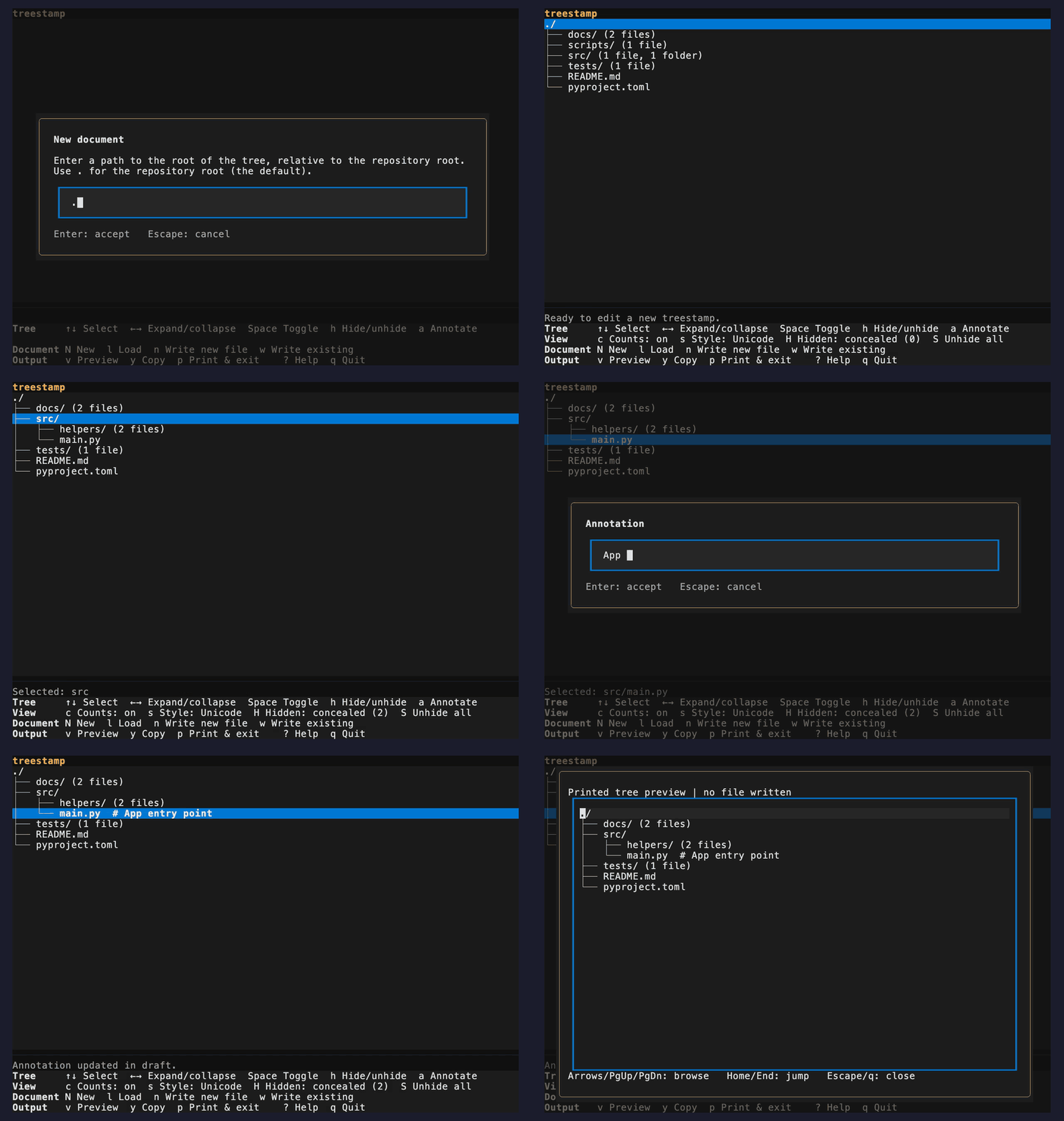
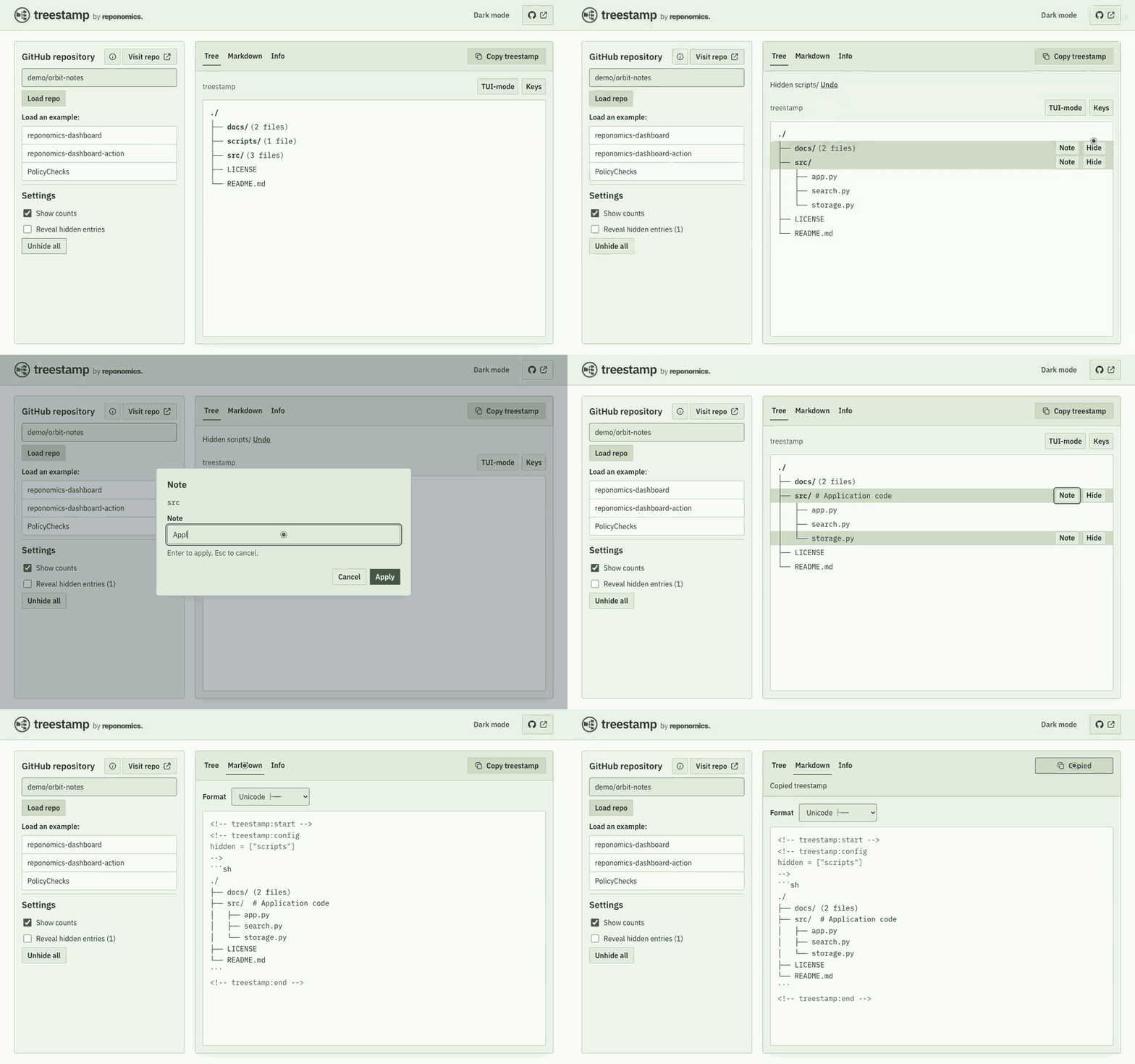
Expand the useful parts, hide the noise, and add a note. Both editors show you the tree as you work.
Terminal — hide, annotate, preview.
Web — click to edit, then copy the Markdown.
3. Add it to your README
Choose Copy in the terminal editor or Copy treestamp on the web, then paste into your README. The copied block already includes the Markdown fence and Treestamp markers—keep the whole block so you can reopen it later.
<!-- treestamp:start -->
```sh
./
├── docs/ (2 files)
├── src/  # Application code
│   ├── app.py
│   ├── search.py
│   └── storage.py
├── LICENSE
└── README.md
```
<!-- treestamp:end -->
Hidden entries also produce a small configuration comment; keep that with the copied tree. The web editor exports to your clipboard and never writes to GitHub.
To include an attribution footer, press t in the terminal editor or select Add “Maintained with treestamp” footer in the web editor's settings. This option is off by default. It adds Maintained with [treestamp](https://github.com/reponomics/treestamp) below the closing code fence (or below the Markdown list) and above <!-- treestamp:end -->. Loading or updating the document preserves the choice; toggle it off to remove the trailer.
Write directly from the terminal editor
Add these empty markers to your README, starting in column one:
<!-- treestamp:start -->
<!-- treestamp:end -->
Choose Write to existing in the terminal editor and enter README.md. Treestamp fills the region and preserves the surrounding text. Write new file creates a separate document instead.
Check your README automatically
treestamp check README.md checks whether the tree matches the repository. It never writes to the document and exits with code 1 when the tree needs attention. Open the document in an editor to review it.
GitHub Actions: after checking out your repository and setting up Python 3.11+, add this step:
- name: Check the README tree
  run: |
    python -m pip install "treestamp==0.3.0"
    treestamp check README.md
Local pre-commit: add this to .pre-commit-config.yaml, then run pre-commit install:
repos:
  - repo: https://github.com/reponomics/treestamp
    rev: v0.3.0
    hooks:
      - id: treestamp-check
Both examples pin the latest release. Run the check for source changes too, not just changes to Markdown.
Snapshots, paths, and existing documents
Choose Load document in either editor to reopen a treestamped README. The terminal editor reads the selected local repository's Git index; the web editor reads a public GitHub repository's default-branch HEAD. Both keep a frozen snapshot for the editing session. A failed load keeps your accepted draft.
Document paths are relative to the selected repository root, even when displaying a subtree. The terminal accepts another checkout with treestamp /path/to/repository. Paths outside that repository, symlink document paths, and paths crossing into submodules are not supported. Treestamp never stages or commits files.
New trees start with immediate children and collapsed directories. Counts include hidden children. Symlinks and submodules appear as leaves. Choose Unicode, ASCII, or Markdown-list output in the editor. Annotations are single-line notes; unsupported filenames or annotations are rejected before output is written or copied.
Web snapshots are cached temporarily; load the repository again if one is no longer available. See privacy.
Windows
Use a terminal and font that display Unicode tree characters, or choose ASCII output. Treestamp emits UTF-8; printed output uses LF line endings, while writing into an existing document preserves its line endings. Windows filesystem restrictions still apply. See CONTRIBUTING for development setup.
Project Structure
Maintained by treestamp.
./
├── .github/ (8 files, 2 folders)
├── assets/ (2 files, 1 folder)
├── docs/ (6 files)
├── scripts/ (6 files)  # Installed-package acceptance
├── src/
│   └── treestamp/  # Shared model and terminal editor
│       ├── cli.py
│       ├── codec.py
│       ├── document.py
│       ├── editor.py
│       ├── errors.py
│       ├── gitio.py
│       ├── maintenance.py
│       ├── model.py
│       ├── session.py
│       ├── sources.py
│       ├── tui.py
│       └── tui_dialogs.py
├── tests/ (16 files)  # Contract and integration tests
├── web/  # Hosted editor: a FastAPI adapter over the same package
│   ├── scripts/ (3 files)
│   ├── src/ (1 folder)
│   ├── tests/ (14 files, 2 folders)
│   ├── Dockerfile
│   ├── README.md
│   ├── fly.preview.toml
│   ├── fly.toml
│   ├── package.json
│   └── pyproject.toml
└── README.md
Development and support
Contributing · Maintenance · Governance · Design · Security assessment · Verifying releases · Changelog · Privacy
Report bugs through GitHub issues, vulnerabilities through private security reporting, and conduct concerns to conduct@reponomics.org.
MIT licensed. Before 1.0, interfaces and the document format may change between releases.
1 maintainer

Metadata
1 maintainer
Release files for treestamp 0.3.0
For a detailed explanation of source distributions (sdists) and built distributions (wheels), please see the package formats documentation.
Source distribution (sdist)
| File | Size | Uploaded | Provenance | Actions |
|---|---|---|---|---|
| treestamp-0.3.0.tar.gz | 86.0 kB | With provenance | Details for treestamp-0.3.0.tar.gz |
Built distribution (wheel)
| File | Interpreter | ABI | Platform | Actions Reset |
|---|---|---|---|---|
| treestamp-0.3.0-py3-none-any.whl | Python 3 | none | any | Details for treestamp-0.3.0-py3-none-any.whl |
Total release size: 129.8 kB
Release files / treestamp-0.3.0.tar.gz
| Download URL | treestamp-0.3.0.tar.gz |
|---|---|
| Size | 86.0 kB |
| Tags | Source |
|
SHA-256 checksum How to use checksums |
4c74e5b12477eb6c5fa1151ac06dc9e75826720b822bbf0d91f3067cff92257f
|
|
BLAKE2b-256 checksum How to use checksums |
34f7f357d56574704e4caf8c5b65ccfeb31a70920969df26747c7fcb696896bc
|
| Upload date | |
|
Uploaded using Trusted Publishing? What is trusted publishing? |
Yes |
| Uploaded via |
twine/7.0.0 CPython/3.13.16
|
Provenance
Provenance describes where a file came from. On PyPI, provenance is shared via attestations, which provide a verifiable record of the build or publishing details. View details, limitations and caveats.


PyPI Publish Attestation
PyPI verified that this artifact, at this checksum, originated from the publisher listed below.
Signed by GitHub Actions, verified by PyPI on Oct 30, 2026.
Transparency logRelease files / treestamp-0.3.0-py3-none-any.whl
| Download URL | treestamp-0.3.0-py3-none-any.whl |
|---|---|
| Size | 43.8 kB |
| Tags | Python 3 |
|
SHA-256 checksum How to use checksums |
447252f7eb4b6db1fa4cdba2e4d019e41bd35c9a62d983757ef6f06d407954e1
|
|
BLAKE2b-256 checksum How to use checksums |
cf6091ada7204a406fd61ae77b0f95e2b38ba12a81760cf3502f98050804b828
|
| Upload date | |
|
Uploaded using Trusted Publishing? What is trusted publishing? |
Yes |
| Uploaded via |
twine/7.0.0 CPython/3.13.16
|
Provenance
Provenance describes where a file came from. On PyPI, provenance is shared via attestations, which provide a verifiable record of the build or publishing details. View details, limitations and caveats.
PyPI Publish Attestation
PyPI verified that this artifact, at this checksum, originated from the publisher listed below.
Signed by GitHub Actions, verified by PyPI on Oct 30, 2026.
Transparency logSecurity for treestamp 0.3.0
Provenance
Provenance describes where a file came from. On PyPI, provenance is shared via attestations, which provide a verifiable record of the build or publishing details. View details, limitations and caveats.
Full provenance
All 2 files in this release have been uploaded with provenance metadata.
Attestation for treestamp-0.3.0.tar.gz
PyPI Publish Attestation
PyPI verified that this artifact, at this checksum, originated from the publisher listed below.
Signed by GitHub Actions, verified by PyPI on Oct 30, 2026.
Transparency logA note on package security
PyPI is a repository for distributing packages, not a service for auditing them. While third-party security researchers and our staff do their best to detect and remove malicious packages, PyPI cannot guarantee the quality, security or suitability of any given package.
To learn more about protecting yourself from malicious actors, visit our package security documentation.














